
I Taped Over My Phone Camera to Protect My Eyes. It Didn't Work.
A viral eye-care hack sounds scientific. It isn't. Here's what's actually happening with Face ID, PWM flicker, and screen distance.
Turning Off the Front Camera Does Not Protect Your Eyes
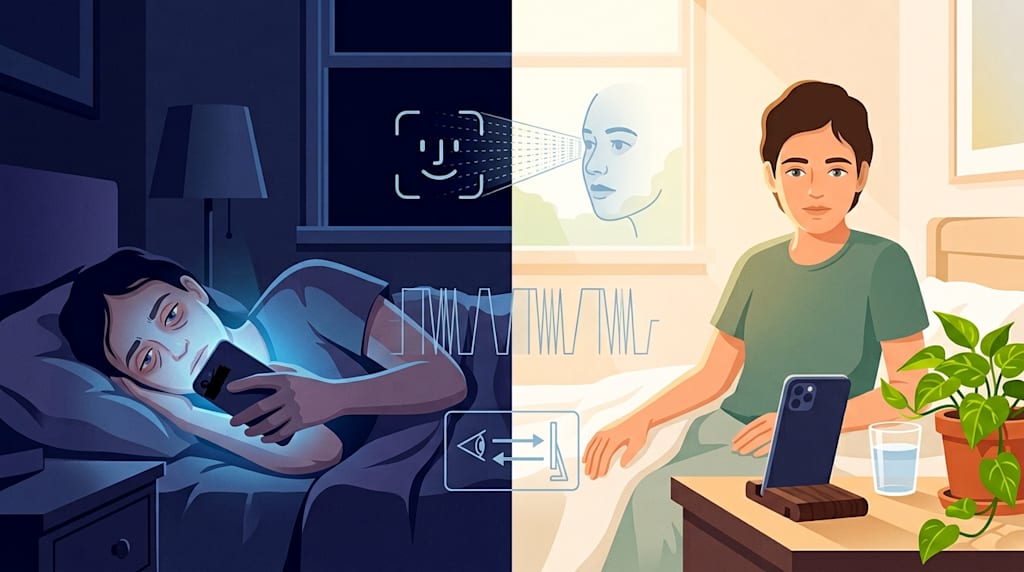
At 1 a.m., the bedroom light is off. The phone screen is dimmed to its lowest setting, and it still feels harsh. You scroll to a post: turning off the front camera while scrolling can protect your eyes. You roll over, find a roll of black tape, cut a small strip, and cover the lens above the screen. The edge of the tape lifts, sticking to a speck of dust. You keep scrolling. Half an hour later, your eyes feel dry, and every blink feels like sandpaper scraping across them. The tape did not solve this.
Turning off the front camera does not protect your eyes.
On an ordinary phone, the front camera only receives light, takes photos, and handles video calls. It does not fire anything into your eyes. Covering it stops it from working, but the screen is still the same screen, the distance is still the same distance, and your blink rate is still just as low.
If you use an iPhone, there is something in the area above the screen that emits outward. In Face ID's TrueDepth camera system, besides the front camera, there are an infrared camera, a flood illuminator, and a dot projector. When you unlock the phone, the dot projector throws thousands of invisible infrared dots onto your face, and the infrared camera reads the depth map formed by those dots to confirm it is you.
Saying it emits infrared light is not wrong. But between emitting infrared light and harming your eyes lie wavelength, power, exposure distance, and time.
The TrueDepth system is a laser product and must comply with international safety standards such as IEC 60825-1. Under normal use, it is classified as Class 1. That means no special protection is required under reasonably foreseeable operation. One unlock exposes you for about 0.2 to 0.7 seconds. If you unlock 150 times a day, that is less than two minutes total. It would take more than ten minutes of close, continuous direct staring to possibly cause mild thermal eye irritation. Sunlight contains infrared. The human body also emits infrared. Point a thermal camera at a person, and their whole body is giving off invisible infrared radiation. You cannot see the word "infrared" and conclude the retina is under attack.
Some people point another phone at Face ID and find that they can sometimes capture it flashing. Or they point an infrared night-vision device at a lit iPhone and exclaim: Look, it is emitting infrared light.
You take a device designed to see infrared, capture infrared, and then treat the capture itself as proof of danger. It is like pointing a thermal camera at a person, discovering that their whole body is emitting invisible infrared radiation, and concluding that the person is dangerous. Cameras photographing LED lights often show dark bands. Photographing a fast-spinning fan can make it look like it is spinning backward. If a device records an infrared light source pulsing, that only proves it is working. Whether it can harm your eyes still depends on wavelength, irradiance, and exposure time. From a video showing flicker alone, you cannot conclude that your eyes are being harmed by high-frequency flicker.
Another term gets mixed in here: PWM flicker.
PWM dimming on phone screens controls the final brightness we see by rapidly changing the screen's light and dark. It happens on the display, and the display occupies most of our field of view. Some people are sensitive to low-frequency PWM on OLED screens; after looking for a while, they may get sore eyes, headaches, or discomfort. That is why phone makers have started pushing high-frequency PWM, DC dimming, and pseudo-DC dimming. That direction at least starts from a problem.
But the infrared dot matrix of Face ID belongs to a biometric identification system. A screen is a screen; a sensor is a sensor. The two work differently, are perceived through different paths, and affect different things. Turning "screen PWM may make some people uncomfortable" into "Face ID infrared is flickering at high frequency and harming your eyes" is concept grafting. Current clinical research is far from being able to rank phones for eye protection by PWM hertz. Even less can anti-flicker be written up as myopia prevention.
If you cover the area above an iPhone that supports Face ID, you may also turn off a feature that matters: Screen Distance.
This feature uses TrueDepth to determine whether the user has been holding an iPhone or iPad closer than 12 inches (about 30 centimeters) from their eyes for too long. If it stays too close, the screen pops up a reminder. It was designed to help teenagers and children develop more reasonable viewing distance habits. To prevent an almost nonexistent "infrared eye damage," you cover the sensor with tape. First you blindfold the distance alarm, then you happily hold the phone against your face and scroll for ten hours. Cat hair sticks to the phone stand, dust collects on the pothos leaves, and you notice none of it.
The accommodative load, reduced blinking, tear film instability, dry eye, and visual fatigue caused by prolonged near work will not clock out just because you put a piece of tape over the camera.
A 2025 meta-analysis published in JAMA Network Open, covering more than 330,000 people, showed that daily screen time and myopia risk follow a pronounced S-shaped curve. When daily screen time is between 1 and 4 hours, myopia risk rises sharply with time; beyond 4 hours, the risk approaches twice as high. The results suggest that under 1 hour per day may represent a relatively safe exposure range. The authors also emphasized that rather than staring at electronic screens alone, the more reasonable direction is to reduce overall near work while increasing time outdoors.
If you want to take care of your eyes while using devices, start with the things that do not sound high-tech.
First, distance. If you can use a bigger screen, use one. A screen that is big enough, fonts that can be comfortably enlarged, and a system with distance reminders all share one benefit: they make it unnecessary to shove your face toward the screen. Watching the same 40-minute online class, a child curled up on the couch with a 6.3-inch phone and a child with a tablet fixed on a desk at a relatively farther distance are facing different near-work conditions for their eyes.
Second, brightness. Screen brightness should follow the ambient light. Do not turn the phone to maximum brightness in a pitch-dark room, and do not squint and force yourself to look in bright sunlight. Anti-reflection, glare reduction, and whether the ambient light sensor works well matter more than many "hardware-level eye protection certifications."
Third, the 20-20-20 rule. Every 20 minutes, look at something 20 feet away for 20 seconds. It is not a cure-all, but it reminds you to interrupt prolonged near work.
Fourth, outdoor time. For children and adolescents, try to ensure enough outdoor activity every day. For adults, looking into the distance outdoors can also relieve visual fatigue.
Fifth, if you are flicker-sensitive, choose a dimming solution carefully. If you clearly belong to the OLED flicker-sensitive group, when changing phones you can pay attention to flicker performance at low brightness, high-frequency PWM, and DC dimming. Do not just stare at the biggest Hz number on the manufacturer's spec page, and do not treat it as a myopia-prevention method.
The tape is peeled off and stuck to the corner of the desk. Screen Distance is on. The phone sits on a stand, an arm's length from your eyes. After this post, go stand by the window for a while.
Your eyes do not need tape.
About the Creator
Jin
Writer of reamstories
https://reamstories.com/jin
Enjoyed the story? Support the Creator.
Subscribe for free to receive all their stories in your feed. You could also become a paid subscriber, letting them know you appreciate their work.
Comments
There are no comments for this story
Be the first to respond and start the conversation.