
Apple’s New CEO Had One Job. The Touchscreen MacBook Pro Shows He Missed It.
From a folding phone that cracked in days to a laptop screen you cannot lie flat, the first Ternus products share a strange habit: adding features before answering why.
Touch Is Not the Answer: Why Apple Under Ternus Looks More Confusing the More You Look at It
I had expectations for John Ternus. He became Apple CEO on September 1, 2026. He came from hardware engineering and had run Apple’s core product lines. Under Cook, Apple’s strategy felt like careful segmentation: rigid tiers, small upgrades, and the sense that paying more got you the complete version. I thought a hardware man would at least ask whether the product was good to use. His first moves gave me my expectations back.
iPhone Duo: the late-mover advantage did not translate into a launch experience
By 2026, foldables had a mature supply chain. Samsung, Huawei, and Honor had already hit most of the pits. As a late mover, Apple had time to polish the hinge, screen, and software adaptation. Apple’s strength is not being first. It is being last to get it right. So the iPhone Duo launch raised a reasonable hope: a foldable iPhone that could be used every day.
The launch brought cracks and bright lines along the fold on the inner screen. One user said the screen “exploded” after fewer than 8 openings. An Australian user reported a failure after about 6 hours and fewer than 20 openings. Analysts said the crack locations were highly consistent. The likely cause was assembly tolerance in the hinge, not simple fatigue in the screen material. Apple acknowledged a “small number” of affected devices and pointed users to AppleCare for replacement. That response is not unreasonable. But for a product sold as proof that foldables had matured, a concentrated launch failure costs more than money.
Software was not better. WeChat, when unfolded, sat in the center with large black areas on both sides. It did not fill the screen or support split screen. Douyin and Hongguo were described as scaled-up phone apps. Apple had shown adaptation progress for 8 apps before launch. That coverage was thin. Apple set April 2027 as the deadline for mandatory adaptation. Buyers pay now. They do not buy in 2027. Slow third-party adaptation is understandable. When Apple’s own apps have adaptation problems, “the ecosystem needs time” stops explaining much.
The late-mover advantage did not show up at launch. Years of polishing did not show up in reliability. That is the disappointment.
Smart home: old chips and a full ecosystem
The October 2026 smart-home lineup used the S8 chip in the HomePod mini 2, the same chip as the Apple Watch S8. The Apple TV 4K used the A19 chip, the same as the iPhone 17. 36Kr read this as a signal that Apple was clearing chip inventory. The reading has support.
The inventory story is not the whole story. HomePod and HomePod mini had tight inventory in March 2026. Gurman predicted the next Apple TV would move from the A15 to the A17 Pro to support Apple Intelligence. The HomePod mini 2 stopped at the S8. That choice may reflect cost control in low-cost smart-home accessories. These devices mostly serve as Thread and Bluetooth gateways and voice entry points. They do not need to run complex AI locally. Mature chips can lower cost and widen ecosystem coverage. That logic exists.
Apple was also building a smart-home system. It released a $299 HomeView display hub and worked with LG and Schneider on cameras, doorbells, locks, and thermostats. Apple wants a loop from entry point to accessory, from voice to screen. The direction makes sense. Smart homes need coordination. But if every piece of the bundle uses old chips to control cost, buyers get a cheaper ecosystem with fewer surprises. Clearing inventory is not the sin. The sin is making users feel that Apple is assembling a bundle instead of solving a specific problem.
iPad mini: 60Hz in 2026
The new iPad mini released in October 2026 moved to an 8.5-inch OLED screen. The refresh rate stayed at 60Hz. There is no ProMotion. Online criticism focused on “no 120Hz in 2026?” 9to5Mac quoted comments such as “$700 without 120Hz?” and “60Hz? 2026? Come on.”
I found no reliable report that Apple added a touchscreen to the iPad mini as a new feature. The iPad mini has been a touchscreen device since the first model. The fair criticism is different: on a device built around touch, Apple still refuses a high refresh rate. The iPad mini is for portability, handheld use, reading, notes, and casual entertainment. A high refresh rate is visible in those tasks. Apple upgraded the panel to OLED and kept the refresh rate segmented. That “give a little, hold back a little” strategy is the irritation. 2026, $700, 60Hz. The three facts sit together without extra explanation.
Touchscreen MacBook Pro: engineering a problem that did not need solving
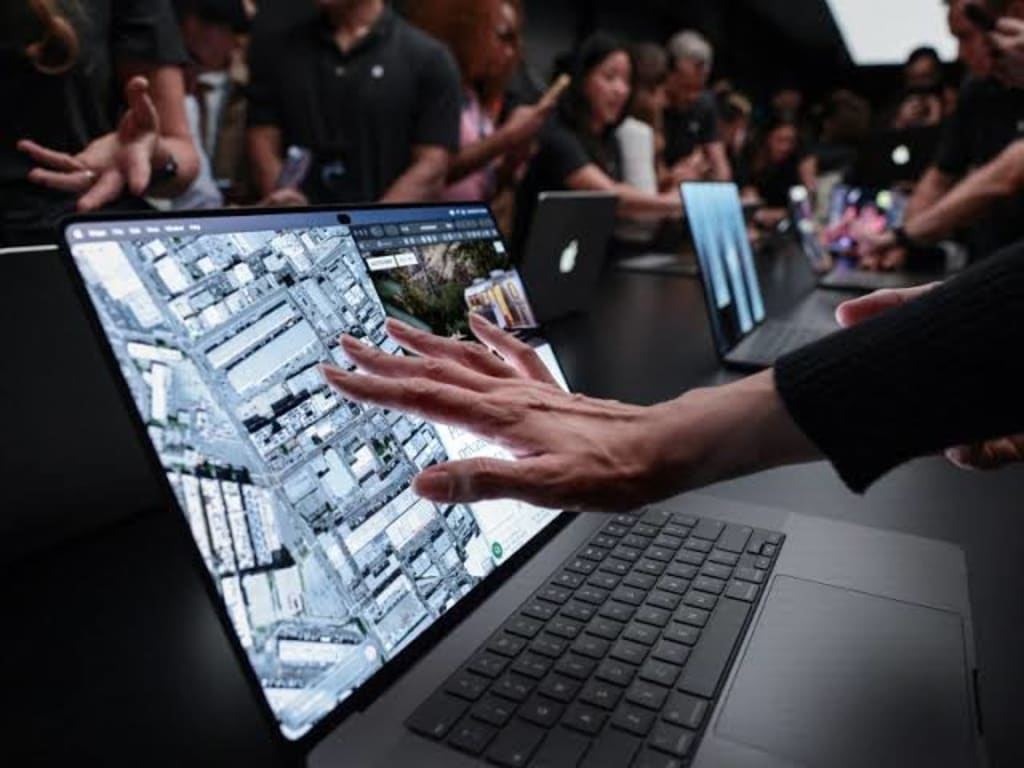
The touchscreen MacBook Pro launched on October 29, 2026, starting at 22,999 yuan. It does not support Apple Pencil. Multiple outlets confirmed this. Korben’s review put it plainly: for a touchscreen device, “not supporting Apple Pencil is the pinnacle of absurdity.”
The gap matters. Illustrators, retouchers, annotators, and 3D modeling users on iPad Pro rely on the pen. They cannot move their workflows to a Mac with stronger performance and fuller file management. iPadOS still trails macOS on file management, multitasking, and professional software. If the MacBook Pro supported Apple Pencil, those users could move more professional work to the Mac. Apple did not offer it. I suspect this is not a capability limit. It looks like a feature saved for the second generation.
The screen also cannot open to 180 degrees. Hands-on reports found no meaningful increase in the maximum opening angle over the old mold. It cannot lie flat like many Windows laptops. Users still touch a tilted screen. Apple redesigned the hinge to improve stability during touch. On-site evaluation said stability was better than most laptops but still not “very stable.” You poke a tilted screen, and it still wobbles.
The deeper issue is the interaction. Human arms are not built to operate a vertical screen in midair for long periods. Calligraphy allows a suspended wrist for large characters or short sessions. Longer passages use a resting wrist. The arm stays parallel to the paper. The wrist does not turn upward in a strange way. On a vertical screen, the arm lifts and the wrist turns up. Phones work in portrait because you hold them. iPads work in portrait because you can lay them flat, hold them, or use a pen. A MacBook screen stands in front of you. The keyboard and trackpad lie flat on the desk. Frequent screen touch means repeated arm lifts. A few taps are fine. A dozen taps? Ten minutes?
Ternus told an interview that the Mac remains keyboard-centered and that touch is a convenient supplement. Then why not use the trackpad? The Mac trackpad already handles two-finger scrolling, zooming, window switching, and desktop dragging well. For an occasional tap, lifting the arm, poking the screen, and bringing the hand back adds work. Where is the efficiency gain?
Precision is the larger issue for professional users. In Photoshop, Final Cut Pro, or development tools, fingers cover content and land with a larger contact area than a mouse pointer. Software must enlarge buttons and spacing to make finger taps accurate. That fights the Mac’s strength: high-density interfaces. If software is not optimized for touch, the result is a mouse interface that accepts a finger. Apple acknowledges that many Mac apps map touch to mouse clicks. The feature lands in an awkward place. Simple actions are easier on the trackpad. Complex actions are more precise with a mouse. It does not replace the trackpad or the mouse. It does not create a new laptop use case.
OLED is the improvement that matters, and touch has nothing to do with it
The OLED panel deserves credit. Tandem OLED gives 2,000 nits of peak brightness, pixel-level black, better color gamut coverage, and a 14-inch model at 1.38 kg. Those are concrete hardware gains. Professional users would want them.
Touch has nothing to do with those gains. Remove touch, and the OLED panel still attracts professional users. Windows laptops have offered touch for years. They rarely make it the headline. It is a bonus. The new Mac upgrade has touch as its only headline. That is the problem. When the main selling point of a professional laptop is a touchscreen with unclear efficiency, an immature ecosystem, and no pen support, the product definition deserves suspicion.
What Apple still has to answer
The pattern across these products is consistent. Apple under Ternus is using a new interaction layer to solve boundaries between product lines. Touch on the Mac has no pen, no flat form, and no software logic rebuilt for high-density work. It does not make the Mac a stronger creative tool. It does not give iPad Pro users a clear next step.
The iPhone Duo’s quality and adaptation problems, the smart home’s chip trade-offs, and the iPad mini’s missing high refresh rate point to the same gap. Hardware is moving. The product logic of why a feature exists is not. Apple can still build things. It has not answered three questions: Who is this feature for? When would someone use it? Why is it better than what they already have? If those answers are missing, touch is just touch.
About the Creator
Jin
Writer of reamstories
https://reamstories.com/jin
Enjoyed the story? Support the Creator.
Subscribe for free to receive all their stories in your feed. You could also become a paid subscriber, letting them know you appreciate their work.
Comments
There are no comments for this story
Be the first to respond and start the conversation.