how to
How tos for the learners and the learned; tips and tricks to help you study effectively, survive your school years, impress your teachers and more.
How to Buy Wildcard SSL Certificates?. AI-Generated.
SSL/TLS (Secure Socket Layers/Transport Layer Security) certificates are also termed digital security certificates. The reason for this terminology is that these SSL/TLS certificates help secure websites with encryption technology.
By Daniel Willams2 years ago in Education
Allah Is Only One and the Creator of All Things
In a world of complexity, diversity and constant change, there is more unique truth than anything else. Allah is one, and he is the creator of all. This belief is not a theological concept of Islam, but the basis of a worldview that shapes as much as Muslims understand their existence, purpose and destiny.
By Muhammad Ruhul Amin2 years ago in Education
Commodities Trading in the UAE: Unlocking Potential in a Global Market
How the UAE Became a Strategic Powerhouse for Commodity Traders Worldwide The United Arab Emirates (UAE), with its strategic location and forward-thinking economic policies, has positioned itself as a major hub for global commodities trading. From precious metals and energy resources to agricultural goods and industrial metals, the UAE offers an array of opportunities for investors, traders, and businesses seeking to engage in one of the world’s most dynamic sectors.
By NCMFINANCE2 years ago in Education
Google Confirms Gmail Update Choice—3 Billion Users Must Now Decide
Google Confirms Gmail Update Choice—3 Billion Users Must Now Decide April 11, 2025 Google has officially confirmed a major update to Gmail that is set to impact all of its estimated 3 billion users globally. This move, aimed at enhancing user experience and security, introduces a controversial choice—one that could significantly change how people use their inboxes. Now, users must decide: stick with the traditional Gmail layout and features or transition to the newly redesigned experience that Google has spent years testing.
By Sakil Hossain2 years ago in Education
5 Cyber Crimes That Could Ruin Your Life—And How to Fight Back
In a world where nearly everything is online—banking, dating, shopping, even job interviews—cybercrime isn't some distant threat. It's real, it's personal, and it can wreck your life before you even realize what's happening.
By Cyber Advocate2 years ago in Education
Difference between an Attorney and Defense Lawyer in Schaumburg
When facing a legal challenge, it’s normal to get confused by the terminology that surrounds the legal world. Two terms often thrown around in the context of criminal law are attorney and defense lawyer. While both are related to the legal profession, there are some distinct differences, especially when you’re dealing with criminal cases. Let’s break it down and understand what sets an attorney apart from a defense lawyer, with a special focus on criminal law and the importance of how having a skilled Cook County Criminal Defense Lawyer by your side can be a gamechanger for your situation.
By Marder and Seidler2 years ago in Education
Do Illinois DUI laws apply to Out of State Drivers?
When you're traveling in a new state, the last thing on your mind is probably getting pulled over by the police for a DUI. However, if you find yourself in this situation while driving through Illinois, it’s important to understand that Illinois DUI laws apply to everyone – including out-of-state drivers. To help navigate this complex situation, it’s essential to understand how Illinois DUI laws work for out-of-state drivers and why having the best criminal lawyer in Rolling Meadows could be crucial to your case.
By Marder and Seidler2 years ago in Education
How to Get the Maximum Benefit Out of Your Personal Injury Claim?
Whether it’s from a car accident, slip and fall, or workplace injury, the aftermath of a personal injury can leave you in pain, with medical bills piling up and the stress of recovery ahead. During this time, the idea of filing a personal injury claim can feel like another burden, but it’s also one of the best ways to ensure that you are compensated for your suffering and losses. This blog guides you through the steps you can take to maximize your compensation, especially when you work with personal injury lawyers in Lake County or a Schaumburg attorney.
By Marder and Seidler2 years ago in Education
4 Ways a Real Estate Attorney Can Help With Your Next Purchase
Buying a home is exciting — it's a big step, whether it's your first house, an investment property, or that dream upgrade you've been working toward. But let’s be honest: the process can also feel overwhelming. Between contracts, inspections, negotiations, and closing day stress, there’s a lot going on. That’s where a real estate attorney in Schaumburg comes in.
By Marder and Seidler2 years ago in Education
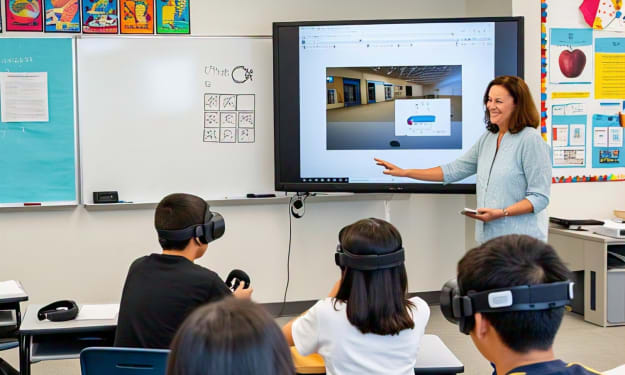
Role of Digital tools in modern Education . AI-Generated.
The Role of Digital Tools in Education In today's fast-paced, technology-driven world, digital tools have revolutionized the way we teach and learn. From interactive whiteboards in classrooms to educational apps on mobile phones, these tools are transforming education by making it more accessible, engaging, and effective. The role of digital tools in education is not just about using technology for the sake of innovation—it’s about enhancing the learning experience and preparing students for the future. One of the most significant contributions of digital tools is improved access to knowledge. The internet has broken down traditional barriers to information. Students can now access online libraries, eBooks, video tutorials, and open-source educational content from anywhere at any time. Platforms like Khan Academy, Coursera, and YouTube offer lessons on a wide variety of subjects, making quality education more democratic and widely available. Digital tools also support personalized learning, allowing students to learn at their own pace and according to their own style. For instance, adaptive learning platforms use artificial intelligence to assess a student’s strengths and weaknesses and adjust content accordingly. This personalized approach helps students better understand difficult concepts and makes learning more efficient and enjoyable. Furthermore, these tools encourage interactive and engaging learning. Instead of passively listening to lectures, students can interact with simulations, play educational games, or engage in group projects using digital collaboration platforms. Such tools not only make learning fun but also promote critical thinking, problem-solving, and creativity—skills that are essential for success in the modern world. The role of digital tools extends to communication and collaboration. Platforms like Google Classroom, Zoom, and Microsoft Teams allow teachers and students to connect seamlessly, whether they are in the same room or miles apart. These tools proved especially vital during the COVID-19 pandemic, ensuring continuity of education through remote learning. They also enable collaborative projects where students can work together on assignments, share ideas, and give feedback in real-time. Teachers also benefit from digital tools. They can use digital assessment tools to track student progress, generate detailed reports, and provide timely feedback. Tools like quizzes, polls, and interactive boards help in keeping the classroom dynamic and responsive. Additionally, digital lesson planning and resource-sharing platforms help educators save time and deliver better instruction. Despite these benefits, it is essential to ensure equity and responsible use of digital tools. Not all students have equal access to devices or the internet, and educators must be mindful of the digital divide. Furthermore, proper guidance and digital literacy training are necessary to ensure students use these tools safely and effectively. Here are some commonly used digital tools in education: 1. Google Classroom – For managing assignments, communication, and grading. 2. Kahoot! – For interactive quizzes and game-based learning. 3. Zoom / Microsoft Teams – For virtual classes and meetings. 4. Moodle – An open-source learning management system (LMS). 5. Canvas – Another LMS for managing coursework and content. 6. Edmodo – For classroom collaboration and communication. 7. Nearpod – For interactive presentations and real-time assessment. 8. Quizlet – For flashcards and study games. 9. Padlet – A digital board for collaboration and brainstorming. 10. Flip (formerly Flipgrid) – For video discussions and student voice. 11. Duolingo – For language learning. 12. Scratch – For teaching coding and programming basics. 13. Seesaw – A student portfolio and parent-teacher communication tool. 14. Socrative – For real-time student feedback and assessments. 15. Trello – For project-based learning and task management.
By Hanif Rahi2 years ago in Education