how to
The vital how-to's for photography enthusiasts: how to create the perfect camera setup, capture the perfect picture, edit your photos and beyond.
Image Hosting: A Comprehensive Guide
In today's digital age, images play a vital role in our online lives. Whether you're a social media influencer, a blogger, or just someone who wants to share memories with friends and family, image hosting is an essential aspect of online communication. In this article, we'll explore the world of image hosting, including image to URL converters, and provide you with a comprehensive guide to help you navigate this vast landscape.
By adam smith2 years ago in Photography
The Blood-Red Sky and the Monster Hunter's Quest
Introduction When the sky turned blood-red as the sun set behind the isolated forest, and the moon climbed higher, darkness engulfed the empty village. Klimold, the renowned monster hunter, was summoned by the town elders to rid the area of a malevolent shadow that hung ominously over the entire region.
By olxia10 2 years ago in Photography
Mastering Social Media Graphics: A Comprehensive Guide to Boost Your Brand's Online Presence
In the fast-paced world of digital marketing, standing out on social media can be a daunting task. With millions of posts vying for attention, how can your brand make an impact? The answer lies in captivating social media graphics. These visual elements aren't just eye-catching; they are powerful tools that can transform your online presence. From boosting engagement to driving traffic and increasing brand awareness, the right graphics can set you apart from the competition. Let's dive into the world of social media graphics and discover how they can elevate your brand to new heights.
By Dhafa News2 years ago in Photography
Your Guide To The Incredible Lakeside Resort: Ratan Villas . Content Warning. AI-Generated.
Luxury hospitality is not always defined by extravagant amenities. There are certain resorts across India that have redefined the definition of luxury by introducing the ideal blend of grand facilities and immaculate views. As we speak of resorts with stunning views, we certainly cannot overlook the essence that Ratan Villas has created. But what made Ratan Villas such a sought-after luxury resort? The answer is the thoughtful and pristine location. Ratan Villas is a celebrated resort near Siliserh Lake Palace and also Sariska Tiger Reserve. And, when we are saying ‘near’, we mean a room with a marvellous view of the Siliserh Lake as well.
By Ratan Villas Sariska2 years ago in Photography
Product Photography Course in Delhi: Your Pathway to Professional Excellence
Introduction In today's visually driven market, high-quality product photography can make all the difference in capturing consumer attention and driving sales. Whether you're an aspiring photographer, a business owner, or a marketing professional, mastering product photography can significantly elevate your visual content game. And what better place to learn this craft than in the vibrant city of Delhi? This article will guide you through everything you need to know about enrolling in a product photography course in Delhi.
By FDS Masterclass2 years ago in Photography
Mastering the Art of Photography: Essential Tips
Photography is a blend of science and art, requiring technical know-how and a creative eye. Whether you’re a novice or looking to refine your skills, these tips will help you capture stunning images. 1. Understand Your Equipment Know Your Camera: Whether you're using a DSLR, mirrorless camera, or a smartphone, familiarize yourself with its features. Read the manual, explore the settings, and practice using different modes. Lenses: Different lenses serve various purposes. A wide-angle lens is great for landscapes, while a telephoto lens is ideal for wildlife and sports. Prime lenses, with fixed focal lengths, are often sharper and better in low light. Tripod: A sturdy tripod is essential for low-light conditions, long exposures, and ensuring sharpness in your photos. 2. Master the Basics of Composition Rule of Thirds: Divide your frame into a 3x3 grid. Place the main subject along these lines or at their intersections to create balanced and engaging photos. Leading Lines: Use natural lines to guide the viewer's eye through the image. Roads, rivers, and architectural elements are excellent for this. Framing: Look for natural frames within your scene, like windows, doorways, or trees, to add depth and focus to your subject. Negative Space: Don't be afraid to leave empty space around your subject. It can create a more dramatic and impactful image. Symmetry and Patterns: Symmetry can be visually appealing, and patterns can add interest. Break the pattern with your subject for a striking effect. 3. Lighting is Key Golden Hour: Shoot during the golden hour (just after sunrise or before sunset) for soft, warm light that enhances colors and textures. Avoid Harsh Midday Sun: Midday sunlight can be harsh and create unwanted shadows. If you must shoot during this time, seek shade or use a reflector to diffuse the light. Use Natural Light: When shooting indoors, position your subject near windows to utilize natural light. Experiment with the direction and intensity of the light. Artificial Lighting: For studio photography, learn to use flashes, strobes, and continuous lighting. Softboxes and diffusers help create soft, even lighting. 4. Understand Exposure Aperture: Measured in f-stops, the aperture controls the amount of light entering the camera. A wider aperture (low f-number) creates a shallow depth of field, blurring the background. A narrower aperture (high f-number) keeps more of the scene in focus. Shutter Speed: The duration the camera’s sensor is exposed to light. Faster shutter speeds freeze motion, while slower speeds can create motion blur. Use a tripod for long exposures. ISO: The sensitivity of the camera’s sensor to light. Lower ISO values produce clearer images, while higher values can introduce noise. Adjust ISO according to lighting conditions. Exposure Triangle: Balance aperture, shutter speed, and ISO to achieve the correct exposure. Understand how changing one affects the others. 5. Post-Processing Editing Software: Learn to use editing software like Adobe Lightroom or Photoshop. Basic adjustments like cropping, exposure correction, and color grading can enhance your photos. Don’t Overdo It: Aim for natural-looking edits. Avoid over-saturation and excessive sharpening, as they can detract from the photo’s quality. RAW Files: Shoot in RAW format for maximum flexibility in post-processing. RAW files retain more detail and allow for better adjustments than JPEGs. 6. Practice and Experimentation Shoot Regularly: The more you practice, the better you become. Take your camera everywhere and challenge yourself with different subjects and lighting conditions. Experiment: Try different genres of photography – portrait, landscape, macro, street, etc. Experiment with angles, perspectives, and techniques. Critique and Learn: Join photography communities and forums. Share your work and seek constructive criticism. Learn from others and analyze great photos to understand what makes them stand out. 7. Develop Your Own Style Be Inspired, Not Imitative: While it’s good to draw inspiration from other photographers, develop your unique style. This comes from experimenting and understanding what you enjoy photographing the most. Consistency: Once you find your style, maintain consistency in your work. This helps build a recognizable portfolio. Photography is a journey of continuous learning and creativity. By understanding your equipment, mastering composition, and practicing regularly, you can significantly improve your skills. Remember, the best camera is the one you have with you, so keep shooting and enjoy the process of capturing moments and telling stories through your images.
By COS2 years ago in Photography
Post-Processing in Photography
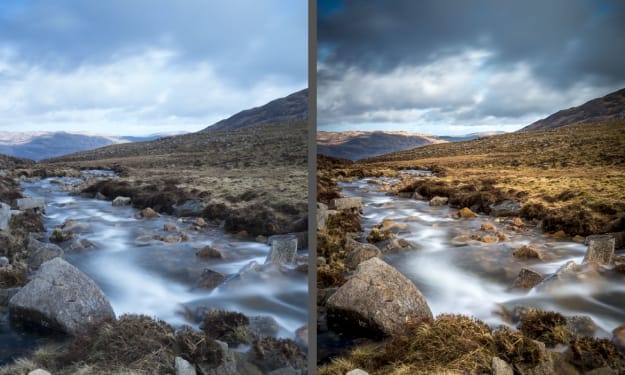
Post-processing refers to the techniques and methods used to enhance and refine images after they have been captured. It involves adjusting and manipulating photographs using various software tools to achieve the desired look and feel. This step is crucial in modern digital photography, allowing photographers to correct mistakes, emphasize important aspects, and bring their creative vision to life. The Importance of Post-Processing Post-processing is essential for several reasons: 1. Correcting Errors: Even the best photographers make mistakes. Post-processing can fix issues like exposure, color balance, and sharpness that might not have been perfect at the moment of capture. 2. Enhancing Aesthetics: Through post-processing, photographers can enhance the visual appeal of their images. This includes adjusting contrast, saturation, and clarity to make the photo more vibrant and engaging. 3. Creative Expression: Post-processing allows photographers to infuse their unique style and vision into their work. Techniques like selective coloring, black and white conversion, and adding filters can transform a mundane shot into a work of art. 4. Highlighting Details: Tools in post-processing software can bring out fine details that might be lost in the original image, adding depth and texture. 5. Consistency: For professionals, maintaining a consistent look across a portfolio or a series of images is crucial. Post-processing helps in achieving a cohesive aesthetic, which is important for branding and professional presentation. The Process of Post-Processing Post-processing typically involves several stages: 1. Importing and Organizing: The first step is to import photos into the chosen software and organize them. This helps in managing large numbers of files and keeping track of edits. 2. Basic Adjustments: This stage includes fundamental edits like cropping, straightening, and adjusting exposure, contrast, and white balance. 3. Detail Enhancement: Photographers may enhance details by sharpening the image, adjusting clarity, and reducing noise. 4. Color Correction: Adjusting colors is crucial for achieving the desired mood. This can involve tweaking the hue, saturation, and luminance of different colors. 5. Local Adjustments: These are selective edits applied to specific areas of the photo. Tools like adjustment brushes and radial filters allow for precise control. 6. Artistic Effects: Adding creative effects such as vignettes, split toning, and filters can significantly change the look and feel of a photo. 7. Final Touches and Exporting: The last steps include final adjustments, watermarking, and exporting the image in the required format and resolution. Best Software for Photo Editing In the digital age, post-processing has become an integral part of photography. Choosing the right software can significantly impact your workflow and the quality of your images. Here are some of the best options available: Adobe Photoshop: The industry standard, Photoshop offers unparalleled editing capabilities. It's perfect for detailed retouching, advanced manipulations, and creating composites. With features like layers, masks, and an extensive set of tools, Photoshop allows photographers to achieve precise control over their images. Adobe Lightroom: While Photoshop excels in detailed editing, Lightroom is designed for photo management and global adjustments. It’s ideal for batch processing and organizing large photo libraries. Lightroom’s non-destructive editing means your original files remain untouched, and its intuitive interface makes it accessible for both beginners and professionals. Capture One: Preferred by many professional photographers, Capture One offers advanced color grading and tethered shooting capabilities. Its powerful RAW processing engine delivers exceptional image quality, making it a great choice for high-end commercial work. Affinity Photo: A cost-effective alternative to Photoshop, Affinity Photo provides a robust set of tools for a one-time purchase. It supports PSD files and offers a comprehensive suite of editing features, including advanced retouching, batch processing, and digital painting. Luminar: Known for its AI-driven editing tools, Luminar simplifies complex adjustments, making it perfect for beginners and those looking for quick edits. Its unique filters and user-friendly interface make it a popular choice for enhancing photos without a steep learning curve. Step-by-Step Guide to Editing Landscape Photos Editing landscape photos can bring out the best in your images, highlighting the beauty and drama of natural scenes. Here’s a step-by-step guide to get you started: 1. Start with a RAW File: Always shoot in RAW format to retain maximum detail and flexibility in post-processing. RAW files capture more data than JPEGs, allowing for better adjustments. 2. Import and Organize: Use software like Lightroom to import and organize your photos. Create a system of folders and keywords to keep your library manageable. 3. Basic Adjustments: Begin with basic adjustments like exposure, contrast, and white balance. Correct any underexposure or overexposure issues to ensure a balanced histogram. 4. Crop and Straighten: Crop your image to improve composition and remove any distracting elements. Use the straighten tool to correct any tilted horizons. 5. Enhance Details: Increase clarity and sharpness to bring out textures in your landscape. Be cautious not to overdo it, as excessive sharpening can introduce noise. 6. Adjust Colors: Use the HSL (Hue, Saturation, Luminance) sliders to enhance specific colors. For landscapes, adjusting the greens and blues can make a significant difference. Consider using a graduated filter to enhance the sky separately from the foreground. 7. Apply Local Adjustments: Use tools like the adjustment brush or radial filter to make localized edits. This allows you to selectively enhance areas like the sky, water, or foliage. 8. Correct Lens Distortions: Enable lens corrections to fix any distortion, vignetting, or chromatic aberration caused by your lens. 9. Noise Reduction: Apply noise reduction to reduce any graininess, especially in photos taken at high ISO settings. Balance it with sharpening to maintain image detail. 10. Final Touches: Add finishing touches such as a slight vignette to draw attention to the center of the image. You can also enhance the mood with split toning, adding warmth to the highlights and cool tones to the shadows. 11. Export: Export your edited image in the desired format and resolution. For web use, JPEG is common, while for prints, consider using TIFF for higher quality. Using Lightroom Presets Effectively Lightroom presets are a powerful tool for speeding up your workflow and maintaining a consistent style. Here’s how to use them effectively: 1. Choose Quality Presets: Invest in high-quality presets designed by reputable photographers. Free presets can be useful, but professional ones often provide better results and more subtle adjustments. 2. Understand the Preset: Apply the preset to a sample photo and examine what adjustments it makes. This helps you understand how each preset affects your images and allows for better customization. 3. Customize Presets: Presets are not one-size-fits-all. Adjust the preset settings to suit the specific photo you’re working on. Tweak exposure, contrast, and other settings to perfect the look. 4. Organize Presets: Keep your presets organized in folders by style or purpose. This makes it easier to find the right preset for each photo. 5. Use Presets as a Starting Point: Think of presets as a foundation. Apply them to get a base look, then refine the edit with additional adjustments. This approach ensures your photos retain a unique touch rather than looking like carbon copies of others. 6. Batch Editing: One of Lightroom’s strengths is batch processing. Apply presets to multiple photos at once, then make individual adjustments as needed. This is particularly useful for maintaining consistency across a series of images, such as a wedding or event. By leveraging the right software, mastering landscape photo editing, and using Lightroom presets effectively, you can elevate your photography and create stunning, professional-quality images.
By COS2 years ago in Photography
Best garlic press and garlic chopper
Brief introduction to garlic as a popular ingredient in cooking Garlic is a staple ingredient in kitchens around the world, revered for its distinctive aroma and potent flavor. It has been used for thousands of years in various cuisines to enhance the taste of dishes, from Italian pastas and Asian stir-fries to Middle Eastern dips and Latin American salsas. Rich in vitamins and minerals, garlic not only adds a delicious depth to food but also offers numerous health benefits, such as boosting the immune system and reducing inflammation. Its versatility and health advantages make it an essential ingredient in both everyday cooking and gourmet culinary creations. Importance of garlic press in the kitchen The garlic press is an essential tool in the kitchen, valued for its ability to quickly and efficiently mince garlic cloves. This tool saves time and effort compared to manually chopping garlic, ensuring a consistent texture and releasing more of the garlic's flavorful oils and juices. By producing uniformly minced garlic, a garlic press enhances the flavor distribution in dishes, making it a favorite among both home cooks and professional chefs. Moreover, its convenience encourages the use of fresh garlic over pre-minced or powdered alternatives, leading to healthier and more delicious meals. Manual garlic presses and Electric garlic presses Manual Garlic Presses Manual garlic presses are the most common type found in kitchens. They typically consist of a chamber where the garlic clove is placed and a lever mechanism that forces the garlic through small holes, mincing it. Click here to buy https://amzn.to/3zwSGq2 Key Features: 1. Material: Often made from stainless steel, aluminum, or durable plastic. 2. Design: Ergonomic handles and easy-to-use lever systems. 3. Cleaning: Many come with removable baskets or are dishwasher safe for easy cleaning. 4. Portability: Compact and easy to store. Electric Garlic Presses Electric garlic presses are a newer innovation designed to make garlic mincing even easier. These devices automate the pressing process, allowing for quick and effortless garlic preparation. Click here to buy https://amzn.to/4cQBaeI Key Features: 1. Power Source: Typically powered by batteries or plugged into an electrical outlet. 2. Efficiency: Quickly processes large quantities of garlic. 3. Design: Includes a motorized mechanism to crush garlic with minimal effort. 4. Cleaning: Often designed with detachable parts for easy cleaning. Step-by-Step Guide to Using a Manual Garlic Press Prepare the Garlic:Select fresh garlic cloves.Peel the garlic cloves by crushing them lightly with the flat side of a knife to loosen the skin, then remove the skin. Load the Garlic Press:Open the garlic press.Place one or more peeled garlic cloves into the chamber of the press. If the cloves are too large, cut them in half. Press the Garlic:Close the garlic press handles together.Squeeze the handles firmly to force the garlic through the small holes, holding the press over the dish or pan where you want the minced garlic. Collect the Minced Garlic:Use a knife or spoon to scrape off any minced garlic sticking to the outside of the press. Remove Garlic Residue:Open the press and remove any remaining garlic residue from the chamber. Tips for Maximizing Efficiency Peel Garlic Easily:Use a garlic peeler tube to quickly and efficiently peel garlic cloves.Alternatively, crush the garlic clove slightly with the flat side of a knife to loosen the skin before peeling. Pre-Cut Large Cloves:Cut large garlic cloves into smaller pieces to fit them easily into the press chamber and ensure even pressing. Use Fresh Garlic:Fresh garlic is easier to press and yields more flavor and juice compared to older, dried-out cloves. Apply Even Pressure:Squeeze the handles evenly to ensure all the garlic is pressed through the holes. .Scrape Off Minced Garlic:Use a knife or small spatula to scrape off the minced garlic sticking to the outside of thel press for maximum yield. Cleaning and Maintenance Tips Clean Immediately After Use:Rinse the garlic press under warm water immediately after use to prevent garlic residue from hardening. Use a Brush:Use a small brush, like an old toothbrush or a specialized cleaning brush, to clean out any garlic bits stuck in the holes. Soak for Tough Residue:If garlic residue has dried, soak the garlic press in warm, soapy water for a few minutes before scrubbing. Dishwasher Safe:Check if your garlic press is dishwasher safe. If so, place it in the dishwasher for thorough cleaning. Removable Parts:If the press has a removable chamber or basket, take it apart for easier cleaning and to ensure no residue is left behind. Dry Thoroughly:After cleaning, dry the garlic press thoroughly to prevent rust and maintain its longevity, especially if it’s made of metal. Lubricate Hinges:Occasionally lubricate the hinges with a small amount of food-safe oil to keep the press operating smoothly. By following these steps and tips, you can ensure that your manual garlic press remains efficient, clean, and in good working condition for years to come. Time-Saving Aspects Using a garlic press significantly reduces the time needed to prepare garlic compared to manual chopping or mincing. With just a simple squeeze, you can quickly crush multiple cloves, eliminating the need for peeling and chopping. This efficiency is especially beneficial when cooking large meals or when time is limited. The ease of use encourages the frequent use of fresh garlic, making meal preparation faster and more convenient. Uniformity in Garlic Size A garlic press ensures that the garlic is minced uniformly, which is challenging to achieve with a knife. This consistency is crucial for even cooking and flavor distribution in your dishes. Uniformly minced garlic integrates better into sauces, dressings, and marinades, preventing the risk of burning larger pieces and resulting in a more balanced and harmonious flavor.nd
By Nweke Hilary Chukwunonso2 years ago in Photography
Best And Far Most Cheapest Canon Rebel Camera. AI-Generated.
The Canon Rebel XTi DSLR Camera, paired with the EF-S 18-55mm f/3.5-5.6 Lens, represents a milestone in Canon's popular Rebel series. Released as an upgrade to its predecessor, the Rebel XT, the XTi brought significant improvements in both performance and usability, making it a favorite among entry-level and intermediate photographers when it debuted in 2006.
By Fire Gamer2 years ago in Photography
JXL to BPG Converter Tool
JXL to BPG Converter Tool Image formats and their conversions are a significant part of our daily online activities. Whether you're a photographer, graphic designer, or just someone who loves sharing high-quality images, understanding and utilizing efficient image formats is crucial. That's where the JXL to BPG Converter Tool comes into play. This article will guide you through everything you need to know about converting JXL files to BPG seamlessly.
By Ahmad Free Tools2 years ago in Photography
A Wild World. AI-Generated.
Urban wildlife photography offers a unique perspective on the intersection of nature and human civilization, capturing moments of wild beauty amidst the bustling backdrop of cities. In recent years, this genre has gained popularity among photographers seeking to showcase the resilience and adaptability of wildlife in urban environments.
By Xavier Francis2 years ago in Photography