editing
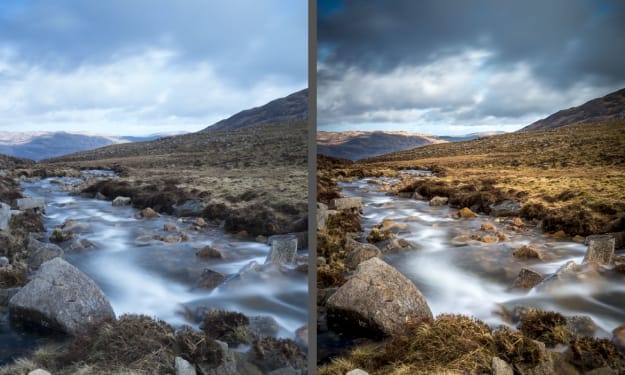
Photo editing doesn't have be a foreign language; learn tips and tricks for using pro platforms like Adobe Photoshop, Lightroom, VSCO, and more.
Post-Processing in Photography
Post-processing refers to the techniques and methods used to enhance and refine images after they have been captured. It involves adjusting and manipulating photographs using various software tools to achieve the desired look and feel. This step is crucial in modern digital photography, allowing photographers to correct mistakes, emphasize important aspects, and bring their creative vision to life. The Importance of Post-Processing Post-processing is essential for several reasons: 1. Correcting Errors: Even the best photographers make mistakes. Post-processing can fix issues like exposure, color balance, and sharpness that might not have been perfect at the moment of capture. 2. Enhancing Aesthetics: Through post-processing, photographers can enhance the visual appeal of their images. This includes adjusting contrast, saturation, and clarity to make the photo more vibrant and engaging. 3. Creative Expression: Post-processing allows photographers to infuse their unique style and vision into their work. Techniques like selective coloring, black and white conversion, and adding filters can transform a mundane shot into a work of art. 4. Highlighting Details: Tools in post-processing software can bring out fine details that might be lost in the original image, adding depth and texture. 5. Consistency: For professionals, maintaining a consistent look across a portfolio or a series of images is crucial. Post-processing helps in achieving a cohesive aesthetic, which is important for branding and professional presentation. The Process of Post-Processing Post-processing typically involves several stages: 1. Importing and Organizing: The first step is to import photos into the chosen software and organize them. This helps in managing large numbers of files and keeping track of edits. 2. Basic Adjustments: This stage includes fundamental edits like cropping, straightening, and adjusting exposure, contrast, and white balance. 3. Detail Enhancement: Photographers may enhance details by sharpening the image, adjusting clarity, and reducing noise. 4. Color Correction: Adjusting colors is crucial for achieving the desired mood. This can involve tweaking the hue, saturation, and luminance of different colors. 5. Local Adjustments: These are selective edits applied to specific areas of the photo. Tools like adjustment brushes and radial filters allow for precise control. 6. Artistic Effects: Adding creative effects such as vignettes, split toning, and filters can significantly change the look and feel of a photo. 7. Final Touches and Exporting: The last steps include final adjustments, watermarking, and exporting the image in the required format and resolution. Best Software for Photo Editing In the digital age, post-processing has become an integral part of photography. Choosing the right software can significantly impact your workflow and the quality of your images. Here are some of the best options available: Adobe Photoshop: The industry standard, Photoshop offers unparalleled editing capabilities. It's perfect for detailed retouching, advanced manipulations, and creating composites. With features like layers, masks, and an extensive set of tools, Photoshop allows photographers to achieve precise control over their images. Adobe Lightroom: While Photoshop excels in detailed editing, Lightroom is designed for photo management and global adjustments. It’s ideal for batch processing and organizing large photo libraries. Lightroom’s non-destructive editing means your original files remain untouched, and its intuitive interface makes it accessible for both beginners and professionals. Capture One: Preferred by many professional photographers, Capture One offers advanced color grading and tethered shooting capabilities. Its powerful RAW processing engine delivers exceptional image quality, making it a great choice for high-end commercial work. Affinity Photo: A cost-effective alternative to Photoshop, Affinity Photo provides a robust set of tools for a one-time purchase. It supports PSD files and offers a comprehensive suite of editing features, including advanced retouching, batch processing, and digital painting. Luminar: Known for its AI-driven editing tools, Luminar simplifies complex adjustments, making it perfect for beginners and those looking for quick edits. Its unique filters and user-friendly interface make it a popular choice for enhancing photos without a steep learning curve. Step-by-Step Guide to Editing Landscape Photos Editing landscape photos can bring out the best in your images, highlighting the beauty and drama of natural scenes. Here’s a step-by-step guide to get you started: 1. Start with a RAW File: Always shoot in RAW format to retain maximum detail and flexibility in post-processing. RAW files capture more data than JPEGs, allowing for better adjustments. 2. Import and Organize: Use software like Lightroom to import and organize your photos. Create a system of folders and keywords to keep your library manageable. 3. Basic Adjustments: Begin with basic adjustments like exposure, contrast, and white balance. Correct any underexposure or overexposure issues to ensure a balanced histogram. 4. Crop and Straighten: Crop your image to improve composition and remove any distracting elements. Use the straighten tool to correct any tilted horizons. 5. Enhance Details: Increase clarity and sharpness to bring out textures in your landscape. Be cautious not to overdo it, as excessive sharpening can introduce noise. 6. Adjust Colors: Use the HSL (Hue, Saturation, Luminance) sliders to enhance specific colors. For landscapes, adjusting the greens and blues can make a significant difference. Consider using a graduated filter to enhance the sky separately from the foreground. 7. Apply Local Adjustments: Use tools like the adjustment brush or radial filter to make localized edits. This allows you to selectively enhance areas like the sky, water, or foliage. 8. Correct Lens Distortions: Enable lens corrections to fix any distortion, vignetting, or chromatic aberration caused by your lens. 9. Noise Reduction: Apply noise reduction to reduce any graininess, especially in photos taken at high ISO settings. Balance it with sharpening to maintain image detail. 10. Final Touches: Add finishing touches such as a slight vignette to draw attention to the center of the image. You can also enhance the mood with split toning, adding warmth to the highlights and cool tones to the shadows. 11. Export: Export your edited image in the desired format and resolution. For web use, JPEG is common, while for prints, consider using TIFF for higher quality. Using Lightroom Presets Effectively Lightroom presets are a powerful tool for speeding up your workflow and maintaining a consistent style. Here’s how to use them effectively: 1. Choose Quality Presets: Invest in high-quality presets designed by reputable photographers. Free presets can be useful, but professional ones often provide better results and more subtle adjustments. 2. Understand the Preset: Apply the preset to a sample photo and examine what adjustments it makes. This helps you understand how each preset affects your images and allows for better customization. 3. Customize Presets: Presets are not one-size-fits-all. Adjust the preset settings to suit the specific photo you’re working on. Tweak exposure, contrast, and other settings to perfect the look. 4. Organize Presets: Keep your presets organized in folders by style or purpose. This makes it easier to find the right preset for each photo. 5. Use Presets as a Starting Point: Think of presets as a foundation. Apply them to get a base look, then refine the edit with additional adjustments. This approach ensures your photos retain a unique touch rather than looking like carbon copies of others. 6. Batch Editing: One of Lightroom’s strengths is batch processing. Apply presets to multiple photos at once, then make individual adjustments as needed. This is particularly useful for maintaining consistency across a series of images, such as a wedding or event. By leveraging the right software, mastering landscape photo editing, and using Lightroom presets effectively, you can elevate your photography and create stunning, professional-quality images.
By COS2 years ago in Photography
5 points to consider while hiring a reliable video editing company
Branding is not as simple as a piece of cake. And so goes for editing professional videos for your business. The reason is that there are a variety of elements related to video editing that many are not aware of.
By SD Edits2 years ago in Photography
Techniques of Image Enhancement in the Spatial Domain
We are aware that flawless pictures are required to run the business. Whatever appears to be appealing tends to be sold fast. But at times even after trying, the camera fails to capture the perfect pictures.
By David Carter2 years ago in Photography
Best And Far Most Cheapest Canon Rebel Camera. AI-Generated.
The Canon Rebel XTi DSLR Camera, paired with the EF-S 18-55mm f/3.5-5.6 Lens, represents a milestone in Canon's popular Rebel series. Released as an upgrade to its predecessor, the Rebel XT, the XTi brought significant improvements in both performance and usability, making it a favorite among entry-level and intermediate photographers when it debuted in 2006.
By Fire Gamer2 years ago in Photography
JXL to BPG Converter Tool
JXL to BPG Converter Tool Image formats and their conversions are a significant part of our daily online activities. Whether you're a photographer, graphic designer, or just someone who loves sharing high-quality images, understanding and utilizing efficient image formats is crucial. That's where the JXL to BPG Converter Tool comes into play. This article will guide you through everything you need to know about converting JXL files to BPG seamlessly.
By Ahmad Free Tools2 years ago in Photography
Celebrate Your Sweet 16 with These Fun and Creative Photoshoot Ideas
Turning sixteen is a milestone event in a teenager's life, marking the transition from childhood to young adulthood. A Sweet 16 celebration often involves parties, gifts, and memorable experiences. One way to immortalize this special moment is through a photoshoot. Here are some creative and fun Sweet 16 photoshoot ideas that will help you capture the essence of this significant birthday.
By Perfect Retouching2 years ago in Photography
Understanding Random Number Generators
www.toolcentral.xyz ### Introduction Random Number Generators (RNGs) are essential tools in various fields, from computer science and cryptography to statistical sampling and gaming. They generate sequences of numbers or symbols that cannot be reasonably predicted better than by a random chance.
By Tool Central2 years ago in Photography
How to Convert YouTube Videos to MP3: A Comprehensive Guide
In the digital age, YouTube has become a treasure trove of content, from educational videos to music tracks. Often, users want to extract audio from these videos for offline listening or other purposes. Converting YouTube videos to MP3 is a popular solution. This article will guide you through the process, covering the tools and methods available, and addressing the legal and ethical considerations.
By Tool Central2 years ago in Photography
Unleashing Creativity: How Vsub's TikTok Viral Video Creator Can Skyrocket Your Content
Make TIKTOK viral videos yourself. HERE In the ever-evolving world of digital content, few phenomena captivate audiences like viral videos. These digital sensations shape trends, influence culture, and generate vast engagement across social media platforms. One creator who has mastered this craft is Vsub, a name synonymous with viral video success. In this blog post, we explore Vsub's journey, their creative process, and the profound impact of their content.
By Oliver Green2 years ago in Photography
Tips for Capturing Stunning Photographs
Taking pictures of anything is an amazing activity and is loved by many people. It is just like doing science, each and every pic brings you joy and satisfaction. Here are some basic guidelines that one must follow to get amazing and gorgeous photos. Even if the photos are not as you expected, you can contact any online neck joint photo editing services with exposure to the type of phones you want to get edited.
By Global Photo Edit2 years ago in Photography