
A COMPREHENSIVE LIVECHAT REVIEW 2023
WHAT IS LIVECHAT SOFT WARE

A COMPREHENSIVE LIVECHAT REVIEW 2023

Concerning LiveChat Software
One of the top live chat software plugins on the market is LiveChat. It's a tool that enables you to add live chat to your website and offer users the quickest response possible. Visitors to your website can live chat with your team about any customer service or sales inquiry.
It incorporates live chat services, By focusing exclusively on this feature, LiveChat stands out. Messages from all of your online channels can be integrated into a single dashboard, and it offers a ton of customization options.
LiveChat includes a variety of helpful chat features, including sneak peeks at messages, file sharing, timelines, delivery tracking, and notifications. It offers more engaging options to draw in customers, such as automated and customized greetings. You can provide feedback on chat, comments, tickets, and other service.
The LiveChat interface is straightforward and simple to use. To keep your chat support team organized, there are team management options like agent groups, agent roles, work scheduler, chat supervision, etc. As well gives statistics, chat reports, ticket reports, daily summary, and other reports and analytics.
With more than 130 tools, LiveChat offers seamless integration, including content management systems (CMS) like WordPress and Drupal, e-commerce platforms like Shopify and BigCommerce, and help desk software like Knowledge Base and Zendesk. There is a free plugin in the official WordPress plugin repository that allows you to add LiveChat to your WordPress website.
Why Should You Include Live Chat on Your Website?
One of the quickest ways to answer website visitors is through live chat. Compared to phones and emails, it is much faster. By including a live chat option on your website, users can ask you questions as they come to mind. Additionally, great communication is made possible by your prompt response
Live chat is typically used for customer service and sales. Live chat is necessary for both support and sales if your business sells goods and services. Customers can instantly contact you via live chat if they run into issues while using your product. Then, you can provide immediate assistance.
This improved communication will undoubtedly improve your reputation in a user's thoughts. And as they spread the word through other media and word-of-mouth, it will undoubtedly pay off in the long run. They will, at the very least, be your clients while you are in operation.
When you know a user is interested in a product, you can direct them directly to the checkout page using live chat, which is great for lead generation and sales. Simply because they can't find a small amount of supplementary information, many users give up on the idea of purchasing a product. Therefore, you can attract each of these users and turn them into clients.
In essence, live chat improves lead generation, sales, engagement, and user experience. It's an easy yet effective way to expand your company and achieve success.
Plans and pricing
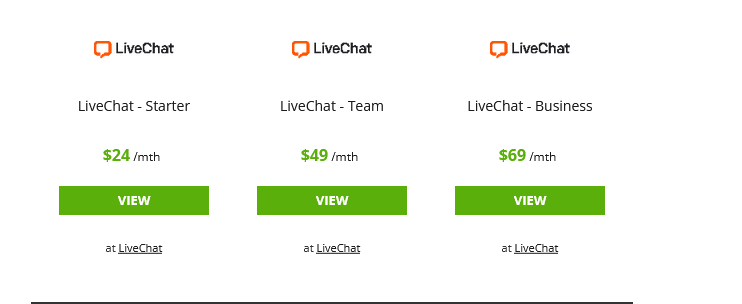
LiveChat offers three fundamental plans, each of which can be purchased on a monthly or annual basis. The Starter plan is incredibly feature-rich and costs $24 per agent per month (paid annually). The biggest restriction is that you can only keep a chat history of 60 days.
Use this link to access Livechat free for 14 Days.
Features
With its vast feature set, LiveChat enables you to connect with customers in an effortless manner and track the effectiveness of your customer support over time.
The chat box itself is very flexible to begin with. Customers can exchange files back and forth, you can schedule meetings by sending links or a calendar, or you can create pre-written answers to frequently asked questions. If your company has multiple departments, each with a different area of expertise, LiveChat also makes it simple to transfer chats between customer service representatives.
Even better, LiveChat synchronizes communications from all the platforms that your company uses. Even with a Starter subscription, you can utilize LiveChat on numerous websites and mobile applications. To make managing support requests simpler, you may import messages from Facebook Messenger, email, SMS, and Apple Business Chat into your LiveChat system.
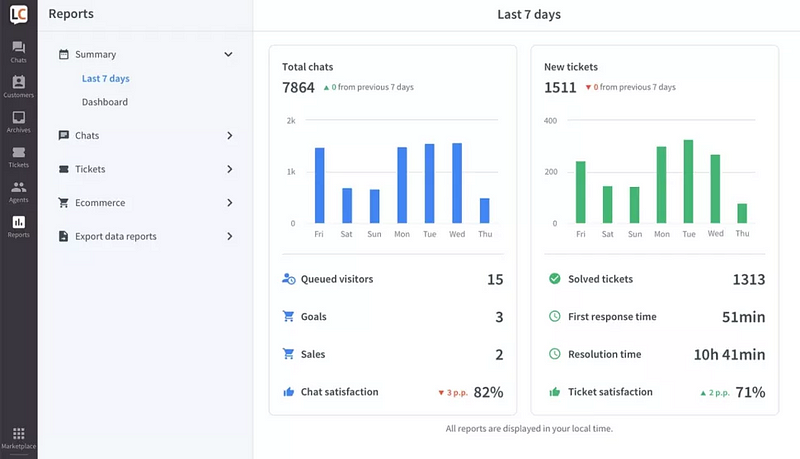
We also liked LiveChat because it makes it easier to maintain a high standard of customer service over time. After a chat, you may send clients one of the preset surveys that are included in the software. Team and Business users can also design their own surveys. Various reports are offered to demonstrate how long it takes agents to reply to new chat requests and whether chat help is accessible.
Interface and in use
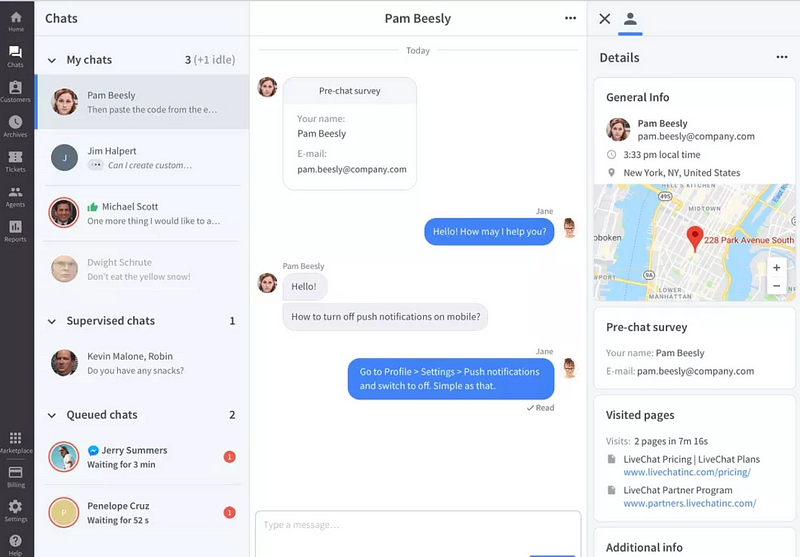
Most of the time, the LiveChat online app was flawless. The messaging interface, which is the most crucial component, has a design resembling that of Facebook Messenger. The left-hand column of the window allows you to quickly see all of your open chats and queued talks. The center column allows you to concentrate on a particular chat. You can see a thorough summary of the consumer you are messaging on the right, including the platform they are messaging from, the pages of your website they have viewed, and whether they are a repeat customer.
You may track hundreds of website visitors in real-time using LiveChat as well. Any visitor can start a chat with you, and you can tailor your message to them depending on the pages they're presently viewing.
We discovered that LiveChat paid attention to a few elements that facilitate using the assistance system. For instance, a specified tag can be used to rapidly access canned responses. Instead of needing to recall the specifics of a chat and tag it after it is archived, you can add tags to a chat at any time for archiving purposes.
Support

LiveChat's customer service is great, as you could anticipate from a business that prioritizes customer satisfaction. The business offers live chat help around-the-clock using its own solution. The amount of knowledge provided in the platform's online help center also astounded us. When describing how to use LiveChat, the tutorials are quite thorough and contain screenshots for each step.
Security
Because LiveChat values your account security so highly, all chats are 256-bit encrypted. Two-factor authentication is a feature that Team and Business users can choose, but we'd prefer to see it become the default setting for all customers. To prevent unauthorized use of your customer service line, administrators can also restrict the amount of IP addresses that can connect into LiveChat at once.
The competitors
While several helpdesk tools offer live chat, SnapEngage is one of LiveChat's main rivals. Live chat is the exclusive focus of SnapEngage, which provides the same multi-channel support as LiveChat. Additionally, it provides HIPAA compliance as a supplement feature (only accessible with a LiveChat Enterprise membership). Though SnapEngage does not provide 24/7 assistance and charges extra for several capabilities, including SMS messaging, we believe LiveChat is a better value for the majority of users.
The ultimate verdict
For messaging with your customers across all of your online platforms, LiveChat is a very potent and adaptable tool. The platform takes a proactive approach to support and security, merges chats from many services, facilitates collaboration between departments or within teams of support agents. The only aspect of LiveChat that we don't particularly like is the price, but given the high caliber of the software, we still believe it offers good value.
About the Creator
Enjoyed the story? Support the Creator.
Subscribe for free to receive all their stories in your feed.
Comments
There are no comments for this story
Be the first to respond and start the conversation.