Latest Stories
Most recently published stories in Gamers.
"The Rise of Gaming Keyboards: The Perfect Tool for Enhanced Gaming Performance"
Article Title: An Article About Gaming Keyboards Gaming keyboards have seen a surge in demand in recent years due to the increasing popularity of video games. Gamers believe that standard keyboards are insufficient for games that require quick and precise movements. Therefore, especially among professional gamers, specially designed gaming keyboards are preferred.
By Yasin Eren4 years ago in Gamers
A love letter to FFXIV
I just canceled my World of Warcraft subscription. After Fifteen years of playing one of my most beloved games, I couldn’t take it anymore. News of problems at Blizzard Activision was all over the internet. Allegations of bullying, harassment of all kinds, just horrible rumors of what really goes on behind the scenes at the video game developer. My heart was utterly shattered. Since 2006, I have explored almost the whole of Azeroth, got various characters to level 90 and above, made and lost friendships, joined guilds, etc.
By Christina Scanlon4 years ago in Gamers
The best Gaming pc tips for beginners
Are you new to the world of gaming and looking for the best gaming PC tips for beginners? You’ve come to the right place! Whether you’re a casual gamer or looking to break into the competitive gaming scene, having the best gaming PC setup is essential. In this blog post, we’ll go over the best gaming PC tips for beginners to help you get started. From choosing the right components to understanding how to optimize your setup, we’ll cover everything you need to know. With the right advice and a little patience, you’ll be gaming like a pro in no time. •Start with the basics Getting into PC gaming can be overwhelming. There is a lot to consider when choosing the right components and assembling your computer. But don't worry, we’re here to guide you through the process. The first step is to start with the basics and make sure you understand the core components of a gaming PC. At its simplest, a gaming PC is composed of three parts: the CPU, GPU, and RAM. The CPU is the central processing unit and acts as the brain of your computer. The GPU or graphics card is responsible for powering the visuals of your games. Lastly, RAM or random access memory helps store data while the game is running. You’ll need to choose the right combination of these three parts in order to build a powerful gaming rig. Depending on your budget, you may also want to consider investing in additional components such as a good power supply, cooling system, and storage options like an SSD or hard drive. Once you have a basic understanding of the components you need, it's time to start building your PC. This is where things can get tricky; you'll need to ensure that all your components are compatible and will work together in harmony. It's important to double check that each component is compatible before making any purchases so that everything will fit together properly. Additionally, take some time to research online tutorials and instruction videos that will show you how to properly assemble your PC. Once you've done this, you should find yourself equipped with the skills and knowledge needed to install the software and drivers that will help keep your gaming PC running smoothly. This includes updating device drivers and making sure all of your software is up-to-date with the latest patches. It might be helpful to read up on how to overclock your hardware so that you can squeeze out every bit of performance from your new gaming machine. Finally, keep an eye out for sales and deals that will help you get better bang for your buck. Even if you're just starting out, there are plenty of options available to you. If you know what components you need, shopping around could save you some money and allow you to upgrade other parts of your gaming setup. Don’t forget to join forums and social media groups that discuss different aspects of PC gaming, since they are full of people who can give advice on what works best. Also remember that learning about your gaming PC and staying up-to-date on the latest tech news can help keep you ahead of the curve. As long as you have patience and follow the tips outlined here, you should soon have a great gaming setup that will provide hours of fun! Make sure to regularly clean your computer to remove dust, dirt, and debris which can cause damage to components or reduce efficiency. To keep your files safe, back them up regularly either by using cloud storage or an external storage device. It's also important to run regular scans using antivirus software to prevent malware and viruses from infecting your system. Last but not least, try joining online communities dedicated to PC gaming as they are great sources for support, information, and advice. With the right tools and knowledge, you can begin your journey into becoming a serious PC gamer. While the journey can be daunting, the reward of having a gaming PC that you can customize to your exact specifications and preferences is truly worth the effort. Before jumping headfirst into the world of PC gaming, it’s important to set realistic goals for your gaming goals and budget. Establishing a balance between the two will ensure that you get the most out of your PC gaming experience without breaking the bank. Keep an open mind and embrace the learning process. Understanding the latest technologies and advancements will always keep you one step ahead. Lastly, remember to enjoy the journey. PC gaming can be a deeply rewarding and gratifying experience, one that you will cherish for years to come. Don't forget to treat your gaming PC with respect and always stay informed about the latest trends and advancements. Whether you're a beginner looking to dip your toe in the waters of PC gaming or a hardcore enthusiast looking to take your gaming to the next level, following these simple tips will guide you through the journey. Take your time and don't feel rushed. Be patient, learn, and have fun. In the end, you will create a gaming PC that suits your needs and provides endless entertainment. So go forth and make the most of your gaming PC - happy gaming! •Consider your budget When it comes to building a gaming PC, one of the most important factors to consider is your budget. You don't want to spend too much and end up with a computer that's overkill for the games you're playing or have difficulty finding components within your budget. It's important to have an idea of what you're willing to spend and make sure you stick to it. Start by researching the different components that are available in your price range. Make sure to read reviews to ensure you're getting quality components. Also consider the future when deciding what components to buy; will the components be powerful enough for future games? It's also important to factor in any other peripherals such as a monitor, keyboard, mouse, and speakers. Once you've determined your budget, you can begin searching for components that meet your needs while staying within your budget. Don't forget to check online retailers and websites such as eBay and Craigslist as they often have better prices than traditional retailers. Also make sure to check out sales and discounts. Finally, remember that building a gaming PC can be a fun experience, so enjoy the process! •Choose the right components When building your own gaming PC, the components you choose are key to achieving the best performance. You'll need to select a processor, graphics card, RAM, storage device, motherboard, power supply, and other peripherals. It's important to understand the different options and how they impact performance before making any decisions. When it comes to processors, Intel and AMD are the two most popular manufacturers. Intel processors are typically faster and more expensive than AMD processors, but that doesn't mean they are always the best choice. To determine which processor will be right for your gaming needs, consider the type of games you plan on playing and how you want your gaming experience to be. When choosing a graphics card, make sure you get one that can handle the resolution and detail of your gaming. If you’re looking for the best graphics possible, look for a card with dedicated video RAM (VRAM) and shader processing cores. A higher-end card will also provide better performance for more demanding games. RAM is another important factor in determining gaming performance. Get as much as you can afford, since higher amounts of RAM enable your computer to process more data and run larger applications. For most gamers, 8GB is enough to get decent performance. Finally, when selecting a storage device, you have a few options. An SSD (solid state drive) is much faster than a traditional HDD (hard disk drive), so if you’re looking for faster load times and better performance, an SSD is the way to go. However, if you’re on a budget or don’t mind slightly longer load times, an HDD can still offer plenty of storage space. By taking the time to research your components and make smart purchases, you can build a gaming PC that meets all your needs and delivers great performance. •Assemblemble your PC If you’ve chosen the right components and have all the necessary parts, it’s time to assemble your PC. This can seem daunting if you’ve never done it before, but with a few simple steps and a bit of patience you can do it. Here’s what you need to do: 1. Start with the case. Place the case on a flat surface and open it up. Take the power supply, motherboard, and drives out of their boxes and set them aside. 2. Install the power supply in the case by sliding it in from the back of the case and securing it with screws. 3. Install the CPU and RAM into the motherboard. 4. Insert the I/O shield into the back of the case and attach the motherboard to it with screws. 5. Connect all of the power cables from the power supply to the motherboard and any other components that require power. 6. Install any additional components, such as a graphics card or hard drive, into their respective slots on the motherboard. 7. Connect any external devices such as a keyboard, mouse, monitor, and speakers to their respective ports on the back of the case or motherboard. 8. Secure all cables in place and close up the case. 9. Plug in the power cord and turn on your computer.
By Sourabh arya4 years ago in Gamers
Let's take a closer look at what we can expect from the NCAA Tournament 2023.
March Madness is upon us once again, and the NCAA Tournament is set to kick off in just a few days. This year's tournament promises to be as exciting as ever, with dozens of teams vying for the chance to cut down the nets and be crowned national champions. Let's take a closer look at what we can expect from the NCAA Tournament 2023.
By satyam jadhav4 years ago in Gamers
Play dress up games at cutedressup for free
Why Dress Up games are increasingly popular now a days? Dress up games have become increasingly popular in recent years. These games allow girls to express their creativity and style by choosing different outfits, hairstyles, and accessories for virtual characters. They are not only entertaining but can also help girls develop their fashion sense and decision-making skills. In this article, we’ll explore the world of dress-up games for girls and discuss their benefits.
By lucasnitto4 years ago in Gamers
WPC2029: A Comprehensive Guide to Register, Login, Dashboard, and Recover Password
If you're new to WPC2029, one of the first things you'll need to know is how to register for an account, log in, access your dashboard, and recover your password if you forget it. In this article, we'll walk you through each of these processes step-by-step, providing you with all the information you need to get started with WPC2029.
By ankit Zestful4 years ago in Gamers
Teen Patti: A beginner's guide to rules and gameplay
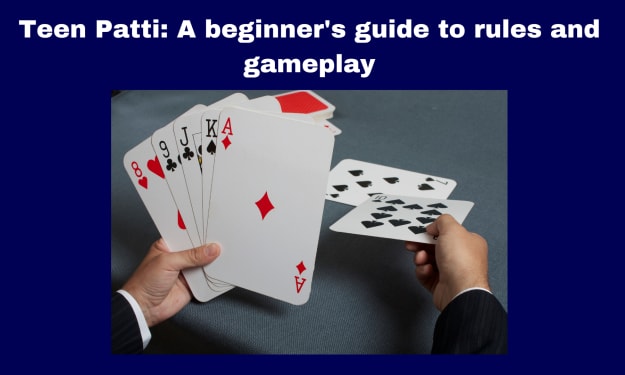
What is teen patti? Teen Patti is a popular card game that originated in India and is also known as "Flash" or "Flush". It is a gambling game that is played with a standard deck of 52 cards and involves a combination of luck and skill. The game is similar to poker in terms of hand rankings and betting rounds, but there are some key differences. Teen Patti is typically played with 3-6 players and involves each player making bets on their cards based on their perceived strength of their hand. The player with the best hand at the end of the game wins the pot of money. Teen Patti is a fun and social game that is enjoyed by many people in India and around the world.
By newteenpatti4 years ago in Gamers
DMarket; The New Way To Buy CS:GO Skins
Counter-Strike: Global Offensive (CS:GO) is one of the most popular first-person shooter games in the world, with millions of players competing against each other in various game modes. One of the most popular aspects of CS:GO is the ability to customize your weapons with skins, which are cosmetic enhancements that don't affect gameplay but can make your weapon look unique and stylish. These skins can be obtained by purchasing them from various marketplaces, and one of the best options is DMarket.
By Timo Zaadsnor4 years ago in Gamers
The NCAA Tournament Selection Process: Exploring Auto Bids and the Bubble Teams on the Bubble
The NCAA men's basketball tournament is one of the most exciting times of the year for sports fans. Every year, 68 teams are selected to compete in the tournament, and each team has a chance to make a run at the national championship. Selection Sunday is the day when the teams are selected and the bracket is released, and this year, Andy Katz has made his predictions for what the bracket will look like.
By MANNU VISHWAKARMA (annu)4 years ago in Gamers