science
Topics and developments in science and medicine, presented by Futurism.
Moon 2.0 – The New Technology Revolution Beyond Earth
Moon 2.0 – The New Technology Revolution Beyond Earth For centuries, the Moon was a distant symbol of mystery, poetry, and dreams. It guided sailors, inspired lovers, and lit up our night skies. But in the 21st century, the Moon is no longer just something to gaze at; it is a destination.
By Wings of Time 12 months ago in Futurism
When Galaxies Collide: The Future Cosmic Dance of the Milky Way and Andromeda
A Slow-Motion Collision in the Night Far beyond the reach of our telescopes’ finest details, an extraordinary cosmic event is already underway. The Milky Way—our home galaxy—and its massive neighbor, the Andromeda Galaxy, are locked in a slow, gravitational embrace. Although they are separated by about 2.5 million light-years, the two galaxies are inching toward each other at a staggering 110 kilometers per second.
By Holianyk Ihor12 months ago in Futurism
The Coolest Star in the Universe: WISE 1828+2650, the “Room-Temperature” Star
When we think of a star, we imagine something blazing hot — a roaring sphere of plasma like our Sun, burning at thousands of degrees and flooding space with light. But the cosmos loves to challenge our assumptions. Somewhere out there, about 40 light-years away, floats a celestial oddball that defies everything we expect from a “star.”
By Holianyk Ihor12 months ago in Futurism
New Discoveries in the TRAPPIST-1 and LHS 1140 Systems: Rethinking What “Habitable” Really Means
For decades, the dream of discovering a second Earth has driven astronomers to peer deep into the cosmos, searching for rocky planets orbiting distant stars. Two of the most intriguing targets in that quest—TRAPPIST-1 and LHS 1140—have recently revealed surprising new details thanks to observations from the James Webb Space Telescope (JWST). These discoveries are changing how scientists think about habitability, atmosphere loss, and what a truly “Earth-like” world might be.
By Holianyk Ihor12 months ago in Futurism
Before they disappear, scientists are racing to name ocean creatures.
Our oceans are home to millions of species, many of which are still unidentified. Tragically, too, a great number of species are disappearing before we even realise they exist. Some vanish forever without being studied, photographed, or comprehended for their part in the complex web of life on Earth.
By Francis Dami12 months ago in Futurism
Parker Solar Probe: Unveiling the Fiery Secrets of the Sun’s Corona
When NASA’s Parker Solar Probe launched in August 2018, it set out on one of the most daring missions in space exploration: to “touch” the Sun. For the first time in human history, a spacecraft would fly directly through the Sun’s outer atmosphere—the corona—collecting data from a region that had always been seen, but never experienced.
By Holianyk Ihor12 months ago in Futurism
New Frontiers in Space: How Microsatellites and CubeSats Are Revolutionizing Space Technology
In the past, sending something into space was a privilege reserved for national space agencies and billion-dollar aerospace companies. But in the last decade, a quiet revolution has been unfolding — one driven by tiny, affordable, and surprisingly powerful satellites known as microsatellites and CubeSats. These small wonders are reshaping everything we know about space exploration, communication, and even climate research.
By Holianyk Ihor12 months ago in Futurism
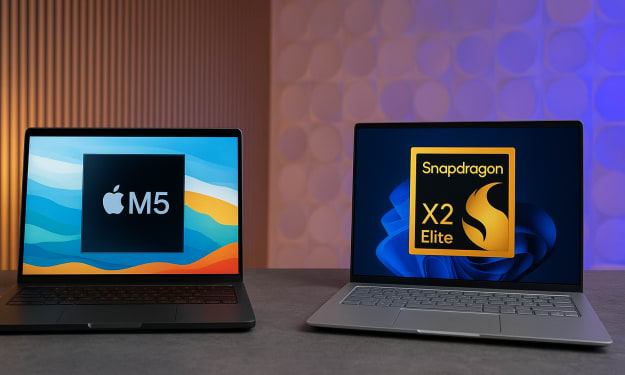
M5 MacBook Pro vs Snapdragon X2 Elite: The ARM Laptop Chip Showdown of 2025
When we talk about laptop performance in 2025, one of the most compelling rivalries isn’t between Intel and AMD any more — it’s between two ARM-based contenders: the newly-announced Apple M5 (inside the latest MacBook Pro) and the upcoming Snapdragon X2 Elite (and its Extreme variant) from Qualcomm. Both chips herald the next generation of ARM laptop computing. But which one takes the crown? Let’s dive into the numbers, the tech, and what it means for you — the user. Setting the stage: Why this matters The laptop market is evolving fast. Gone are the days when premium laptops meant bulky, hot-running Intel/AMD silicon. Today, ARM architectures are increasingly viable for high-performance computing: lower power, better integration, and fewer compromises. The M5 and Snapdragon X2 Elite both ride a 3 nm class process, signalling the next leap in mobile/ultraportable performance. For Apple, the M5 continues the narrative of vertical integration — hardware + software tuned for a singular ecosystem. For Qualcomm, the Snapdragon X2 Elite offers the promise of high-end ARM performance in Windows laptops from multiple OEMs, potentially shoring up competition. This is an important pivot in the “ARM laptop chips 2025” conversation. Core specs & architecture overview Apple M5 According to official and leaked data, the M5 uses a 10-core CPU configuration (likely 4 high-performance cores + 6 efficiency cores) built on a 3 nm (or equivalent) node. ([Wikipedia][1]) GPU side: Apple claims up to ~30% faster graphics versus its previous generation M4, with enhancements in ray-tracing and AI-accelerator capability. ([Wikipedia][1]) Key benchmark leak: in single-core testing the MacBook Pro M5 variant clocked ~4,263 in Geekbench-style tests. ([Tom's Hardware][2]) Snapdragon X2 Elite (Extreme) Built for Windows laptops in early 2026, the Snapdragon X2 Elite line (including the high-end “Extreme” variant) packs up to 18 CPU cores according to leaks and benchmarking sources. ([Windows Central][3]) Memory bandwidth and core count significantly higher: e.g., one spec list shows 228 GB/s vs 153 GB/s for M5 in one comparison. ([NanoReview.net][4]) Early results show strong multi-core and graphics performance, setting a new bar for ARM in laptops. ([WIRED][5]) Performance face-off: Single-core, multi-core & graphics Single-core performance In single-threaded workloads — the kind of tasks that emphasise responsiveness (web browsing, document editing, launching apps) — the M5 holds a slight edge. Leaked benchmark entries show it reaching around 4,263 vs ~4,080 for the Snapdragon X2 Elite Extreme. ([Tom's Hardware][2]) That’s an impressive feat: Apple continues to hit very high single-core ceilings, thanks in part to its strong performance cores and efficient thermal envelope inside the MacBook chassis. Multi-core performance Here is where the Snapdragon X2 Elite pulls ahead. With up to 18 cores, early benchmarks show it reaching multi-core scores of ~23,000+ (Geekbench-style) compared to the M5’s ~17,800 in comparable tests. ([TechRadar][6]) In real-world terms this means heavy workloads — GPU rendering, large-scale compiling, multitasking across dozens of threads — may favour the Snapdragon architecture. Graphics & GPU performance Graphics benchmarks (e.g., 3DMark Steel Nomad Light) show a tight contest. One source reports the Snapdragon X2 Elite Extreme achieving ~42.5 fps vs ~40.5 fps for the M5. ([Geeky Gadgets][7]) While the margin is small (~5 %), it signals that Qualcomm’s integrated GPU (Adreno X2-90/whatever the naming) is catching up or perhaps even surpassing Apple’s offering in certain GPU-bound tasks. That said, the ecosystem (drivers, optimised apps) still matter hugely. Efficiency, thermals & real-world considerations Benchmarks alone don’t tell the full story. In laptops, sustained performance, cooling, power draw, and battery life are often the differentiators. For the M5 MacBook Pro, reviewers report class-leading single-core scores, but some note battery life falling short of the headline figures (~18 hours vs a claimed 24) under heavy use. ([TechRadar][8]) The Snapdragon X2 Elite, by virtue of its higher core count and likely higher power envelope, will demand robust cooling and may be more dependent on laptop OEM design to deliver sustained performance without thermal throttling. The MacBook Pro benefits from Apple’s tight hardware/software integration — from the OS (macOS) to the cooling solution and power management. Windows laptops powered by Snapdragon chips will face heterogeneous ecosystems and variable hardware implementation. Thus, while the Snapdragon may have the peak multi-core numbers, real-world sustained performance, usability, battery life and ecosystem play in favour of Apple’s M5 in many scenarios. User-centric implications: What does this mean for you? If you prioritise responsiveness and general productivity If your workload is mostly office apps, web browsing, light photo editing, streaming and everyday tasks — you’ll likely be delighted with the M5 MacBook Pro. Its single-core strength ensures snappy responses, excellent integration, and a mature platform. The “M5 MacBook Pro vs Snapdragon X2 Elite” battle here tilts in favour of the M5 for this class of use-case. If you are into heavy multitasking, large projects, or thread-rich workflows If you compile large code-bases, render 3D scenes, run virtual machines, or heavily multitask across dozens of threads — the Snapdragon X2 Elite’s higher multi-core count gives it a meaningful edge in this domain. In those raw benchmark-type tasks, the extra cores matter. If you care about GPU/creative workloads The GPU gap is narrowing. The Snapdragon shows a slight lead in one benchmark, but the real differentiator may be in software optimisation and ecosystem. Apple already has a mature set of creative apps (Final Cut Pro, Logic, etc.) tuned to its hardware. Windows + Snapdragon hardware is still emerging. So for creatives, you’ll want to look at the entire system (app support, thermal cooling, display, I/O) not just the chip. When battery life, ecosystem & support matter Here, Apple takes advantage of years of integration. The M5 MacBook Pro offers a mature, polished experience. With a Snapdragon-based machine, you’ll need to check the OEM implementation, cooling solution, battery size, OS experience, and app compatibility. The chipset alone doesn’t guarantee the same level of user experience. Market & future implications The rivalry between Apple’s M5 and Qualcomm’s Snapdragon X2 Elite line reflects a larger shift in the ARM laptop space. For years Apple has defined what ARM could do in laptops. But now, companies like Qualcomm are bringing serious competition to the table. Qualcomm’s push means Windows OEMs might finally deliver ARM-laptop alternatives that can match or challenge Apple not just in light-use scenarios but heavier workloads too. For Apple, this competition pressures further innovation — we already hear about upcoming M5 Pro and M5 Max versions, which could widen the gap again or shift the battleground. ([TechRadar][8]) For consumers: more choice is good. More performance, more form-factors, potentially lower prices as competition heats up. Verdict: Who wins? The short version: there’s no absolute winner — the “better chip” depends heavily on your usage model. For everyday workflows, light-to-moderate workloads, and the best user experience today: the M5 MacBook Pro remains the reliable pick. For heavy multitasking, thread-intensive workloads, or if you’re building a high-end Windows ARM laptop and can wait for the Snapdragon X2 Elite ecosystem to mature — the Snapdragon brings serious promise. In other words: if you need maximum multi-core firepower now, keep an eye on the Snapdragon X2 Elite and its laptop partners. If you want a polished experience today with excellent performance and battery life: the M5 MacBook Pro is hard to beat. Final thoughts The headline “M5 MacBook Pro vs Snapdragon X2 Elite” may sound like a simple comparison — but in reality, it’s the beginning of a broader shift. ARM laptop chips in 2025 are no longer niche; they’re now contenders. And when chips like the M5 and Snapdragon X2 Elite go head-to-head, the winners aren’t just the brands — it’s us, the users, who benefit. The next few months will be fascinating: more benchmarks, more devices, more real-world reviews. Whether you’re an Apple loyalist or a Windows-ARM early-adopter, this era marks the start of a new chapter for portable computing. For now — choose the machine that matches your workflow, ecosystem preference, and budget. Because whichever chip you pick, you’re buying into a very powerful future.
By NextGen Mobile Tech12 months ago in Futurism
iPhone and Mac: How Apple’s Perfect Pair Transforms the Way You Work, Connect, and Create
In today’s digital world, convenience is everything. From managing work to staying in touch with family, the average person juggles multiple devices every day. For millions of Americans, that ecosystem is powered by Apple — and the magic truly happens when the iPhone and Mac work together. Apple’s seamless integration between these two devices is one of the company’s biggest strengths. Whether you’re replying to messages on your Mac, copying text from your iPhone and pasting it on your laptop, or using your phone’s camera as a webcam, Apple has created an environment where switching between devices feels effortless. If you’ve ever wondered how to make the most of your iPhone and Mac combo, this guide will show you exactly what’s possible — and how it can change the way you work, connect, and create. Why the iPhone–Mac Relationship Matters The iPhone and Mac are more than just two separate gadgets. Together, they form a unified ecosystem that enhances productivity and creativity. For U.S. professionals, students, freelancers, and everyday users, this pairing has become a modern essential. Here’s why: Continuity Across Devices – Start a task on one device and finish it on the other without interruption. Unified Communication – Send texts, answer calls, and respond to notifications from your Mac — even when your iPhone is across the room. Automatic Syncing – Photos, documents, passwords, and notes stay consistent across both devices through iCloud. Powerful Productivity Tools – From Handoff to AirDrop, these built-in features eliminate the friction between phone and computer. It’s not about flashy features — it’s about making technology invisible, so you can focus on what you actually want to do. The Core Features That Make iPhone + Mac So Powerful Apple’s ecosystem is built on small features that deliver a big impact. Below are the most important ones every iPhone and Mac user should know. 1. Handoff: Pick Up Right Where You Left Off Handoff allows you to start an email, document, or web page on your iPhone and continue instantly on your Mac. The feature appears as a small icon in your Mac’s dock or your iPhone’s app switcher. For example, if you’re reading an article on Safari during your morning commute, you can open your Mac at work and continue reading from the exact same spot — no extra steps needed. 2. Universal Clipboard: Copy Here, Paste There One of Apple’s most underrated tools is the Universal Clipboard. Copy text, images, or links on your iPhone, then paste them directly into a document on your Mac. Writers, designers, and marketers love this because it makes multitasking between devices seamless — no more emailing yourself notes or screenshots. 3. AirDrop: Instant File Sharing AirDrop uses Bluetooth and Wi-Fi to transfer files between your Apple devices without cables or internet. Whether you’re sharing photos, PDFs, or videos, it’s fast, private, and simple. For U.S. professionals working with clients, AirDrop also means no more waiting for uploads or digging through messy email attachments. 4. Continuity Camera: Use Your iPhone as a Mac Webcam When Apple introduced Continuity Camera, it instantly upgraded the video call experience. Instead of relying on the Mac’s built-in webcam, your iPhone becomes a high-definition camera that connects wirelessly. In a world where remote work and video calls are standard, this feature makes you look sharper and more professional — whether you’re in a Zoom meeting or recording content for YouTube. 5. iPhone Mirroring on macOS Sequoia: The Game Changer Apple’s latest addition, iPhone Mirroring (introduced with macOS Sequoia and iOS 18), takes integration to an entirely new level. It lets you view and control your iPhone directly from your Mac. Your iPhone’s screen appears in a window on your desktop, and you can use your Mac’s keyboard and trackpad to navigate apps, reply to messages, or even drag and drop files between devices. This is especially useful for multitasking — you can check notifications, edit photos, or browse social media on your iPhone without ever reaching for it physically. It’s like having your phone and computer merge into one workspace. Setting Up Your iPhone and Mac for Seamless Integration Getting started is easier than you might think. Here’s a quick setup checklist: 1. Sign in with the same Apple ID on both devices. 2. Enable Bluetooth, Wi-Fi, and Handoff (found under Settings → General → AirPlay & Handoff on iPhone, and System Settings → General → AirPlay & Handoff on Mac). 3. Connect to the same Wi-Fi network. 4. Turn on iCloud sync for apps like Notes, Photos, and Safari. 5. Update both devices to the latest iOS and macOS versions for full compatibility. Once everything is synced, your devices start communicating instantly. The magic happens behind the scenes — and that’s exactly how Apple designed it. Top 5 Must-Try iPhone + Mac Workflows To really unlock the potential of Apple’s ecosystem, try these practical workflows used by power users and professionals across the U.S. 1. Copy, Paste, and Go If you’re researching online on your iPhone, simply copy a paragraph or link, switch to your Mac, and paste it directly into your notes or document. This is a lifesaver for students and journalists who collect information on the go. 2. Take Calls and Messages from Your Mac When your iPhone and Mac are linked, you can make and receive calls right from your MacBook. Messages also sync, allowing you to text from your keyboard instead of typing on your phone. This helps maintain focus during work hours without constantly switching devices. 3. Use AirDrop for Instant File Transfers Need to send a photo or design from your iPhone to your Mac instantly? Just AirDrop it. The process is private, wireless, and far faster than emailing or using cloud services. 4. Mirror and Manage Your iPhone on Mac With iPhone Mirroring in macOS Sequoia, you can check notifications, manage apps, or access files while your phone stays in your pocket. It’s ideal for professionals who want to stay organized without being distracted by their devices. 5. Turn Your iPhone into a High-Quality Webcam Enable Continuity Camera to use your iPhone’s advanced lenses and sensors for video calls. You’ll notice sharper focus, better lighting, and a more natural look — perfect for remote work, interviews, or content creation. How This Integration Boosts Productivity and Creativity When your devices work together, your workflow becomes faster, smarter, and more enjoyable. For professionals: iPhone + Mac means quick access to files, real-time collaboration, and a unified workspace. For creatives: You can shoot 4K videos on iPhone, edit them seamlessly in Final Cut Pro on Mac, and export professional-quality projects. For students: Notes sync instantly, assignments move between devices, and researching is easier than ever. For everyday users: Simple conveniences — like answering a FaceTime call from your Mac — save time every day. This ecosystem isn’t just about convenience. It’s about focus. The integration removes the small daily interruptions that slow you down, allowing you to stay in your creative flow. Privacy and Security: Apple’s Hidden Advantage Apple’s device integration works through its secure iCloud and Bluetooth systems. All data transfers — from clipboard to AirDrop — are encrypted end-to-end. That means your information never leaves your devices or goes through third-party servers. For users in the U.S., this focus on privacy is a major reason Apple continues to dominate the premium tech market. It’s not only about what your devices can do, but how safely they do it. Final Thoughts: The Future of Apple’s Unified Experience The iPhone and Mac have always been strong on their own, but together they represent something bigger — a connected lifestyle. With features like iPhone Mirroring, Continuity Camera, and Universal Clipboard, Apple has blurred the line between mobile and desktop computing. As the company continues to push boundaries with artificial intelligence, on-device processing, and seamless syncing, the iPhone + Mac ecosystem will only get smarter. If you’re already an Apple user, take the time to explore these features. You might be surprised how much smoother your digital life can be when your devices truly work in harmony. And if you’re new to Apple, this pairing is one of the best reasons to consider joining the ecosystem — it’s not about having two devices; it’s about having one experience that moves with you.
By NextGen Mobile Tech12 months ago in Futurism
Dark matter may eventually be revealed via radio waves in the early universe.
The Universe was quiet long before the first stars formed. No galaxies. No illumination. Only huge expanses of hydrogen gas and dark matter, an enigmatic substance that shapes everything we see today.
By Francis Dami12 months ago in Futurism
Is it possible for life to exist on Mars? Yeast provides a hint.
People have been making bread and beer with baker's yeast for generations. Few people thought that this microscopic organism could provide clues about how life can persist on an other planet, like Mars.
By Francis Dami12 months ago in Futurism