
How to Use AI-Assisted Refactoring to Reduce Technical Debt
A Practical Guide for AI-Assisted Refactoring

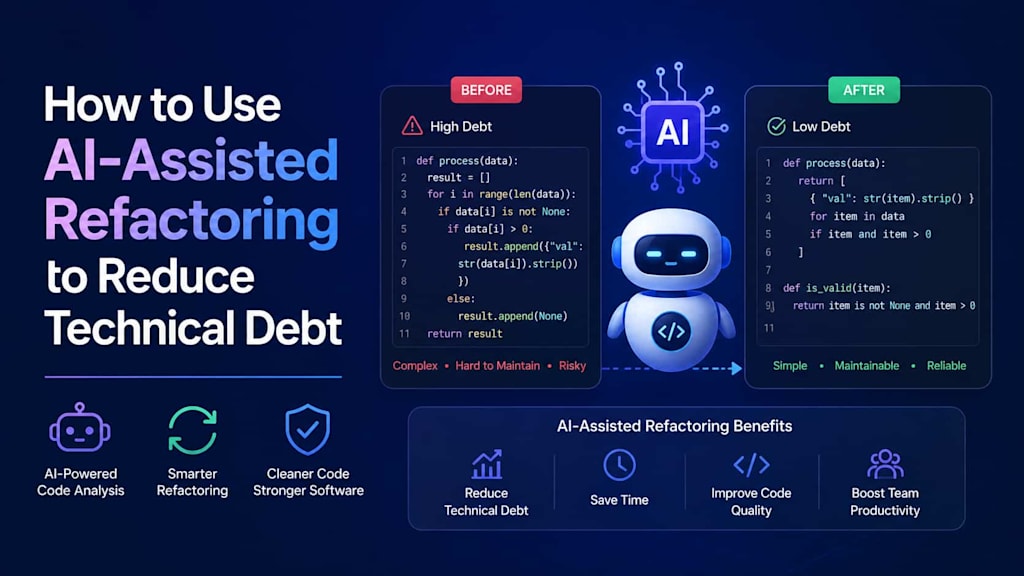
In today’s fast-paced software development environment, managing technical debt is a critical challenge for organizations of all sizes. Technical debt—an accumulation of outdated, inefficient, or poorly structured code—can slow down development, increase maintenance costs, and introduce risks for enterprise systems. Traditionally, refactoring code to address technical debt has been a labor-intensive process requiring careful analysis, testing, and developer expertise. However, advances in artificial intelligence (AI) are transforming how teams approach refactoring, enabling AI-assisted solutions that reduce technical debt faster and more efficiently.
In this article, we’ll explore how AI-assisted refactoring works, its benefits, and practical steps for leveraging it in your software projects.
Understanding Technical Debt
Before diving into AI-assisted refactoring, it’s important to define what technical debt is. Technical debt occurs when software development teams take shortcuts—whether intentionally or unintentionally—that make future changes more difficult. Examples include:
- Poorly documented or inconsistent code
- Legacy code that lacks modularity
- Outdated libraries and frameworks
- Duplicate or redundant code segments
- Inefficient algorithms
The consequences of technical debt are far-reaching. It slows down feature development, increases the likelihood of bugs, complicates testing, and raises operational risks. Addressing technical debt is not just a maintenance task—it’s a strategic necessity.
What Is AI-Assisted Refactoring?
AI-assisted refactoring refers to the use of artificial intelligence, machine learning models, and intelligent tools to automatically analyze, restructure, and improve existing code. Unlike traditional refactoring, which relies entirely on human developers to identify problematic patterns and manually correct them, AI-assisted refactoring leverages algorithms to:
- Identify redundant or inefficient code
- Suggest optimizations and code improvements
- Automatically apply changes while maintaining functionality
- Highlight potential risks or side effects of modifications
AI-assisted refactoring doesn’t replace developers—it enhances their capabilities. By combining human expertise with AI analysis, teams can address technical debt more efficiently while maintaining quality and reliability.
Benefits of AI-Assisted Refactoring
1. Accelerated Refactoring
Manual refactoring can be slow, especially for large, complex codebases. AI-assisted tools scan code at high speed, detect inefficiencies, and provide automated suggestions. This significantly reduces the time required to identify and fix technical debt.
2. Improved Code Quality
AI can identify patterns that humans may overlook, such as subtle redundancies, security vulnerabilities, or performance bottlenecks. By applying AI-assisted refactoring, teams can achieve more consistent and maintainable code.
3. Risk Reduction
AI tools can simulate the impact of changes before they are applied, reducing the risk of breaking existing functionality. Many AI-assisted refactoring tools integrate with test suites to validate that the code continues to behave as expected.
4. Knowledge Retention
Technical debt often arises when original developers leave or documentation is incomplete. AI-assisted refactoring can learn from existing patterns, maintain coding standards, and ensure that knowledge about best practices is embedded in the codebase.
5. Scalability
For organizations with multiple applications or large enterprise systems, AI-assisted refactoring provides a scalable approach to reduce technical debt across projects simultaneously.
Key AI Techniques in Refactoring
Several AI techniques are employed in refactoring solutions:
- Static code analysis: AI scans source code without executing it, detecting code smells, duplication, or inefficiencies.
- Natural Language Processing (NLP): NLP models can understand comments, documentation, and code naming conventions to ensure semantic correctness during refactoring.
- Machine learning models: Trained on large code repositories, these models can suggest optimal design patterns, modularization, and function restructuring.
- Automated testing integration: AI can run and analyze unit, integration, and regression tests to verify that refactored code remains functional.
- Predictive analytics: AI predicts which parts of the code are most prone to errors or future maintenance challenges and prioritizes them for refactoring.
Steps to Implement AI-Assisted Refactoring
1. Assess Your Codebase
Start by auditing your existing code. Identify high-risk areas, modules with frequent bugs, duplicated code, or outdated dependencies. AI-assisted tools often provide automated reports to highlight technical debt hotspots.
2. Choose the Right AI Refactoring Tool
Several AI-assisted refactoring tools are available in the market. When selecting one, consider:
- Compatibility with your programming languages and frameworks
- Integration with your existing CI/CD pipelines
- Level of automation versus manual review
- Reporting and visualization features
3. Define Refactoring Goals
Clearly define what you aim to achieve with refactoring. Goals could include:
- Reducing code duplication
- Improving performance
- Enhancing maintainability
- Modernizing legacy code for cloud migration
- Integrating AI-assisted testing
4. Apply AI Analysis
Run the AI tool to analyze your codebase. Most tools provide a list of suggested changes with severity levels, potential impacts, and estimated effort required. Review these suggestions carefully—human judgment remains critical.
5. Conduct Pilot Refactoring
Before applying AI-assisted refactoring across the entire codebase, start with a pilot module or project. Evaluate how well the tool performs, verify test coverage, and ensure that changes do not introduce regressions.
6. Integrate Automated Testing
AI-assisted refactoring works best when integrated with automated testing. Ensure your CI/CD pipelines include unit, integration, and regression tests. The AI tool can run tests after refactoring to validate functionality.
7. Apply Incremental Refactoring
Avoid attempting a full-scale refactor in one step. Break down the process into incremental improvements. AI tools can track changes, maintain coding standards, and ensure consistency across the codebase.
8. Monitor and Maintain
After AI-assisted refactoring, continue monitoring code quality. Use static analysis tools and metrics to ensure that technical debt remains low and that new debt does not accumulate over time.
Best Practices for AI-Assisted Refactoring
- Combine AI with Human Expertise: AI can suggest improvements, but developers must validate changes, especially in critical business modules.
- Maintain Coding Standards: Ensure the AI tool aligns with your organization’s coding guidelines to avoid introducing inconsistent patterns.
- Focus on High-Impact Areas First: Prioritize modules that cause the most maintenance challenges or slow development.
- Document Changes: Even with AI assistance, maintain clear documentation for future developers.
- Continuously Train AI Tools: Some AI solutions improve over time by learning from your codebase and past refactoring decisions.
Challenges and Considerations
While AI-assisted refactoring is powerful, there are challenges:
- Over-reliance on AI: Blindly accepting AI suggestions can lead to unintended changes or bugs.
- Complex legacy systems: Extremely old or poorly documented systems may still require significant human intervention.
- Tool limitations: Not all AI tools support every language or framework, and some may struggle with domain-specific logic.
- Security concerns: Automated changes must be carefully reviewed to avoid introducing vulnerabilities.
Organizations should combine AI tools with experienced engineers to strike a balance between automation and control.
Real-World Use Cases
1. Modernizing Legacy Banking Systems
Banks often have decades-old systems with accumulated technical debt. AI-assisted refactoring allows them to restructure code, integrate new APIs, and adopt cloud architectures while minimizing downtime and operational risk.
2. E-Commerce Platform Optimization
Large e-commerce platforms with complex codebases can leverage AI-assisted refactoring to reduce duplicated logic, improve transaction performance, and accelerate feature delivery without extensive manual effort.
3. Healthcare Software Compliance
Healthcare applications must meet strict regulatory requirements. AI-assisted refactoring helps identify outdated modules, optimize workflows, and ensure that refactored code remains complint and maintainable.
Future of AI-Assisted Refactoring
AI-assisted refactoring is poised to become a standard practice in software engineering. As AI models become more sophisticated, they will:
- Provide real-time refactoring suggestions during development
- Automatically detect emerging technical debt
- Predict future maintenance costs
- Integrate seamlessly with low-code and no-code platforms
By adopting AI-assisted refactoring early, organizations can maintain cleaner codebases, accelerate delivery, and reduce long-term costs.
Conclusion
Technical debt is an unavoidable aspect of software development, but it doesn’t have to be a bottleneck. AI-assisted refactoring offers a powerful way to reduce technical debt efficiently, improve code quality, and accelerate software delivery. By combining AI tools with experienced developers, organizations can transform legacy systems, modernize the software architecture, and ensure that their codebase remains scalable, maintainable, and robust for the future.
Embracing AI-assisted refactoring is not just about adopting new technology—it’s about adopting a smarter, faster, and more sustainable approach to software engineering.
About the Creator
Chudovo
Chudovo is a custom software development company, focused on complex systems implementation.
Enjoyed the story? Support the Creator.
Subscribe for free to receive all their stories in your feed.
Comments
There are no comments for this story
Be the first to respond and start the conversation.