
How to Test Barcode Scanning Software Before Rolling It Out
A practical approach to validating scanning accuracy, system integrations, and operational readiness before deploying barcode scanning software across stores and warehouses.

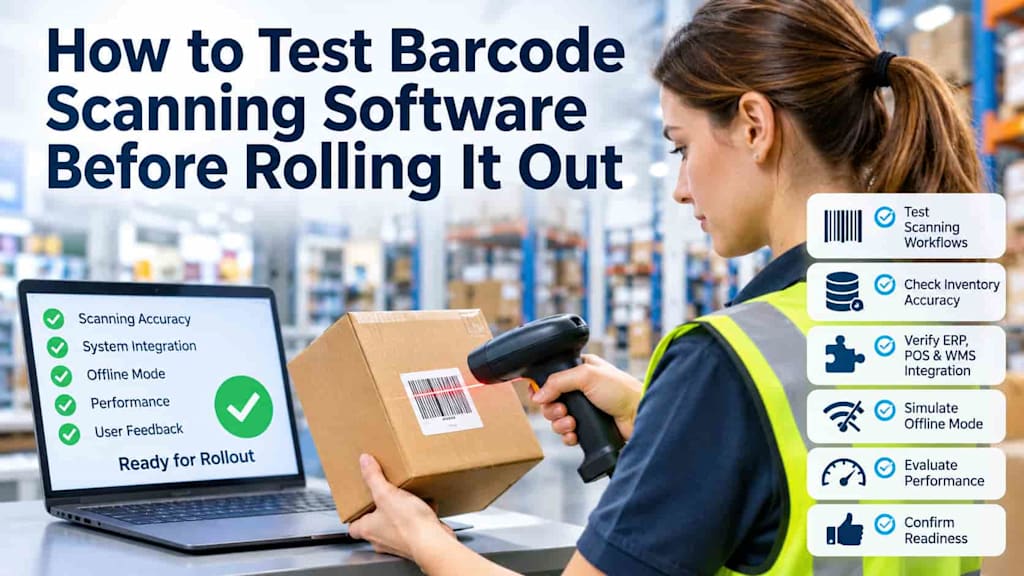
Introduction
Barcode scanning software plays an important role in retail and warehouse operations. It helps employees process incoming goods, maintain accurate inventory records, pick orders, handle returns, and complete customer purchases. However, introducing a new scanning solution across multiple locations involves more than checking whether a device can recognize a barcode. Businesses must ensure that every scanning operation produces the correct result and that information moves reliably between connected systems.
A solution that performs well in a controlled demonstration may encounter unexpected problems in a busy warehouse or retail store. Poor barcode recognition, delayed inventory updates, duplicate transactions, and unreliable network connections can create discrepancies that affect daily operations.
These risks become particularly important when businesses introduce new retail processes, including self-service purchasing supported by a mobile self-checkout architecture. In such environments, scanning errors can directly affect stock availability, transaction accuracy, and the customer experience.
Testing barcode scanning software before a full deployment allows decision-makers to identify operational weaknesses, validate integrations, and determine whether employees can use the solution effectively. A structured pilot program provides evidence that the software is ready for real working conditions.
1. Identify Critical Scanning Workflows
The first step is understanding how barcode scanning software will be used throughout the business. Different departments have different requirements, and testing should reflect the actual processes employees perform every day.
In retail environments, common scanning workflows include:
Receiving goods: Employees scan incoming products and compare them with purchase orders or delivery documents.
Stock counting: Store personnel scan items on shelves and in storage areas to verify inventory quantities.
Checkout: Cashiers or customers scan products to register purchases and calculate transaction totals.
Returns: Employees scan returned products to identify the original item and update its inventory status.
Shelf replenishment: Staff scan products when moving inventory from storage areas to sales floors.
Warehouse operations introduce additional scenarios, particularly order picking, packing, internal transfers, and shipment preparation.
Testing should prioritize workflows where scanning failures could have the greatest operational impact. For example, an incorrect barcode during receiving may introduce inaccurate stock information into the inventory system. A missed scan during order picking can result in an incomplete shipment, while an incorrect product identification during checkout may cause pricing discrepancies.
Businesses should select representative scenarios for a pilot test. A warehouse might test receiving a mixed shipment containing products with similar packaging, while a retail store could evaluate checkout operations involving promotional products and multiple item variations.
The objective is to cover both routine activities and situations that employees encounter less frequently but that could create significant problems if the software handles them incorrectly.
2. Test Barcode Recognition and Inventory Accuracy
Reliable barcode recognition is one of the most important requirements for any scanning solution. However, recognizing a barcode successfully does not automatically mean that the correct product will be registered.
Businesses should test the software using actual inventory rather than relying exclusively on demonstration products or prepared test labels.
Start by checking barcode recognition under different operating conditions. These may include:
Damaged, faded, or partially obscured labels.
Barcodes printed on reflective or curved packaging.
Small labels on products with limited scanning space.
Different barcode formats used by suppliers.
Poor lighting conditions in warehouses and storage areas.
Products with visually similar packaging or multiple variations.
For example, a warehouse employee may receive several product boxes with nearly identical designs but different sizes or model numbers. The software must identify each item correctly rather than relying on visual similarities or incomplete product information.
Testing should also cover incorrect and duplicate scans. Employees may accidentally scan the same item twice, scan a neighboring product, or attempt to process a barcode that is not registered in the product database.
The application should provide clear feedback when a barcode cannot be matched to an existing product record. It should not silently register an incorrect item or allow incomplete information to create unreliable inventory records.
Inventory accuracy must also be checked after scanning operations. If an employee counts 45 units of a product, the resulting inventory record should reflect the correct quantity. The same principle applies to receiving, picking, transfers, and returns.
A useful pilot scenario involves performing a physical stock count before testing, scanning the same inventory with the new software, and comparing the resulting quantities. Any differences should be investigated to determine whether they originate from recognition errors, duplicate scans, incorrect product mappings, or inventory synchronization problems.
3. Verify ERP, POS, and WMS Integration
Barcode scanning software rarely operates independently. Retailers and warehouse operators typically depend on several connected systems, including Enterprise Resource Planning (ERP), Point of Sale (POS), and Warehouse Management System (WMS) platforms.
Testing these integrations is essential because even accurate scanning can produce unreliable business results if information does not reach the appropriate systems correctly.
For example, when warehouse employees receive a shipment, the scanning application should update the relevant inventory records. The ERP system should reflect the received quantities, while the WMS should make the products available for the appropriate warehouse operations.
Retail environments require similar consistency. When a product is sold at one store, its stock availability should be updated in the systems responsible for inventory management. Other locations should receive accurate information according to the company's synchronization rules.
A pilot should examine several integration scenarios:
Inventory updates: Scan products during receiving, sales, and returns. Confirm that the corresponding quantities change correctly in connected systems.
Delayed synchronization: Introduce a controlled delay between the scanning application and the inventory platform. Check whether updates are eventually processed without losing transactions.
Conflicting records: Modify product quantities in another connected system while scanning operations are taking place. Verify how the software handles conflicting information.
Pricing consistency: Compare product prices between the scanning application and POS system, including promotional prices and recently updated product records.
Product availability: Check whether stock changes in a warehouse are reflected accurately in the systems used by retail stores.
Testing should also confirm that failed integration requests are visible to administrators. If a transaction cannot be transferred, employees or support teams need enough information to identify the problem and resolve it.
Unnoticed integration failures can be particularly expensive because they may affect multiple locations before anyone realizes that inventory records are no longer consistent.
4. Test Offline Scanning and Error Recovery
Network reliability is not guaranteed in every retail or warehouse environment. Large distribution centers may have areas with limited wireless coverage, while store networks can experience temporary interruptions.
Barcode scanning software should therefore be tested under controlled offline conditions.
Disconnect a scanning device from the network during a receiving or stock-counting operation. Check whether the application can continue recording transactions locally and whether employees receive clear notifications about its offline status.
After restoring the connection, verify that all stored transactions synchronize correctly.
Pay particular attention to duplicate transactions. For example, an employee might scan a group of products while offline, then repeat part of the operation because the application does not immediately display confirmation. When connectivity returns, the system must avoid counting the same items twice.
Conflicting updates also require attention. Imagine that an employee scans 20 units in a warehouse while another user changes the inventory quantity through the ERP system. The application should follow clearly defined synchronization rules rather than unexpectedly overwriting newer information.
Businesses should also test what happens when synchronization is interrupted again before all transactions have been transferred.
A reliable recovery process should preserve recorded information, identify unsuccessful updates, and allow authorized employees to resolve problems without manually reconstructing entire transactions.
5. Evaluate Performance in Real Operating Conditions
A scanning solution that works well with a small number of products may struggle during periods of intensive activity. Performance testing should therefore reproduce realistic retail and warehouse workloads.
For retail businesses, this could involve testing checkout operations during simulated peak shopping hours. Evaluate how quickly products are recognized, how long transactions take to complete, and whether the application remains responsive when several employees use it simultaneously.
Warehouse managers should organize similar exercises around receiving and order-picking activities. For example, employees could process a large delivery containing multiple product categories while supervisors monitor scanning speed and inventory updates.
Several indicators can help evaluate performance:
Scanning speed: How quickly does the application recognize products and confirm successful scans?
Error rate: How frequently does it fail to recognize valid barcodes or identify incorrect products?
Processing time: How long does it take for scanned transactions to appear in connected systems?
Manual corrections: How often must employees intervene to fix product information or inventory quantities?
Application stability: Does the software remain responsive during extended periods of activity?
Numbers alone cannot provide a complete assessment. Employee feedback is equally important.
During the pilot, ask staff whether the scanning process is intuitive, whether error messages are understandable, and whether the application makes routine tasks easier or introduces additional steps.
For example, warehouse employees may report that scanning works correctly but requires too many actions to confirm a completed picking task. Cashiers might identify difficulties when switching between standard products and promotional items.
These observations can reveal usability problems that technical performance measurements do not capture.
6. Evaluate Test Results and Decide Whether the Software Is Ready for Rollout
Once testing is complete, decision-makers need to determine whether the software meets the business requirements established before the pilot.
Acceptance criteria should be defined in measurable terms. These may include minimum barcode recognition accuracy, acceptable inventory discrepancy levels, synchronization times, offline recovery requirements, and application response times.
Critical workflows should meet their acceptance criteria consistently, not just during isolated successful tests.
The evaluation should also distinguish between minor usability improvements and problems that could threaten business operations.
For example, a confusing notification may be relatively easy to correct before deployment. However, recurring duplicate transactions or inaccurate inventory updates represent more serious risks that should prevent a wider rollout until resolved.
This evaluation is also a useful opportunity to revisit the original custom vs. off-the-shelf barcode scanning software decision. Pilot results may reveal that a solution meets most operational requirements but struggles with a particular integration, product category, or warehouse process. Businesses should determine whether these limitations can be addressed through configuration, additional integration work, or changes to the implementation approach.
Companies operating in German-speaking markets may also benefit from documenting barcode scanning software selection criteria that reflect local operational requirements, existing ERP and warehouse platforms, multilingual interfaces, and support expectations.
Before approving deployment, prepare a summary covering:
Workflows successfully tested and validated.
Identified scanning and inventory accuracy issues.
Integration problems and their current resolution status.
Offline operation and recovery results.
Performance measurements under realistic workloads.
Employee feedback and required usability improvements.
Outstanding risks and responsibilities for addressing them.
Based on these findings, management can choose between three options: proceed with deployment, extend the pilot after making adjustments, or reconsider the selected solution if critical requirements remain unmet.
A phased rollout is generally preferable to introducing the software across every location simultaneously. Starting with a limited number of stores or warehouses allows the business to monitor actual usage, identify unexpected issues, and refine operational procedures before expanding deployment.
Conclusion
Testing barcode scanning software before a full rollout helps businesses avoid inventory discrepancies, integration failures, and disruptions to everyday operations. A practical pilot should cover real scanning workflows, barcode recognition, connected systems, offline recovery, and performance under realistic workloads. By establishing measurable acceptance criteria and collecting employee feedback, retail and warehouse managers can make informed deployment decisions. Investing time in pilot testing is considerably less disruptive than correcting widespread operational problems after the software has already been introduced across multiple locations.
About the Creator
Chudovo
Chudovo is a custom software development company, focused on complex systems implementation.
Enjoyed the story? Support the Creator.
Subscribe for free to receive all their stories in your feed.
Comments
There are no comments for this story
Be the first to respond and start the conversation.