
How Scan-and-Go Apps Work: Architecture of Mobile Self-Checkout
Explore the technology, components, and user flow behind mobile scan-and-go shopping.

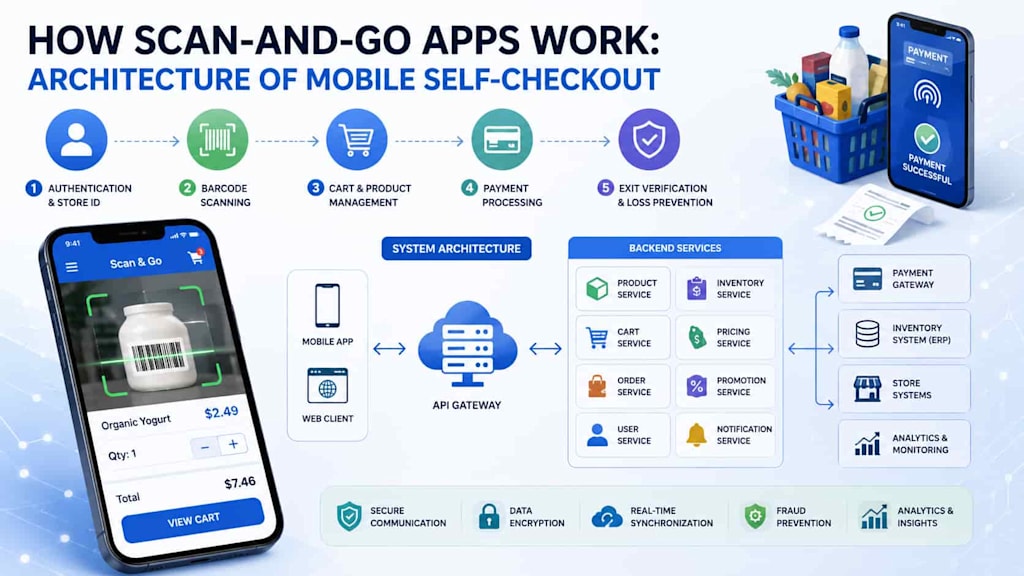
Mobile self-checkout is changing the way customers interact with physical stores. Instead of placing products into a cart and waiting at a traditional checkout, shoppers can use their smartphones to scan items as they shop, review their purchases, pay digitally, and leave the store with minimal assistance.
Behind this seemingly simple experience is a carefully designed software architecture. A scan-and-go solution must connect mobile scanning, product databases, inventory systems, payment services, authentication, fraud prevention, and store operations. Understanding how these components work together is essential for retailers planning to introduce mobile self-checkout.
What Is a Scan-and-Go App?
A scan-and-go app allows customers to use their smartphones as portable self-checkout devices. After entering a store, the customer opens the application and scans the barcode of each product they want to purchase.
The application identifies the item, retrieves its information from the retailer's backend, and adds it to a virtual shopping cart. Customers can see product names, prices, quantities, discounts, and the current order total while continuing to shop.
When shopping is complete, the customer proceeds to payment through the application. After successful payment, the system generates a digital receipt and may provide a confirmation that allows the customer to exit through a designated checkout area.
Retailers can implement this functionality through dedicated applications or broader retail platforms that include apps with barcode scanning feature as one component of the customer experience.
The Core Architecture of Mobile Self-Checkout
A typical scan-and-go platform consists of several interconnected layers rather than a single mobile application.
The main components include:
Mobile application
Barcode scanning module
Backend services
Product and inventory database
Shopping cart service
Payment gateway
Authentication and user management
Fraud prevention mechanisms
Store and checkout systems
Analytics and monitoring tools
The mobile app acts as the primary interface, while backend services coordinate the business logic and communication between different systems.
This architecture allows retailers to update prices, promotions, inventory, and customer information centrally without requiring customers to install a new application every time the business changes its operations.
Step 1: Customer Authentication and Store Identification
The process usually begins when a customer opens the application and signs in.
Authentication can be handled through email and password, phone numbers, social login, biometrics, or other identity mechanisms. Some retailers may allow guest shopping while requiring authentication before payment.
The application also needs to identify the store where the customer is shopping. This can happen through GPS, QR codes displayed at the entrance, Bluetooth beacons, Wi-Fi information, or manual store selection.
Knowing the store is important because product availability, prices, promotions, taxes, and inventory may differ between locations.
Step 2: Barcode Scanning
Barcode scanning is the central interaction in the scan-and-go experience.
The smartphone camera captures the barcode, while a scanning SDK recognizes the encoded information. The application then sends the barcode value to the backend.
The backend searches the product database and returns information such as:
Product name
Price
Product image
SKU
Available quantity
Discounts
Taxes
Promotional offers
The application displays the result almost immediately, allowing the customer to confirm that the correct product has been added.
Fast response times are particularly important because shoppers may scan dozens of products during a single visit.
Step 3: Product and Cart Management
After a product is recognized, the cart service creates or updates the customer's virtual shopping basket.
The cart needs to support more than simply storing product names. It should calculate quantities, prices, discounts, taxes, promotional rules, and the total order value.
For example, a retailer may have a promotion such as "buy two, get one free." The cart service must understand the promotion and automatically adjust the total.
The cart should also remain synchronized across the mobile device and backend. This prevents inconsistencies if the customer changes devices or if another system needs access to the order.
Step 4: Backend and API Layer
The backend is the central communication layer of the system.
The mobile application normally communicates with backend services through secure APIs. Instead of connecting directly to the retailer's database, the application sends requests to appropriate services.
A modular architecture might include separate services for:
Product catalog
Inventory
Shopping carts
Pricing
Promotions
Orders
Payments
Customer accounts
Notifications
Fraud detection
This separation makes the platform easier to maintain and scale. It also allows individual services to be updated without rebuilding the entire system.
For large retailers, microservices can be useful when different business functions need to scale independently. Smaller implementations may use a modular monolithic backend to reduce initial complexity.
Step 5: Payment Processing
Once the customer finishes shopping, the application calculates the final amount and initiates payment.
Payment processing is usually handled through a trusted payment gateway rather than storing sensitive card information directly in the mobile application.
Depending on the market and retailer, customers may be able to use credit cards, debit cards, digital wallets, or retailer-specific payment methods.
The payment workflow should include secure authentication, transaction validation, error handling, and confirmation from the payment provider.
After the payment is approved, the backend marks the order as completed and generates a digital receipt.
Step 6: Exit Verification and Loss Prevention
One of the biggest architectural challenges in scan-and-go systems is preventing theft and accidental non-payment.
A customer could theoretically place an item into a bag without scanning it. Therefore, retailers often introduce additional verification mechanisms.
These can include random receipt checks, exit gates, employee verification, weight-based systems, computer vision, transaction monitoring, or risk-based checks.
The architecture can assign a risk score to transactions based on factors such as unusual scanning patterns, high-value purchases, repeated corrections, or other signals.
The goal is to balance security with convenience. Excessive verification can undermine the primary advantage of scan-and-go shopping: speed.
Offline Operation and Connectivity
Mobile self-checkout normally depends on reliable network connectivity, but stores can contain areas with weak signals.
A robust application can therefore use local caching and temporary storage to maintain parts of the shopping experience during short connectivity interruptions.
For example, product information or scanning events may be temporarily stored on the device and synchronized with the backend when the connection returns.
However, offline functionality introduces additional complexity. Developers must consider duplicate scans, conflicting data, expired prices, failed synchronization, and payment restrictions.
For this reason, offline capabilities should be designed according to the actual operating environment rather than added as an afterthought.
Security and Data Protection
Security is fundamental because scan-and-go applications process customer accounts, transactions, product information, and potentially payment-related data.
Important security mechanisms include encrypted communication, secure authentication, token management, role-based access control, API protection, device security, and detailed audit logs.
The architecture should also minimize the amount of sensitive information stored on the customer's device.
Retailers need to consider privacy requirements applicable to their target markets and establish clear policies for collecting, processing, and retaining customer data.
Analytics and Continuous Optimization
Scan-and-go architecture can provide valuable operational data.
Retailers can analyze scanning behavior, abandoned carts, frequently purchased products, transaction times, payment failures, and other metrics.
These insights can help businesses optimize store layouts, promotions, product availability, and customer experiences.
Monitoring tools are equally important for the technical side. Development and operations teams need visibility into API response times, failed transactions, scanning errors, server performance, and application crashes.
Conclusion
A scan-and-go app may appear simple from the customer's perspective, but its underlying architecture combines multiple technologies and business systems. The mobile application handles scanning and user interaction, while backend services manage products, carts, pricing, payments, inventory, security, and analytics.
A successful mobile self-checkout solution must prioritize fast scanning, reliable synchronization, secure payments, intuitive UX, and effective loss prevention. The architecture should also be flexible enough to integrate with existing retail systems and scale as adoption grows.
For retailers, the best approach is to begin with clearly defined customer and operational requirements, select an architecture that matches the expected scale, and introduce advanced capabilities gradually. When these components work together effectively, scan-and-go technology can turn a conventional shopping trip into a faster, more convenient, and highly connected retail experience.
About the Creator
Chudovo
Chudovo is a custom software development company, focused on complex systems implementation.
Enjoyed the story? Support the Creator.
Subscribe for free to receive all their stories in your feed.
Comments
There are no comments for this story
Be the first to respond and start the conversation.