
How to Integrate Barcode Scanning with Retail Inventory Systems
A practical guide to connecting barcode scanning with inventory workflows

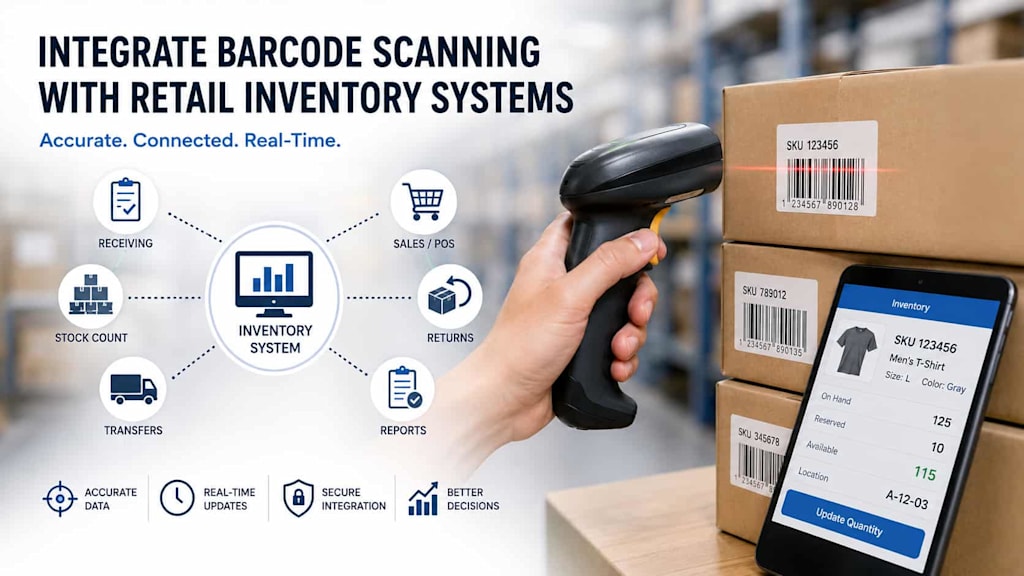
Retail inventory management depends on accurate, timely information. Every product received, moved, counted, or sold can affect stock levels, and even small data-entry mistakes can lead to discrepancies. Barcode scanning provides a practical way to automate many of these processes while improving visibility across stores, warehouses, and distribution centers.
However, simply adding barcode scanning to a retail application is not enough. The scanning component needs to communicate reliably with inventory databases, point-of-sale systems, warehouse platforms, and other business software. A well-planned integration ensures that every scan produces the right inventory action without creating duplicate records or slowing down employees.
Why Barcode Scanning Matters for Retail Inventory
Traditional inventory processes often depend on employees entering product identifiers manually. This takes time and increases the risk of errors. Barcode scanning replaces much of this manual work with automated identification.
When a worker scans a product, the application can immediately retrieve its SKU, product name, price, location, quantity, and other relevant information. The system can then perform an appropriate operation, such as increasing stock after receiving goods or decreasing stock after a sale.
Modern barcode scanning solutions can support a wide range of retail processes, including receiving, stock counting, shelf replenishment, order fulfillment, returns, transfers, and inventory audits.
The main benefits include:
Faster product identification
Reduced manual data entry
Fewer inventory errors
More accurate stock counts
Faster receiving and fulfillment
Better inventory visibility
Easier integration with retail software
For retailers with multiple locations, these advantages become even more important because centralized inventory information can be updated as transactions occur.
Choose the Right Barcode Scanning Technology
Before starting the integration, retailers need to determine which barcode formats and scanning devices their operations require.
Traditional 1D barcodes remain common for products in retail stores. However, 2D formats such as QR codes and Data Matrix can contain more information and support additional use cases.
The scanning hardware also matters. Retailers may use handheld scanners, fixed scanners at checkout stations, mobile computers, or smartphone cameras. The best option depends on the environment and workflow.
For example, warehouse employees may benefit from dedicated rugged scanners designed for continuous use, while store employees performing occasional inventory checks may be able to use smartphones or tablets.
The software should support the required barcode standards and provide a consistent interface regardless of the scanning device.
Connect the Scanner to the Inventory System
The next step is establishing communication between the scanning application and the inventory management platform.
A typical architecture includes several components:
Scanning layer – Captures and decodes the barcode.
Mobile or desktop application – Processes the scanned identifier.
API or integration layer – Transfers information between applications.
Inventory management system – Stores product and stock information.
Database – Maintains inventory records and transaction history.
When a barcode is scanned, the application sends the decoded value to the appropriate backend service. The backend identifies the product and returns the relevant information. If the scan represents an inventory transaction, the system updates the corresponding stock record.
Using APIs is generally preferable to connecting scanning devices directly to the inventory database. APIs provide a controlled integration layer, improve security, and make it easier to change individual components later.
Design Inventory Workflows Around Scanning
Scanning should be integrated into actual retail workflows rather than treated as a standalone feature.
Consider inventory receiving. An employee scans a product when a shipment arrives. The application identifies the SKU, retrieves the expected quantity, and allows the employee to confirm the received units. Once confirmed, the inventory system updates available stock.
Stock counting follows a similar process. Employees scan each item and enter or confirm the quantity. The application compares the result with expected inventory and flags discrepancies for review.
For product transfers, the process can involve scanning items at the source location and again when they arrive at the destination. This creates a transaction trail and reduces the risk of inventory being moved without being properly recorded.
Returns can also benefit from scanning. A barcode can identify the original product and help employees determine whether it should be returned to sellable inventory, sent for inspection, or marked as damaged.
Consider Real-Time Synchronization
Real-time synchronization is particularly important for retailers operating multiple stores or warehouses.
If inventory information is updated only periodically, employees may see outdated quantities. This can result in incorrect stock availability, unnecessary replenishment, or failed customer orders.
A real-time integration can update inventory immediately after a transaction. For example, when an item is sold through a POS system, the inventory platform can receive the transaction and reduce the available quantity. When a warehouse employee scans new stock, the available inventory can increase automatically.
However, real-time synchronization requires careful handling of network interruptions. Retail applications should be able to temporarily store transactions when connectivity is unavailable and synchronize them once the connection is restored.
This approach is particularly useful for mobile inventory applications operating in warehouses, large retail spaces, or areas with unreliable connectivity.
Build Validation and Error Handling
A barcode scan does not automatically guarantee that the correct inventory operation will occur. The application needs strong validation mechanisms.
For example, the system should check whether:
The barcode exists in the product catalog
The product is active
The product belongs to the expected location
The requested quantity is valid
The transaction has already been processed
The employee has permission to perform the operation
Duplicate transaction protection is especially important. A scanner might capture the same barcode twice, or a user might accidentally press a confirmation button more than once.
The backend should therefore use unique transaction identifiers and appropriate validation rules. Clear error messages should also explain what went wrong and what the employee should do next.
Integrate with POS, ERP, and Warehouse Platforms
Retail inventory rarely exists in isolation. It usually interacts with several other enterprise systems.
POS integration connects sales transactions with inventory changes. ERP systems may manage purchasing, suppliers, accounting, and broader business operations. Warehouse management systems can coordinate receiving, picking, packing, and shipping.
The integration should establish which system is responsible for each type of data. For example, the product catalog might be managed centrally by an ERP platform, while real-time warehouse movements are handled by a WMS.
This avoids situations where different systems independently modify the same inventory information without synchronization rules.
Event-driven architecture can be useful for larger retailers. Instead of tightly coupling every system, inventory events can be published and consumed by the systems that need them. This approach can make integrations more scalable as the retail ecosystem grows.
Mobile Scanning and Self-Checkout Considerations
Mobile scanning introduces additional requirements because smartphones and tablets have different cameras, operating systems, and performance characteristics.
The application should provide fast scanning, visual confirmation, appropriate lighting support, and clear feedback when a barcode cannot be recognized. It should also minimize unnecessary network requests to keep scanning responsive.
For self-service shopping scenarios, the Scan-and-Go app architecture needs to connect scanning functionality with product catalogs, pricing, promotions, shopping carts, payments, and inventory services. This makes the integration more complex than simply reading a barcode and displaying product information.
Security is another important consideration. Retailers need to prevent unauthorized inventory modifications and protect transaction data. Authentication, role-based access control, encrypted communication, and secure API authentication should be included from the beginning.
Test the Integration Before Deployment
Barcode integration should be tested in realistic operating conditions rather than only in a development environment.
Testing should cover different barcode sizes, damaged labels, low lighting, various scanning distances, duplicate scans, unavailable products, incorrect locations, network interruptions, and synchronization conflicts.
Performance testing is also important. If dozens of employees scan products simultaneously, backend services must be able to process requests without significant delays.
Pilot deployments can help identify practical problems before a retailer rolls the system out across all locations. Employee feedback is particularly valuable because workers can reveal workflow issues that may not be obvious during technical testing.
Conclusion
Integrating barcode scanning with a retail inventory system can significantly improve operational accuracy, speed, and visibility. The most successful implementations connect scanning technology with well-designed inventory workflows, APIs, centralized product data, and reliable synchronization mechanisms.
Retailers should consider not only how quickly a barcode can be scanned but also what happens after the scan. Validation, transaction processing, offline support, security, error handling, and integration with POS, ERP, and warehouse systems are all essential.
With the right architecture and careful testing, barcode scanning can become a core component of a connected retail ecosystem, helping businesses maintain accurate inventory while reducing manual work and improving the customer experience.
About the Creator
Chudovo
Chudovo is a custom software development company, focused on complex systems implementation.
Enjoyed the story? Support the Creator.
Subscribe for free to receive all their stories in your feed.
Comments
There are no comments for this story
Be the first to respond and start the conversation.