
How to Assess Xamarin Migration Risks Before Moving to .NET MAUI
A practical framework for identifying compatibility issues, evaluating technical dependencies, and planning a low-risk transition from Xamarin.Forms to .NET MAUI.

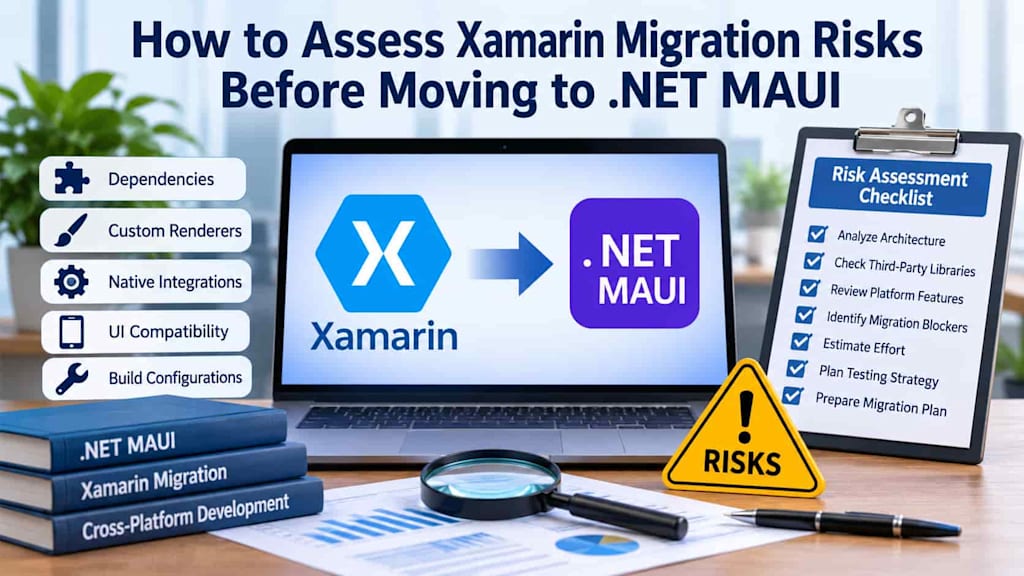
Introduction
Migrating an established mobile application to a newer development platform is not simply a matter of updating the technology stack. Existing applications often contain years of accumulated business logic, custom user interface components, third-party dependencies, native integrations, and platform-specific functionality. These elements can make a migration significantly more complicated than initially expected.
For organizations maintaining Xamarin applications, moving to .NET MAUI presents an opportunity to modernize mobile development and establish a more sustainable technical foundation. However, the success of this transition depends heavily on understanding the existing application's architecture and identifying potential obstacles before development begins.
A structured Xamarin migration assessment helps development teams determine which components can be retained, which require modifications, and which may need complete replacement. It also provides technical decision-makers with a realistic understanding of migration costs, delivery risks, and potential business disruptions.
Rather than treating migration as an isolated development project, organizations should approach it as a controlled modernization initiative supported by technical analysis, testing, and operational planning.
1. Evaluate the Existing Application Architecture
The first stage of risk assessment is understanding how the current application is structured. Xamarin applications can differ considerably in architecture, even when they use the same underlying framework.
Some applications rely heavily on Xamarin.Forms, shared business logic, and relatively standard platform integrations. Others contain extensive platform-specific implementations, customized navigation systems, and tightly coupled dependencies.
Before estimating migration effort, development teams should document the application's major architectural components:
Shared business logic and application services.
Xamarin.Forms pages, layouts, and controls.
Custom renderers and platform-specific effects.
Native Android and iOS integrations.
Authentication, networking, and data-access components.
Third-party libraries and SDKs.
Build configurations, deployment pipelines, and signing processes.
This inventory helps architects identify dependencies between components and understand how changes in one area might affect the rest of the application.
Although this assessment is not focused on comparing cross-platform UI frameworks, understanding the application's existing architecture is essential for identifying the technical implications of adopting .NET MAUI
Particular attention should be given to tightly coupled implementations. For example, business logic that directly depends on platform-specific APIs may require more extensive restructuring than services already separated behind well-defined interfaces.
The objective is to establish a reliable baseline before migrating legacy Xamarin applications to .NET MAUI, rather than discovering architectural limitations after development has started.
2. Assess Third-Party Library Compatibility
Third-party dependencies are among the most important potential migration blockers. Existing Xamarin applications frequently depend on libraries for authentication, analytics, push notifications, payment processing, mapping, document handling, and other specialized functionality.
A library that worked reliably in Xamarin may not have a compatible .NET MAUI version. Some packages may have been discontinued, while others may support modern .NET but require additional configuration or changes to their integration.
Development teams should review every direct and indirect dependency and classify it according to its migration readiness.
A practical classification includes:
Reusable: The library has an actively maintained .NET MAUI-compatible release or supports the required target frameworks without significant changes.
Adaptable: The library can be retained, but its integration, initialization, or configuration requires modifications.
Replaceable: An alternative package or service provides equivalent functionality with acceptable implementation effort.
Blocking: No suitable compatible version or replacement is currently available, creating a significant technical risk.
Compatibility should not be evaluated solely by checking whether a package can be installed. Teams must also verify whether it supports the required Android and iOS versions, native dependencies, security requirements, and application functionality.
Particular care is necessary with commercial SDKs. Their compatibility may depend on vendor licensing, support agreements, proprietary native components, or release schedules.
For critical dependencies, organizations should obtain confirmation from vendors before committing to a migration timeline.
3. Identify Custom Renderer and UI Compatibility Risks
Custom renderers are another major source of uncertainty in Xamarin.Forms migration projects. Applications often use them to modify standard controls, implement specialized visual behavior, or provide functionality unavailable through the original framework.
.NET MAUI introduces a different approach to customizing controls through handlers. Consequently, existing custom renderers should not automatically be considered reusable.
Each renderer needs to be examined to determine:
What visual or functional requirement does it address?
Does .NET MAUI already provide equivalent functionality?
Can the behavior be implemented through an existing handler or customization mechanism?
Does it depend on platform-specific native properties?
Are there differences in rendering, layout, or interaction behavior?
Some renderers may become unnecessary because the required functionality is available through standard MAUI controls. Others may need to be redesigned or replaced with custom handlers.
UI dependencies also deserve separate attention. Complex layouts, navigation structures, third-party controls, animations, and custom input components can behave differently after the transition.
A compatibility assessment should identify screens with unusual layouts, extensive customization, or accessibility requirements. These are particularly important candidates for early prototyping and regression testing.
Teams should also examine differences in typography, screen scaling, keyboard behavior, touch interactions, and visual consistency across devices.
A technically successful migration is not sufficient if users experience unexpected interface changes or lose familiar functionality.
4. Examine Native APIs and Platform-Specific Functionality
Many Xamarin applications combine shared code with native Android and iOS implementations. These integrations may provide access to device cameras, biometric authentication, Bluetooth, location services, background processing, notifications, file systems, and hardware-specific capabilities.
Such functionality can create significant migration risks because native APIs and platform lifecycle behavior may change across target frameworks and operating system versions.
Architects should identify every platform-specific implementation and determine whether it relies on APIs that remain available and supported in the intended .NET MAUI environment.
The assessment should pay particular attention to:
Permissions and privacy-related functionality.
Background tasks and application lifecycle events.
Push notifications and deep linking.
Camera, media, and file access.
Biometric authentication and secure storage.
Bluetooth, GPS, and other hardware integrations.
Native third-party SDKs.
The critical question is not simply whether a native API exists. Teams must establish whether its behavior remains equivalent under the new application architecture.
For example, a background synchronization feature may depend on operating system scheduling restrictions. Even if the underlying API remains available, changes in lifecycle management or permission handling could affect its reliability.
Organizations should also document differences between Android and iOS implementations. A feature that appears shared from the user's perspective may depend on entirely different native mechanisms on each platform.
5. Review Build Configurations and Development Infrastructure
Build and deployment infrastructure is frequently overlooked during early migration planning. However, problems involving target frameworks, workloads, signing certificates, provisioning profiles, or CI/CD pipelines can delay an otherwise successful technical transition.
Development teams should review the existing build environment and identify all configuration dependencies.
Important assessment areas include:
Supported .NET SDK versions and MAUI workloads.
Android SDK, build tools, and target API requirements.
Xcode versions and iOS deployment requirements.
Application identifiers and platform-specific manifests.
Signing certificates and provisioning profiles.
Environment-specific configuration and secrets.
Automated build, testing, and release pipelines.
The team should also check whether development and deployment environments can support the intended target platforms consistently.
Legacy build scripts may contain Xamarin-specific assumptions that no longer apply. Automated processes for generating application packages, managing versions, or publishing releases may require substantial adjustments.
These issues should be included in the initial risk register rather than treated as minor implementation details.
6. Estimate the Scope of Required Changes
After identifying technical dependencies, architects need to estimate the actual work involved in addressing them.
A useful approach is to classify application components into three groups:
Reusable components
These include business services, data models, API clients, validation rules, and other platform-independent functionality that can operate with minimal modification. Reusing these components can reduce development effort and preserve established business logic.
Components requiring refactoring
This category includes services with platform-specific dependencies, custom renderers, navigation implementations, and integrations that need adaptation to new framework conventions.
Components requiring replacement
Discontinued libraries, unsupported native integrations, obsolete UI controls, and incompatible third-party SDKs may need alternative implementations.
The assessment may also help decision-makers evaluate long-term architectural requirements when choosing between .NET MAUI and native .NET development, particularly for applications with extensive platform-specific functionality.
This classification provides a more realistic basis for estimating migration effort than counting application screens or source-code files.
When assessing Xamarin-to-.NET MAUI migration requirements, teams should also consider component criticality, technical complexity, availability of documentation, and the availability of developers with the necessary platform expertise.
The estimate should include time for investigation, prototyping, implementation, testing, and release preparation. A migration budget based exclusively on development hours is likely to underestimate the actual cost.
7. Prioritize Risks and Define Testing Requirements
Not every compatibility issue deserves the same level of attention. Migration risks should be prioritized according to their likelihood, potential impact, and difficulty of mitigation.
A payment integration that may become incompatible represents a different level of business risk from a minor visual difference in an informational screen.
Testing requirements should be defined before development begins. Teams should identify the functionality that must be covered by unit tests, integration tests, UI tests, and device-level validation.
Particular attention should be given to authentication, payments, data synchronization, notifications, offline functionality, and other business-critical operations.
A representative device matrix should cover supported operating system versions, screen sizes, and relevant hardware configurations.
The assessment should also identify existing test coverage and determine whether the current application provides a sufficiently reliable baseline for regression testing.
8. Protect Business Continuity and Existing Users
Technical compatibility is only one part of migration risk. Organizations must also consider how the transition could affect existing users, operational processes, and release schedules.
A poorly planned migration can introduce service interruptions, unexpected application behavior, data synchronization problems, or delays in delivering essential updates.
One important decision is whether the migration should be performed as a single release or through a gradual transition involving smaller releases. The appropriate approach depends on application complexity, user expectations, release frequency, and the organization's ability to maintain parallel development efforts.
Before development begins, teams should establish:
A strategy for preserving existing user data.
Requirements for API and backend compatibility.
A rollback or recovery plan.
A process for monitoring application stability after release.
Communication procedures for significant user-facing changes.
A maintenance plan for the existing production application.
The organization should also consider whether current Xamarin maintenance must continue during migration. Security updates and critical bug fixes may remain necessary until the new application reaches production readiness.
Maintaining business continuity requires realistic scheduling and clearly defined release acceptance criteria, not simply a technically completed migration.
9. Practical Pre-Migration Risk Assessment Checklist
Before approving a Xamarin-to-.NET MAUI project, technical decision-makers should verify that the following activities have been completed:
Document the existing application architecture and major dependencies.
Inventory all third-party libraries and verify their compatibility.
Identify discontinued or unsupported packages.
Review custom renderers and determine whether they can be replaced or adapted.
Evaluate UI controls, navigation, layouts, and visual dependencies.
Inventory native APIs and platform-specific functionality.
Verify Android and iOS compatibility requirements.
Review build configurations, signing, and CI/CD infrastructure.
Classify components as reusable, refactorable, or replaceable.
Identify critical migration blockers and estimate remediation effort.
Define regression, integration, and device-level testing requirements.
Establish business continuity and rollback strategies.
Prepare a prioritized migration roadmap and realistic budget.
Completing this checklist gives organizations a more objective basis for approving the project and allocating development resources.
Conclusion
A successful transition from Xamarin to .NET MAUI begins long before the first migration-related code changes are made. Third-party dependencies, custom renderers, native integrations, UI compatibility, and build configurations can all introduce unexpected complexity if they are not evaluated early.
A structured risk assessment helps development teams distinguish reusable components from those requiring refactoring or replacement, identify critical blockers, and prioritize work according to technical and business impact.
It also provides CTOs, architects, and engineering managers with the information needed to estimate costs, plan testing, protect existing users, and maintain application functionality throughout the transition.
Ultimately, modern cross-platform development with .NET MAUI should be approached as a planned modernization effort rather than a straightforward framework upgrade. Organizations that invest in pre-migration analysis are better positioned to control costs, reduce disruption, and establish a reliable foundation for the application's future.
About the Creator
Chudovo
Chudovo is a custom software development company, focused on complex systems implementation.
Enjoyed the story? Support the Creator.
Subscribe for free to receive all their stories in your feed.
Comments
There are no comments for this story
Be the first to respond and start the conversation.