
How to Choose the Best AI Video Tool for Realistic and Professional Content
Learn how to choose the best AI video tool for realistic and professional content in 2026. Explore features, pricing, video quality, Lip Sync AI capabilities, workflow tips, and expert insights for creators and businesses.

Why AI Video Tools Are Dominating Content Creation
The Rise of AI-Powered Video Production
The world of video creation has changed dramatically in the last few years. What once required expensive cameras, professional studios, actors, editors, and weeks of post-production can now be achieved using AI-powered tools in a fraction of the time. AI video generation has evolved from awkward animations and robotic avatars into something surprisingly realistic. In 2026, advanced AI video models are capable of generating cinematic footage, synchronized audio, intelligent camera movement, and near-human facial expressions. According to recent industry reports, platforms like Veo 3.1, Runway Gen-4.5, Kling 3.0, and Seedance 2.0 are pushing AI video quality to production-grade standards.
This rapid progress explains why creators, marketers, educators, and businesses are heavily investing in AI video workflows. Short-form content demand continues to explode across TikTok, YouTube Shorts, Instagram Reels, and corporate training platforms. AI tools reduce production bottlenecks and help creators scale content without constantly hiring large teams. Think about it like replacing a traditional factory with a smart automated assembly line. The creative process still matters, but repetitive technical tasks become faster and cheaper.
Another reason AI video tools are growing so quickly is accessibility. Small businesses that previously could not afford professional production now have access to cinematic visuals and multilingual presenters. AI democratizes video creation in the same way smartphones democratized photography. Today, a solo creator with the right AI stack can compete visually with larger production agencies. That shift is reshaping digital marketing, online education, and entertainment faster than many experts predicted.
Why Businesses and Creators Are Switching to AI
Businesses are no longer experimenting casually with AI video tools. They are integrating them directly into daily operations. Marketing teams use AI-generated commercials, onboarding departments create multilingual training videos, and influencers generate large amounts of social-ready content without filming every clip manually. A growing number of creators now use hybrid workflows that combine real footage with AI-generated B-roll, synthetic voiceovers, and automated editing.
One major advantage is speed. Traditional video production can take days or even weeks for scripting, shooting, editing, and revisions. AI tools compress that process dramatically. Some modern generators can create short cinematic clips in under three minutes while maintaining realistic motion and sound synchronization. For businesses operating in fast-moving industries, that speed can become a competitive advantage.
Cost reduction is another major driver. Instead of renting studios or hiring multiple specialists, companies can produce internal videos using AI avatars and automated voice dubbing systems. Platforms like Synthesia and HeyGen are increasingly used for corporate communication because they simplify multilingual delivery and presentation consistency.
The final reason is scalability. Content today behaves like fuel for digital visibility. The more platforms a brand operates on, the more video content it needs. AI tools make scaling realistic. Rather than filming ten variations of the same advertisement, AI can generate multiple versions optimized for different audiences, languages, or aspect ratios. This ability to mass-produce personalized content is one of the strongest reasons AI video generation continues to dominate creative industries.
Understanding Different Types of AI Video Tools
Text-to-Video Platforms
Text-to-video systems are currently the most talked-about category in AI video generation. These tools allow users to type prompts describing scenes, camera angles, environments, and motion. The AI then generates entirely new video footage from scratch. It feels almost like directing a movie using words instead of cameras.
Platforms such as Runway, Veo, Kling, and Sora focus heavily on cinematic generation. Some offer synchronized sound effects, dynamic camera movements, and even consistent characters across scenes. According to recent rankings, modern systems now support 4K output, HDR rendering, and advanced motion controls. These features make them attractive for advertisements, trailers, social media campaigns, and experimental filmmaking.
Still, not every text-to-video platform is suitable for every creator. Some excel at photorealistic environments but struggle with human anatomy. Others produce excellent cinematic motion but have weak editing workflows. Choosing the right one depends heavily on your goals. If your priority is storytelling and realism, cinematic-focused models are better. If you want fast social content, lighter editing-focused tools may provide better efficiency.
A common mistake people make is assuming all AI video tools work the same way. They do not. Some tools specialize in realism, while others focus on avatars, editing, or automation. Understanding the category differences is essential before investing money into subscriptions or credits.
AI Avatar and Presenter Tools
AI avatar tools occupy a different space within the AI video ecosystem. Instead of generating entire cinematic worlds, these platforms focus on realistic digital presenters and talking-head videos. They are extremely popular in corporate communication, online learning, customer support, and multilingual marketing.
Platforms like HeyGen and Synthesia dominate this segment because they allow businesses to create presenters who speak naturally in dozens of languages. Users can upload scripts, select avatars, and generate professional spokesperson videos without hiring actors or recording studios. For training departments or global marketing campaigns, this can save enormous amounts of time.
The most important factor when evaluating avatar platforms is realism. Some avatars still appear robotic or emotionally flat. Others now include natural eye movement, subtle facial expressions, and highly accurate speech synchronization. The gap between average and premium avatar systems is massive. You should always test demos before committing to a platform.
Customization also matters. Some businesses need branded avatars based on real employees, while others require multilingual dubbing and localized accents. The best avatar tools support flexibility without making workflows overly complicated. A platform may have impressive graphics, but if editing a script becomes frustrating, productivity quickly suffers.
AI Editing and Enhancement Software
AI editing software is often overlooked, yet it is one of the most practical categories for professional creators. These tools improve existing footage rather than generating entirely new scenes. Features include automatic captioning, scene detection, noise removal, background cleanup, AI cropping, voice enhancement, and intelligent highlight extraction.
Editors like CapCut AI, Descript, VEED, and OpusClip help creators speed up post-production significantly. Instead of manually searching through hours of footage, AI identifies engaging moments automatically. For YouTubers, podcasters, and marketers, this saves countless editing hours every month.
The real strength of AI editing tools lies in workflow integration. Many creators now use multiple AI systems together. They may generate clips using Runway or Kling, then finalize them in CapCut or VEED for captions and social formatting. This layered approach often produces better results than relying on one platform for everything.
Professional creators should also evaluate export flexibility carefully. Some editing tools compress footage heavily or limit high-resolution exports behind expensive plans. Export quality affects branding more than many users realize. A highly realistic AI scene loses impact if compression artifacts make it appear blurry on social media platforms.
Lip Sync AI and Voice Synchronization Tools
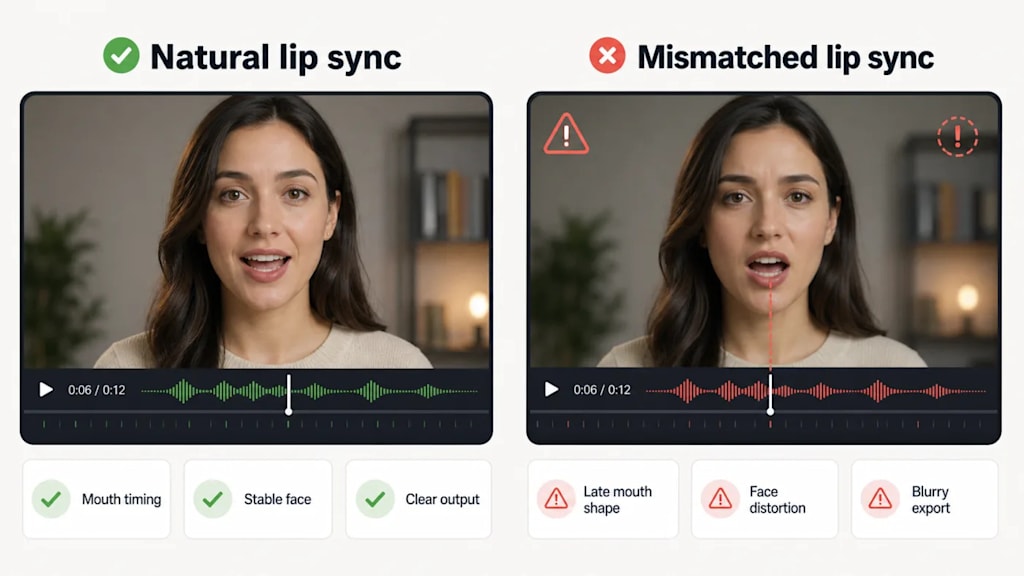
One of the fastest-growing segments in AI video production is Lip Sync AI technology. These tools synchronize mouth movement with spoken audio so accurately that many viewers cannot distinguish AI-generated speech from real footage anymore. This technology plays a major role in dubbing, AI avatars, multilingual marketing, and virtual influencers.
Recent testing by creators and communities shows that platforms like Magic Hour AI, HeyGen, and Synthesia have dramatically improved lip-sync realism in 2026. Accurate mouth movement is critical because humans instinctively notice facial inconsistencies. Even slight delays between audio and facial animation can break immersion instantly.
Lip-sync systems are especially useful for global businesses. Instead of filming separate videos for every language, companies can dub existing content while maintaining realistic mouth movement. This creates a far more professional experience than traditional voiceovers layered over mismatched facial expressions.
Still, not all lip-sync systems perform equally. Fast speech, emotional dialogue, and close-up facial shots remain difficult for weaker AI models. Before selecting a tool, creators should test real-world dialogue scenarios rather than relying only on polished promotional demos. The difference between controlled demos and everyday production can be surprisingly large.
The Most Important Features to Look For
Realistic Visual Quality
Visual realism remains the most important factor for most creators. If an AI-generated video looks artificial, viewers lose trust quickly. Realism involves more than image sharpness. It includes lighting consistency, facial anatomy, environmental detail, texture quality, and believable motion physics.
Modern AI video systems now support advanced cinematic features such as depth simulation, camera tracking, HDR rendering, and multi-scene continuity. Kling 3.0 and Runway Gen-4.5 are widely recognized for realistic motion generation and cinematic output quality. Still, realism varies depending on the type of scene. Human movement remains one of the hardest challenges for AI.
When evaluating quality, creators should test difficult scenarios. Fast movement, crowded environments, reflective surfaces, and emotional close-ups often reveal weaknesses hidden in simpler demos. AI-generated landscapes may look stunning, but realistic human interaction is still where top-tier models separate themselves from weaker competitors.
Creators should also think about platform compatibility. A video designed for TikTok may not require the same level of realism as a commercial advertisement or brand documentary. Choosing the right quality level depends heavily on where the final content will appear.
Audio and Voice Accuracy
Video quality means little if audio feels unnatural. Modern AI tools increasingly combine visual generation with synchronized sound design, ambient effects, and voice synthesis. Some systems even generate native audio directly inside the video pipeline.
Voice realism includes pronunciation, pacing, emotional tone, and natural pauses. Robotic delivery instantly reduces audience engagement. That is why professional creators often combine specialized voice AI systems with video generators to improve final output quality.
Audio editing flexibility is equally important. Can you replace voices easily? Does the platform support multilingual dubbing? Are background sounds adjustable? These questions matter because video production rarely ends after the first render. Professional workflows depend heavily on revisions and refinements.
Motion Consistency and Camera Controls
Many AI tools can create visually impressive still frames, but consistent motion remains challenging. Professional-quality video requires smooth transitions, believable body movement, and stable object interaction. This is where advanced systems gain a major advantage.
Some newer models now include cinematic camera controls such as dolly shots, zoom effects, rack focus, and motion extraction from reference videos. These features allow creators to direct scenes more intentionally rather than relying entirely on unpredictable AI behavior.
Consistency matters especially for storytelling. If a character changes appearance between scenes or objects move unnaturally, immersion collapses. Professional users should prioritize tools with strong scene continuity and motion reliability.
Editing Flexibility and Workflow Integration
The best AI video tool is not always the one with the flashiest demos. Often, it is the one that fits naturally into your workflow. Professional creators rarely rely on one platform alone. They combine generators, editors, subtitle tools, voice systems, and publishing software together.
A good workflow-focused platform should support easy exports, flexible editing, timeline integration, and collaboration features. Some creators prioritize direct social publishing, while others need advanced timeline control for commercial editing.
Compatibility with existing software is also important. If exporting files becomes frustrating or formats are limited, production slows dramatically. Think of workflow integration as the plumbing system behind a luxury house. Beautiful visuals mean little if the infrastructure constantly causes problems.
How Pricing Impacts Your Choice
Subscription Models vs Pay-As-You-Go
Pricing structures vary significantly across AI video platforms. Some tools charge monthly subscriptions, while others use credit systems based on generation time or export quality. Pay-as-you-go models work well for occasional creators, while agencies producing large volumes often benefit from subscriptions.
Professional creators should calculate cost per finished video rather than subscription price alone. A cheaper platform that requires constant regeneration may actually cost more in the long run. Hidden rendering costs can also become frustrating quickly.
Hidden Costs Most Users Ignore
Many users focus only on monthly pricing while ignoring export restrictions, watermark removal fees, storage limits, and premium feature paywalls. These hidden costs affect long-term scalability significantly.
Commercial licensing is another overlooked issue. Some AI-generated footage may include licensing limitations depending on the platform. Businesses using AI for advertising should carefully review ownership policies before publishing campaigns commercially.
Common Mistakes People Make When Choosing AI Video Software
Chasing Hype Instead of Workflow
The AI industry moves extremely fast. Every few months, a new model appears claiming revolutionary realism. Many creators jump between tools constantly instead of building stable workflows. This often leads to wasted money and inconsistent production quality.
The best tool is not necessarily the newest one. It is the platform that consistently supports your content goals, editing style, and publishing schedule.
Ignoring Export Quality and Licensing
Low export quality can damage brand perception instantly. Compression artifacts, unstable frame rates, and watermarks make videos appear unprofessional even if the original generation looked impressive.
Licensing confusion can also create legal problems for businesses. Always verify commercial usage rights before publishing AI-generated advertisements or branded campaigns.
The Future of AI Video Creation
Hyper-Realistic AI Actors
The next generation of AI video tools will likely blur the line between synthetic and real actors even further. Facial realism, emotional performance, and body movement continue improving rapidly. Industry partnerships between AI companies and film studios already show how seriously entertainment companies are taking this technology.
Real-Time AI Video Generation
Real-time generation could become the biggest breakthrough of all. Instead of waiting minutes for rendering, creators may soon direct AI scenes interactively, similar to controlling a live video game environment. This would completely reshape filmmaking, advertising, and social media production.
Conclusion
Choosing the best AI video tool requires more than chasing viral demos or flashy marketing promises. The right platform depends on your goals, workflow, budget, and production style. Some creators need cinematic realism, while others prioritize AI avatars, automated editing, or multilingual dubbing. Understanding these differences is the key to making a smart decision.
The AI video industry is evolving at astonishing speed. Realistic visuals, advanced motion controls, and accurate Lip Sync AI systems are becoming more accessible every year. Businesses and creators who understand how to combine these tools strategically will gain a major advantage in digital storytelling and content production.
Instead of searching for one perfect platform, many professionals now build flexible AI ecosystems that combine generation, editing, dubbing, and publishing tools together. That hybrid approach often delivers the best balance between realism, efficiency, and creative control.
About the Creator
Enjoyed the story? Support the Creator.
Subscribe for free to receive all their stories in your feed.
Comments
There are no comments for this story
Be the first to respond and start the conversation.