
What Does "Shared With You" Mean on TikTok? (Complete Guide)
Here is exactly how TikTok’s "Shared With You" system works, who can see it, and how it tracks your privacy.

Have you ever opened TikTok and seen a label that says "Shared With You" on a video, and wondered what it actually means? You're not alone. Thousands of TikTok users search this question every month, and the answer is simpler than you think.
In this complete guide, we'll explain what "Shared With You" means on TikTok, what it means for videos, profile views, and shared videos. Covering every variation of this question in one place.
What Does "Shared With You" Mean on TikTok?
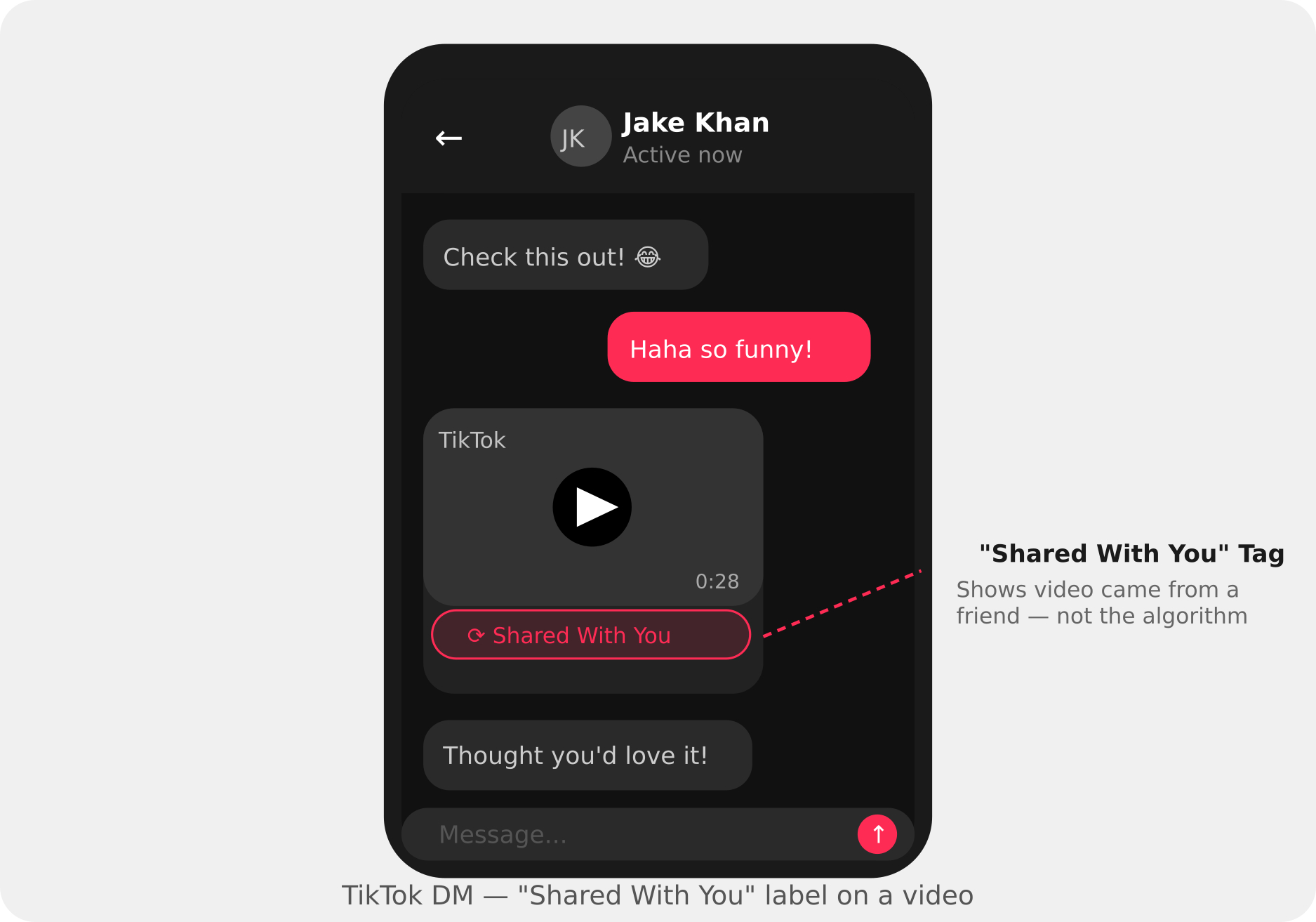
"Shared With You" on TikTok means that someone sent you a specific video directly. Either through TikTok's built-in Direct Messages (DMs) or through an external app like iMessage, WhatsApp, or Telegram.
This label appears on the video so you instantly know: this wasn't just a random algorithm suggestion. Someone personally chose to send this content to you.
Quick Answer: "Shared With You" = a video (or content) was sent directly to you by another user via DMs or iMessage.
What Does "Shared With You" Mean on a TikTok Video Specifically?
A lot of users ask: what does shared with you mean on a TikTok video exactly?
When you see this label on a specific video inside your TikTok inbox or chat, it means:
- Another TikTok user found that video while scrolling.
- They tapped the Share button and chose to send it directly to you.
- TikTok tagged it as "Shared With You" to separate it from content you discovered yourself.
The video itself is no different. it's the same public TikTok video anyone can watch. The label simply tells you the source of how it reached you: a personal share, not the algorithm.
What Does "Shared Videos With You" Mean on TikTok?
If you're seeing a section called "Shared Videos With You" this is a collection or feed view of all the videos that have been sent to you across your TikTok conversations.
Think of it as your personal "inbox of recommended videos" from friends and contacts. Instead of digging through every DM, TikTok groups all the videos people have shared with you into one browsable section.
This is especially useful if:
- You're part of multiple group chats where people frequently share TikToks.
- You have friends who regularly send you content.
- You're catching up after being offline for a few days.
What Does "Shared With You" Mean on TikTok Profile Views?
This one confuses a lot of people. When you hear "Shared With You" in the context of TikTok profile views, it can mean one of two things:
Meaning 1: Someone Shared Your Profile
Another TikTok user copied your profile link and sent it to someone else — via DMs, iMessage, or another platform. This is a form of social sharing that can drive new visitors to your profile.
Meaning 2: A Profile Was Shared With You
Someone sent you another creator's TikTok profile - possibly recommending an account they think you'd enjoy following. TikTok may label this interaction as "Shared With You" in your activity feed.
Either way, "Shared With You" in the context of profile views is about social sharing of TikTok profiles not organic traffic from the For You Page.
What Does "Shared With You on TikTok" Mean for iPhone Users?
If you're an iPhone user on iOS 15 or later, there's an additional layer to this feature that Android users don't have.
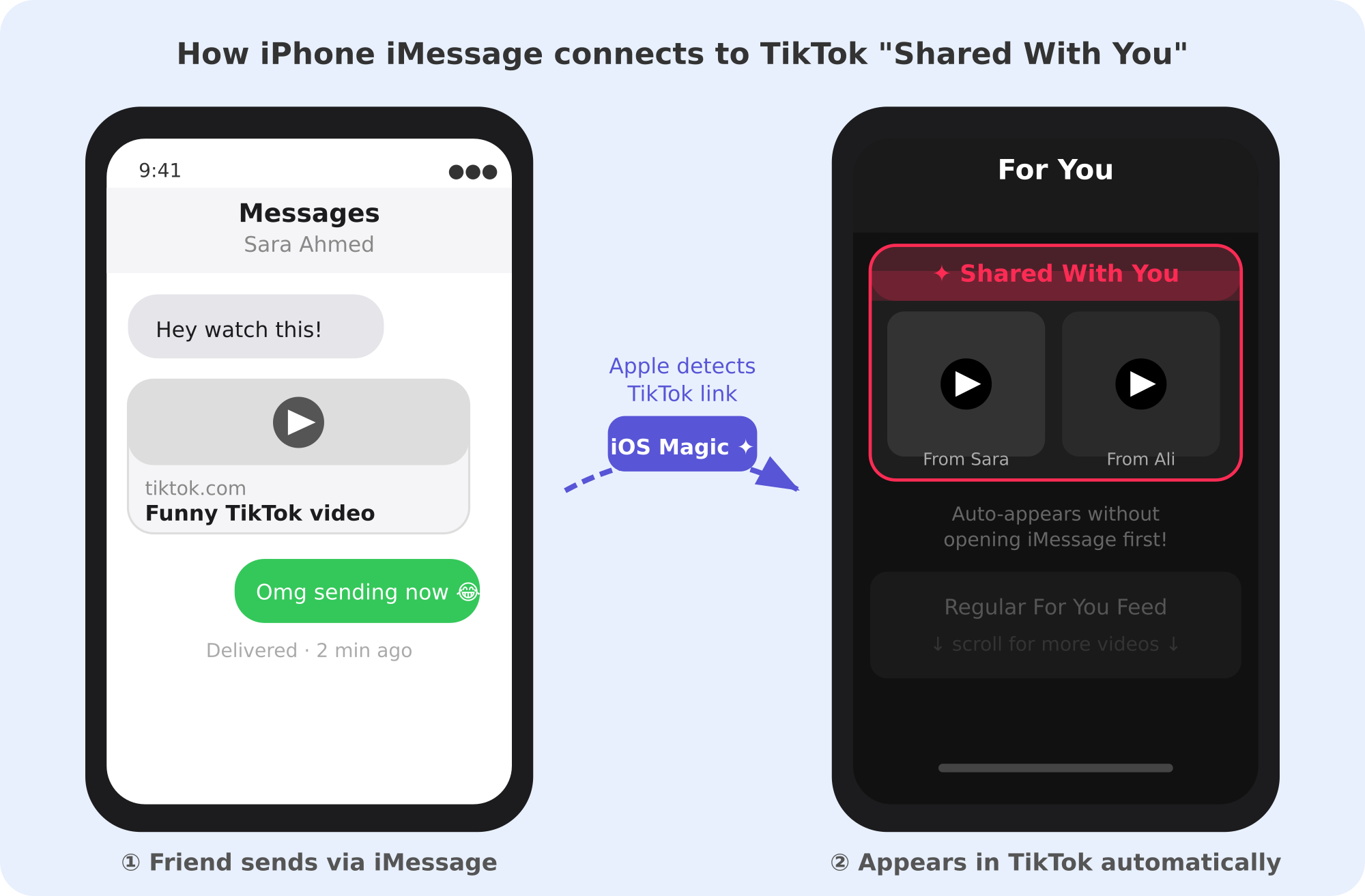
Apple has a system-level feature called "Shared with You" that works across apps including TikTok. Here's how it works:
- A contact sends you a TikTok video link via iMessage.
- Apple's iOS automatically detects it's a TikTok link.
- The video appears inside the TikTok app under a "Shared with You" section, even before you open the iMessage.
This means TikTok videos your friends text you will proactively appear in the app. It's a seamless bridge between iMessage and TikTok, designed so you never miss content people send you.
Where Does "Shared With You" Appear on TikTok?
Here's a full breakdown of every place this label can show up:
Location: TikTok DM / Chat Thread
What It Means: A specific video was sent to you in that conversation
Location: "Shared Videos With You" Section
What It Means: All videos shared with you, collected in one place
Location: For You Page (occasionally)
What It Means: Content promoted by personal sharing signals
Location: iPhone TikTok App (iOS 15+)
What It Means: iMessage-shared TikToks surfaced automatically
Location: Activity / Notifications
What It Means: Alert that someone shared a video or profile with you
How Does the "Shared With You" System Work?
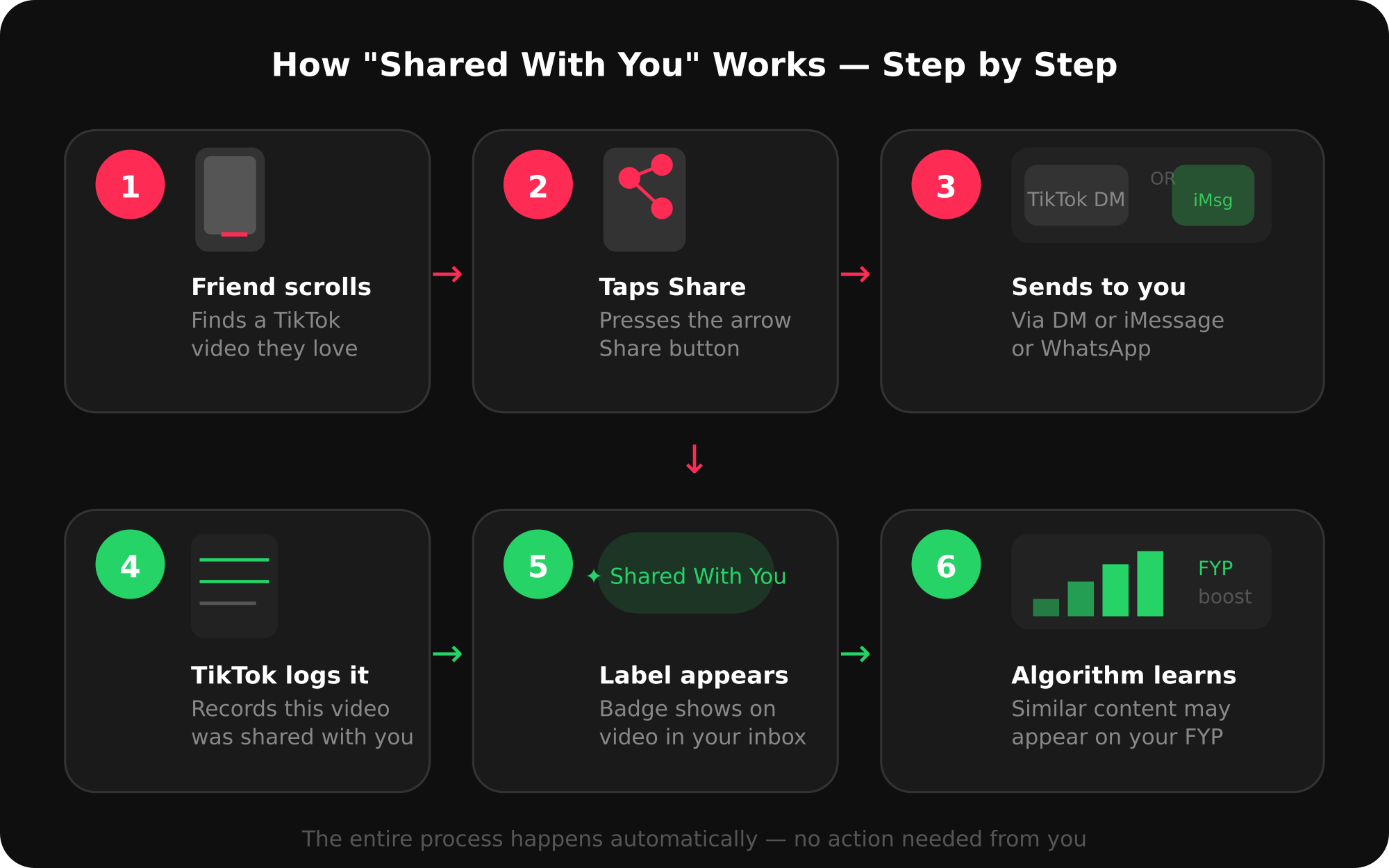
Here's the full journey of a "Shared With You" video from send to screen:
- Step 1: A friend finds a TikTok video they like while scrolling.
- Step 2: They tap the arrow (Share) icon on the right side of the screen.
- Step 3: They choose to send it to you via TikTok DM or copy the link to iMessage/WhatsApp.
- Step 4: TikTok (or Apple's iOS) logs that this specific video was shared specifically with you.
- Step 5: The video gets tagged as "Shared With You" so you can identify it at a glance.
- Step 6: TikTok's algorithm may also note this interaction and begin recommending similar content on your For You Page.
Does "Shared With You" Affect TikTok's Algorithm?
Yes, more than most people realize. Here's why personal shares are powerful:
- Strong relevance signal: TikTok treats a direct share as proof the content resonated deeply with someone.
- For You Page influence: Videos shared with you are more likely to influence the kind of content TikTok recommends you next.
- Creator benefit: If your video gets shared a lot person-to-person, TikTok sees it as high-value content and may push it to broader audiences.
- Social graph data: TikTok uses sharing patterns between users to map interests and improve recommendations for everyone.
For creators and brands, this means every share counts, not just views and likes.
Is "Shared With You" Private? Can Anyone Else See It?
Yes, it's completely private. The "Shared With You" label is only visible to you.
- Other TikTok users cannot see which videos were shared with you.
- The sender cannot see whether you watched the video they sent.
- TikTok does not display your "Shared With You" list to anyone else.
Your direct messages and shared content remain confidential between you and the sender, unless you choose to share them further yourself.
How to Find "Shared With You" Videos on TikTok
Via TikTok DMs (Android & iPhone):
- Open TikTok.
- Tap the chat/message icon at the top right.
- Open the conversation with the person who shared the video.
- Scroll to find the video, it will be labeled "Shared With You."
Via Apple's Shared with You (iPhone only):
- Open TikTok on your iPhone.
- Look for the "Shared with You" section on your For You Page or profile area.
- Videos sent to you via iMessage will appear here automatically.
How to Turn Off "Shared With You" on TikTok (iPhone)
If you prefer not to have iMessage-shared TikToks appear automatically in the app:
- Open iPhone Settings.
- Tap Messages.
- Scroll to Shared with You.
- Toggle TikTok to OFF.
This disables Apple's integration only, your TikTok DMs will continue working normally.
Why Do I See Random "Shared With You" Videos I Don't Remember Receiving?
This happens for a few reasons:
- Old messages: A contact sent you a video weeks ago that you scrolled past.
- Apple iMessage sync: Someone texted you a TikTok link and iOS surfaced it automatically.
- Group iMessage threads: A TikTok shared in a group chat appears for every member.
- Multiple accounts: If you use more than one TikTok account, shared videos from another account may appear when you switch.
"Shared With You" vs. TikTok Repost — What's the Difference?
These two features get confused a lot. Here's the key distinction:
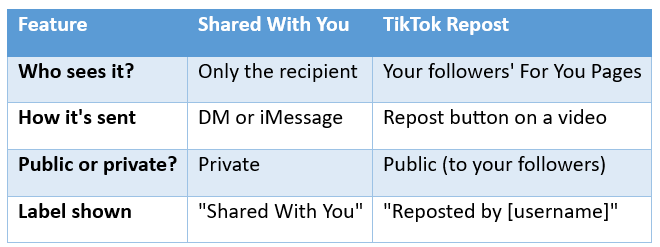
Feature: Who sees it?
- Shared With You: Only the recipient
- TikTok Repost: Your followers' For You Pages
Feature: How it's sent
- Shared With You: DM or iMessage
- TikTok Repost: Repost button on a video
Feature: Public or private?
- Shared With You: Private
- TikTok Repost: Public (to your followers)
Feature: Label shown
- Shared With You: "Shared With You"
- TikTok Repost: "Reposted by [username]"
Feature: Algorithm impact
- Shared With You: Personal signal
- TikTok Repost: Broader distribution signal
In short: "Shared With You" is private sharing. Repost is public amplification.
Pro Tips: How to Use Sharing to Grow on TikTok in 2026
Understanding this feature isn't just trivia, it's a growth strategy. Here's how smart creators use it:
- Create "Share-Worthy" Content: Videos that make people say "I need to send this to someone" get shared privately more often. Think relatable humor, surprising facts, emotional stories, or useful tutorials.
- Encourage Direct Shares in Your CTA: End your videos with: "Send this to someone who needs to hear it" or "Tag a friend who gets this." Direct shares are more powerful engagement signals than comments or likes alone.
- Build Social Proof First: New visitors who land on your profile from a shared video will judge your credibility by your numbers. A profile with strong followers, likes, and views signals that others already trust your content.
- Track What Gets Shared: TikTok's analytics shows you share counts per video. The videos getting the most shares are your "winners", study them and replicate the formula.
A profile with strong foundational signals (like followers, likes, and views) instantly establishes trust and helps convert those casual profile visitors into permanent followers. Utilizing dedicated TikTok growth services from trusted platforms like TokBoostly can help you strengthen your profile credibility and build that crucial initial social proof seamlessly. When someone shares your video and the recipient checks your profile, a strong and established presence makes them far more likely to hit that follow button.
Still Confused? Let's Clear It Up
What does "shared with you" mean on TikTok?
It means another user sent a video directly to you via TikTok DMs or iMessage. The label tells you the video reached you through personal sharing, not the algorithm.
What does "shared videos with you" mean on TikTok?
It refers to a collection of all videos that have been sent to you across your TikTok conversations a grouped inbox of personally shared content.
What does "shared with you" mean on a TikTok video?
It means that specific video was sent to you personally by a contact, not recommended by TikTok's For You Page algorithm.
What does "shared with you on TikTok" mean in terms of profile views?
It means either someone shared your profile with others (possibly driving new views), or someone sent you another creator's profile via DMs.
What does "shared with you" mean on TikTok for iPhone users?
On iPhone (iOS 15+), it also refers to Apple's built-in "Shared with You" feature, which automatically surfaces TikTok videos sent to you through iMessage, directly inside the TikTok app.
Does the person who shared the video know if I watched it?
TikTok shows read receipts in DMs (they can see you opened the chat), but they cannot see specifically which videos you watched or replayed.
Can I share a "Shared With You" video to someone else?
Yes. Tap the Share arrow on any TikTok video and send it to whoever you like, there are no restrictions on forwarding content.
The Bottom Line for Creators and Scrollers
The "Shared With You" feature on TikTok is one of those small details that reveals a lot about how the platform actually works. It's not just a label, it's TikTok telling you that a real person, in your real social circle, thought a video was worth your attention.
For creators and brands in 2026, understanding these signals, and creating content that earns personal shares, is one of the most effective organic growth strategies available. Combine that with the right credibility tools, and you'll build an audience that grows compounding over time.
About the Creator
TokBoostly
We’re passionate about understanding how TikTok works, from viral trends & creator psychology to audience growth and engagement signals. TokBoostly shares practical, easy-to-read guides for creators, brands, & social media enthusiasts.
Enjoyed the story? Support the Creator.
Subscribe for free to receive all their stories in your feed.
Comments
There are no comments for this story
Be the first to respond and start the conversation.