
Optimizing for Core Web Vitals: Boosting Page Experience for SEO
Boost load speed, interactivity, and stability for top SEO results

As search engines increasingly prioritize user experience, Core Web Vitals (CWV) have become essential for websites aiming to rank highly on Google. Core Web Vitals are a set of specific page experience metrics designed to evaluate key aspects of user satisfaction, including page load speed, interactivity, and visual stability.
These factors are critical, not only for SEO but for creating a smooth, engaging browsing experience that retains visitors and drives conversions.
In this article, we’ll dive into the technical aspects of optimizing for Core Web Vitals, offering a roadmap for enhancing your website’s page experience and SEO performance.
What Are Core Web Vitals?
Core Web Vitals, introduced by Google in 2020, consist of three primary metrics:
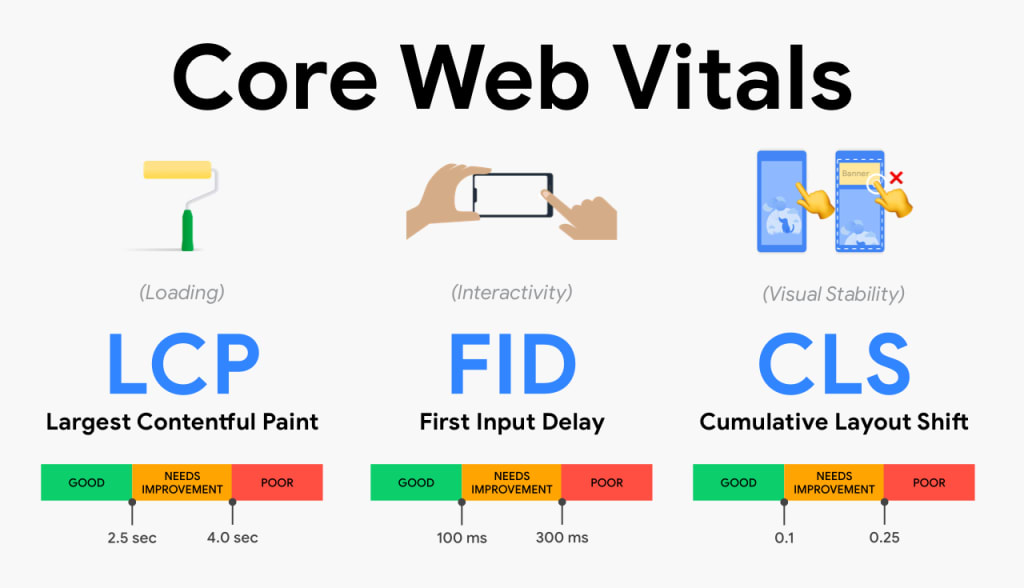
- Largest Contentful Paint (LCP): Measures loading performance by tracking how long it takes for the main content of a page to load. Ideally, this should be within 2.5 seconds of when the page first starts loading.
- First Input Delay (FID): Measures interactivity by evaluating the time it takes for a page to respond to the first user interaction, such as clicking a link or tapping a button. A good FID should be under 100 milliseconds.
- Cumulative Layout Shift (CLS): Measures visual stability by tracking how much visible content shifts unexpectedly during loading. A CLS score of 0.1 or lower is considered good.
Let’s go over each metric in detail and discuss technical strategies to improve your website’s performance for each.
1. Largest Contentful Paint (LCP): Reducing Page Load Time
The LCP score is influenced by the time it takes to load large page elements, such as images, videos, and text blocks, that constitute the primary content users see first.
Tips to Improve LCP:
- Optimize Image Size and Format: Compress images without losing quality using tools like TinyPNG or ImageOptim, and consider using modern formats like WebP for better compression.
- Use a Content Delivery Network (CDN): CDNs cache and distribute content closer to the user’s geographical location, reducing load times. Popular options include Cloudflare, Fastly, and Amazon CloudFront.
- Minimize CSS and JavaScript: Heavy CSS and JavaScript files can delay rendering. Use tools like CSSNano and UglifyJS to minify CSS and JavaScript, removing unnecessary characters to reduce file sizes.
- Implement Lazy Loading: Lazy loading defers the loading of images and other media until they’re needed. This reduces initial load times and boosts LCP by ensuring only above-the-fold content loads immediately.
- Optimize Server Response Time: Server response times can be improved by upgrading hosting services, using caching mechanisms, and implementing faster frameworks. Aim to keep server response times under 600 milliseconds.
2. First Input Delay (FID): Enhancing Interactivity
FID measures the time between when a user first interacts with a page and when the browser responds to that interaction. Poor FID scores can result from unoptimized JavaScript that delays page responsiveness.
Tips to Improve FID:
Defer or Asynchronously Load JavaScript: Using the async or defer attributes allows JavaScript files to load in the background without blocking the main thread. This reduces delays in processing user interactions.
- Reduce JavaScript Execution Time: Minimizing JavaScript by removing unnecessary code and optimizing complex functions reduces FID. Code-splitting, which breaks code into smaller chunks, can also help by loading only the required parts at any given time.
- Optimize Third-Party Scripts: Third-party scripts (e.g., chatbots, tracking scripts) can introduce significant delays. Limit their use, or load them in a way that doesn’t affect critical-path resources.
- Use Web Workers: Web Workers allow you to run JavaScript operations in the background without affecting the main page. This can improve FID by keeping the main thread free for immediate user interactions.
3. Cumulative Layout Shift (CLS): Ensuring Visual Stability
CLS evaluates how often elements on your page shift as new content loads, which can lead to a frustrating user experience. Ensuring elements remain in place as the page loads is crucial for a good CLS score.
Tips to Improve CLS:
- Define Dimensions for Media Elements: Always specify width and height attributes for images, videos, and other media to help the browser allocate space, reducing unexpected shifts.
- Reserve Space for Ads: If your site uses ads, ensure they’re placed in dedicated, pre-defined areas. Dynamic ad loading is one of the main causes of CLS issues, so be mindful of placement to avoid sudden shifts.
- Use Font Display Swap: When loading web fonts, the font-display: swap; CSS property can prevent layout shifts. This displays a fallback font until the custom font loads, keeping the layout stable.
- Avoid Inserting Content Above Existing Content: Adding content on top of what users are viewing causes layout shifts. Instead, insert new content below the viewport to keep existing elements stable.
Tools to Measure Core Web Vitals
Several tools are available to help diagnose and measure Core Web Vitals:
- Google PageSpeed Insights: Provides detailed insights and optimization recommendations for Core Web Vitals on both mobile and desktop.
- Google Search Console: The Core Web Vitals report in Search Console offers data for all pages, including aggregate metrics on LCP, FID, and CLS.
- WebPageTest: Offers insights into load times and content layout, helping identify potential causes for poor Core Web Vitals scores.
- Lighthouse: A developer tool integrated into Chrome’s DevTools that audits websites for performance, accessibility, and SEO, providing actionable recommendations.
Conclusion: Prioritizing Core Web Vitals for Lasting SEO Success
In the modern SEO landscape, optimizing for Core Web Vitals is a key aspect of staying competitive. By focusing on LCP, FID, and CLS, website owners can ensure a better user experience, which directly impacts search rankings and visitor satisfaction.
Investing in these improvements is beneficial not only for ranking but for the overall experience your site delivers. Enhanced page speed, interactivity, and stability will not only satisfy Google’s algorithms but also create an environment where users are more likely to stay, interact, and convert.
By following the strategies outlined above, you’ll be well on your way to optimizing Core Web Vitals, boosting both your SEO performance and the experience your website provides to every visitor.
About the Creator
Murthy Venkat
Digital Marketing consultant to provide useful information & Strategies for branding, business promotions and more
Enjoyed the story? Support the Creator.
Subscribe for free to receive all their stories in your feed.
Comments
There are no comments for this story
Be the first to respond and start the conversation.