
How to Use TikTok Search Optimization to Reach a Wider Audience
Complete Guide on TikTok Search Optimization

TikTok search optimization is the habit of building your videos so that people typing a question into the search bar end up watching yours. It sounds like a small tweak, but a lot of people now open TikTok the way they'd open a search engine, looking for a recipe, a product review, a quick tutorial or a place to visit, and the creators who show up for those searches keep getting views long after the post goes out. The good news is that none of this needs special software. It comes down to knowing what your audience types, saying and writing those words in the right places, and giving the app good reasons to keep your video near the top.
How TikTok Search Decides Which Videos to Show
The For You page works on discovery, meaning the app guesses what you might enjoy and serves it up, whereas search starts from an intent. Someone has a specific question, and TikTok tries to match it with videos that clearly answer it. To make that match, the system looks at the words attached to your video, which include your caption, any text on the screen, the hashtags you chose and what you actually say out loud, and then weighs how viewers respond once they click.
That second half is easy to forget. Keywords get you considered, but watch time, replays and reactions decide whether you stay in the results, which is why this guide has a whole section on engagement signals. If you'd like a deeper walkthrough of that side, there's a separate guide on how to rank your TikTok videos in search that goes into the ranking mechanics.
Conduct Keyword Research Before You Film
Most creators pick a topic first and think about keywords later, if they think about them at all. Flipping that order saves a lot of guesswork, because you can see what people already search for before you spend an afternoon filming. There are three simple places to look, and they work well together.
Use the Search Bar
The search bar is the quickest and most honest research tool you have. Type the start of a phrase related to your topic, and TikTok suggests how real people finish it, so you're looking at actual search habits instead of your own assumptions. A creator in the skincare niche might type "how to" followed by a product, and notice that the suggestions lean towards routines for oily skin, or sensitive skin, or a specific age group.
Write down the phrases that fit your content, then try small variations by adding a word like "beginner", "at home" or "for students" and checking how the suggestions change. Longer phrases tend to be easier to rank for than a single broad word, since fewer videos are competing for them and the viewer's intent is clearer. It's also worth opening the top few results for a phrase to see what's already ranking, so you can tell what kind of video the audience seems to prefer.
Check Tools
Search suggestions show you what people type, and a few outside tools can help you see what's trending around it. TikTok's own Creative Center is a free place to start. Its Keyword Insights section lists popular keywords and phrases and lets you filter by region and industry, and you can switch between a table and a word cloud depending on how you like to scan information.
There are a couple of limits to keep in mind. TikTok says the data comes from ads and doesn't include organic-only posts, and the tool is only available on the desktop version, so treat it as a source of ideas instead of a perfect picture of search demand. Cross-check anything promising with the search bar, and if a phrase shows up in both, it's usually a safe one to build a video around.
Optimize Your Profile
People searching on TikTok can land on accounts as well as individual videos, so your profile deserves the same attention as your posts. Your display name and username are both searchable, which means a name that includes what you actually do, such as "Maya | Home Workouts", gives the app another clear signal about your niche.
Your bio works the same way. A short, plain description of who you help and what you post, written with the phrases people actually search, does more than a clever one-liner that nobody would think to type. Keep it readable for a human first, because a visitor deciding whether to follow you will read it in a couple of seconds, and a bio stuffed with repeated keywords looks spammy.
Optimize Your Video Content for Search
Once you know your target phrase, the next job is placing it where TikTok and viewers can both find it. The strongest approach is to use the same core phrase across several layers of the video, so the signals agree with each other instead of pointing in different directions.
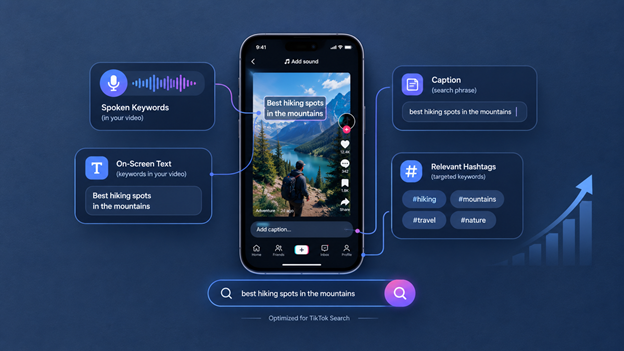
Speak Your Keywords
TikTok can pick up on what you say, so your spoken words count, and they matter more than many people realize. Say your main phrase out loud early in the video, ideally in the opening seconds, in a sentence that sounds like normal speech and not like a robot reading a keyword list. "Today I'm showing you how to meal prep for a week on a budget" works better than shouting the phrase awkwardly.
Speak clearly and keep background music low enough that your voice is easy to follow. Auto-captions are only as accurate as the audio they hear, so a muffled recording can cost you the benefit of everything you just said.
Add On-Screen Text
Text on the screen does two jobs at once. It helps viewers who are watching without sound, and it gives the app another readable copy of your topic. A short overlay in the first couple of seconds, such as the title of the tip or the question you're answering, is usually enough.
Keep it short and keep it within the safe area so the interface doesn't cover it. Use the same phrase you plan to put in your caption, or something very close to it, because matching signals across text, speech and caption make the topic obvious.
Write Searchable Captions
Your caption is the most visible place for a keyword, and it's where you can be most specific. Start with a sentence that includes your target phrase and describes what the video delivers, such as "A simple beginner routine for building muscle at home without equipment", then add a line of context if it helps the viewer.
Write it the way you'd explain the video to a friend. A caption that reads naturally and contains one or two relevant phrases beats a caption crammed with every related word you can think of, because the app can tell when text is forced, and viewers can too.
Use Targeted Hashtags
Hashtags still help the app understand your topic, but they work best when they're specific and relevant. A small set of three to five tags tends to be plenty. Mix one broad tag for the general category with a few that describe the exact subject, and skip anything that doesn't truly relate to the video, because off-topic tags confuse the signal you're trying to send.
Try not to rely on huge trending tags that have nothing to do with your content. The extra views, if any, come from people who weren't looking for your topic and tend to leave quickly, which can hurt the viewing signals you need.
Drive Algorithm Signals That Keep You Ranking
Keywords get your video into the pool, but how people behave once they click is what keeps it there. The app watches whether viewers stay, whether they reply and whether they come back, and videos that hold attention keep getting shown for the same searches. These are habits you can build into every post.
Encourage Specific Comments
Comments are a strong sign that a video struck a chord, and the way you ask makes a big difference. A vague "let me know what you think" rarely gets a response, while a direct question gets answers. Ask something people can reply to in a few words, like "Which of these three mistakes did you make first?" or "Where are you watching from?"
Replies also carry their own opportunity, since the words in the comments around your video add to the context the app sees. Answering a question from the comments with a short follow-up video is another way to reuse a topic that already has proven interest.
Engage Quickly
The first stretch after you post matters, so be around for it. When you reply to early comments promptly, you keep the conversation going, and an active thread signals that people are interested. It also tells viewers that someone real is behind the account, which makes them more likely to follow.
Pick a posting time when you can actually stay on the app for a short while afterward instead of posting and disappearing. Even twenty or thirty minutes of replying, liking comments and pinning a useful one can help a video get off to a better start.
Keep Viewers Watching to the End
Watch time is probably the biggest signal of the three, and it's something you can shape while you're planning the video. Open with the answer to the question in the search, not a long introduction, and keep the pacing tight so the viewer never has a reason to drift away. A video that gives people what they searched for quickly, and keeps giving them something as it goes, tends to earn more replays and completed views.
When a video performs well in search, it may keep bringing in viewers for weeks. That makes it worth revisiting your top performers and building follow-ups around the same phrases.
How to Tell If Your TikTok Search Strategy Is Working
You don't have to guess. TikTok's analytics for creators show where your views come from, and it's worth checking the traffic source breakdown on your best posts to see how much of it comes from search compared with the For You page. If a video you optimized is picking up search views over several weeks, you've found a topic worth repeating.
Look at a few things together: how long people watch, how often they reply or save, and which videos keep earning views after the first few days. When something works, make a second version with a different angle on the same phrase, and when something doesn't, check whether the keyword was too broad or the opening took too long to get to the point.
Frequently Asked Questions
Does TikTok search optimization really work
It can, as long as the video also holds attention. Keywords help the app understand and match your content, but watch time and engagement decide whether it keeps showing up, so both parts need to be in place.
How many hashtags should I use for TikTok search
Three to five relevant hashtags is a sensible range for most videos. What matters more is that each one describes the video accurately, since unrelated tags can blur the topic.
Where should I put my keywords on TikTok
Spread your main phrase across the places the app can read: say it in the first few seconds, show it as on-screen text, include it in the caption, and use it in a couple of fitting hashtags. Your profile name and bio can carry your broader niche keywords.
Do I need special tools for TikTok keyword research
No. The search bar suggestions are free and often enough on their own. Tools like TikTok's Creative Center add extra ideas, though they have limits, such as being based on ad data, so confirm anything you find against real search suggestions.
How long does it take to rank in TikTok search
There's no fixed timeline. Some videos pick up search views within days, while others build slowly over weeks, so judge a strategy across several videos instead of one.
Can I optimize old TikTok videos for search
You can improve parts of an older post, like editing the caption to include a clearer phrase, but the spoken words and on-screen text are locked in once it's published. For stronger results, make a fresh video that targets the keyword properly.
Make Every Video Easy to Find
Reaching a wider audience on TikTok is mostly a matter of being clear. Find the phrases people really search, say and show them in each video, ask questions that bring real replies, and check your analytics to see what's earning views. Do that consistently across a few weeks of posts and your older videos begin working for you in the background.
About the Creator
Salman Ashraf
Social Media Strategist & Content Writer
Enjoyed the story? Support the Creator.
Subscribe for free to receive all their stories in your feed. You could also become a paid subscriber, letting them know you appreciate their work.
Comments
There are no comments for this story
Be the first to respond and start the conversation.