
Spotify Simplified: A Guide to Mastering Its Features
music
Spotify is one of the most popular music streaming platforms in the world, offering unparalleled access to songs, playlists, podcasts, and more. But despite its widespread use, many listeners don’t take full advantage of all the tools and tricks Spotify has to offer. This guide is designed to simplify Spotify for you, highlighting key features that can enhance your music experience. Whether you’re looking to personalize your interface, explore top artists, revisit iconic albums, or use advanced playlist tools, you’ll find everything you need here.
1. Customize Spotify for a Unique Experience
Spotify is all about personalization, and customizing Spotify is the first step to mastering the platform. Customization options allow you to organize your library, enhance audio quality, and even change the app’s appearance.
For instance, you can use Spotify’s equalizer to adjust sound settings based on your preferences. Whether you enjoy thumping bass for hip-hop tracks or crisp treble for classical music, the equalizer ensures every song sounds perfect.
Additionally, creating folders for your playlists helps you keep things tidy. Group playlists by mood, genre, or occasion—like “Party Vibes” or “Chill Sunday”—to quickly find the right mix for any moment.
2. Find Out Who Is the Most Listened to Artist on Spotify
Curious about who is the most listened to artist on Spotify? This feature keeps you connected to the global music scene and helps you discover popular artists you might not know.
In recent years, artists like Bad Bunny, Taylor Swift, and The Weeknd have topped Spotify’s charts, breaking streaming records and captivating listeners worldwide. By visiting artist pages, you can view their top songs, albums, and even upcoming tour dates.
3. Relive the Magic of Spotify Top Albums 2021
Music fans often enjoy revisiting the past to rediscover iconic releases. The Spotify top albums 2021 list is a great starting point.
That year brought us unforgettable albums like Olivia Rodrigo’s SOUR, which resonated with listeners for its raw emotion and catchy melodies. Kanye West’s Donda was another standout, blending gospel influences with modern rap. On the pop scene, Doja Cat’s Planet Her became a hit with its genre-defying sound.
4. Master Playlist Creation with Spotify Playlist Maker
Playlists are an essential part of Spotify’s appeal, and using a Spotify playlist maker can help you create the perfect listening experience.
When building a playlist, start with a clear theme. For example, you could create a “Road Trip Jams” playlist featuring upbeat tracks for long drives or a “Focus Playlist” filled with instrumental music for studying.
Spotify’s “Enhance” feature is a useful tool that suggests additional songs based on the ones you’ve already added. This makes it easy to find new tracks that fit your playlist’s vibe.
Don’t forget about collaborative playlists, where friends and family can contribute their favorite songs. Whether it’s for a party or a casual hangout, collaborative playlists ensure everyone’s music preferences are included.
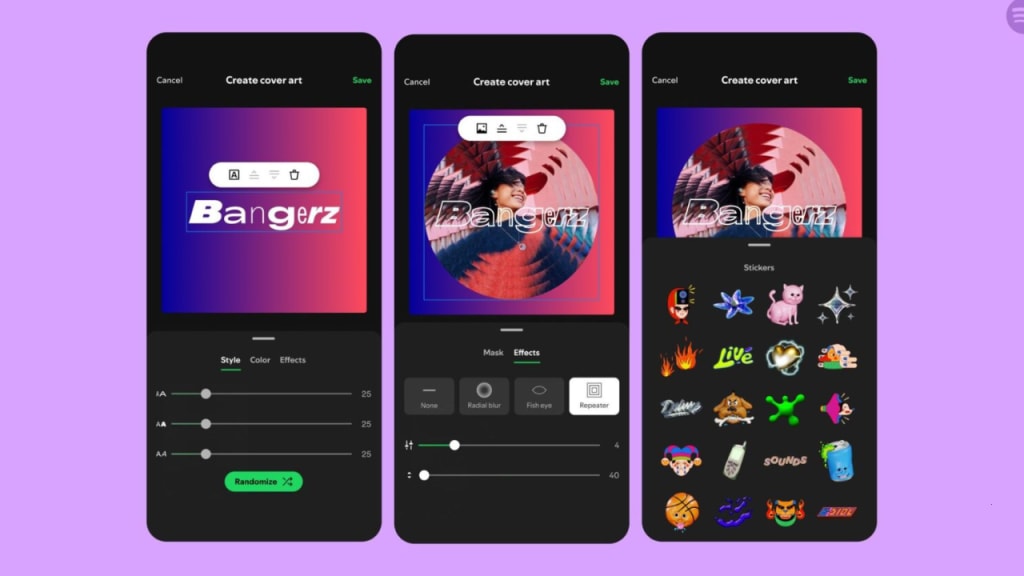
Lastly, give your playlists a personal touch by adding custom cover art and descriptions. These small details make your playlists stand out and reflect their unique themes.
5. Download Spotify Songs for Offline Listening
One of Spotify’s most convenient features is offline playback. By learning how to download Spotify songs to your phone, you can enjoy your favorite tracks even without an internet connection.
This feature is particularly handy for travelers, commuters, or anyone in areas with limited connectivity. Premium users can download entire playlists, albums, or individual songs with just a tap, while free users can access podcasts offline.
To ensure uninterrupted playback, make sure your downloads are refreshed periodically. Offline listening not only saves data but also ensures you’re never without your favorite music.
6. Explore Podcasts and Exclusive Content
Spotify is more than a music streaming service—it’s also a hub for podcasts and exclusive content. From true crime to comedy, Spotify’s podcast library has something for everyone.
Spotify Originals, like The Joe Rogan Experience or Science Vs, offer high-quality content that you won’t find on other platforms. To explore these, head to the “Podcasts” section of the app and browse categories or trending recommendations.
Spotify is also expanding its audiobook selection, allowing users to listen to popular literary works. Whether you’re a fan of fiction or non-fiction, audiobooks are a great way to enjoy stories on the go.
7. Share Your Spotify Experience
Sharing music is a social experience, and Spotify makes it easy to connect with friends and family. The “Friends Activity” feature lets you see what others are listening to in real time, sparking conversations about shared interests.
For collaborative listening, try Spotify’s Group Sessions feature. This tool lets multiple users control the same playlist or queue, making it perfect for virtual gatherings or group workouts.
Spotify also offers social media sharing options. Post your favorite songs, playlists, or albums directly to platforms like Instagram or Twitter, complete with album art and links.
8. Use Hidden Gems Like Spotify’s Web Player
If you’re looking for a fresh perspective on your music library, try Spotify’s web player. This browser-based version of Spotify includes unique features, such as viewing your playback history or managing playback across multiple devices.
The web player also syncs seamlessly with your mobile and desktop apps, ensuring a consistent experience across platforms. Use it as an alternative way to explore your library and discover new features.
Conclusion
Spotify is packed with features that cater to every type of listener. From customizing your setup to exploring top artists, revisiting iconic albums, creating playlists, and listening offline, the platform offers endless possibilities for enhancing your music journey.
With podcasts, audiobooks, and social sharing tools, Spotify goes beyond music to create a versatile entertainment hub. Start exploring these features today to unlock Spotify’s full potential.
What’s your favorite Spotify hack? Have you tried any of the tips mentioned in this guide? Share your thoughts in the comments below—we’d love to hear from you!
About the Creator
Enjoyed the story? Support the Creator.
Subscribe for free to receive all their stories in your feed.
Comments
There are no comments for this story
Be the first to respond and start the conversation.