
iOS 27 Beta 2: Features, Compatible iPhones, and Should You Upgrade?
Explore what's new in Apple's iOS 27 Beta 2, which iPhones are supported, the latest Apple Intelligence features, and whether installing the developer beta is the right choice for your device.

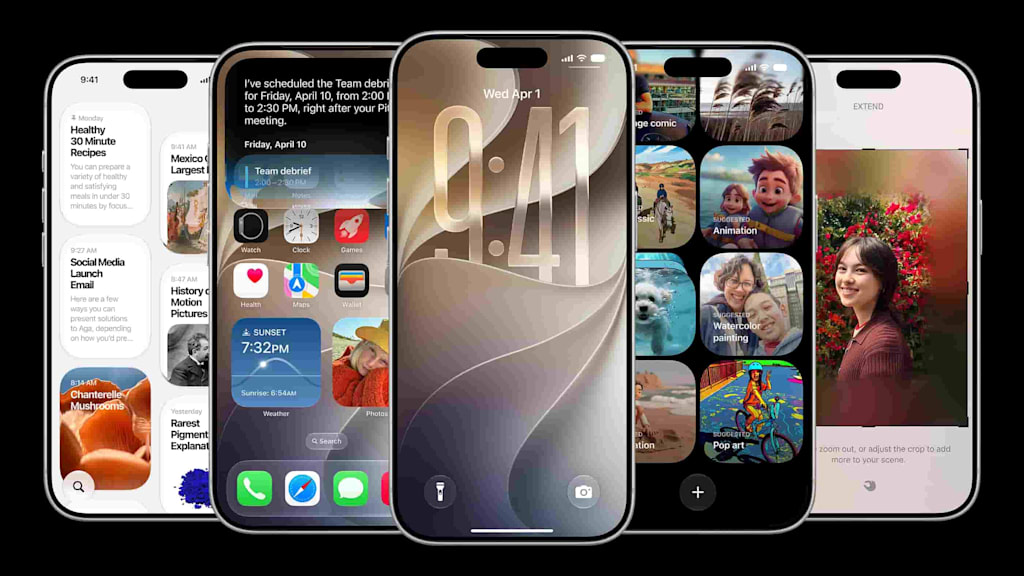
Apple has released iOS 27 Developer Beta 2, giving developers and technology enthusiasts another opportunity to explore the next generation of iPhone software before its official public release. Each beta update brings refinements, bug fixes, and improvements based on feedback from earlier versions, helping Apple prepare for a stable release expected later this year.
Although developer betas are designed primarily for testing, many users are curious about installing them to experience new features early. Before making that decision, it is important to understand what has changed, which iPhones are compatible, what limitations still exist, and whether a beta version is suitable for your everyday device.
This guide explains the most important aspects of iOS 27 Beta 2 in simple language, helping you decide whether upgrading now makes sense or if waiting for the public release is the better option.
What's New in iOS 27 Beta 2?
The second developer beta focuses mainly on improving the experience introduced in the first beta. Rather than adding a long list of brand-new features, Apple has concentrated on improving system stability, refining animations, fixing reported bugs, and optimizing overall performance.
Users testing the software have noted smoother navigation, more responsive interface transitions, and better consistency across Apple's built-in applications. These refinements may appear small individually, but together they create a more polished user experience.
Like most beta updates, Apple will continue making adjustments before the final version becomes available to the public.
Which iPhones Support iOS 27?
One of the most encouraging aspects of iOS 27 is its broad device compatibility.
If your iPhone currently supports iOS 26, it is generally expected to support iOS 27 as well. This allows many existing users to continue receiving software improvements without immediately upgrading their hardware.
Compatible models include:
iPhone 11 series
iPhone 12 series
iPhone 13 series
iPhone 14 series
iPhone 15 series
iPhone 16 series
iPhone 17 series
iPhone Air
iPhone SE (2nd generation)
iPhone SE (3rd generation)
Although compatibility remains extensive, not every feature will be available on every supported device.
Apple Intelligence Requires Newer Hardware
One of the biggest highlights of iOS 27 is the continued expansion of Apple Intelligence.
These AI-powered features are designed to improve productivity, writing assistance, image generation, notifications, and Siri interactions. However, they also require significantly more processing power than traditional iPhone features.
Because of these hardware requirements, Apple Intelligence is only supported on selected devices, including:
iPhone 15 Pro
iPhone 15 Pro Max
All iPhone 16 models
All iPhone 17 models
iPhone Air
Users with older supported iPhones will still receive iOS 27 but will not have access to Apple Intelligence features.
This distinction is important because many users mistakenly assume that software compatibility automatically includes every new capability.
Siri AI Continues to Evolve
Apple has placed considerable attention on improving Siri through artificial intelligence.
The new Siri is designed to better understand natural language, maintain conversation context, and complete more complex requests than previous versions.
However, Apple has also introduced certain hardware-based limitations.
Some advanced Siri capabilities—including enhanced AI Dictation and more expressive Siri voices—are currently limited to:
iPhone 17 Pro
iPhone 17 Pro Max
iPhone Air
These features require additional on-device processing that older hardware cannot efficiently provide.
In addition, Apple currently uses a waitlist system for some Siri AI capabilities. Users interested in testing these features may need to register first before access becomes available.
Performance Improvements in Beta 2
Compared with the first developer beta, many early testers report noticeable improvements in daily performance.
Some commonly observed improvements include:
Faster interface responsiveness
Improved animation smoothness
Better system stability
Reduced application crashes
More consistent multitasking performance
As with every beta release, experiences may differ depending on the device model and installed applications.
Some users may also notice temporary battery drain immediately after installation while the operating system completes indexing and background optimization tasks.
This behavior is common after installing major iOS updates and often improves after normal device usage over the following days.
Should You Install iOS 27 Beta 2?
Whether you should install the beta depends largely on how you use your iPhone.
If your device is primarily used for development, software testing, or exploring new Apple features, installing Beta 2 can provide early access to upcoming improvements.
However, if your iPhone is essential for work, banking, business communication, or other important daily activities, waiting for the public release is generally the safer choice.
Developer beta software remains unfinished by design. Even when overall stability improves, unexpected bugs, compatibility issues, or application crashes may still occur.
Before installing any beta version, creating a complete backup of your device is strongly recommended.
Advantages of Installing iOS 27 Beta 2
For users who enjoy exploring new technology before its official release, iOS 27 Beta 2 offers several advantages.
Early Access to New Features
Installing the beta allows users to experience Apple's newest software innovations months before the public release. This includes interface improvements, performance refinements, and the latest Apple Intelligence capabilities for supported devices.
Better Stability Than the First Beta
Apple typically addresses many issues reported after the initial beta release. Beta 2 often includes bug fixes, smoother animations, and better overall responsiveness, making it a more polished testing experience than its predecessor.
Opportunity to Test Siri AI
Eligible devices can begin the process of joining Apple's Siri AI waitlist. Since access may take time, installing the beta earlier allows interested users to prepare for future AI features as they become available.
Help Improve Future Releases
Developers and beta testers play an important role in identifying software issues before the public rollout. Reporting bugs and sharing feedback helps Apple improve stability for millions of users.
Potential Drawbacks to Consider
Although Beta 2 is more refined than the first developer release, it is still pre-release software.
Users may encounter:
Unexpected application crashes
Compatibility issues with third-party apps
Temporary battery drain
Performance inconsistencies
Minor interface bugs
Features that change before the final release
These issues are normal during beta testing and may be resolved in later updates.
Who Should Install iOS 27 Beta 2?
The developer beta is generally best suited for:
App developers testing compatibility
Technology enthusiasts interested in previewing new features
Users with a secondary iPhone dedicated to testing
Individuals comfortable troubleshooting occasional software issues
Using a secondary device helps reduce the impact of any unexpected software behavior.
Who Should Wait for the Public Release?
Waiting is often the better option for users who:
Depend on their iPhone for work or business
Frequently use banking or financial apps
Need maximum reliability every day
Prefer stable software over early access
Do not want to troubleshoot beta-related issues
The public release will include additional refinements based on months of developer and public beta testing.
Tips Before Installing the Beta
If you decide to install iOS 27 Beta 2, a few preparation steps can make the process smoother.
Back Up Your iPhone
Create a complete backup using iCloud or a computer before installing any beta software. A recent backup makes it easier to restore your data if you decide to return to a stable version.
Check App Compatibility
Some third-party applications may not yet be optimized for iOS 27 Beta 2. If you rely on specific apps for work or study, verify their compatibility before upgrading.
Ensure Enough Storage
Major beta updates require several gigabytes of free storage space. Removing unnecessary files and apps beforehand can help avoid installation interruptions.
Keep Your Device Charged
Installing a major operating system update may take some time. Connecting your iPhone to a charger during installation helps prevent interruptions caused by low battery.
Frequently Asked Questions
Is iOS 27 Beta 2 free to install?
Yes. Registered developers can access the beta through Apple's developer program. Apple also typically releases a public beta later in the testing cycle for eligible users.
Can I install it on my primary iPhone?
While it is technically possible, Apple recommends using beta software on a secondary device whenever practical because unfinished software may contain bugs.
Will every supported iPhone receive Apple Intelligence?
No. Although many iPhones support iOS 27, Apple Intelligence requires newer hardware and is limited to compatible devices such as the iPhone 15 Pro series, iPhone 16 lineup, iPhone 17 lineup, and iPhone Air.
Does Beta 2 improve battery life?
Battery performance varies. Some users may notice temporary battery drain immediately after installation while background indexing completes. Battery life often becomes more consistent after several days of regular use.
Can I return to a previous version of iOS?
Yes, but the process may require restoring your device using a backup created before installing the beta. Users should review Apple's official guidance before attempting a downgrade.
Final Verdict
iOS 27 Beta 2 represents another important step toward Apple's next major iPhone software release. The update focuses on improving stability, refining performance, and preparing users for new Apple Intelligence experiences while maintaining compatibility with a broad range of iPhones.
For developers and experienced beta testers using a secondary device, Beta 2 offers a valuable opportunity to explore new features and contribute feedback before the public rollout. At the same time, users who rely on their iPhone for essential daily tasks may prefer waiting until the official release, when additional testing and optimization have been completed.
Ultimately, the best choice depends on how you use your device and your comfort level with pre-release software. Understanding both the benefits and the limitations of beta testing helps you make an informed decision that matches your needs.
Personal Note
While researching iOS 27 Beta 2, one thing stood out: Apple is focusing not only on introducing new features but also on refining the overall user experience before the public release. The broader device compatibility is encouraging, while the hardware requirements for Apple Intelligence highlight the growing role of on-device AI processing. If you're curious about upcoming features and have a secondary iPhone available, exploring the beta can be an interesting experience. Otherwise, waiting for the stable public version remains a sensible choice for everyday use.
About the Creator
Kiya Verma1
✍️ Storyteller | 📚 Research Enthusiast | 🌍 Curious Mind
Sharing insights, practical knowledge, life lessons, and digital discoveries. Passionate about writing content that informs, inspires, and helps people solve real-world challenges.
Enjoyed the story? Support the Creator.
Subscribe for free to receive all their stories in your feed.
Comments
There are no comments for this story
Be the first to respond and start the conversation.