
Stop Clicking Around: Why Cypress is Your Best QA Friend
A friend in need is a friend in deed

You know that feeling when you’re five tabs deep, debugging a flaky Selenium test that only fails on Wednesdays? Yeah. Me too.
Let me introduce you to someone who doesn’t ghost you in CI and actually understands JavaScript: Cypress.
What Is Cypress?
Cypress is a modern, end-to-end testing framework designed to tame the wild beast of browser-based applications. Whether you’re testing a sleek React frontend, a sprawling Angular monolith, or a quirky vanilla JavaScript side project, Cypress handles it all with finesse. It’s not just another testing tool—it’s a developer’s ally, built to streamline the chaos of ensuring your web app doesn’t crumble under the weight of real-world user interactions. Fast, intuitive, and packed with features, Cypress arrives with batteries included, ready to make your testing life less of a Sisyphean nightmare.
Let’s break down why Cypress stands out in a world of clunky, outdated testing tools. First, it eliminates the need for those soul-crushing sleep() hacks that litter legacy test suites like digital duct tape. Cypress’s automatic waiting intelligently pauses execution until your app’s DOM is ready or that pesky API call returns, ensuring tests don’t fail because of timing issues. Imagine writing a test for a login form: instead of guessing how long it takes for the server to respond (and praying your hardcoded timeout doesn’t break on a slow network), Cypress waits for the submit button to become clickable and the response to land. No fuss, no brittle delays—just clean, reliable tests.
Then there’s the time travel feature, which sounds like something Elon Musk might hype on X but is far more practical. Cypress captures screenshots at every step of your test, letting you rewind and inspect exactly what went wrong when a test fails. Picture this: your test for a shopping cart checkout flow bombs because a discount code didn’t apply. Instead of staring at a cryptic error message, you flip through a visual timeline of the browser’s state, spotting the moment the coupon field turned red. It’s like having a debugger that doubles as a storyboard artist, minus the pretentious beret.
Real-time reloading keeps your tests in sync with your code, automatically rerunning them as you tweak your app. Make a change to your JavaScript, save, and watch Cypress instantly re-execute the relevant tests in the background. No need to manually refresh or restart anything. This is particularly handy when you’re iterating on a feature, like tweaking a CSS animation to make a button pulse just right. Cypress keeps up, ensuring your tests reflect the latest state of your app without you breaking a sweat.
The browser-based UI is where Cypress flexes its cinematic flair. Tests don’t just run—they perform. You get a clean, visual interface that shows your tests executing in real time, like watching a movie of your app being poked and prodded. Each command, click, or assertion is displayed alongside the browser’s live state, making it easy to see what’s happening at every step. For example, if you’re testing a dropdown menu, you can watch Cypress click the menu, select an option, and verify the result, all while the UI highlights each action. It’s intuitive enough for a junior dev to grok and powerful enough for a grizzled QA engineer to love.
Since Cypress speaks JavaScript natively, it’s a dream for developers working on JavaScript-based apps. There’s no mental gymnastics or context switching to write tests in a different language or wrestle with a mismatched DSL. If you’re building a Node.js-powered web app, your test code feels like an extension of your application code. Want to test a React component’s state update? Write a test in JavaScript that queries the DOM with cy.get() and asserts the result with cy.should(). It’s as natural as debugging in the browser console, with none of the arcane syntax of older frameworks like Selenium.
The developer experience is where Cypress truly shines, cutting through the red tape that makes testing feel like a punishment. Forget spending hours configuring WebDriver, tweaking XML files, or hunting down deprecated browser plugins. Cypress is designed to get you up and running in minutes. Install it with npm install cypress, run npx cypress open, and you’re off to the races, writing your first test without wading through a 500-page manual.
Cypress isn’t just about making tests easier to write; it’s about making them easier to trust. By focusing on real-world browser interactions, it ensures your tests mirror how users actually experience your app. No more crossing your fingers that a passing test suite means a working product. And with a vibrant community on X sharing plugins, recipes, and tips, you’re never alone when tackling a tricky test scenario, like mocking a third-party API or testing a WebSocket connection.
A Taste Test
Let’s write a dead-simple test. Imagine a page with a search input that filters a list of items. Here’s a complete Cypress test, and then we’ll walk through it line by line.
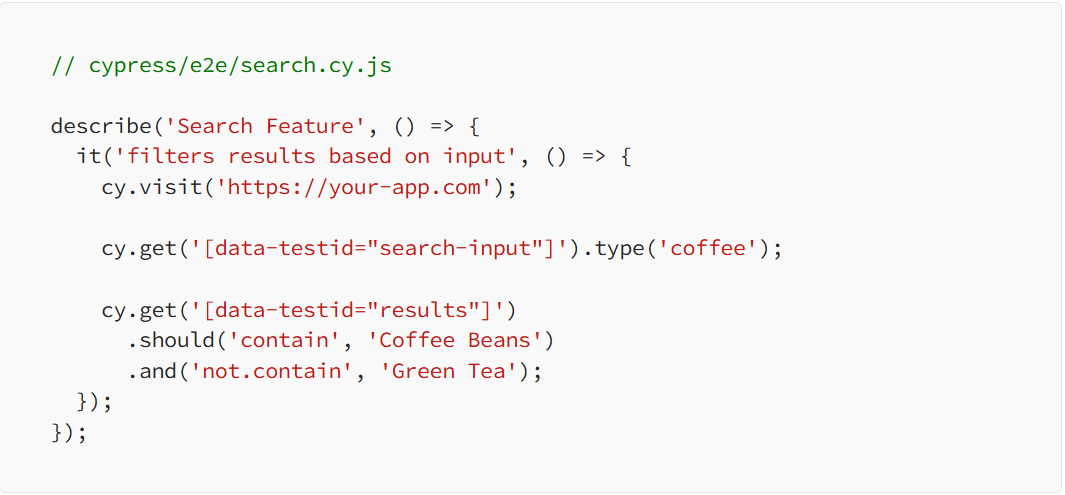
Now you may tell yourself: ‘Whoa, wait a minute. What’s all of this ?’. Don’t you worry, we’ll go through each step together.
This sets up a test suite. You can group related tests together inside describe blocks. This one's focused on the search feature.

This is the actual test case. The it block describes what the test is verifying. Keep these human-readable—they double as documentation.

We’re telling Cypress to open this URL in a real browser. Cypress spins up Chrome (or another supported browser) and loads your app like a real user would.

We grab the search input using a data-testid selector (a good practice), and simulate the user typing “coffee”.

Then we assert the filtered list contains what we expect (“Coffee Beans”) and does not contain irrelevant items (“Green Tea”).

That’s it! You’ve successfully written your first Cypress test. Congratulations ! :)
It’s Not All Sunshine and Rainbows (But It’s Pretty Darn Close)
Let’s get real, testing web applications is a grind, and no tool exists that makes every developer’s life a montage of high-fives and bug-free code. Like any tool Cypress has its quirks and limitations, but its tradeoffs are a small price to pay for the streamlined experience it delivers. Let’s dive into the gritty details of where Cypress stumbles and why it’s still the go-to for most modern web apps, especially those built with React, Vue, or Angular.
First up, browser support.
Cypress is unapologetically cozy with Chrome-family browsers. Think Chrome, Chromium, and their close cousins. It’s optimized to run like a dream on these, leveraging their developer tools and rendering engines to deliver fast, reliable tests. Want to test a button’s hover state on a React app? Cypress will zip through it on Chrome, clicking and asserting with the precision of a Turing-inspired algorithm. But if you’re hoping to run your tests on Firefox or Edge, you’re in for a mixed bag. Support for these browsers exists and is improving: (I) Firefox has made strides with recent Cypress updates; (II)Edge, being Chromium-based, plays nicer than it used to—but it’s not yet a seamless experience. For example, some advanced features, like network stubbing, might hiccup on Firefox due to differences in WebDriver protocols. If your app’s users are Chrome loyalists, this isn’t a dealbreaker. But if you need broad browser coverage, you’ll need to weigh whether Cypress’s Chrome bias fits your testing strategy.
Then there’s the issue of headless mode for large test suites.
It’s not always smooth sailing. Running tests in headless mode can be flaky if your setup isn’t dialed in. Imagine you’ve got a 500-test suite for an Angular e-commerce app, checking everything from product filters to checkout flows. In headed mode, Cypress’s visual UI makes debugging a breeze, but switch to headless for CI/CD pipelines, and you might hit memory leaks or timeouts if your tests aren’t optimized. For instance, a test that hammers an API endpoint might overload the headless browser’s event loop, causing sporadic failures. The fix? Lean on Cypress’s best practices: shard your tests, limit DOM queries, and tweak your CI config (like increasing memory in your GitHub Actions runner). It’s extra work, but it’s not rocket science—just the kind of pragmatic problem-solving Edison or Curie would nod approvingly at.
Another limitation bites when you need multi-tab testing.
Cypress doesn’t support it (yet). If your app relies on multiple browser tabs—like a Vue-based project management tool that opens task details in a new tab—you’re out of luck. Cypress operates within a single tab, simulating user interactions in a focused context. For example, testing a workflow where a user clicks a link to open a PDF in a new tab and then returns to the main app? You’ll need to rethink your test or mock the behavior within a single tab. The Cypress team is vocal on X about working on multi-tab support, but for now, it’s a gap. Most modern single-page apps (SPAs) don’t lean heavily on multi-tab flows, so this might not sting, but it’s worth noting if your app is an outlier.
Despite these quirks, the tradeoffs are worth it for most modern web apps. Cypress is tailor-made for the JavaScript ecosystem, especially frameworks like React, Vue, or Angular. Its JavaScript-native syntax means you’re writing tests in the same language as your app, with no context switching to decipher a clunky DSL.
For SPAs, where state management and dynamic rendering are king, Cypress’s ability to query the DOM and stub network requests makes it a powerhouse. Take a Vue app with a REST API backend: Cypress can intercept API calls, mock responses, and verify UI updates without hitting the real server, saving you from flaky network dependencies.
The developer experience seals the deal. Cypress’s browser-based UI, real-time reloading, and time-travel debugging (screenshots at every step) make writing tests feel less like pulling teeth and more like, well, coding. It’s no wonder developers on X rave about it, sharing plugins to extend functionality or workarounds for edge cases like testing WebSockets. For React, Vue, or Angular apps, Cypress is like a well-tailored suit-it fits just right forgiving minor imperfections. Sure, it’s not perfect—Chrome bias, headless hiccups, and single-tab constraints keep it grounded—but for most modern web apps, it’s as close to testing nirvana as you’ll get without selling your soul to a Selenium grid.
About the Creator
Enjoyed the story? Support the Creator.
Subscribe for free to receive all their stories in your feed.
Comments
There are no comments for this story
Be the first to respond and start the conversation.