
How to Untangle ERP Integrations Before a Major System Change
A practical guide to mapping hidden connections, clarifying data ownership, and preparing an old ERP for modernization or replacement.

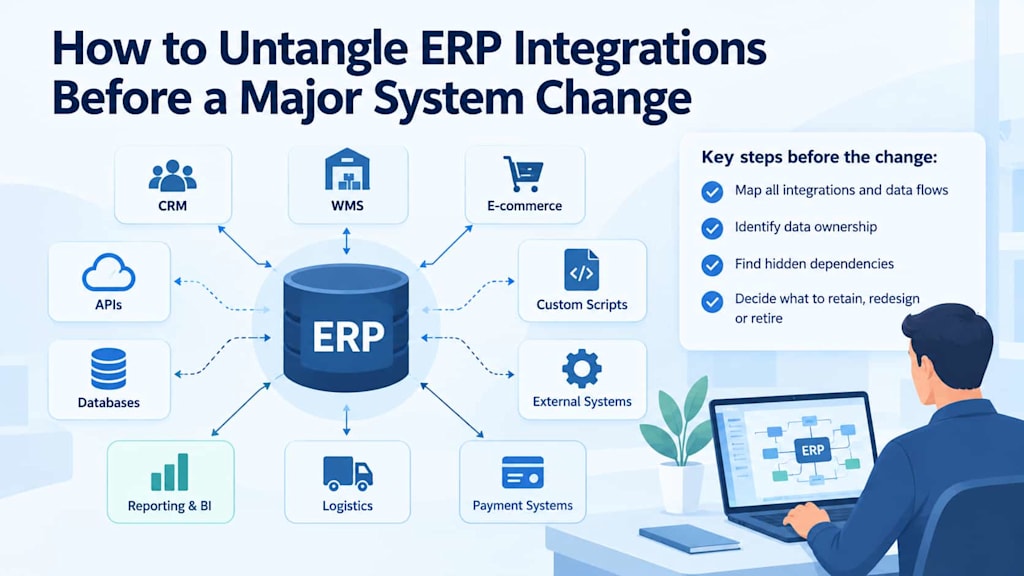
Replacing or modernizing an enterprise resource planning system is rarely limited to the ERP itself. Over the years, an ERP becomes connected to dozens or even hundreds of surrounding applications, databases, scripts, interfaces, and business processes. Some connections are formally documented, while others may exist only because a developer created a workaround years ago.
This surrounding ecosystem can make an otherwise straightforward ERP project surprisingly difficult. Replacing the central system without understanding its dependencies can result in broken integrations, duplicated data, failed processes, and unexpected operational disruptions.
For this reason, integration discovery should happen before the actual migration or modernization begins.
Start by Mapping the ERP Ecosystem
The first step is to create a complete picture of what connects to the ERP. This should go beyond a list of officially supported integrations.
Start with the obvious systems: CRM, warehouse management, e-commerce platforms, payment services, business intelligence tools, HR applications, logistics systems, and customer portals. Then examine databases, file transfers, scheduled jobs, custom applications, middleware, and scripts.
The important question is not simply which systems are connected. Teams also need to understand why each connection exists and what business process depends on it.
For example, an e-commerce platform may retrieve product availability from the ERP, while a warehouse management system sends inventory updates back to it. A CRM may depend on customer information, while a reporting database may receive nightly exports.
Creating a visual dependency map makes these relationships easier to understand and gives modernization teams a common reference point.
Understand What Happens Around the ERP
An ERP is usually only one component of a larger business technology environment. Years of operational changes can create layers of integrations that are difficult to see from the ERP application itself.
This is why teams should investigate what happens around the ERP before the actual move begins. The analysis should include scheduled jobs, external APIs, data exports, database connections, authentication mechanisms, file-based exchanges, middleware, and manual processes.
Application owners and business users can provide valuable information that technical documentation may not contain. A finance employee may know about a spreadsheet that receives a daily ERP export. A warehouse manager may depend on an automated file transfer that does not appear in the official integration catalog.
These details matter because undocumented processes can become major migration risks.
Examine APIs and Point-to-Point Integrations
APIs are often easier to manage than older integration mechanisms, but simply having an API does not mean the dependency is well understood.
For each API connection, teams should identify the systems involved, data being exchanged, authentication method, frequency of requests, error-handling behavior, and business processes affected by an outage.
Point-to-point integrations deserve particular attention. An ERP may have direct connections to multiple systems, with each connection implementing its own assumptions about data formats and business rules.
This architecture can become difficult to maintain because changes to one system may require adjustments in several others. These are often the dependencies that make legacy ERP replacement complicated, particularly when individual connections have accumulated over many years without consistent architectural standards.
During modernization, teams should determine whether an existing point-to-point connection should remain, be redesigned through an integration layer, or be removed because its original purpose no longer exists.
Investigate Databases and Direct Data Access
Not every ERP dependency passes through an API.
Older applications may read directly from ERP databases, create reporting replicas, execute stored procedures, or extract data through custom queries. These connections can remain invisible if the modernization team only reviews formal interfaces.
Database access should therefore be included in the dependency inventory.
Teams should document which applications access which databases, tables, views, or procedures and determine whether they are reading information, writing information, or both.
Direct database writes are especially important because they can bypass application-level validation and business rules. Replacing an ERP without accounting for such connections can cause applications to fail or create inconsistent data.
Look for Custom Scripts and Automation
Custom scripts are another common source of hidden dependencies.
Shell scripts, Python utilities, PowerShell jobs, scheduled tasks, ETL processes, and small internal applications may perform important functions that nobody considers part of the ERP integration architecture.
Some scripts may transform data before sending it to another system. Others may rename files, trigger imports, generate reports, or reconcile records between platforms.
Teams should search code repositories, servers, scheduled-task configurations, deployment environments, and automation platforms for references to ERP endpoints, databases, files, and credentials.
The goal is to discover not only formal software integrations but also the small pieces of automation that keep daily processes running.
Map CRM, WMS, E-Commerce, and Other Business Connections
The most visible integrations often involve major business platforms.
CRM systems may exchange customers, orders, invoices, or account information with the ERP. WMS platforms may depend on product, inventory, warehouse, and shipment data. E-commerce systems may synchronize catalogs, pricing, stock levels, orders, and customer information.
Each connection should be documented according to its business purpose rather than simply its technical implementation.
For every integration, teams can record:
Source and destination systems
Data being exchanged
Direction of data flow
Transfer frequency
Integration technology
Business owner
Technical owner
Failure consequences
Known workarounds
Dependencies on other integrations
This creates a more useful picture than a basic application inventory.
Identify Data Ownership
One of the most important questions during ERP modernization is which system actually owns each piece of data.
For example, the ERP may be the authoritative source for financial transactions, while a CRM owns customer relationship information and a product information management system controls product descriptions.
Problems occur when multiple systems appear to be authoritative for the same information.
Teams should define ownership for important data domains such as customers, products, suppliers, inventory, orders, invoices, prices, and financial records. They should also document which systems are allowed to create, modify, or consume that information.
Clear ownership helps prevent duplicate records and conflicting updates during migration.
Find Undocumented Dependencies
Documentation should be treated as a starting point rather than proof that the dependency map is complete.
Interviews with developers, system administrators, business users, and former project participants can reveal connections that are absent from official architecture diagrams.
Logs can also provide useful evidence. Network traffic, API gateway records, database access logs, file-transfer logs, and application monitoring data can show which systems communicate with the ERP in practice.
This is particularly important for long-running systems where personnel and vendors have changed over the years.
A structured process can help how to identify dependencies across technical and business environments without relying exclusively on existing documentation.
Decide What to Retain, Redesign, or Retire
Once dependencies are mapped, every integration should be evaluated according to its current business value and technical condition.
Some connections should be retained because they support essential processes and remain technically appropriate.
Others may need redesign. An important integration might still be required, but its point-to-point implementation could be replaced with an API gateway, integration platform, event-driven architecture, or another controlled mechanism.
Some dependencies can simply be retired. An old reporting database, unused API, duplicate data export, or abandoned script may still appear in documentation even though nobody depends on it anymore.
This classification helps reduce unnecessary work during the ERP project.
Pay Attention to Dependencies That Cross Several Systems
Some of the most difficult problems involve chains rather than individual connections.
For example, an online order might move from an e-commerce platform to the ERP, then to a WMS, while customer and order information is simultaneously sent to a CRM and analytics platform.
Replacing one component can therefore affect several downstream processes.
Teams should map these dependency chains and identify critical paths. This helps distinguish isolated integrations from changes that could affect a large portion of the organization.
Understanding these chains also makes it easier to define migration sequences. Systems that depend heavily on the ERP may need to be adapted before the ERP itself changes.
Build a Clean Integration Baseline
The final result of the discovery process should be more than a collection of diagrams. Organizations need a usable integration baseline that can guide architecture decisions, migration planning, testing, and future maintenance.
The baseline should identify current connections, data ownership, technical mechanisms, business importance, known risks, and the planned status of each dependency.
It can then become a reference point for deciding which integrations will remain unchanged, which will be redesigned, and which will disappear.
Conclusion
ERP modernization becomes significantly more manageable when organizations understand the ecosystem surrounding the existing system before making major changes.
Mapping APIs, point-to-point connections, databases, custom scripts, business applications, data flows, and undocumented processes reveals where the real complexity lies. Establishing data ownership and evaluating the purpose of every dependency then makes it possible to distinguish essential integrations from technical debt and obsolete connections.
The goal is not to preserve every existing integration. It is to understand them well enough to make deliberate decisions. By retaining what remains valuable, redesigning fragile connections, and retiring unnecessary dependencies, organizations can approach ERP modernization with a clearer architecture and fewer surprises.
About the Creator
Chudovo
Chudovo is a custom software development company, focused on complex systems implementation.
Enjoyed the story? Support the Creator.
Subscribe for free to receive all their stories in your feed.
Comments
There are no comments for this story
Be the first to respond and start the conversation.