
How to Reduce Integration Complexity in Multi-ERP Environments
Learn how to connect SAP, NetSuite, Odoo, and other enterprise systems through flexible integrations that preserve data consistency and simplify long-term maintenance.

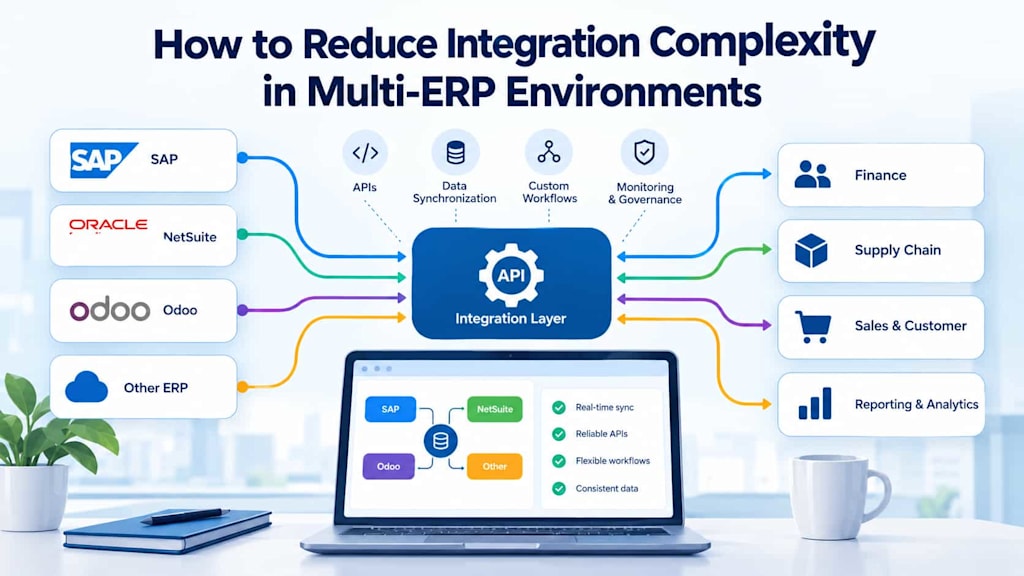
Many companies rely on more than one enterprise resource planning (ERP) system to manage their operations. Business acquisitions, regional requirements, specialized departments, and legacy applications can lead to environments where SAP, NetSuite, Odoo, and other platforms operate simultaneously. Although each system may serve a specific purpose, the connections between them can become increasingly difficult to maintain.
A sales platform might send orders to one ERP, a warehouse management system might retrieve inventory data from another, and a financial application might require information from both. When these integrations are developed independently, organizations can end up with duplicated logic, inconsistent records, and dependencies that make even minor changes expensive.
Reducing integration complexity does not necessarily mean consolidating every application into one platform. Instead, companies need an integration strategy that supports existing business requirements while allowing individual systems to evolve independently.
1. Understand the Existing Integration Landscape
The first step is to establish how information moves across the enterprise. Before introducing new middleware, APIs, or custom connectors, teams should document the current applications, their responsibilities, and the dependencies between them.
An integration inventory should identify which systems exchange information, what data they share, how frequently synchronization occurs, and which business processes depend on each connection. It should also distinguish between real-time integrations, scheduled data transfers, and manual processes.
For example, a company might use SAP for manufacturing and financial management, NetSuite for a subsidiary's operations, and Odoo for a specialized sales process. If all three systems maintain separate customer, product, or supplier records, the organization must determine which application owns each type of information.
Visualizing these relationships helps reveal unnecessary connections. If several applications independently retrieve data from the same source, a shared integration service may reduce duplicated effort. However, introducing a common layer is not always beneficial if it creates a new bottleneck or adds complexity to a simple workflow.
The objective is to establish clear ownership, identify critical dependencies, and prioritize integrations according to their business impact.
2. Use APIs Without Creating Tightly Coupled Systems
Application programming interfaces (APIs) provide a standard way for enterprise applications to exchange data and trigger operations. They can reduce reliance on direct database access, custom file transfers, and manual exports.
However, API integration alone does not guarantee a maintainable architecture. When every application depends directly on the internal structure and behavior of every other application, even small changes can affect multiple business processes.
A more sustainable approach separates business logic from system-specific implementation details. Integration services can translate data formats, validate requests, manage authentication, and handle errors without requiring every application to understand the internal structure of its counterparts.
For example, an order-processing workflow should not need to know every technical detail of SAP or NetSuite. It should interact with a clearly defined interface that represents the required business operation. If the underlying ERP changes, the integration adapter can absorb many of the differences.
API gateways may help manage authentication, access policies, rate limits, and monitoring when many services are involved. For asynchronous processes, message queues or event-driven integration can prevent temporary outages in one application from immediately interrupting another.
These architectural choices should reflect actual requirements. A small number of stable integrations may work well with direct API connections, while larger environments may benefit from reusable integration services and standardized messaging.
3. Keep SAP Integrations Maintainable Over Time
Large enterprise platforms often support extensive customization, and those customizations can become difficult to maintain as business requirements change. Integrations may depend on specific data structures, custom fields, proprietary interfaces, or assumptions about how internal processes operate.
The challenge of keeping SAP integrations manageable as systems evolve begins with reducing unnecessary dependencies on implementation details.
Where appropriate, teams should favor supported APIs and documented integration interfaces over direct access to internal database tables. They should also track API versions, monitor deprecated interfaces, and assess the effect of upgrades before changes reach production.
An integration layer can isolate SAP-specific logic from other applications. For instance, if a financial process consumes customer information from SAP, an adapter can transform the source data into a stable internal representation. Other applications can then consume that representation without depending on SAP's exact field structure.
Testing is equally important. Automated contract tests can verify that an interface continues to provide the expected fields and behavior. Regression tests can confirm that changes to an integration do not disrupt invoicing, purchasing, inventory updates, or other critical operations.
Documentation should describe dependencies, transformation rules, error-handling behavior, and ownership. Without this information, even a technically sound integration may become difficult to change when its original developers leave.
4. Connect Cloud ERP Platforms to Real Business Processes
Cloud ERP platforms often provide standard APIs, integration tools, and extension mechanisms. Nevertheless, organizations still need to connect these capabilities to workflows that may have developed over many years.
Connecting cloud ERP with existing business workflows requires understanding how employees actually perform their work, rather than simply reproducing existing data exchanges in a new technical environment.
Consider a purchasing process in which a department submits a request, a manager approves it, and the finance team verifies budget availability. An ERP integration should preserve these responsibilities while ensuring that each application receives the information it needs.
If the workflow spans NetSuite, a procurement platform, and an internal approval application, teams should define when an approval becomes final, which system records the decision, and how failures are communicated.
Custom workflows should be designed around explicit business events and rules. An approved purchase order, for example, can trigger an update in another system without requiring continuous polling of the entire database.
Idempotency is also essential: if a message is delivered twice, the receiving application should not create duplicate orders or financial transactions. Retry mechanisms, unique transaction identifiers, and clear error states help make these workflows reliable.
The goal is not to eliminate every difference between applications. It is to ensure that those differences do not create unnecessary manual work or inconsistent business outcomes.
5. Adapt Modular ERP Systems Without Over-Customizing Them
Platforms such as Odoo offer modular functionality that organizations can configure and extend according to their operational needs. This flexibility can simplify adoption, but extensive custom development may introduce new maintenance obligations.
Adapting modular ERP systems to integration requirements means distinguishing between genuine business needs and technical workarounds that can be avoided through configuration or standard functionality.
Before creating a custom module, teams should evaluate whether an existing feature, supported extension, or external integration service can meet the requirement. Custom modules are justified when they provide meaningful business value, but they should have clear boundaries and documented interfaces.
For example, an Odoo implementation might handle sales and inventory while SAP manages manufacturing and financial consolidation. Instead of duplicating all business logic across both platforms, the organization can define which system owns each process and exchange only the information required by the other.
Module dependencies should remain explicit, and upgrades should be tested against custom extensions and external connectors. Teams should avoid embedding credentials, endpoint addresses, or system-specific assumptions throughout application code.
This approach preserves the flexibility of modular ERP software without allowing every new requirement to expand the integration architecture unnecessarily.
6. Maintain Consistent Data Across Applications
Data synchronization is one of the most challenging aspects of a multi-ERP environment. Two systems may represent the same customer, product, or transaction differently, even when they use similar terminology.
A company should define common data structures, identifier conventions, validation rules, and ownership policies. For instance, customer records might be created in a CRM system but synchronized to several ERPs, while financial account information remains controlled by a designated finance platform.
The principle of designing a consistent data flow across enterprise applications is to establish a clear source of truth for each important data entity and define how updates propagate.
Not every record needs a single universal owner. Different systems can own different attributes of the same business entity, provided that these responsibilities are explicitly documented and conflicts are resolved predictably.
Synchronization mechanisms must also account for delays, duplicate messages, temporary outages, and updates arriving in the wrong order. Event timestamps, version numbers, reconciliation jobs, and retry policies can help detect and correct inconsistencies.
For critical business data, monitoring should identify records that failed to synchronize or violate validation rules. Regular reconciliation between systems can reveal discrepancies that individual API calls might not expose.
These controls are particularly important for inventory balances, customer records, order statuses, and financial transactions, where inconsistent information can affect both operations and reporting.
7. Monitor Integrations and Plan for Change
Integration architecture should be treated as an ongoing operational responsibility rather than a one-time implementation project.
Teams should monitor API availability, synchronization latency, processing failures, queue backlogs, and data validation errors. Alerts should identify problems that affect business processes instead of overwhelming technical staff with low-priority notifications.
Each integration should have a defined owner, documented recovery procedures, and clear expectations for service availability. Critical workflows should be tested against realistic failure scenarios, including unavailable endpoints, expired credentials, and interrupted network connections.
Changes to ERP platforms, APIs, and business processes should follow a controlled release process. Compatibility testing and staged deployment can reduce the risk of widespread disruption.
Finally, organizations should periodically review whether existing integrations remain necessary. When an application is replaced or a workflow changes, obsolete connections and duplicated transformations should be removed rather than carried forward indefinitely.
Conclusion
Reducing integration complexity in multi-ERP environments requires clear system boundaries, reliable APIs, disciplined data synchronization, and workflows designed around real business needs.
Companies do not necessarily need to replace SAP, NetSuite, Odoo, or other enterprise platforms to improve integration. By defining data ownership, isolating system-specific logic, limiting unnecessary customization, and monitoring critical connections, they can reduce dependencies while preserving the strengths of each application.
The most maintainable integration architecture is not the one with the most sophisticated technology. It is the one that allows business processes to operate reliably today while making future system changes easier, more predictable, and less expensive.
About the Creator
Chudovo
Chudovo is a custom software development company, focused on complex systems implementation.
Enjoyed the story? Support the Creator.
Subscribe for free to receive all their stories in your feed.
Comments
There are no comments for this story
Be the first to respond and start the conversation.