
How to Get Website Ranks Without Link Building: A Step-by-Step Guide
Practical Solutions for a Website to Achieve Search Engine Rankings.


How to Rank a Website Without Link Building: A Step-by-Step Guide
Introduction
In the ever-evolving world of search engine optimization (SEO), ranking high on search engine results pages (SERPs) is the ultimate goal for most website owners and digital marketers. Traditionally, link building has been one of the most effective strategies to achieve this goal. However, link building can be time-consuming, expensive, and sometimes even risky if not done correctly. The good news is that there are several other strategies you can emplement to improve your website's rankings without relying on link building.
You can rank your website without building links by following the steps outlined in this thorough guide. Everything from technical SEO and user experience to on-page SEO and content optimization will be covered. You'll know exactly how to raise your website's rankings without using link building by the end of this guide.
Table of Contents
- Understanding the Basics of SEO
- What is SEO?
- Why is SEO Important?
- The Role of Link Building in SEO
- Why Avoid Link Building?
2. On-Page SEO Optimization
- Keyword Research and Selection
- Optimizing Title Tags
- Meta Descriptions
- Header Tags (H1, H2, H3)
- URL Structure
- Internal Linking
- Image Optimization
- Content Optimization
- Mobile-Friendliness
- Page Speed Optimization
3. Content Strategy
- Creating High-Quality Content
- Content Length and Depth
- Content Freshness
- Content Relevance
- Content Formatting
- Content Promotion
- User-Generated Content
4. Technical SEO
- Website Architecture
- XML Sitemaps
- Robots.txt
- Canonical Tags
- Structured Data Markup
- HTTPS and Security
- Crawlability and Indexability
- Fixing Broken Links
- Duplicate Content Issues
5. User Experience (UX)
- Website Design and Navigation
- Mobile Responsiveness
- Page Load Speed
- User Engagement Metrics
- Bounce Rate Reduction
- Improving Dwell Time
- Accessibility
6. Local SEO
- Google My Business Optimization
- Local Citations
- Reviews and Ratings
- Localized Content
- NAP Consistency
7. Social Media and SEO
- Social Signals and SEO
- Social Media Content Strategy
- Social Media Engagement
- Social Media and Brand Awareness
8. Analytics and Monitoring
- Setting Up Google Analytics
- Tracking Key Metrics
- Monitoring Rankings
- Analyzing User Behavior
- A/B Testing
- Continuous Improvement
9. Advanced Strategies
- Voice Search Optimization
- Video Content and SEO
- Artificial Intelligence and SEO
- E-A-T (Expertise, Authoritativeness, Trustworthiness)
- Semantic Search and Latent Semantic Indexing (LSI)
and Conclusion.
1. Understanding the Basics of SEO
What is SEO?
Search Engine Optimization (SEO) is the practice of optimizing a website to improve its visibility on search engines like Google, Bing, and Yahoo. The goal of SEO is to attract organic (non-paid) traffic to a website by ranking higher in search engine results for relevant keywords.
Example: Imagine you own a bakery in New York City. When someone searches for "best bakery in NYC," you want your bakery's website to appear at the top of the search results. SEO is the process of optimizing your website to achieve this goal.
Why is SEO Important?
SEO is crucial because it helps your website get discovered by potential customers. When your website ranks higher in search results, it is more likely to be clicked on, leading to increased traffic, leads, and conversions. SEO also helps build credibility and trust with your audience, as websites that rank high are often perceived as more authoritative.
The Role of Link Building in SEO
Link building is the process of acquiring hyperlinks from other websites to your own. These links act as "votes of confidence" from other sites, signaling to search engines that your content is valuable and trustworthy. Traditionally, link building has been a cornerstone of SEO because search engines like Google use backlinks as a key ranking factor.
Why Avoid Link Building?
While link building can be effective, it has its drawbacks. It can be time-consuming, expensive, and sometimes risky if you engage in unethical practices like buying links or participating in link schemes. Additionally, Google's algorithms are becoming increasingly sophisticated, and they can penalize websites that engage in manipulative link-building tactics.
By focusing on other aspects of SEO, you can achieve high rankings without the need for link building. This guide will show you how.
2. The Best Way to Optimize On-Page SEO and Rank a Website Without Link Building
On-page SEO refers to the optimization of individual web pages to rank higher and earn more relevant traffic. This involves optimizing both the content and the HTML source code of a page.
Keyword Research and Selection
Step 1: Identify Your Target Audience
Before you can select the right keywords, you need to understand your target audience. Who are they? What are their needs, preferences, and pin points? What kind of content are they searching for?
Example: If you own a bakery, you might use a tool like Google Keyword Planner to find that "gluten-free bakery NYC" has a high search volume and low competition. You decide to target this keyword in your content.
Step 2: Use Keyword Research Tools
Use tools like Google Keyword Planner, Ahrefs, SEMrush, or Ubersuggest to find relevant keywords. Look for keywords with high search volume and low competition.
Example: Instead of a generic title like "Welcome to Our Bakery," you could use "Best Gluten-Free Bakery in NYC | Fresh Baked Goods Daily." This title includes your primary keyword and is more likely to attract clicks.
Step 3: Analyze Competitor Keywords
Look at the keywords your competitors are ranking for. This can give you insights into what keywords are driving traffic to their sites.
Example: If your competitor ranks for "vegan bakery NYC," you might consider targeting similar keywords like "vegan desserts NYC" or "vegan pastries near me."
Step 4: Choose Long-Tail Keywords
Long-tail keywords are longer, more specific phrases that are easier to rank for. They also tend to have higher conversion rates because they are more closely aligned with user intent.
Example: Instead of targeting "bakery," you could target "best gluten-free bakery in NYC for weddings." This long-tail keyword is more specific and likely to attract highly targeted traffic.
Optimizing Title Tags (On Page SEO) for Website
Step 1: Include Primary Keywords
Your title tag should include the primary keyword you want to rank for. Place it as close to the beginning of the title as possible.
Example: Instead of "Our Bakery," use "Best Gluten-Free Bakery in NYC | Fresh Baked Goods Daily."
Step 2: Keep It Under 60 Characters
Title tags should be concise and to the point. Keep them under 60 characters to ensure they display properly in search results.
Example: "Best Gluten-Free Bakery in NYC | Fresh Baked Goods Daily" is concise and fits within the character limit.
Step 3: Make It Compelling
Your title tag should be compelling enough to encourage users to click through to your site. Use action words and create a sense of urgency or curiosity.
Example: "Best Gluten-Free Bakery in NYC – Order Fresh Baked Goods Today!" is more compelling than a generic title.
Meta Descriptions (On Page SEO) for Website
Step 1: Include Keywords
While meta descriptions are not a direct ranking factor, they can influence click-through rates. Include your primary keyword in the meta description.
Example: "Looking for the best gluten-free bakery in NYC? Visit us for fresh, delicious baked goods made daily. Order online or stop by today!"
Step 2: Keep It Under 160 Characters
Like title tags, meta descriptions should be concise. Keep them under 160 characters to ensure they display fully in search results.
Example: "Best gluten-free bakery in NYC. Fresh, delicious baked goods made daily. Order online or visit us today!" fits within the character limit.
Step 3: Write a Clear Call-to-Action
Encourage users to click through to your site by including a clear call-to-action (CTA) in your meta description.
Example: "Visit our gluten-free bakery in NYC today and taste the difference! Order online or stop by for fresh baked goods."
Header Tags (H1, H2, H3) (On Page SEO) for Website
Step 1: Use H1 for the Main Title
Each page should have one H1 tag, which is the main title of the page. This should include your primary keyword.
Example: On your homepage, use an H1 tag like "Welcome to NYC's Best Gluten-Free Bakery."
Step 2: Use H2 and H3 for Subheadings
Use H2 and H3 tags to break up your content into sections. This makes it easier for users to read and for search engines to understand the structure of your content.
Step 3: Include Keywords in Subheadings
Where relevant, include secondary keywords in your H2 and H3 tags.
Example: Use an H2 tag like "Gluten-Free Desserts for Every Occasion" to include a secondary keyword.
URL Structure (On Page SEO) for Website
Step 1: Keep URLs Short and Descriptive
URLs should be short, descriptive, and include your primary keyword. Avoid using unnecessary words or numbers.
Example: Instead of www.bakery.com/page123, use www.bakery.com/gluten-free-bakery-nyc.
Step 2: Use Hyphens to Separate Words
Use hyphens (-) to separate words in your URLs. Avoid using underscores (_) or spaces.
Step 3: Avoid Dynamic Parameters
Dynamic URLs with parameters (e.g., ?id=123) can be confusing for both users and search engines. Use static URLs whenever possible.
Example: Use www.bakery.com/gluten-free-bakery-nyc instead of www.bakery.com/gluten-free-bakery-nyc?id=123.
Internal Linking (On Page SEO) for Website
Step 1: Link to Relevant Pages
Internal links help search engines understand the structure of your site and the relationship between different pages. Link to relevant pages within your content.
Example: In a blog post about gluten-free desserts, link to your bakery's menu page with anchor text like "Check out our full gluten-free menu here."
Step 2: Use Descriptive Anchor Text
Use descriptive anchor text that includes keywords to give search engines more context about the linked page.
Example: Instead of "Click here," use "Explore our gluten-free bakery menu."
Step 3: Avoid Overloading with Links
While internal linking is important, avoid overloading your content with too many links. This can be distracting for users and may be seen as spammy by search engines.
Example: In a 1,000-word blog post, include 3-5 internal links to relevant pages.
Image Optimization (On Page SEO) for Website
Step 1: Use Descriptive File Names
Use descriptive file names for your images that include relevant keywords. Avoid using generic names like "image1.jpg."
Example: Name an image of a gluten-free cake gluten-free-cake-nyc.jpg.
Step 2: Add Alt Text
Alt text is used by search engines to understand the content of an image. Include your primary keyword in the alt text but avoid keyword stuffing.
Step 3: Compress Images
Large image files can slow down your page load speed. Compress your images to reduce file size without sacrificing quality.
Example: Use tools like TinyPNG or JPEGmini to compress images before uploading them to your site.
Content Optimization (On Page SEO) for Website
Step 1: Write High-Quality Content
Content is king in SEO. Write high-quality, original content that provides value to your audience. Avoid duplicate content, as it can harm your rankings.
Step 2: Use Keywords Naturally
Include your primary and secondary keywords naturally throughout your content. Avoid keyword stuffing, as it can lead to penalties from search engines.
Step 3: Optimize for Readability
Use short paragraphs, bullet points, and subheadings to make your content easy to read. Aim for a Flesch Reading Ease score of 60 or higher.
Example: Break up a long paragraph into shorter sections with subheadings like "1. Choose the Right Flour" and "2. Measure Ingredients Accurately."
Mobile-Friendliness (On Page SEO) for Website
Step 1: Use a Responsive Design
A responsive design ensures that your website looks good and functions well on all devices, including smartphones and tablets.
Step 2: Test Your Site on Mobile Devices
Use tools like Google's Mobile-Friendly Test to check how your site performs on mobile devices. Make any necessary adjustments to improve the user experience.
Step 3: Optimize for Mobile Speed
Mobile users expect fast-loading pages. Optimize your site for mobile speed by compressing images, minimizing code, and using a content delivery network (CDN).
Page Speed Optimization (On Page SEO) for Website
Step 1: Use a Fast-Hosting Provider
Your hosting provider plays a significant role in your site's speed. Choose a reliable hosting provider with fast servers.
Step 2: Minimize HTTP Requests
Reduce the number of HTTP requests by combining files, using CSS sprites, and minimizing the use of external scripts.
Example: Combine multiple CSS files into one to reduce the number of HTTP requests.
Step 3: Enable Browser Caching
Browser caching allows users to store certain elements of your site locally, reducing load times for returning visitors.
Example: Enable browser caching by adding the following code to your .htaccess file:
<IfModule mod_expires.c>
ExpiresActive On
ExpiresByType image/jpg "access 1 year"
ExpiresByType image/jpeg "access 1 year"
ExpiresByType image/gif "access 1 year"
ExpiresByType image/png "access 1 year"
ExpiresByType text/css "access 1 month"
ExpiresByType text/html "access 1 month"
ExpiresByType application/pdf "access 1 month"
ExpiresByType text/x-javascript "access 1 month"
ExpiresByType application/x-shockwave-flash "access 1 month"
ExpiresByType image/x-icon "access 1 year"
ExpiresDefault "access 1 month"
</IfModule>
3. Content Strategy (On Page SEO) for Website
Content is the backbone of any successful SEO strategy. Without high-quality content, it's nearly impossible to rank well in search engines. In this section, we'll explore how to create and optimize content that resonates with your audience and drives organic traffic.
Creating High-Quality Content
Step 1: Understand Your Audience
Before you start creating content, you need to understand who your audience is. What are their pain points, interests, and needs? What kind of content do they consume? Use tools like Google Analytics, social media insights, and customer surveys to gather this information.
Example: If your bakery's audience is health-conscious individuals, create content around topics like "The Benefits of Gluten-Free Baking" or "How to Choose the Right Gluten-Free Flour."
Step 2: Conduct Topic Research
Once you understand your audience, conduct topic research to identify what they are searching for. Use tools like Google Trends, AnswerThePublic, and BuzzSumo to find popular topics in your niche.
Step 3: Create a Content Calendar
A content calendar helps you plan and organize your content creation efforts. It ensures that you consistently publish high-quality content and cover a wide range of topics.
Example: Write a 2,000-word guide on "The Ultimate Guide to Gluten-Free Baking" that covers everything from ingredient selection to baking techniques.
Content Length and Depth
Step 1: Aim for Comprehensive or full Content
Long-form content (1,500+ words) tends to perform better in search engines because it provides more value to readers. Aim to create comprehensive content that covers a topic in depth.
Step 2: Use Data and Statistics
Including data and statistics in your content can make it more authoritative and trustworthy. Use reputable sources and cite them properly.
Example: Include statistics like "According to a 2022 study, 30% of Americans are actively trying to reduce their gluten intake."
Step 3: Update Content Regularly
Search engines favor fresh content. Regularly update your existing content to keep it relevant and accurate.
Example: Update your blog post "Top Gluten-Free Trends in 2023" at the beginning of 2024 to reflect the latest trends.
Content Freshness
Step 1: Publish New Content Regularly
Consistently publishing new content signals to search engines that your site is active and relevant. Aim to publish new content at least once a week.
Step 2: Update Old Content
In addition to publishing new content, regularly update your old content. This can include adding new information, updating statistics, or improving the overall quality of the content.
Step 3: Monitor Industry Trends
Stay up-to-date with industry trends and news. Creating content around trending topics can help you attract more traffic and improve your rankings.
Content Relevance
Step 1: Align Content with User Intent
User intent refers to the reason behind a user's search query. Make sure your content aligns with the user's intent, whether they are looking for information, a product, or a service.
Step 2: Use Keywords Strategically
Incorporate relevant keywords into your content, but avoid keyword stuffing. Use synonyms and related terms to make your content more natural and relevant.
Example: In a blog post about gluten-free baking, use related terms like "gluten-free flour," "gluten-free recipes," and "gluten-free ingredients."
Step 3: Create Evergreen Content
Evergreen content is content that remains relevant over time. Examples include how-to guides, tutorials, and FAQs. Evergreen content can drive consistent traffic to your site.
Content Formatting
Step 1: Use Headings and Subheadings
Headings and subheadings break up your content into manageable sections, making it easier for readers to scan and understand. Use H1, H2, and H3 tags to structure your content.
Step 2: Use Bullet Points and Numbered Lists
Bullet points and numbered lists make your content more readable and visually appealing. They also help highlight key points and make your content easier to digest.
Step 3: Include Visual Elements
Visual elements like images, infographics, and videos can enhance your content and make it more engaging. Use alt text and descriptive file names to optimize these elements for SEO.
Content Promotion
Step 1: Share on Social Media
Promote your content on social media platforms to increase its visibility and reach. Use relevant hashtags and engage with your audience to encourage shares and interactions.
Step 2: Email Marketing
Send your content to your email subscribers to drive traffic to your site. Use compelling subject lines and CTAs to encourage clicks.
Step 3: Collaborate with Influencers
Partner with influencers in your niche to promote your content. Influencers can help you reach a wider audience and build credibility.
User-Generated Content
Step 1: Encourage Reviews and Testimonials
Encourage your customers to leave reviews and testimonials on your site. User-generated content like this can improve your credibility and attract more traffic.
Step 2: Host Contests and Giveaways
Contests and giveaways can encourage users to create and share content related to your brand. This can increase your visibility and attract more traffic.
Step 3: Create a Community
Build a community around your brand by creating forums, social media groups, or other platforms where users can share their experiences and content.
4. Technical SEO (On Page SEO) for Website
Technical SEO refers to the process of optimizing your website's infrastructure to help search engines crawl and index your site more effectively. This involves everything from improving site speed to ensuring your site is mobile-friendly.
Website Architecture
Step 1: Create a Logical Site Structure
A logical site structure makes it easier for search engines to crawl and index your site. Organize your content into categories and subcategories and use a clear hierarchy.
Example: Organize your bakery's website into categories like "Menu," "About Us," "Blog," and "Contact."
Step 2: Use a Flat Architecture
A flat architecture means that all pages on your site are within a few clicks of the homepage. This makes it easier for search engines to find and index your pages.
Step 3: Implement Breadcrumbs
Breadcrumbs are a navigation aid that shows users where they are on your site. They also help search engines understand the structure of your site.
Example: Use breadcrumbs like "Home > Menu > Gluten-Free Desserts" to help users navigate your site.
XML Sitemaps
Step 1: Create an XML Sitemap
An XML sitemap is a file that lists all the pages on your site. It helps search engines find and index your content more efficiently.
Step 2: Submit Your Sitemap to Search Engines
Submit your XML sitemap to Google Search Console and Bing Webmaster Tools. This ensures that search engines are aware of your sitemap and can crawl your site more effectively.
Example: Log in to Google Search Console, navigate to "Sitemaps," and submit your sitemap URL.
Step 3: Update Your Sitemap Regularly
As you add new content to your site, update your XML sitemap to include the new pages. This ensures that search engines are always aware of your latest content.
Robots.txt
Step 1: Create a Robots.txt File
A robots.txt file tells search engines which pages on your site they can and cannot crawl. This is useful for preventing search engines from indexing duplicate or low-quality content.
Example: Create a robots.txt file that blocks search engines from crawling your admin login page.
Step 2: Use Disallow and Allow Directives
Use the "Disallow" directive to block search engines from crawling certain pages, and the "Allow" directive to give them access to specific pages.
Example: Use the following code in your robots.txt file to block search engines from crawling your admin page:

Step 3: Test Your Robots.txt File
Use Google Search Console to test your robots.txt file and ensure that it is working correctly. This will help you avoid accidentally blocking important pages.
Example: Use the "Robots.txt Tester" tool in Google Search Console to check for errors in your robots.txt file.
Canonical Tags
Step 1: Identify Duplicate Content
Duplicate content can harm your SEO efforts. Identify pages on your site that have similar or identical content.
Example: If you have multiple URLs for the same product (e.g., www.bakery.com/cake and www.bakery.com/cake?size=large), identify them as duplicate content.
Step 2: Implement Canonical Tags
A canonical tag tells search engines which version of a page is the "master" version. This helps prevent duplicate content issues and ensures that the correct page is indexed.
Example: Add the following canonical tag to the duplicate page:

Step 3: Monitor for Canonical Issues
Regularly check your site for canonical issues using tools like Google Search Console. Fix any issues that arise to ensure that your site is properly indexed.
Structured Data Markup
Step 1: Understand Structured Data
Structured data is a standardized format for providing information about a page and classifying its content. It helps search engines understand the content of your site and can improve your visibility in search results.
Example: Use structured data to mark up your bakery's menu items, reviews, and business hours.
Step 2: Implement Schema Markup
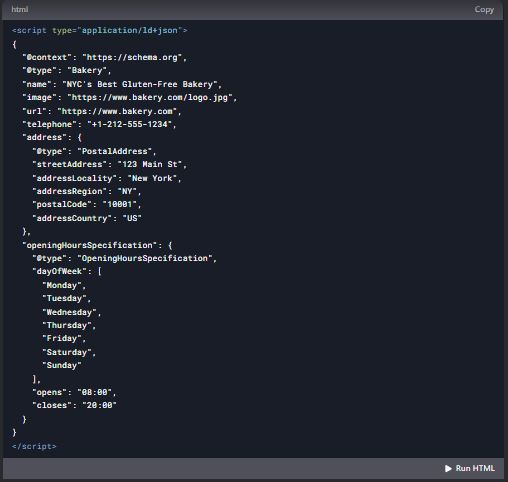
Use Schema.org markup to add structured data to your site. This can include information like product details, reviews, and event dates.
Example: Add the following schema markup to your bakery's homepage:
Step 3: Test Your Structured Data
Use Google's Structured Data Testing Tool to test your structured data and ensure that it is implemented correctly. This will help you avoid errors and improve your chances of appearing in rich snippets.
HTTPS and Security
Step 1: Switch to HTTPS
HTTPS is a secure version of HTTP that encrypts data between the user's browser and your server. Switching to HTTPS can improve your site's security and SEO.
Step 2: Implement SSL/TLS Certificates
SSL/TLS certificates are used to enable HTTPS on your site. Obtain and install a certificate from a reputable Certificate Authority (CA).
Step 3: Monitor for Mixed Content
Mixed content occurs when a secure page (HTTPS) includes insecure elements (HTTP). Use tools like Why No Padlock to identify and fix mixed content issues.
Crawlability and Indexability
Step 1: Ensure All Pages Are Accessible
Make sure that all pages on your site are accessible to search engines. Avoid using JavaScript or Flash to load important content, as search engines may have difficulty crawling it.
Example: Ensure that your "Gluten-Free Menu" page is accessible to search engines by using HTML instead of JavaScript to load the content.
Step 2: Use Internal Linking
Internal linking helps search engines discover and index your pages. Use descriptive anchor text and link to relevant pages within your content.
Step 3: Monitor Crawl Errors
Use Google Search Console to monitor crawl errors on your site. Fix any errors that arise to ensure that your site is properly indexed.
Fixing Broken Links
Step 1: Identify Broken Links
Broken links can harm your SEO efforts by creating a poor user experience and preventing search engines from crawling your site. Use tools like Screaming Frog or Ahrefs to identify broken links.
Step 2: Fix or Remove Broken Links
Once you've identified broken links, either fix them by updating the URL or remove them from your site. This will improve your site's usability and SEO.
Step 3: Monitor for New Broken Links
Regularly check your site for new broken links and fix them promptly. This will help you maintain a high-quality site and improve your rankings.
Duplicate Content Issues
Step 1: Identify Duplicate Content
Duplicate content can harm your SEO efforts by confusing search engines and diluting your rankings. Use tools like Copyscape or Siteliner to identify duplicate content on your site.
Step 2: Implement Canonical Tags
As mentioned earlier, canonical tags can help resolve duplicate content issues by telling search engines which version of a page is the "master" version.
Step 3: Consolidate Similar Content
If you have multiple pages with similar content, consider consolidating them into a single page. This will help you avoid duplicate content issues and improve your rankings.
5. User Experience (UX)(On Page SEO) for Website
User experience (UX) refers to the overall experience a user has when interacting with your website. A positive UX can improve your SEO by increasing user engagement, reducing bounce rates, and improving dwell time.
Website Design and Navigation
Step 1: Use a Clean and Simple Design
A clean and simple design makes it easier for users to navigate your site and find the information they need. Avoid clutter and use a consistent layout across all pages.
Step 2: Implement Intuitive Navigation
Your site's navigation should be intuitive and easy to use. Use clear labels for your menu items and organize your content into logical categories.
Example: Use a navigation menu with labels like "Menu," "About Us," "Blog," and "Contact."
Step 3: Include a Search Bar
A search bar allows users to quickly find the content they are looking for. Make sure your search bar is prominently displayed and easy to use.
Mobile Responsiveness
Step 1: Use a Responsive Design
A responsive design ensures that your site looks good and functions well on all devices, including smartphones and tablets. This is crucial for providing a positive user experience.
Step 2: Test Your Site on Multiple Devices
Test your site on multiple devices to ensure that it is fully responsive. Use tools like Google's Mobile-Friendly Test to identify and fix any issues.
Step 3: Optimize for Touchscreens
Make sure your site is optimized for touchscreens by using large buttons and links and avoiding hover-only elements.
Page Load Speed
Step 1: Optimize Images
Large image files can slow down your site's load speed. Compress your images to reduce file size without sacrificing quality.
Example: Use tools like TinyPNG or JPEGmini to compress images before uploading them to your site.
Step 2: Minimize Code
Minimize your site's HTML, CSS, and JavaScript code to reduce load times. Use tools like Google PageSpeed Insights to identify and fix code-related issues.
Step 3: Use a Content Delivery Network (CDN)
A CDN can improve your site's load speed by distributing your content across multiple servers around the world. This reduces the distance between the user and the server, resulting in faster load times.
User Engagement Metrics
Step 1: Monitor Bounce Rate
Bounce rate refers to the percentage of users who leave your site after viewing only one page. A high bounce rate can indicate that your site is not engaging or relevant to users.
Step 2: Improve Dwell Time
Dwell time refers to the amount of time a user spends on your site after clicking through from a search result. Improve dwell time by creating engaging content and providing a positive user experience.
Step 3: Encourage User Interaction
Encourage user interaction by including CTAs, comments sections, and social sharing buttons. This can increase user engagement and improve your SEO.
Example: Add a comments section to your blog posts and encourage readers to share their thoughts.
Bounce Rate Reduction
Step 1: Improve Content Quality
High-quality, relevant content is more likely to engage users and reduce bounce rates. Make sure your content is well-written, informative, and aligned with user intent.
Example: Write a blog post titled "10 Gluten-Free Baking Tips from NYC's Top Bakery" that provides valuable information to your audience.
Step 2: Optimize for Readability
Use short paragraphs, bullet points, and subheadings to make your content easy to read. This can help keep users on your site longer and reduce bounce rates.
Example: Break up a long paragraph into shorter sections with subheadings like "1. Choose the Right Flour" and "2. Measure Ingredients Accurately."
Step 3: Use Internal Linking
Internal linking can encourage users to explore more pages on your site, reducing bounce rates. Use descriptive anchor text and link to relevant pages within your content.
Example: In a blog post about gluten-free baking, link to your bakery's menu page with anchor text like "Check out our full gluten-free menu here."
Improving Dwell Time
Step 1: Create Engaging Content
Engaging content is more likely to keep users on your site longer. Use storytelling, visuals, and interactive elements to make your content more engaging.
Step 2: Use Multimedia
Incorporate multimedia elements like images, videos, and infographics into your content. This can make your content more engaging and increase dwell time.
Step 3: Provide Value
Make sure your content provides value to users by answering their questions, solving their problems, or providing useful information. This can encourage users to stay on your site longer.
Accessibility
Step 1: Use Alt Text for Images
Alt text is used by screen readers to describe images to visually impaired users. Use descriptive alt text to make your site more accessible.
Step 2: Ensure Keyboard Navigation
Make sure your site can be navigated using a keyboard alone. This is important for users who cannot use a mouse.
Step 3: Use ARIA Labels
ARIA (Accessible Rich Internet Applications) labels provide additional information to screen readers. Use ARIA labels to make your site more accessible to users with disabilities.
Example: Add ARIA labels to your navigation menu to help screen readers understand its structure.
6. Local SEO (On Page SEO) for Website
Local SEO is the process of optimizing your website to rank higher in local search results. This is particularly important for businesses that serve a specific geographic area.
Google My Business Optimization
Step 1: Claim Your Google My Business Listing
If you haven't already, claim your Google My Business (GMB) listing. This is a free tool that allows you to manage how your business appears on Google Search and Maps.
Step 2: Complete Your Profile
Fill out your GMB profile completely, including your business name, address, phone number, website, hours of operation, and categories. The more information you provide, the better.
Step 3: Add Photos and Videos
Add high-quality photos and videos to your GMB profile. This can help your business stand out and attract more customers.
Local Citations
Step 1: List Your Business on Local Directories
List your business on local directories like Yelp, Yellow Pages, and TripAdvisor. Make sure your business information is consistent across all directories.
Step 2: Use Structured Data Markup
Use structured data markup to provide search engines with information about your business, such as your name, address, and phone number (NAP).
Step 3: Monitor and Update Citations
Regularly monitor your local citations and update them as needed. Inconsistent or outdated information can harm your local SEO efforts.
Reviews and Ratings
Step 1: Encourage Customer Reviews
Encourage your customers to leave reviews on your GMB profile and other review sites. Positive reviews can improve your local SEO and attract more customers.
Step 2: Respond to Reviews
Respond to both positive and negative reviews in a professional and courteous manner. This shows that you value customer feedback and can improve your reputation.
Step 3: Monitor Review Sites
Monitor review sites for new reviews and respond promptly. This can help you build a positive online reputation and improve your local SEO.
Localized Content
Step 1: Create Location-Specific Pages
If you serve multiple locations, create separate pages for each location. Include location-specific keywords and information on each page.
Step 2: Use Local Keywords
Incorporate local keywords into your content, such as the name of your city or region. This can help you rank higher in local search results.
Step 3: Create Local Content
Create content that is relevant to your local audience, such as blog posts about local events or news. This can help you attract more local traffic.
NAP Consistency
Step 1: Ensure NAP Consistency
Make sure your business name, address, and phone number (NAP) are consistent across all online platforms. Inconsistent NAP information can harm your local SEO.
Step 2: Use Structured Data Markup
As mentioned earlier, use structured data markup to provide search engines with consistent NAP information.
Step 3: Monitor for NAP Inconsistencies
Regularly monitor your online listings for NAP inconsistencies and update them as needed. This will help you maintain a strong local SEO presence.
7. Social Media and SEO (On Page SEO) for Website
Social media can play a significant role in your SEO efforts by driving traffic to your site, increasing brand awareness, and improving user engagement.
Social Signals and SEO
Step 1: Understand Social Signals
Social signals refer to the engagement your content receives on social media, such as likes, shares, and comments. While social signals are not a direct ranking factor, they can indirectly impact your SEO by driving traffic and increasing brand visibility.
Step 2: Share Content on Social Media
Share your content on social media platforms to increase its visibility and reach. Use relevant hashtags and engage with your audience to encourage shares and interactions.
Step 3: Monitor Social Media Metrics
Monitor social media metrics like engagement, reach, and click-through rates to understand how your content is performing. Use this data to refine your social media strategy.
Social Media Content Strategy
Step 1: Create Shareable Content
Create content that is highly shareable, such as infographics, videos, and listicles. Shareable content is more likely to be shared on social media, increasing its reach and visibility.
Step 2: Use Visual images and videos
Visual content like images and videos tends to perform better on social media. Use high-quality visuals to make your content more engaging and shareable.
Step 3: Post Consistently to website
Post consistently on social media to keep your audience engaged and attract new followers. Use a content calendar to plan and schedule your posts.
Social Media Engagement
Step 1: Engage with Your Audience
Engage with your audience by responding to comments, answering questions, and participating in conversations. This can help you build a loyal following and increase brand loyalty.
Step 2: Run Social Media Contests
Run contests and giveaways on social media to encourage user engagement and attract new followers. Make sure the rules are clear and the prizes are relevant to your audience.
Step 3: Collaborate with Influencers
Collaborate with influencers in your niche to promote your content and reach a wider audience. Influencers can help you build credibility and attract more traffic to your site.
Social Media and Brand Awareness
Step 1: Build a Strong Brand Presence
Build a strong brand presence on social media by using consistent branding, posting high-quality content, and engaging with your audience. This can help you increase brand awareness and attract more traffic to your site.
Step 2: Use Social Media Advertising
Use social media advertising to promote your content and reach a wider audience. Platforms like Facebook, Instagram, and LinkedIn offer targeted advertising options that can help you reach your ideal audience.
Step 3: Monitor Brand Mentions
Monitor social media for brand mentions and respond promptly. This can help you build a positive online reputation and increase brand awareness.
8. Analytics and Monitoring (On Page SEO) for Website
Analytics and monitoring are crucial for understanding how your SEO efforts are performing and identifying areas for improvement.
Setting Up Google Analytics
Step 1: Create a Google Analytics Account
If you haven't already, create a Google Analytics account and add the tracking code to your website. This will allow you to track and analyze your site's traffic and user behavior.
Step 2: Set Up Goals
Set up goals in Google Analytics to track specific actions, such as form submissions, newsletter sign-ups, or purchases. This will help you measure the effectiveness of your SEO efforts.
Step 3: Use Custom Dashboards
Create custom dashboards in Google Analytics to monitor key metrics and track your progress. This will help you stay organized and focused on your SEO goals.
Tracking Key Metrics
Step 1: Monitor Organic Traffic
Monitor your site's organic traffic to understand how well your SEO efforts are performing. Look for trends and patterns in your traffic data.
Step 2: Track Keyword Rankings
Track your keyword rankings to see how well your site is performing for specific keywords. Use tools like Ahrefs, SEMrush, or Google Search Console to monitor your rankings.
Step 3: Analyze User Behavior
Analyze user behavior metrics like bounce rate, dwell time, and pages per session to understand how users are interacting with your site. Use this data to identify areas for improvement.
Monitoring Rankings
Step 1: Use Rank Tracking Tools
Use rank tracking tools like Ahrefs, SEMrush, or Moz to monitor your keyword rankings. These tools can provide valuable insights into your SEO performance.
Step 2: Track Competitor Rankings
Track your competitors' rankings to understand how you stack up against them. Use this information to identify opportunities and refine your SEO strategy.
Step 3: Monitor SERP Features
Monitor SERP features like featured snippets, knowledge panels, and local packs. These features can impact your visibility and click-through rates.
Analyzing User Behavior
Step 1: Use Heatmaps
Use heatmaps to visualize how users interact with your site. Heatmaps can show you where users are clicking, scrolling, and spending the most time.
Step 2: Conduct User Surveys
Conduct user surveys to gather feedback on your site's usability and content. Use this feedback to make data-driven improvements to your site.
Step 3: Analyze Conversion Rates
Analyze your site's conversion rates to understand how well your content is driving desired actions. Use this data to optimize your content and improve your SEO.
A/B Testing
Step 1: Test Different Headlines
Test different headlines to see which ones perform best. Use A/B testing tools like Google Optimize to compare different versions of your content.
Step 2: Test Different CTAs
Test different CTAs to see which ones drive the most conversions. Experiment with different wording, colors, and placements.
Step 3: Test Different Layouts
Test different layouts to see which ones perform best. Experiment with different placements of images, text, and other elements.
Continuous Improvement
Step 1: Regularly Review Analytics
Regularly review your analytics data to identify trends and patterns. Use this information to make data-driven decisions and refine your SEO strategy.
Step 2: Stay Up-to-Date with SEO Trends
Stay up-to-date with the latest SEO trends and best practices. SEO is constantly evolving, so it's important to stay informed and adapt your strategy as needed.
Step 3: Iterate and Optimize
SEO is an ongoing process. Continuously iterate and optimize your site based on your analytics data and user feedback. This will help you stay ahead of the competition and achieve long-term success.
9. Advanced Strategies (On Page SEO) for Website
Once you've mastered the basics of SEO, you can start implementing more advanced strategies to further improve your rankings and drive more traffic to your site.
Voice Search Optimization
Step 1: Optimize for Conversational Keywords
Voice search queries tend to be more conversational and longer than text-based queries. Optimize your content for conversational keywords and phrases.
Step 2: Use Natural Language
Use natural language in your content to align with how people speak. This can help you rank higher in voice search results.
Step 3: Create FAQ Pages
Create FAQ pages that answer common questions related to your niche. This can help you capture voice search traffic and improve your rankings.
Video Content and SEO
Step 1: Create High-Quality Videos
Create high-quality videos that provide value to your audience. Use engaging visuals, clear audio, and concise messaging.
Step 2: Optimize Video Titles and Descriptions
Optimize your video titles and descriptions with relevant keywords. This can help your videos rank higher in search results.
Step 3: Use Video Sitemaps
Use video sitemaps to help search engines understand and index your video content. This can improve your chances of appearing in video search results.
Artificial Intelligence and SEO
Step 1: Use AI Tools for Keyword Research
Use AI-powered tools like Clearscope or MarketMuse to identify relevant keywords and optimize your content. These tools can provide valuable insights into your SEO strategy.
Step 2: Implement AI-Powered Chatbots
Implement AI-powered chatbots on your site to improve user engagement and provide instant support. This can help you reduce bounce rates and improve dwell time.
Step 3: Use AI for Content Creation
Use AI tools like GPT-3 to generate content ideas, write blog posts, and create social media content. While AI-generated content should be reviewed and edited by humans, it can save time and improve efficiency.
E-A-T (Expertise, Authoritativeness, Trustworthiness)
Step 1: Demonstrate Expertise
Demonstrate your expertise by creating high-quality, authoritative content. Use data, case studies, and expert opinions to back up your claims.
Step 2: Build Authority
Build authority by earning backlinks from reputable sites, publishing guest posts, and participating in industry forums. The more authoritative your site is, the higher it will rank.
Step 3: Establish Trustworthiness
Establish trustworthiness by providing accurate, up-to-date information and being transparent with your audience. Use HTTPS, display customer reviews, and provide clear contact information.
Semantic Search and Latent Semantic Indexing (LSI)
Step 1: Understand Semantic Search
Semantic search refers to the process of understanding the intent behind a user's query and providing relevant results. It takes into account factors like context, synonyms, and related terms.
Step 2: Use LSI Keywords
LSI (Latent Semantic Indexing) keywords are terms related to your primary keyword. Use LSI keywords in your content to help search engines understand the context and relevance of your content.
Step 3: Focus on User Intent
Focus on user intent when creating content. Understand what users are looking for and provide content that meets their needs. This can help you rank higher in semantic search results.
Conclusion
In this guide, I've covered a wide range of strategies to help you rank your website without relying on link building. From on-page SEO and content optimization to technical SEO and user experience, there are many ways to improve your rankings and drive organic traffic to your site.
About the Creator
Akib Zaved Babu
I'm a Digital Marketing & Content Marketing Expert specializing in SEO, website audits, competitor analysis, social media marketing, and paid ads. With a data-driven approach, they help businesses boost traffic, rankings, and conversions.
Enjoyed the story? Support the Creator.
Subscribe for free to receive all their stories in your feed.
Comments
There are no comments for this story
Be the first to respond and start the conversation.