
How to Check Aadhaar Linked Mobile Number on TAFCOP Portal?
In today’s digital age, ensuring the security of your personal information is paramount. One crucial aspect of this is keeping track of the mobile numbers linked to your Aadhaar.

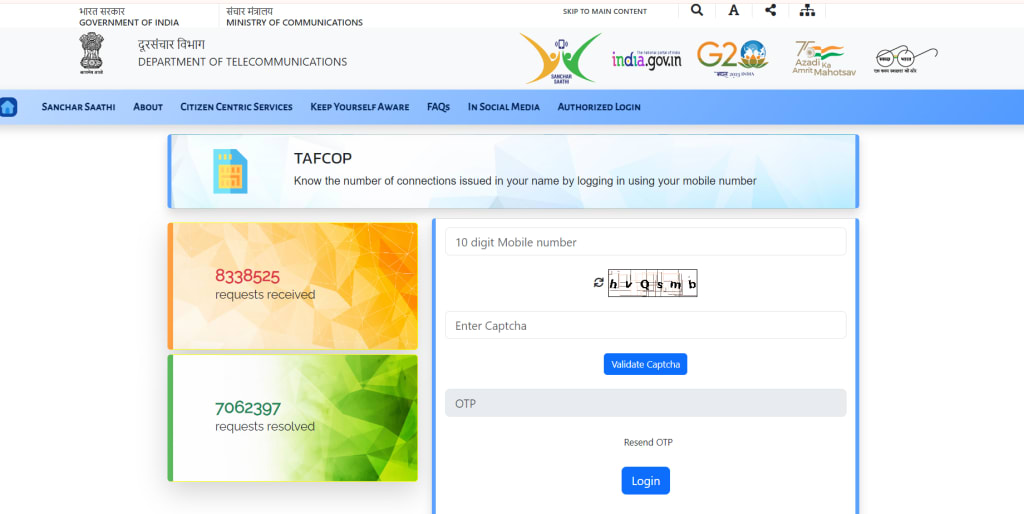
Before the implementation of eKYC (electronic Know Your Customer) with fingerprint verification for acquiring a new SIM card, it was relatively easy for fraudsters to obtain a SIM card under someone else’s name. This posed a significant risk of identity theft. To enhance security measures against such fraudulent activities, the Department of Telecommunications has recently introduced a portal. This portal allows any Aadhaar cardholder to check the SIM cards issued in their name. The portal is known as Telecom Analytics for Fraud Management and Consumer Protection (TAFCOP).
By utilizing TAFCOP, users can easily verify and manage the mobile connections linked to their Aadhaar number. This proactive approach not only helps individuals protect their identity but also allows them to maintain control over their mobile connections. Here’s a step-by-step guide on how you can use the TAFCOP portal to monitor your SIM card registrations:
Step 1: Access the TAFCOP Portal First, visit the official TAFCOP portal by navigating to https://tafcop.dgtelecom.gov.in/. Ensure that you have entered the correct web address to avoid any phishing scams.
Step 2: Enter Your Mobile Number On the homepage, you will find an input field prominently displayed. Enter your mobile number in this field and click on the “Get OTP” button.
Step 3: Receive and Enter OTP Shortly, you will receive a One-Time Password (OTP) from the Department of Telecommunications (DoT) on your mobile number. Enter this OTP in the designated field and click on the “Validate” button to proceed.
Step 4: View Registered Mobile Numbers Upon successful OTP verification, the portal will display a list of all mobile numbers that have been issued using your Aadhaar details. It’s important to note that if your number is registered as a corporate connection, all mobile numbers associated with the corporate account will be listed as well.
Step 5: Examine the Listed Numbers Carefully review the list of mobile numbers. If you come across any numbers that you do not recognize or no longer use, you can report them directly through the portal.
Step 6: Report Unrecognized or Unused Numbers To report an unrecognized number, check the box next to the number and select the “This is not my number” option. For numbers that you no longer require, select the “Not required” option. This will notify the Department of Telecommunications, and they will take the necessary action to deactivate or block the reported numbers.
Step 7: Submit Your Report Once you have selected the numbers to be reported, click on the “Report” button to submit your request. The telecom service providers will then process your request and deactivate the unwanted numbers.
It’s a good practice to periodically check the TAFCOP portal to ensure that no unauthorized mobile numbers are registered under your Aadhaar details. Regular monitoring helps in safeguarding your identity and maintaining control over your mobile connections.
By following these steps, you can effectively use the TAFCOP portal to manage and secure your mobile connections, thus preventing potential identity theft and fraud. Stay vigilant and make use of this helpful resource provided by the Department of Telecommunications to protect your personal information.
FAQs for TAFCOP Portal and SIM Card Management
1. What is the TAFCOP portal and why is it important?
Answer: The TAFCOP portal, officially known as Telecom Analytics for Fraud Management and Consumer Protection, is an online platform introduced by the Department of Telecommunications. It enables Aadhaar cardholders to verify and manage the SIM cards registered under their names. This portal is crucial as it helps prevent identity theft and fraud by allowing users to detect and report unauthorized mobile connections linked to their Aadhaar number.
2. How can I access and use the TAFCOP portal?
Answer: To use the TAFCOP portal, follow these steps:
- Visit the official website at https://tafcop.dgtelecom.gov.in/.
- Enter your mobile number in the input field on the homepage and click "Get OTP."
- Enter the One-Time Password (OTP) you receive on your mobile and click "Validate."
- Review the list of mobile numbers registered with your Aadhaar details.
- Report any unrecognized or unnecessary numbers by selecting the appropriate options and clicking "Report."
3. What should I do if I find unfamiliar numbers linked to my Aadhaar?
Answer: If you find unfamiliar numbers linked to your Aadhaar, follow these steps:
- Check the box next to the unrecognized number.
- Select the option "This is not my number" to report it as unauthorized.
- For numbers you no longer need, choose the "Not required" option.
- Click on the "Report" button to submit your request. The Department of Telecommunications will process your report and deactivate the unwanted numbers to secure your identity.
4. Why is it necessary to periodically check the TAFCOP portal?
Answer: Periodic checks on the TAFCOP portal are necessary to ensure no unauthorized mobile numbers are registered under your Aadhaar details. Regular monitoring helps safeguard your identity, maintain control over your mobile connections, and prevent potential identity theft and fraud. Staying vigilant and proactive in managing your SIM card registrations is a key measure in protecting your personal information.
5. What steps does the TAFCOP portal take to protect users from phishing scams?
- Answer: The TAFCOP portal incorporates several measures to protect users from phishing scams, including:
- Ensuring the official web address is secure and starts with "https."
- Providing a straightforward and user-friendly interface to minimize confusion and errors.
- Implementing OTP-based verification to ensure only authorized users can access sensitive information.
Offering clear guidelines on reporting unauthorized numbers to prevent misuse of personal data. These steps collectively help users navigate the portal safely and securely, reducing the risk of phishing attacks.
About the Creator
Anya Singh
Anya Singh is a passionate writer at Tafcop, specializing in telecommunications content. With a deep understanding of the Tafcop portal, she delivers clear, engaging, and SEO-optimized articles that inform and captivate our readers.
Enjoyed the story? Support the Creator.
Subscribe for free to receive all their stories in your feed.
Comments
There are no comments for this story
Be the first to respond and start the conversation.