
How to Automate Document Processing With AI and OCR
A practical guide to improving document workflows through intelligent data extraction, validation, and system integration.

How to Identify Documents Suitable for Automation
Document processing is a common source of repetitive work across business operations. Employees review invoices, application forms, contracts, receipts, reports, and other records, extracting information and transferring it into business systems. When these activities are performed manually, they consume time, introduce inconsistencies, and make it difficult to process growing document volumes efficiently.
The first step toward automation is identifying workflows where document handling creates measurable operational costs. Businesses should examine how frequently documents arrive, how many fields employees must extract, how often information is reentered, and how much time is spent correcting mistakes. Processes involving standardized documents and predictable data requirements are generally strong candidates.
For example, an organization might regularly receive forms containing names, reference numbers, dates, addresses, and monetary values. If employees repeatedly copy these fields into a customer management system or accounting application, automated extraction could reduce manual effort.
However, document volume alone does not determine suitability. Businesses should also consider the consistency of input formats, the consequences of incorrect data, and the availability of reliable validation rules. A high-volume workflow involving straightforward information may be easier to automate than a smaller process requiring complex legal interpretation.
Start by documenting the existing workflow from document receipt to final data entry. Identify manual handoffs, duplicate activities, common errors, and approval requirements. This assessment establishes a baseline for evaluating potential improvements and helps prioritize processes with the clearest business benefits.
How to Prepare Documents for OCR Processing
Optical character recognition (OCR) converts text within images and scanned documents into machine-readable content. However, extraction quality depends significantly on the condition of the source material. Poor scans, unusual layouts, handwritten annotations, and inconsistent formatting can all reduce accuracy.
Businesses should begin by standardizing document intake wherever possible. Digital PDFs, office documents, scanned images, and photographs may require different preparation procedures. Establishing accepted file formats, minimum image resolution, and basic quality requirements helps prevent avoidable processing failures.
Image preprocessing can improve recognition results. Common techniques include correcting page orientation, removing noise, improving contrast, detecting document boundaries, and deskewing tilted scans. When documents contain multiple pages, the system should also preserve page order and associate each page with the correct record.
Another important step is identifying document types before extraction begins. Invoices, application forms, receipts, and contracts have different information structures. Classification allows the processing workflow to apply the appropriate extraction method and validation rules to each category.
For organizations converting paper-based records into digital information, preparation also involves deciding which information must be retained and how it should be organized. Not every word on every page needs to become a separate database field. Some workflows require a few identifiers and totals, while others need searchable full text or selected clauses.
Businesses should define the required output before configuring OCR. Specify which fields must be captured, which can remain optional, and how dates, currencies, identifiers, and addresses should be normalized. Clear output requirements reduce unnecessary extraction and simplify downstream integration.
Finally, preserve the original document alongside its extracted data. Keeping the source available makes it easier to investigate discrepancies, verify important values, and demonstrate how a particular record was processed.
How to Choose Between Traditional OCR and AI-Based Extraction
Traditional OCR and AI-based extraction address related but different challenges. Traditional OCR primarily recognizes characters and words from document images. Depending on the implementation, additional templates and rules may be needed to determine which recognized text belongs in which field.
This approach can work well when documents follow stable layouts. For example, a standardized form with fixed labels and predictable field positions may be processed using established recognition and positional rules. Traditional OCR can offer a practical solution when input formats change infrequently and the required information is clearly defined.
AI-based extraction can help when document layouts vary or when the relationship between labels and values is less predictable. Machine learning models can classify document types, identify fields in different positions, and interpret contextual relationships between pieces of information. Some approaches can also process tables and semi-structured documents without requiring an individual template for every format.
The distinction is not absolute. Modern document-processing solutions often combine OCR with AI models, layout analysis, classification, and business rules. OCR may recognize the text, while an AI model identifies the relevant fields and a validation layer checks the results.
The right choice depends on document variability, extraction complexity, acceptable error rates, implementation costs, and available expertise. Businesses should evaluate performance using representative samples rather than relying solely on vendor demonstrations or general accuracy claims.
A useful pilot compares both approaches against the same set of documents. Measure not only whether text is recognized correctly, but also whether the information is assigned to the correct fields and returned in the required format.
When applying AI to repetitive document tasks, organizations should also account for privacy, access controls, data retention, and model reliability. Sensitive documents may require specific processing environments or restrictions on where data can be transmitted. AI-generated interpretations should not automatically be treated as verified facts.
How to Validate Extracted Data and Handle Errors
Successful extraction does not guarantee that the resulting data is correct. A system may recognize every character accurately but still assign a value to the wrong field, confuse a subtotal with a total, or extract information from an outdated document.
Validation should therefore be designed as a separate stage of the workflow. Begin with field-level checks, such as confirming that dates follow an accepted format, email addresses have plausible structures, and required identifiers are present. Numeric fields can be checked for valid ranges, while currency values should follow consistent formatting rules.
Businesses can also apply cross-field validation. For example, the sum of individual line items may need to match a stated total, or a document's issue date must not fall after its recorded approval date. These checks can identify inconsistencies that character recognition alone cannot detect.
Where appropriate, extracted information can be compared with trusted business records. A customer identifier might be checked against a customer database, while a reference number could be matched to an existing transaction. Such checks help distinguish valid but unfamiliar values from probable extraction errors.
Not every record should follow the same review process. A practical approach uses confidence scores, validation outcomes, and business risk to determine the next action.
High-confidence records that pass all required checks may proceed automatically. Records with uncertain fields or minor inconsistencies can be routed to an employee for targeted review. Documents that are incomplete, illegible, or structurally unexpected may require manual processing from the beginning.
Human review is particularly important when incorrect extraction could cause financial loss, regulatory problems, contractual misunderstandings, or inappropriate decisions about individuals. AI should not be used to bypass approvals or professional judgment where those safeguards are required.
Exception handling should also capture the reason for failure. Categorizing issues such as unreadable scans, missing fields, unexpected formats, and conflicting values helps teams identify recurring problems and improve the process over time.
How to Connect Document Processing With Business Systems
Extracted information creates business value when it reaches the systems where employees make decisions and complete operational tasks. Without effective integration, automation may simply replace manual transcription with another intermediate step.
The first requirement is a clearly defined data structure. Establish field names, data types, required values, identifier formats, and rules for representing missing information. Standardization makes it easier to transfer data between document-processing tools and existing applications.
Next, determine how records should enter the destination system. Depending on the available capabilities, integration may use application programming interfaces (APIs), structured file transfers, database interfaces, or controlled user-interface automation. The choice should reflect security requirements, system limitations, transaction volumes, and maintenance needs.
Integration must also account for duplicate records and interrupted transactions. A document might be submitted twice, a network request could fail, or a destination system could reject a record because a required field is missing. Each situation needs a defined response to prevent incomplete or repeated transactions.
Maintain a traceable relationship between the original document, extracted fields, validation results, and the destination record. This creates an audit trail that supports troubleshooting and helps employees understand where information originated.
Access controls should follow the sensitivity of the data. Limit access to documents and extracted information according to job responsibilities, encrypt data where appropriate, and establish retention policies for originals, intermediate files, and processing logs.
Businesses should also avoid assuming that every integration must be fully automated from the beginning. A phased implementation may initially deliver validated records to a review queue before enabling direct system updates. This approach allows teams to test reliability and refine exception handling without disrupting established operations.
One practical example is automating data capture from shipping paperwork: extracted reference numbers, dates, and other required fields can be validated and transferred into an existing operational application. The same implementation principles apply to many other document-heavy business processes, regardless of industry.
How to Measure Automation Accuracy and Efficiency
Automation should be evaluated using operational results rather than the number of documents processed alone. A system can handle thousands of pages quickly while still creating substantial correction work if extraction errors are frequent.
Start with a baseline covering processing time, labor requirements, error rates, document volumes, and the cost of manual review. Compare these figures with results from the automated workflow over a representative period.
Extraction accuracy should be measured at several levels. Character recognition accuracy shows how well the system reads text, while field-level accuracy indicates whether individual values are correct. Document-level accuracy measures whether an entire record meets the required standard. These metrics answer different questions and should not be treated as interchangeable.
Straight-through processing is another useful indicator. It measures the proportion of documents that complete the workflow without human intervention. However, a high rate is beneficial only when records meet the required accuracy and compliance standards.
Other important measures include average processing time, exception frequency, manual correction time, duplicate rates, and the percentage of records successfully accepted by destination systems. Businesses should also track how often employees override automated results and which document types produce the most errors.
Financial evaluation should include the full cost of implementation and operation. Relevant expenses may include software, infrastructure, integration, model usage, employee training, maintenance, and ongoing quality assurance. Compare these costs with measurable savings from reduced manual work, fewer corrections, and faster processing.
Test the system against representative documents, including difficult scans, uncommon formats, and records with missing information. Monitor performance after deployment because document layouts, input quality, and business requirements can change.
Use these findings to establish improvement priorities. If one document category consistently requires manual correction, it may need better preprocessing, different extraction methods, or revised validation rules. Continuous measurement helps ensure that automation remains reliable as business conditions evolve.
Conclusion
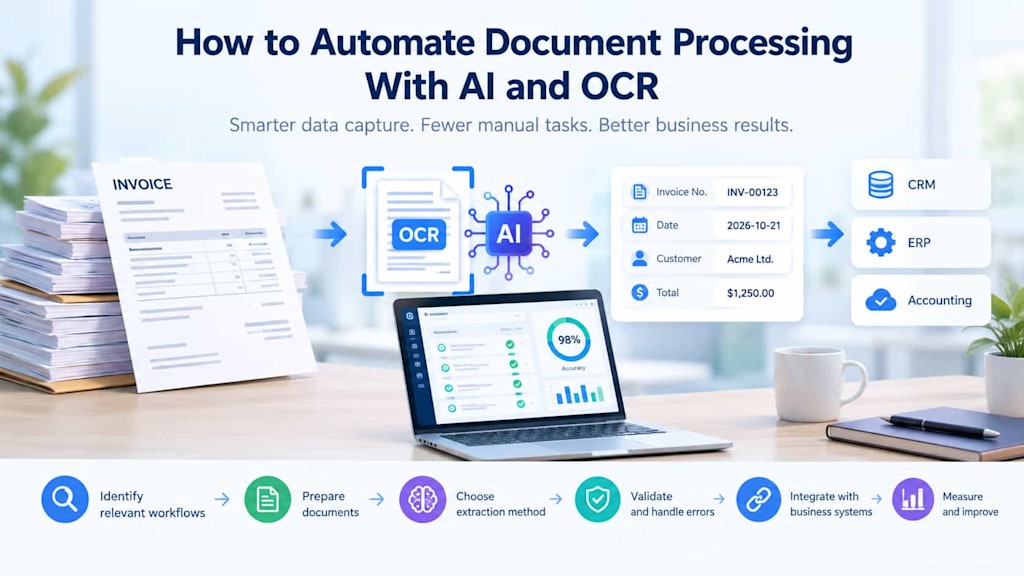
Automating document processing with AI and OCR requires more than selecting a recognition tool. Businesses must identify suitable workflows, prepare source documents, choose appropriate extraction methods, validate results, integrate structured information, and establish clear procedures for exceptions.
A measured implementation approach helps organizations reduce repetitive work without sacrificing accuracy, security, or accountability. Starting with a well-defined workflow, testing against realistic documents, and retaining human oversight for uncertain or high-risk decisions creates a stronger foundation for expansion.
Ultimately, effective automation is not about eliminating human involvement from every document. It is about directing routine work through reliable processes while ensuring that employees remain available where judgment, verification, and responsibility matter most.
About the Creator
Chudovo
Chudovo is a custom software development company, focused on complex systems implementation.
Enjoyed the story? Support the Creator.
Subscribe for free to receive all their stories in your feed.
Comments
There are no comments for this story
Be the first to respond and start the conversation.