
Download Music from YouTube Music
FAQs to Download YouTube Music Songs - everything you need to know

This article will provide you some FAQs and the best way to download YouTube Music for offline playback.
Q1: I have YouTube Premium, can I download music from YouTube Music to computer?
A: Unfortunately, there's no official YouTube Music desktop app till now, let alone downloading music for offline listening.
YouTube Music only provide a mobile and web-based platform for streaming music and music videos, and it doesn't develop a standalone desktop app.
For those who wanna get offline YouTube Music songs on PCs, you'd better use NoteBurner YouTube Music Downloader which helps to extract regular audios from YouTube Music.
Q2: I have a YouTube Music app on phone, can I download songs offline?
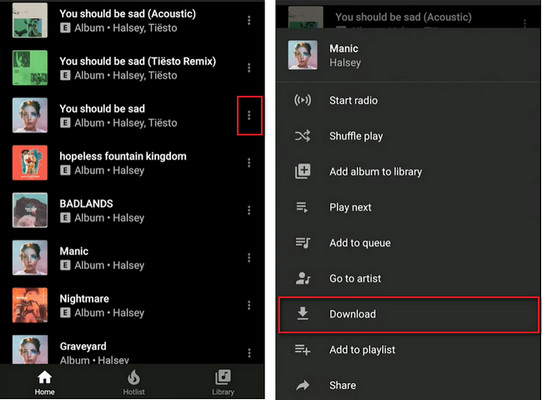
A: Sure, on the YouTube Music mobile app, you can easily download your YouTube playlists using a Premium account.
Q3: Is it possible to download songs from YouTube Music Free?
A: Yes, if you turn to use a third-party tool, NoteBurner YouTube Music Converter, you can download songs from YouTube Music Free to multiple commonly used audio formats at up to 10X speed. This makes it easy to listen to your favorite music offline or on different devices even without YouTube Premium.
Q4: Where does YouTube Music download to on my phone?
A: You can easily download music from YouTube Music to Android or iPhone mobile, however, it's out of luck to locate the downloaded YouTube Music files.
In fact, YouTube Music is a kind of streaming service, just like Spotify and Apple Music, encrypting all its music titles. Your downloaded YouTube Music content is stored in an app data folder, and can only be played within its mobile app. If you're trying to move them elsewhere, you'll only get the error message like "cannot support the file type".
Best Way to Download Music from YouTube Music as Offline Audio Files
Downloading YouTube Music songs with NoteBurner YouTube Music Downloader is a great way to bring more freedom to your collected music tracks.
It's a handy tool to capture your YouTube Music collections and save them in plain MP3, AAC, FLAC, WAV, AIFF, or ALAC, meaning that you could now move YouTube Music downloads to any music player or permanently save them on computer without any hassle.
Best of all, this NoteBurner program could save the original sound quality and ID3 tags for all your YouTube Music titles. Generally speaking, this is the best way to download YouTube Music library for offline usage.
Step 1 Go to Setting Window
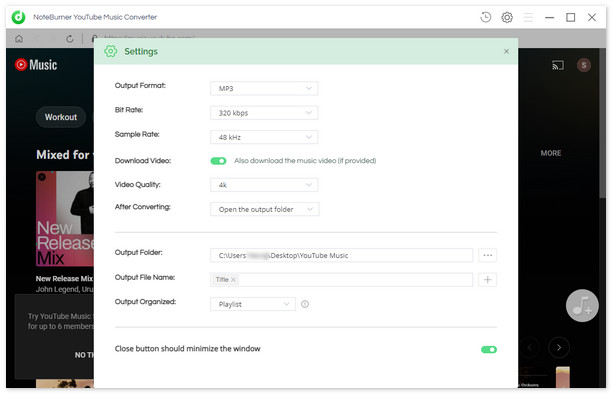
Open NoteBurner on your Windows PC or Mac desktop. On upper right, click the Setting icon to customize your output settings.
Step 2 Select YouTube Music Playlist on NoteBurner
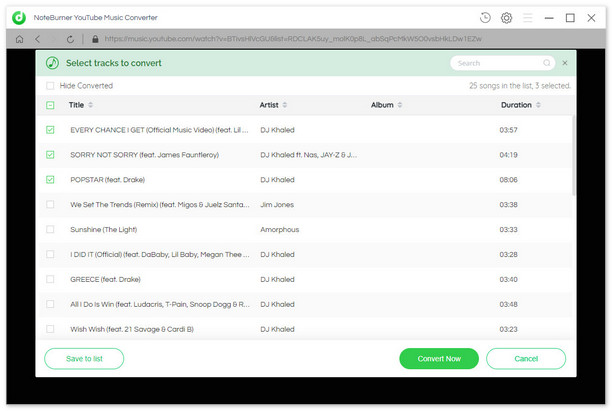
Choose your favorite playlists on NoteBurner's main interface, then tap the "+Add" icon to add songs.
Step 3 Download Music from YouTube Music to MP3
Next, you'll just need to click the "Convert Now" button to start downloading MP3s from YouTube Music Free or YouTube Music Premium.
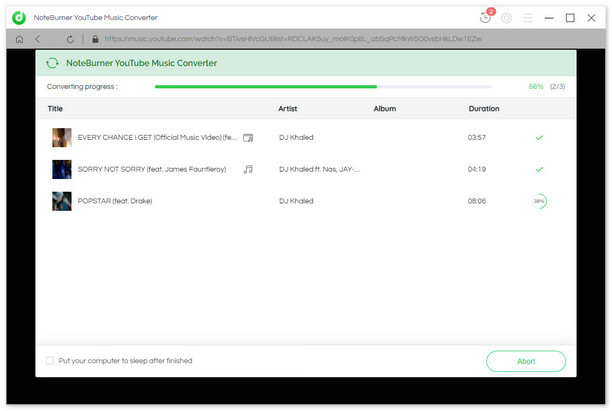
Once the conversion is finished, go to "History" and you'll find all downloaded YouTube Music listed.
Conclusion
YouTube Music has quickly become one of the most popular music streaming services due to its affordability and large selection of songs. But it's disappointing that it allows mobile users only to download songs for offline playback till now.
But in this article, you'll get a useful tool, NoteBurner YouTube Music Downloader, that helps you extract audios from YouTube Music service, while converting them to MP3, AAC, FLAC, or other open-source music formats. After that, you can keep YouTube Music playable on computer forever.
About the Creator
Enjoyed the story? Support the Creator.
Subscribe for free to receive all their stories in your feed.
Comments
There are no comments for this story
Be the first to respond and start the conversation.