
Digital Twins for Facility Management
What Owners Actually Use (Not Just What Vendors Sell)

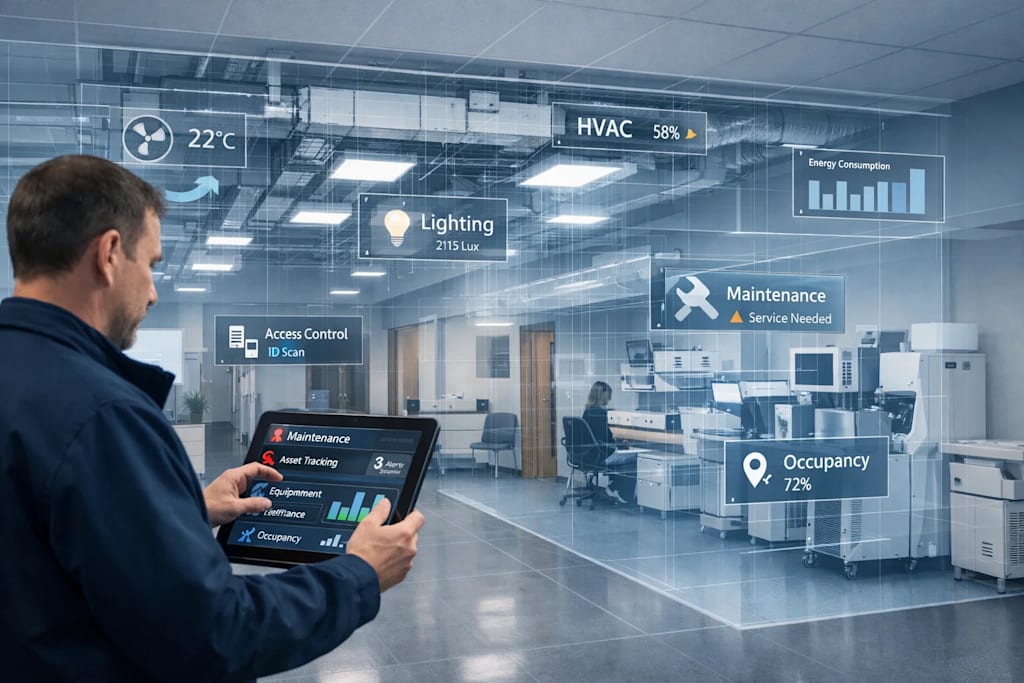
Digital twins are often marketed as futuristic, all-in-one solutions—but what do facility owners actually use in real-world operations?
If you're managing commercial buildings, healthcare facilities, or campuses, the reality is simple: owners don’t need flashy dashboards—they need actionable data, reliability, and ROI.
In this guide, we’ll break down how digital twins are actually used in facility management, what features matter most, and how to implement them effectively.
What is a Digital Twin in Facility Management?
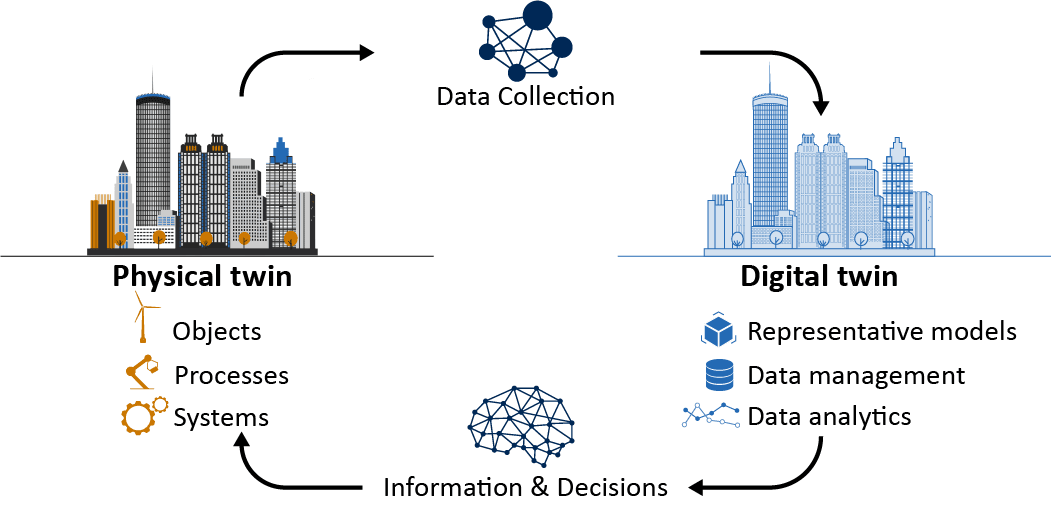
A digital twin is a dynamic, data-connected digital replica of a physical building that integrates:
- BIM models
- IoT sensor data
- Real-time system performance
- Maintenance records
Unlike static BIM models, digital twins evolve over time and support operational decision-making.
Technologies powering digital twins often include platforms like
The Gap Between Marketing vs Reality
What Vendors Promise:
- Fully autonomous buildings
- AI-driven predictive everything
- Complete lifecycle automation
What Owners Actually Use:
- Preventive maintenance tracking
- Asset visibility
- Energy monitoring
- Space utilization insights
👉 The difference comes down to practical usability vs over-engineered solutions.
Core Use Cases Owners Rely On
1. Asset Management & Equipment Tracking
Facility teams use digital twins to:
- Locate equipment quickly
- Track lifecycle and warranties
- Access O&M manuals instantly
Real Value:
Instead of searching spreadsheets, teams click on a BIM element and view all asset data in one place.
2. Preventive & Reactive Maintenance
Digital twins integrate with CMMS (Computerized Maintenance Management Systems) to:
- Schedule maintenance tasks
- Log service history
- Trigger alerts for system failures
- What owners care about:
- Reducing downtime
- Extending asset life
3. Energy Monitoring & Optimization
Using IoT sensors, digital twins help track:
- HVAC performance
- Power consumption
- Peak load usage
Organizations focused on sustainability often align with standards from U.S. Green Building Council.
Outcome:
- Lower operational costs
- Improved energy efficiency
4. Space Utilization & Occupancy Insights
Especially in offices, hospitals, and campuses:
- Track how spaces are used
- Optimize room allocation
- Improve workplace planning
Example:
Underutilized meeting rooms can be repurposed or downsized.
5. Renovation & Capital Planning
Digital twins provide accurate, up-to-date building data for:
- Future renovations
- System upgrades
- Expansion planning
Why it matters:
Owners avoid costly surprises due to outdated drawings.
What Owners DON’T Use (Despite the Hype)
Let’s be honest—many features go unused:
❌ Overly complex 3D dashboards with no practical function
❌ AI predictions without reliable data input
❌ Full automation without human oversight
❌ High-cost integrations with unclear ROI
👉 If it doesn’t save time or money, it won’t be used.
Key Features Owners Actually Value
Accurate As-Built Data (LOD 500) - Reliable models reflecting real-world conditions are non-negotiable.
Simple, User-Friendly Interface - Facility managers are not BIM experts—they need intuitive tools.
Integration with Existing Systems
- CMMS
- BMS (Building Management Systems)
- ERP platforms
Mobile Accessibility - Technicians should access data on-site via tablets or smartphones.
Scalable Implementation - Start small (critical assets) and expand gradually.
How Digital Twins Are Created (Practical Workflow)
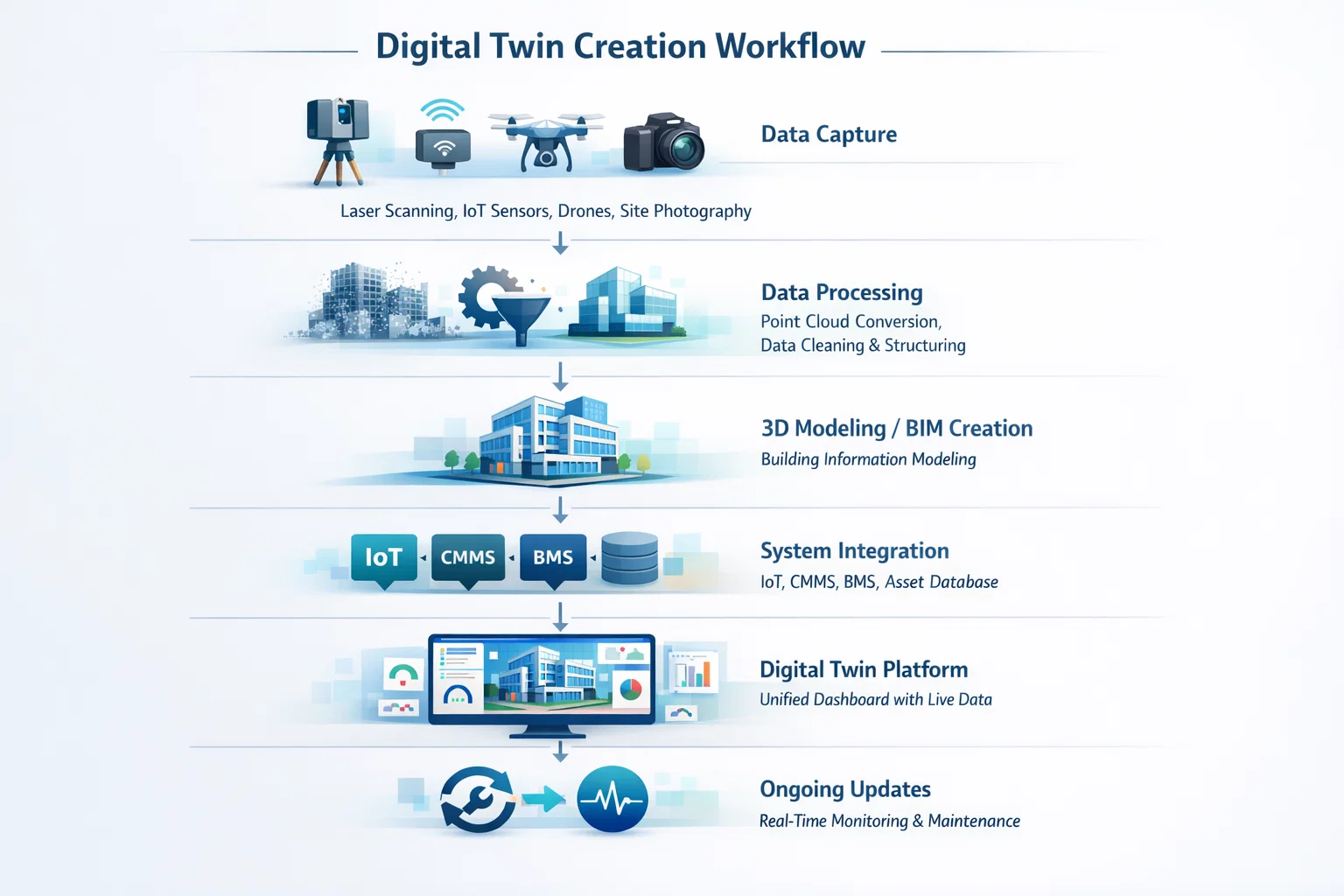
Step 1: Reality Capture - Using laser scanners like Leica RTC360 to capture existing conditions.
Step 2: Scan-to-BIM Modeling - Convert point cloud data into accurate BIM models (LOD 300–500).
Step 3: Data Integration - Attach asset data, manuals, and maintenance records.
Step 4: Platform Deployment - Upload to digital twin platforms for real-time use.
Step 5: Continuous Updates - Keep the model updated with renovations and maintenance changes.
Challenges Facility Owners Face
1. High Initial Cost - Digital twin implementation can be expensive upfront.
2. Data Overload - Too much data without structure becomes useless.
3. Lack of Training - Teams may not adopt tools without proper onboarding.
4. Integration Issues - Legacy systems may not connect easily.
Best Practices for Successful Adoption
🎯 Start with High-Value Assets - Focus on HVAC systems, electrical panels, and critical equipment.
🎯 Define Clear Use Cases - Don’t implement digital twins “just because”—tie them to business goals.
🎯 Keep Data Clean & Structured - Garbage in = garbage out.
🎯 Partner with Experts - Work with experienced BIM and digital twin providers.
Digital twins are not just a buzzword—they are powerful tools when implemented correctly.
But success depends on one key principle:
👉 Focus on what facility owners actually use—not what technology vendors promote.
By prioritizing usability, accuracy, and integration, digital twins can transform facility management from reactive to proactive—delivering real ROI.
Further Reading
Traditional Survey vs BIM Laser Scanning
How Architecture Can Withstand Hurricanes, Flooding, and Rising Sea Levels
Why BIM is Crucial for Durable Coastal Construction Projects in Florida?
Point Cloud to BIM for Historic & Brownfield Buildings in Massachusetts
Using 3D Laser Scanning for Accurate Facility Upgrade and Renovation Planning
Using Scan-to-BIM for Florida’s 30-Year Structural Recertification
About the Creator
Matt Sharon
A professional content writer. Having years of experience in Technology, health, finance, and construction and real estate field. Writing is my passion and I love to play with words Confidently.
Enjoyed the story? Support the Creator.
Subscribe for free to receive all their stories in your feed.
Comments
There are no comments for this story
Be the first to respond and start the conversation.