
CrowdStrike FS Flaw -Global BSOD Crisis
CrowdStrike Falcon Sensor Flaw Sparks Global BSOD Crisis: What You Need to Know

Introduction
CrowdStrike Falcon, a leading cybersecurity solution, provides a comprehensive suite of protection mechanisms designed to prevent breaches and detect sophisticated cyber threats. However, a recent issue with the Falcon sensor has resulted in widespread Blue Screen of Death (BSOD) errors on Windows hosts globally. This article offers an in-depth analysis of the problem, its potential impact, associated risks, and detailed steps for mitigation, including an automated solution.
Issue Summary
Description
The issue pertains to a defect in a CrowdStrike Falcon sensor update that resulted in BSOD errors on Windows systems. The problem was traced back to a faulty driver file named C-00000291.sys, which was inadvertently included in a sensor update. This defect led to system instability, manifesting as various BSOD errors and continuous reboot loops.
Common Error Messages
Affected users have reported encountering the following BSOD errors:
- • PAGE_FAULT_IN_NON_PAGED_AREA
- • CRITICAL_PROCESS_DIED
- • SYSTEM_THREAD_EXCEPTION_NOT_HANDLED
Root Cause
According to CrowdStrike CEO George Kurtz, the issue was due to a “defect found in a single content update,” and not a security breach or cyberattack. The faulty channel file caused system crashes, impacting Windows hosts but leaving Mac and Linux systems unaffected.
Affected Areas and Risks
Potentially Affected Systems
• Operating Systems: Primarily Windows hosts.
• Scope: Thousands of Windows PCs globally.
• Impact: Continuous BSOD errors leading to reboot loops, causing significant disruption to users and potentially halting business operations.
Risks
- 1. Operational Disruption:
- Impact: Frequent system crashes can halt critical operations, leading to loss of productivity.
- Mitigation: Prompt resolution and communication with affected users are essential.
- 2. Data Loss:
- Impact: Repeated reboots and crashes could lead to unsaved data loss.
- Mitigation: Regular backups and data recovery strategies should be in place.
- 3. Resource Drain:
- Impact: IT resources will be consumed in addressing the issue and deploying fixes.
- Mitigation: Automating the resolution process helps reduce manual intervention and resource consumption.
Mitigation Process
Manual Resolution
1. Boot into Safe Mode or Windows Recovery Environment (WRE):
Access the system without triggering BSOD errors.
2. Navigate to the CrowdStrike Driver Directory:
Path: C:\Windows\System32\drivers\CrowdStrike
3. Delete the Faulty File:
Locate and delete C-00000291.sys.
4. Reboot Normally:
Restart the system to resume normal operations.
Automated Resolution Using Group Policy
To efficiently resolve the issue across many systems, an automated solution leveraging Group Policy Objects (GPOs) is recommended. This approach involves creating and deploying two PowerShell scripts via GPOs.
Script 1: Force Safe Mode Boot
Purpose: Configure systems to boot into Safe Mode where the faulty driver can be removed.
Script: ForceSafeMode.ps1

Steps:
Create a GPO:
Name: "Force Safe Mode"
Apply to affected OUs.
Edit GPO:
Navigate to Computer Configuration -> Policies -> Windows Settings -> Scripts (Startup/Shutdown).
Add ForceSafeMode.ps1 to Startup scripts.
Script 2: Fix the Issue in Safe Mode
Purpose: Delete the problematic driver file and revert Safe Mode settings.
Script: CrowdStrikeFix.ps1
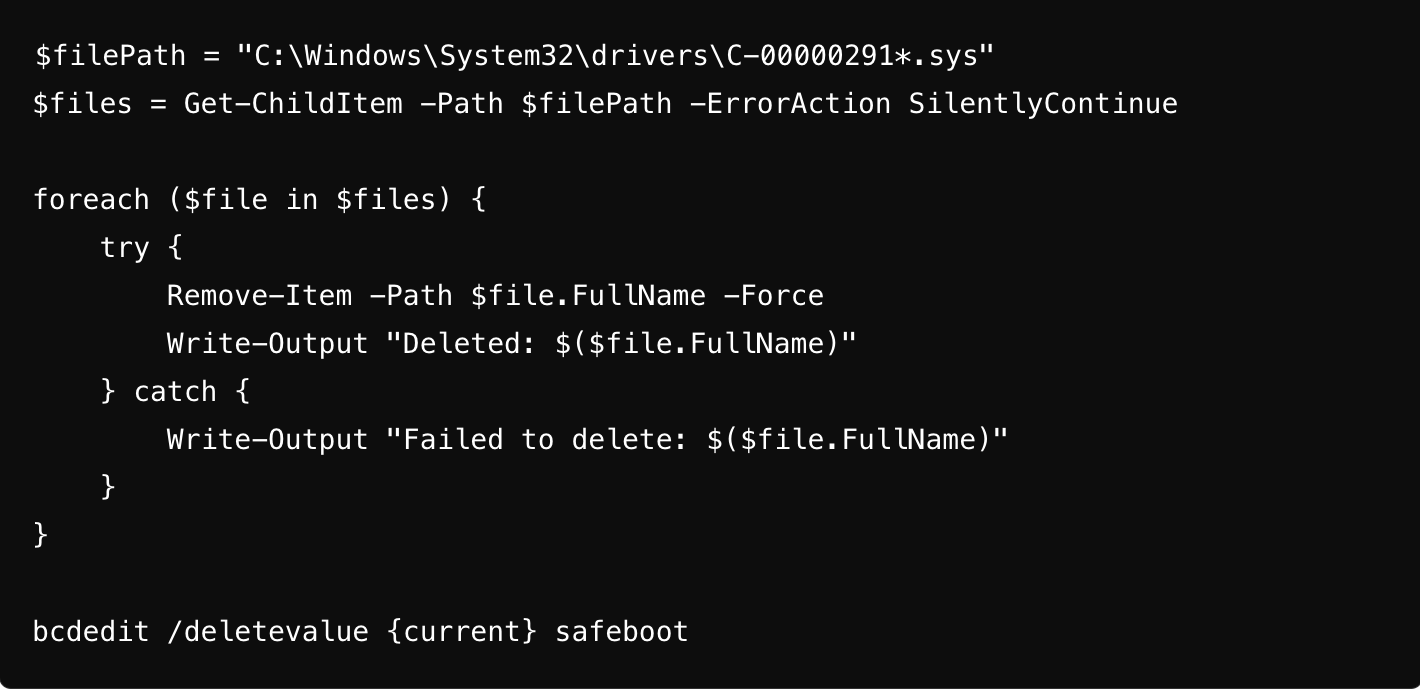
Steps:
Create a GPO:
Name: "CrowdStrike Fix Safe Mode"
Apply after "Force Safe Mode" GPO.
Edit GPO:
Navigate to Computer Configuration -> Policies -> Windows Settings -> Scripts (Startup/Shutdown).
Add CrowdStrikeFix.ps1 to Startup scripts.
Deployment:
Ensure "Force Safe Mode" GPO is applied first to reboot into Safe Mode.
"CrowdStrike Fix Safe Mode" GPO will execute in Safe Mode, applying the fix and reverting boot settings.
Conclusion
The CrowdStrike Falcon sensor BSOD issue, while significant, can be effectively managed with a systematic approach to mitigation. Understanding the problem, its scope, and associated risks is crucial for effective resolution. By employing automated solutions via Group Policy and PowerShell scripts, organizations can streamline the resolution process, minimize operational disruption, and restore normalcy efficiently.
Organizations are encouraged to test the provided scripts in a controlled environment before widespread deployment and to maintain clear communication with users to manage expectations and minimize impact. Through these measures, the BSOD issue can be addressed effectively, ensuring continuity of operations and maintaining the integrity of cybersecurity defenses.
About the Creator
Enjoyed the story? Support the Creator.
Subscribe for free to receive all their stories in your feed.
Comments
There are no comments for this story
Be the first to respond and start the conversation.