
Block Unused SIM Cards Quickly with TAFCOP Portal
Easily block unused SIM cards with the TAFCOP Portal. Streamline your mobile management and enhance security today. Click to discover how simple it can be!

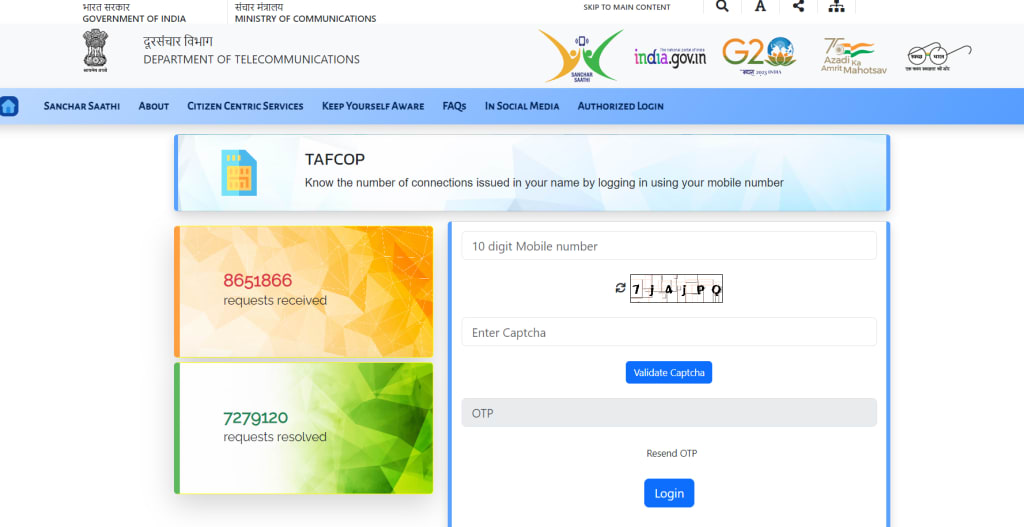
If you have purchased multiple SIMs under one ID and don't plan on using all of them, now it is easier than ever to deactivate those which you aren't using. The Indian government recently unveiled TAFCOP (Telecom Analytics for Fraud Management and Consumer Protection), managed by the Department of Telecommunications (DoT).
What Can Be Found on the TAFCOP Portal?
By visiting the TAFCOP portal, you can:
Check Active SIMs Under Your Name: It is simple to discover which SIM cards are active under your name, enabling you to quickly ascertain that no one has fraudulently taken one in your name. This feature helps ensure no one has taken fraudulent advantage of it by fraudulently taking up one or more SIMs in your name.
Block Unwanted SIMs: If you discover any unwarranted SIMs under your name, immediately block it to protect yourself against fraud. This prevents scammers from exploiting your identity.
View Sim Details: With SIM Details you can easily track all your SIM cards by viewing details like their number, issuance date and other important data. This enables you to keep an effective watch over them all.
Register Complaints: Should you experience any issues with your SIM card, here is where you can register them so we can respond swiftly and address them as quickly as possible.
How Can I Navigate The TAFCOP Portal?
To use the TAFCOP portal, first enter your Aadhaar number and date of birth. Next, an OTP will be generated for you to enter into the portal - once this process is complete you'll be ready to utilize its features.
Why Is TAFCOP Portal Significant?
TAFCOP provides mobile customers with a powerful tool for protecting themselves against SIM card fraud. Customers can easily gain information on their SIMs and block any suspicious ones using this portal.
How Can I Access the TAFCOP Portal?
To access the TAFCOP portal, follow these steps.
Visit TAFCOP at this address: https://tafcop.dgtelecom.gov.in and log-in using your Aadhaar number and date of birth to generate an OTP that will be sent directly to your mobile number.
Enter OTP: Enter the OTP you received on your mobile. After entering OTP, click "Login". Utilize Portal Features: Once logged in, you can take advantage of all the features offered by TAFCOP portal.
How Can I Deactivate SIM Cards on TAFCOP Portal?
Log into Your Account: Click "Deactivate SIM" Tab
Select Your Reason for Deactivation: Once clicked "Submit", a pop-up window will prompt you to provide the reason for deactivating. Select Your Response And Submit It Deactivate SIM Cards: Following clicking Submit, your selected SIM cards will be deactivated.
No Fees: Deactivating a SIM card through TAFCOP's portal does not incur any charges and usually takes less than 24 hours to complete. Please Note:
Important If this SIM is linked with bank accounts or other important services, be sure to inform these providers to prevent any issues with deactivated service accounts.
Conclusion: TAFCOP portal is an invaluable tool for managing and protecting SIM cards, providing an efficient means to resolve any related issues as well as shield yourself against fraud.
Frequently Asked Questions (FAQs) About TAFCOP Portal
Q1. What is the TAFCOP portal and its purpose?
1Ans. TAFCOP (Telecom Analytics for Fraud Management and Consumer Protection) portal was recently unveiled by the Indian government as an initiative to assist mobile users manage their SIM cards more easily. Administered by Department of Telecommunications (DoT), its primary function is protecting consumers against SIM card fraud by providing users with tools such as checking for active SIMs under their name, blocking unwanted ones, viewing details about them and filing complaints against any occurrences of SIM fraud.
Q2. How can I locate my SIM cards active under my name on the TAFCOP portal?
2 Ans. To easily determine how many active SIM cards exist under your name, follow these steps.
Visit TAFCOP website: https://tafcop.dgtelecom.gov.in and select "Login" on its homepage to complete registration process. Provide Aadhaar Number and Date of Birth before entering OTP sent to registered mobile phone number for OTP generation and entry.
Once logged in, you can view all active SIM cards registered under your name.
Q3. How can I block an unwanted SIM card using TAFCOP portal?
3Ans. To block an unwanted SIM card, follow these steps.
Log into the TAFCOP portal using your Aadhaar number and OTP. Its Select "Deactivate SIM", review all SIMs issued under your name, then click "Deactivate" next to any SIM you would like to block.
Once selected, click "Submit," and your SIM card will be deactivated within 24 hours without incurring any additional costs.
Q4. What information must I provide in order to use TAFCOP portal?
4 Ans. To use the TAFCOP portal, it is necessary to provide your Aadhaar number and date of birth. After providing this data, an OTP will be sent via text messaging on your registered mobile number allowing you to log into and utilize its features.
Q5. Does using the TAFCOP portal to deactivate my SIM card incur any costs?
5Ans. No fees or charges apply when deactivating a SIM card via TAFCOP portal. The process typically completes within 24 hours and will cost nothing out-of-pocket.
About the Creator
Anya Singh
Anya Singh is a passionate writer at Tafcop, specializing in telecommunications content. With a deep understanding of the Tafcop portal, she delivers clear, engaging, and SEO-optimized articles that inform and captivate our readers.
Enjoyed the story? Support the Creator.
Subscribe for free to receive all their stories in your feed.
Comments
There are no comments for this story
Be the first to respond and start the conversation.