
3uTools Mac Latest 2025 features for Mac Users
Quick Guide for 3uTools macOS Lovers

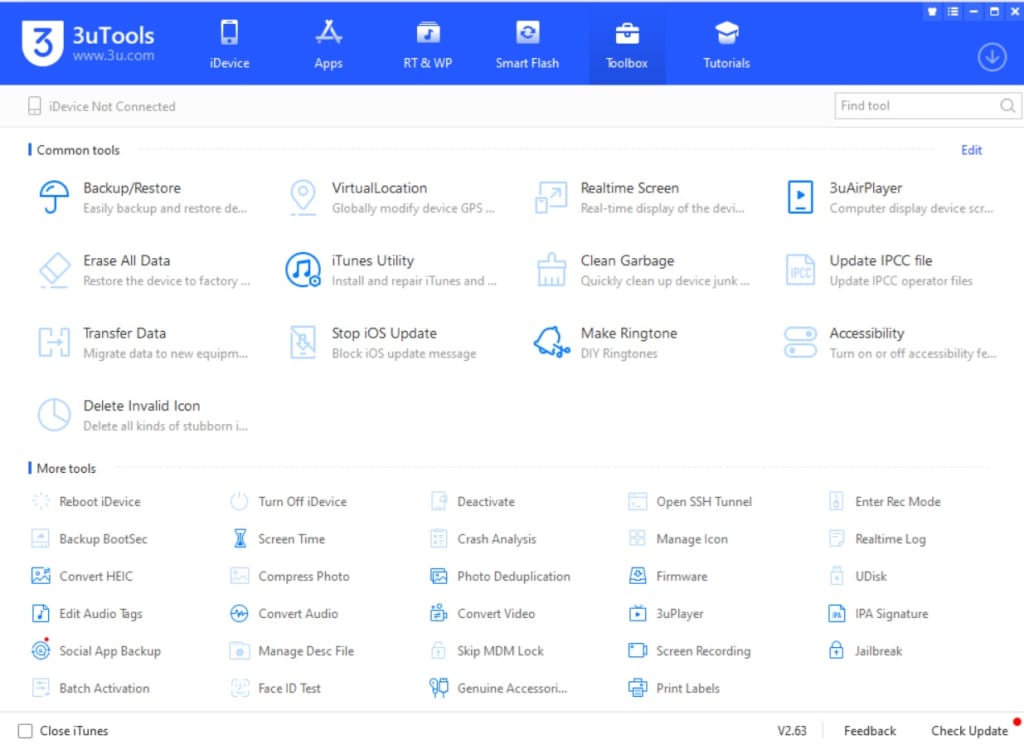
3uTools is a multi-functional iOS device management application that helps users control their iPhones, iPads, and iPods from a PC or Mac. It includes a variety of features, such as app management, file transfers, backups, and device customization. Although the complete range of features on 3uTools is primarily available for Windows, the Mac version offers a more limited set of functionalities but still provides many valuable tools for managing iOS devices.
Features of 3uTools for Mac Version
1. Device Information
- Access detailed information about your iOS device, including the device model, iOS version, serial number, IMEI number, storage capacity, and more.
2. File Management
- File Explorer: Manage the files on your iPhone/iPad, enabling file transfers between your iOS device and Mac.
- Photo & Video Management: Review, manage, and transfer photos and videos between your Mac and iOS device.
- Backup & Restore: Create backups of your iOS device or restore from previous backups, helpful for data transfer when upgrading or switching devices.
3. App Management
- Install/Uninstall Apps: Manage your iOS device’s apps by installing or removing them directly from your Mac.
- App Data: Access and manage app data on your device, including exporting or backing up app files and documents.
4. Ringtones & Wallpapers
- Ringtone Management: Set custom ringtones on your iOS device or transfer ringtones between your Mac and iPhone.
- Wallpaper Management: Change wallpapers on your device or transfer new ones from your Mac to your iPhone.
5. iCloud & iTunes Backup
- iCloud Management: While less extensive than the Windows version, 3uTools for Mac allows access to manage iCloud backups and sync content with your device.
- iTunes Backup: You can manage and restore from your iTunes backups via the 3uTools interface if you prefer iTunes.
6. Flash and Jailbreak Tools (Limited)
- Firmware Flashing: Download and install the latest firmware (iOS version) onto your device for updating or downgrading iOS versions.
- Jailbreaking: The Mac version provides limited jailbreaking features for specific iOS versions, though it is more restricted compared to the Windows version of 3uTools.
7. No Jailbreak Features (Non-Jailbroken Devices)
- Even without jailbreaking, 3uTools for Mac can perform most tasks such as file management, backups, and app management. Jailbreaking is not necessary to utilize these tools.
8. System Cleanup
- Remove junk files from your iOS device to free up storage space, which includes caches, logs, and temporary files, enhancing your device's performance.
9. Device Repair (Limited)
- In certain cases, 3uTools can assist with basic device repairs, like resolving boot loops or restoring your device if it becomes unresponsive. However, this feature may be limited in the Mac version.
Differences Between Mac and Windows Versions
While the Mac variant of 3uTools offers a wealth of useful features, the Windows version generally provides a broader range of functionalities. For instance, the Windows version supports:
- More extensive jailbreaking capabilities
- Custom ROM flashing
- Advanced system adjustments
These functionalities are more constrained on the Mac version due to technical and compatibility limitations.
How to Use 3uTools on Mac
1. Download 3uTools for Mac
- Visit the 3uTools Mac website to download the macOS version of the software.
2. Install the Software:
- Open the downloaded .dmg file and follow the on-screen instructions for installation.
3. Connect Your iOS Device:
- Open 3uTools after installation, then connect your iPhone, iPad, or iPod via a USB cable.
4. Start Managing Your Device:
- Utilize the various features of 3uTools to manage your apps, files, backups, and more.
3uTools for Mac offers a solid range of features for managing your iOS devices without jailbreaking. It enables viewing device information, managing files, handling app management, and performing basic system repairs, although it lacks some advanced capabilities found in the Windows version. If you’re seeking a comprehensive iOS device management solution and you own a Mac, 3uTools is a commendable choice for handling essential tasks with your iOS devices.
About the Creator
sadbal
I am Developer and Secretary and Teacher, Interesting with many ares.
Enjoyed the story? Support the Creator.
Subscribe for free to receive all their stories in your feed.
Comments
There are no comments for this story
Be the first to respond and start the conversation.