
6 Best Lyrics Apps for Musicians
Stuck writing lyrics? Here are the 6 best lyrics apps for musicians in 2026, routed by genre, so you pick the right one. Try them on your next song.

Search "lyrics app" and you get dozens of results that all claim to help you write. Most don't, not really.
Some are a plain notepad with a music icon on it. Some are a rhyming dictionary, which is a lookup tool, not a place to write. And some are a full music-making app with a lyrics box bolted on the side.
Few of them actually help you write the words.
Here's the deal. This list is routed by the kind of musician you are, not stacked into one flat ranking. A drill rapper and a folk singer-songwriter need different tools, and pretending one app wins for both helps nobody.
Key takeaways
- Best for rappers / hip-hop writers: RhymeFlux
- Best all-genre word and rhyme reference: MasterWriter
- Best free rhyming dictionary: RhymeZone
- Best for melody-first songwriters: Hookpad
- Best AI help for writer's block: LyricStudio
- Best free all-in-one for producers and bands: BandLab
How did we rank the best lyrics apps?
I judged every app on five things, then ran one last test over the whole list. The goal was to match the tool to the job, not crown one winner.
Here are the five criteria.
- Rhyme and word depth. Perfect rhymes, near rhymes, and multi-syllable rhymes, plus phrase rhymes and whole word families. A deep tool finds connections you'd never spot on your own.
- Writing space and song structure. A real editor with verse, chorus, and bridge sections and live feedback, versus a blank notepad or a lookup box.
- Music integration. Does it also help with melody, chords, beats, or recording? This is the all-genre angle, and it splits the field hard.
- Sync and safety. Cloud sync, autosave, version history, offline access. Losing a verse you'll never write the same way twice is the worst feeling in music.
- Price and platforms. Is the free tier actually useful? What does it really cost, and where does it run: web, iOS, Android, desktop? Ads count against it.
Now that test. A rhyming dictionary like RhymeZone is a lookup tool, not a writing app, while a music-making app like BandLab makes the whole song with a lyrics box attached. Both earn a spot here, for completely different jobs.
One quick example of what "rhyme depth" even means. A basic tool only gives you perfect rhymes: brain, train, rain. A deeper tool also finds the near-rhymes most modern music leans on: brain, flames, came.
Which are the 6 best lyrics apps for musicians right now?
Six picks, in order. Each one is the best at its specific job. Read past the headline to the weaknesses, because that's where you'll figure out if it fits you.
1. RhymeFlux - best for rappers and hip-hop writers
RhymeFlux is a rap and hip-hop songwriting and rhyming app with recording built in, running on web, iOS, and Android. It's the writing space I wished existed when I was filling notebooks with half-finished verses.
The two headline features are Rhyme Highlighting and Live Syllable Counting. As you type, the highlighter color-codes matching rhyme families in your lines in real time, including slant and near rhymes, not just perfect ones, and a running syllable count sits on every line.
It works word by word using an extended rap-specific slang map and rap-tuned sound matching. So the highlighter colors "God" and "Fraud" in the same family, and catches near-rhymes like "veins" and "brain" that a plain dictionary would miss. If you want the deeper version of why those count, here's a breakdown of what slant rhyme is.
One detail worth knowing: the live highlighter colors single words by rhyme family. It does not paint multi-word chains across a bar. The multi-syllable work comes from two other tools.
Word Suggestions is the first. Tap any word and get instant rhymes, word swaps, and multi-syllable options on the spot. No tab-switching, no losing your place.
Rhyme Finder is the second. Type any word and get a deep list of rhymes grouped by syllable count, so you can hunt the exact shape your bar needs.
Then there's the flow side. That syllable count pairs with a visual flow grid that shows where each syllable lands against the beat, so you catch an overloaded bar before you ever hit record. That's the part most lyric apps completely ignore.
The rest rounds it out: per-line recording, a distraction-free read mode for the booth, drag-and-drop song sections, autosave, and cloud sync. There's also a rap-tuned AI co-writer when you want a push on a stuck line.
Now the limits, because they matter. It's built for rhyme-driven music: rap, hip-hop, drill, trap, and melodic rap. If you write non-rhyming songs, or you need to compose the melody and chords yourself, this is not your tool.
It also doesn't make beats. It's a writing and recording app, not a beat-making app.
Best for: rappers and rhyme-dense writers who want pro rhyme detection, syllable and flow feedback, and recording in one place.
Price: The free tier gives you 1 song with 3 sections and 15 AI uses every 30 days. Rhyme highlighting and AI light up on the first 12 lines of your first tab, then it drops to plain text, and you can keep writing for free forever. Pro is $15/month, $99/year, or $249 lifetime, which opens up unlimited songs and lines, full highlighting, 800 AI uses, and offline writing.
2. MasterWriter - best all-genre word and rhyme reference
MasterWriter is a deep, curated word and phrase reference built for serious lyricists in any genre. It's been a studio staple for songwriters for years, and you can feel that pedigree the moment you open it.
What you're paying for is depth. One of the largest rhyme dictionaries anywhere, plus tens of thousands of rhymed phrases, a strong thesaurus, word families, and pop-culture references. It also ships with version and copyright tools for tracking your songs.
The trade-off: it's a reference and word-finding tool more than a flow-aware writing space. There's no syllable meter, and no rap-specific slant or multi-syllable intelligence, so flow-heavy writers will want something else for the rhythm side.
It runs on Mac, Windows, iOS, and Android with cloud sync, so your work follows you. The word depth is the draw, full stop.
Best for: dedicated songwriters across pop, country, folk, and rock who want the deepest word and phrase reference money can buy.
Price: about $79.95/year, with a long free trial and no permanent free tier. There's a monthly plan too if you'd rather not pay up front.
3. RhymeZone - best free rhyming dictionary
RhymeZone is the most-used free rhyming dictionary on the web, and for good reason. It pulls perfect rhymes, near and slant rhymes, synonyms, and related words from Merriam-Webster.
It's fast, it's free, and it's been the go-to lookup for songwriters of every genre for a long time. Type a word, get a wall of options, copy what you need.
But know what it is. It's a lookup tool, not a writing app. With no editor, no syllable counting, and no way to save, every rhyme means leaving your draft, looking it up, and pasting it back.
That friction adds up over a full session. Still, for a free reference you keep open in a second tab, nothing beats it.
Best for: quick, free rhyme lookups next to whatever you write in.
Price: free on the web and ad-supported, with a small paid ad-free option on the mobile app.
4. Hookpad - best for melody-first songwriters
Hookpad is a melody-and-chords writing tool from Hooktheory that shows you which chords and notes fit together using built-in music theory. It learned that theory from a huge database of real songs, so its suggestions actually sound right.
This is the pick for musicians who write the music, not just the words. If you start at the piano or the keyboard and the lyrics come later, Hookpad is built for your half of the job.
The catch for a lyrics list: its lyrics feature is a plain text line under the melody, with no rhyme help, no syllable help, and no thesaurus. That lyrics line sits on the paid Standard plan, and the free tier has no lyrics feature at all, so the free version is really just for composing the music.
It's web only, so no native mobile app. When your song's done, you can export it as an audio file to take into a recording session.
Best for: singer-songwriters and producers who build melody and chords first and want the lyrics to sit under the music.
Price: there's a free tier, Standard is $7.99/month or $199 lifetime, and an AI add-on runs an extra $14.99/month.
5. LyricStudio - best AI help for writer's block
LyricStudio is an AI writing assistant that suggests lines and rhymes in your chosen genre and mood when you're stuck. Point it at a vibe, and it offers up next lines to react to. It works across any genre, which makes it a handy blank-page breaker.
The weaknesses are real, though. The suggestions can feel generic, so you'll edit heavily to make them sound like you. It also has no melody or beat side, and it isn't rap-specialized, so flow-heavy writers won't get rhythm help.
It runs mostly on the web. Think of it as a co-writer for getting unstuck, not a full studio.
Best for: writers of any genre who want AI nudges to get the pen moving again.
Price: there's a free trial plus a low-cost paid subscription. Pricing shifts now and then, so check the site for the current numbers before you commit.
6. BandLab - best free all-in-one for producers and bands
BandLab is a genuinely free all-in-one music-making app, with recording, beats, and collaboration, that also includes a cloud-synced lyrics pane with version history. So your words live right next to the track instead of in some separate app.
The free part is the headline, and it's not a trick. You get a real recording and beat-making studio at no cost, plus a place to keep your lyrics in the same project.
One limitation. The lyrics pane is bare: no rhyme help, no syllable counter, no verse or chorus templates. It's a music-making app first, with lyrics attached as a convenience.
It runs on web, iOS, Android, and desktop, so you're covered everywhere. The core app is free, with an optional paid membership on top.
Best for: producers and bands who want to write lyrics in the same free app where they make the song.
Price: the core app is free, with an optional paid membership. Check the app for the current membership price.
How do these lyrics apps compare at a glance?
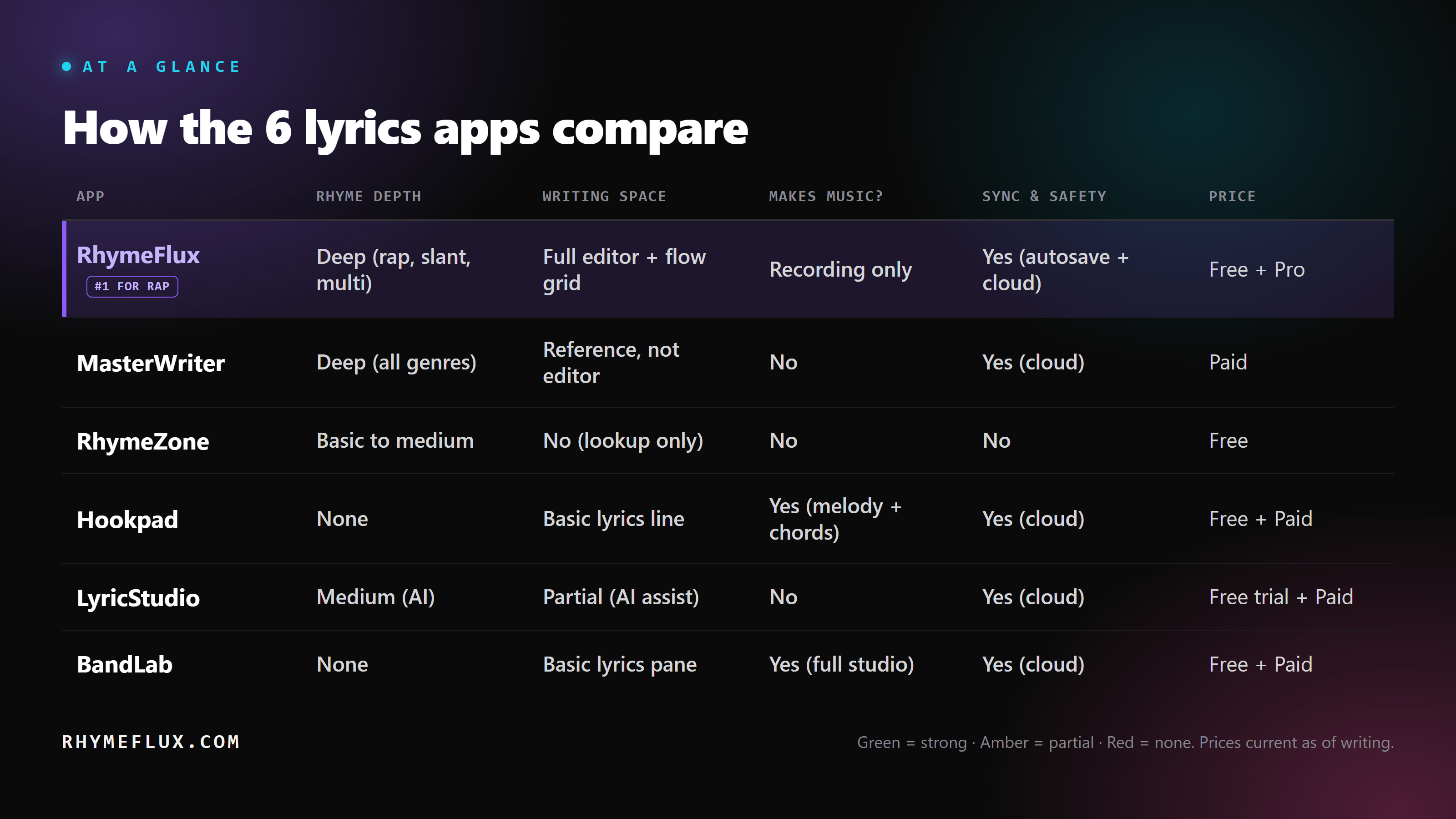
Prices are current as of writing. Check each app for the latest before you buy.
What do musicians get wrong when choosing a lyrics app?
Three mistakes, over and over. None of them are about talent. They're about picking the wrong category of tool for the job in front of you.
Mistake one: buying the wrong category entirely. People grab a music-making app or a reference tool when what they actually need is a place to write the words, then wonder why the lyrics still aren't coming. The fix is to decide first whether your real bottleneck is the words, the music, or both, then shop for that.
Mistake two: a tool tuned for the wrong genre. A rap-tuned rhyme tool will steer a country ballad somewhere weird, and a melody composer is dead weight if all you needed was a list of rhymes. The fix is simple: match the tool's specialty to your genre, not to whatever's trending.
Mistake three: no autosave, no sync, gone. Writing in something with no cloud sync or autosave is how a great verse disappears for good: one closed tab, one dead phone, and it's gone. The fix is to pick a tool that saves and syncs on its own, or back up every single session by hand.
Which lyrics app is right for you?
Pick by what kind of musician you are. The right tool is the one that matches your bottleneck, so route yourself with this:
- If you write rap or rhyme-dense music, go with RhymeFlux.
- If you're an all-genre lyricist who wants the deepest word and phrase reference, go with MasterWriter.
- If you just need fast, free rhyme lookups, go with RhymeZone.
- If you write melody and chords first, go with Hookpad.
- If you're stuck and want AI suggestions, go with LyricStudio.
- If you make the beat and the song in one place, go with BandLab.
One honorable mention for the phone-only writers: Lyric Notepad bundles rhyme coloring, a syllable counter, and a recorder on mobile, but it leans on ads and has no cloud sync, so I left it off the main six.
Frequently asked questions
Is there a free app for writing lyrics?
Yes, several. RhymeFlux has a free tier for rap and rhyme-heavy writing, RhymeZone is a free rhyming dictionary, and BandLab is a free music-making app with a lyrics pane. Each one is free for a different job, so pick by what you actually need.
What's the best lyrics app for songwriters versus rappers?
For all-genre songwriters, MasterWriter has the deepest word and phrase reference. For rappers, RhymeFlux is built around slant rhymes, syllable counting, and flow, which a general tool won't give you. The genre you write in should decide it.
Do I really need a rhyming dictionary to write good lyrics?
Not strictly, but it helps you escape the obvious rhymes everyone reaches for first. A good rhyme tool finds near-rhymes and multi-syllable options you wouldn't think of, which keeps your lines from sounding predictable. Think of it as a sparring partner, not a crutch.
Can I write lyrics on my phone?
Yes. RhymeFlux runs on iOS and Android, MasterWriter and RhymeZone have mobile apps, and BandLab is on phones too. If you only write on your phone, double-check the app has cloud sync so you never lose a verse.
Are AI lyrics apps worth it?
For breaking a blank page, they can be, since a suggested line is easier to react to than empty space. Just expect to edit the output heavily so it sounds like you and not a machine. RhymeFlux keeps its AI co-writer as one tool among many, instead of the whole point, which I think is the right balance.
About the Creator
Luke Mounthill
Hey, I'm Luke Mounthill. I produce 100% royalty-free, vocal-ready beats for Rap, Hip Hop, R&B, Trap, and more. I also offer mixing, mastering, custom production, and share useful tips to help your music stand out.
Enjoyed the story? Support the Creator.
Subscribe for free to receive all their stories in your feed.
Comments
There are no comments for this story
Be the first to respond and start the conversation.