
Your computer never really boots itself. Here is the nanosecond trick that makes it look easy.
A power button, a hidden chip, and a chain of trust that decides who controls your device.
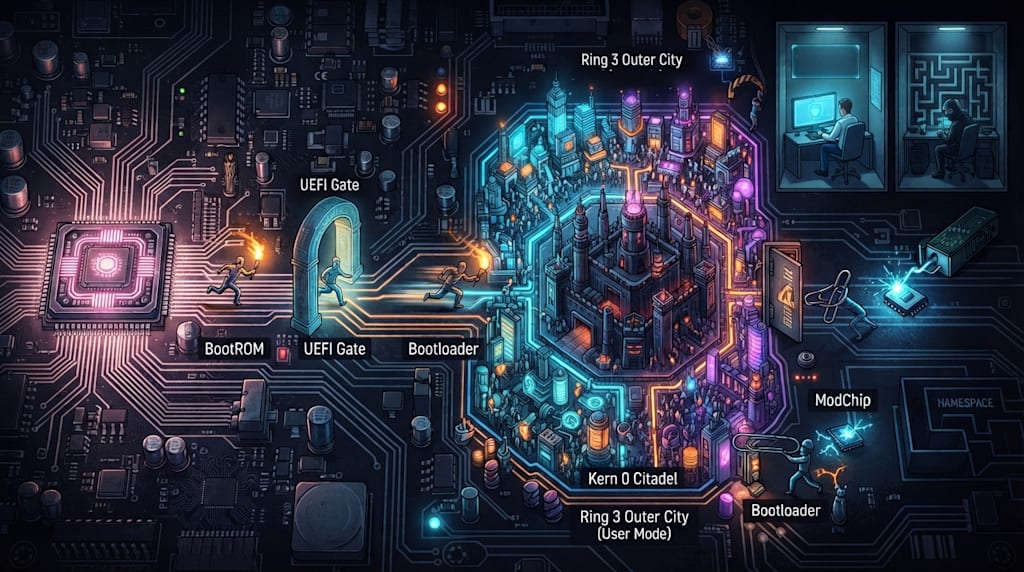
The fan starts. The light comes on. The screen stays black.
For a human, this is less than a second. For the computer, it is a relay race from hardware to software, from firmware to kernel, from Ring 0 to Ring 3.
We say a computer pulls itself up by its bootstraps. That sounds impossible. A program must run before the computer can start. But the computer cannot run a program until it has started.
The answer is simpler than the paradox. The computer does not lift itself. It stands on a tiny stool built into the hardware. Then it reaches a bigger stool. Then it climbs into the operating system.
The first program is not on the hard drive
Early computers made you start them by hand. You flipped switches to enter a few instructions. You fed in paper tape or punched cards. That tiny program did one job: read a larger program from somewhere else.
Later, engineers burned that tiny program into hardware. It does not need to be started. It sits where the CPU must look after power-on.
When power is stable and the clock starts, the CPU receives a reset signal. Reset does not mean random. It puts the CPU into a fixed state. The program counter goes to a fixed address called the reset vector. On traditional x86, that address points to the BIOS or UEFI firmware on the motherboard. On ARM, phones, and game consoles, execution starts in BootROM, a small program burned into the chip at the factory.
Firmware fixed in hardware is the first cause of booting. It does not need to be booted. After CPU reset, it is simply what runs.
This is staged bootstrapping. BootROM or UEFI loads the bootloader. The bootloader loads the kernel. The kernel starts user space. User space starts system services. The desktop appears. Each stage depends on the one before it. The chain of trust passes down one link at a time.
The map on the disk
The CPU wakes up and faces a dark storage wasteland: the hard drive. To load an operating system into memory, it needs a map.
The old map was MBR, the Master Boot Record. It lives in the first 512 bytes of the disk. Even a 10 TB drive gives MBR only that tiny space. Because addresses take up room, MBR can recognize drives only up to about 2 TB. It supports at most four primary partitions. It is an old notebook with one page of contents. It cannot hold much, and it cannot guide you to the big city.
Modern computers use UEFI booting with GPT, the GUID Partition Table. GPT removes the limits on capacity and partition count. It also stores a backup. If the MBR is damaged, the whole disk may become unreadable. GPT keeps a copy at the front and another at the back. If one copy is damaged, the other can still work.
To keep old software happy, a GPT disk still keeps a fake MBR at the start. Its only job is to tell old software: this disk already has an owner. Do not touch it.
The map tells the system where to find the next runner. The first runner is firmware.
First runner: firmware
After you press the power button, the CPU runs its first piece of authority code. That code lives in firmware.
On PCs, the old steward was BIOS. It understood 16-bit assembly. It read the MBR at the head of the disk. It was slow, rigid, and plain. The new steward is UEFI. UEFI is almost a small operating system. It can read FAT32. It can run .efi programs. It can even connect to a network. That is why modern BIOS screens can use a mouse, take screenshots, and look fancy.
Embedded devices work the same way with different names. Phones, tablets, and the Switch use BootROM. BootROM is the first code after hardware wake. It is earlier than any software. It usually cannot be changed. Its job is simple: initialize basic hardware, then find and verify the next runner.
A PC’s UEFI reads a boot program such as bootx64.efi from the ESP partition on a GPT disk. A phone’s BootROM reads the next bootloader from flash, eMMC, or an SD card and checks its signature. The Switch’s Tegra BootROM verifies and loads the official bootloader.
The first torchbearer does not light the whole field. It passes the flame.
Second runner: the bootloader
After firmware checks the hardware, it usually does not wake Windows or Linux directly. It wakes a middleman: the bootloader.
The kernel is picky. It may need boot parameters. You might want safe mode, debugging, or a specific root partition. It may live in a file system the firmware cannot read, such as Linux ext4, while UEFI understands only FAT. You may have two operating systems and need a menu. You may need a temporary root file system, initramfs, before mounting the real root partition.
The bootloader is a guide. Linux uses GRUB. Embedded systems use U-Boot. Android phones use ABL or a vendor bootloader. Windows uses Windows Boot Manager.
The bootloader moves the kernel file, such as vmlinuz, and the initial file system, initrd or initramfs, into memory. It sets CPU registers, boot parameters, and the memory layout. When everything is ready, it jumps. Control of the CPU goes to the kernel.
The kernel takes over
Once the kernel has the CPU, it builds order.
It creates virtual memory and page tables so each process thinks it owns memory alone. It sets up interrupts, exceptions, and the scheduler so tasks can take turns. It loads drivers for the disk, network card, keyboard, and screen. It mounts the root file system. It starts the first user-space process.
On Linux, that process is usually init or systemd, with PID 1. On Android, the chain goes through init, Zygote, and System Server, then the desktop. On Windows, it goes from ntoskrnl.exe to smss.exe, wininit.exe, services, and finally explorer.exe.
Now the user sees that the system has started. Before that moment, the computer completed a nanosecond-scale transfer of power.
Ring 0 and Ring 3
After the kernel takes over, it uses CPU hardware to build a strict hierarchy. This is the base of system security.
Intel x86 originally defined four privilege levels. Ring 0 is the kernel, the highest privilege. Rings 1 and 2 were for drivers. Ring 3 is applications, the lowest privilege. Modern operating systems mostly dropped Rings 1 and 2. Only Ring 0 and Ring 3 remain.
The reason is portability. Linux and Windows NT needed to run on different CPU architectures, such as MIPS and ARM. Many non-x86 RISC designs support only two levels: kernel mode and user mode. To keep code portable, operating system designers used two levels and cut the middle.
Inside the CPU, a CS register records the current identity.
Level 0 is god mode. You can run every instruction. You can enable and disable interrupts. You can read and write any memory. You can operate disk I/O directly.
Level 3 is civilian mode. You can do math. You cannot touch hardware directly.
If an app in Ring 3 tries to run an assembly instruction to read the disk, the CPU sees the problem during decode. You have level 3 privilege, but this is a level 0 instruction. The CPU throws an exception. The kernel catches it and kills the app. That is what a program crash really is.
How does a civilian get things done? It uses a system call, or syscall.
The app runs the SYSCALL instruction. The CPU switches to Ring 0 and jumps to a place the kernel prepared. It also switches stacks. The stack pointer moves from the user stack to the kernel stack. This stops a hacker from hiding traps in the user stack. The kernel works in a clean space. It does the job, copies the result back to user memory, and returns to Ring 3.
The wall stops ordinary programs from touching hardware and crashing the system.
Root is not Ring 0
People often ask: if I root my phone, does my app run in Ring 0?
No. Even with root, your app runs in Ring 3.
Root means User ID 0. That is a software idea. It is a user record in Linux. Its power comes from the kernel being designed to obey Root user requests without question.
Ring 0 is a hardware idea. Only kernel code runs there.
When you have root and run rm -rf /, this happens:
The Root user asks to delete files.
The kernel checks the requester. It sees ID 0. Deleting system files is dangerous, but the big brother asked, so it agrees.
The kernel, running in Ring 0, drives the disk head and erases the data.
The Root user is an imperial envoy with the emperor’s edict. He is still a person in Ring 3. Ring 0 is the executioner who holds the blade. Root has the highest administrative power. It does not have the highest physical execution power.
The chain of trust and the cracking business
Once you understand the boot chain and the privilege wall, you can read phone bootloader locks, root, and Switch cracking. They all attack the chain of trust.
A normal phone boot chain is tight:
BootROM, hardware, verifies the bootloader signature.
The bootloader verifies the kernel signature.
The kernel verifies the system partition.
The system boots into Android or iOS.
A bootloader lock makes the bootloader check whether the next stage, the kernel, is official. If it is official, it passes. If someone changed it, for example to gain root, it refuses to boot.
Unlocking the bootloader uses official tools or an exploit to tell the bootloader: stop checking signatures. No matter what kernel I flash, run it.
This has a cost. Unlocking breaks the complete chain of trust. Android Verified Boot stops working. The TEE, the Trusted Execution Environment, senses an unsafe environment. Banking apps crash. WeChat or Alipay fingerprint payments fail. You opened a door for freedom. You also removed its lock.
Unlocking is not root. To get root, you need an organ transplant.
Magisk on Android is a common example. Its core trick is Systemless. It does not touch the System partition. The usual process: extract boot.img from the official firmware. Magisk injects its core code, the su binary and daemon, into that image. It leaves the original System partition alone. Because you unlocked the bootloader, the bootloader sees a tampered image. The signature is wrong, but it shrugs: you unlocked it, so do what you want. It flashes the image. The phone reboots. The kernel loads. Magisk’s daemon starts and takes over permission management.
Switch cracking is a different kind of brute force.
The earliest Switch consoles had a bug in the Tegra X1 BootROM. Hackers used a paper clip to short the controller rail and enter RCM recovery mode. Then they sent a payload over USB and used a buffer overflow to trick the CPU. Nintendo could not patch this in software. It had to release new hardware.
Nintendo later fixed the bug. Modern hard mods require opening the console and soldering a third-party chip onto the motherboard. The chip uses voltage fault injection, or voltage glitching.
When the Switch boots, the CPU reads the official bootloader and checks its signature. The modchip watches the CPU like a sniper. At the nanosecond when the CPU is about to verify the signature, the modchip drops the CPU core voltage. The voltage drop shocks the CPU. Its mind goes blank for an instant. It skips the verification instruction, or it reads a failed False as True.
Imagine a guard stopping you for ID. You do not have it. At the moment he asks, you bang a gong next to his ear. His mind goes blank. He waves you through: fine, go in.
Since you slipped through by shocking the guard, you do not load Nintendo’s official system. You load a custom system such as Atmosphere. It is a customized bootloader plus system patches. It takes over the boot process and modifies Nintendo’s OS in memory. It tells the system that a pirated card passed verification.
This is only the principle. Cracking and piracy are not worth encouraging. They damage the ecosystem and strip devices of official service and security.
Cat and mouse after root
Root success does not mean peace. It starts a cat-and-mouse game with app developers, especially banks, games, and streaming services.
An app is also a civilian in Ring 3. It cannot ask the CPU, am I rooted? It uses indirect methods.
First, it checks household registration. The app scans /bin or /sbin for a su file. It looks for Magisk Manager.
Second, it calls the parent. This is the Play Integrity API. The app sends a request through Google’s services to ask about your hardware. Google checks your bootloader state. If you unlocked it, the hardware TEE reports: yes, the door is open.
If apps check files, can we hide the contraband during inspection?
This is the core of Magisk Hide, now evolved into Zygisk, Shamiko, and similar tools. Linux has a feature called Mount Namespace. It lets each process see a different file system view.
Normally, your file system contains root files. When you open a banking app, Magisk intercepts the startup and creates a parallel universe for that app. In that universe, Magisk uses unmount to remove the su file and Magisk modules. The banking app opens its eyes and sees a clean official system. It nods and lets you through.
The war has moved to hardware. New root schemes like KernelSU hide inside the kernel, in Ring 0, so apps in Ring 3 cannot investigate. App vendors work with phone makers on hardware key attestation. The moment you unlock the bootloader, you lose the ability to pass security verification.
If you unlock for freedom, you live in this cat-and-mouse game through constant disguise.
What actually happens when you press power
The map, MBR and GPT, decides how the disk is divided.
The relay, BootROM or UEFI to bootloader to kernel, moves control from hardware to software.
The wall, Ring 0 and Ring 3, stops civilian apps from touching hardware.
Root is the emperor in Ring 3. It can order Ring 0 around, but it stays outside the wall.
Cracking, whether rooting a phone or modding a Switch, tries to break the chain of trust.
After root, attack and defense become a game of namespaces and disguises.
Computer booting works as a staged relay. Hardware places a tiny root that cannot be changed. It does not need to be booted. After CPU reset, it simply runs. Then it loads larger programs stage by stage. Control moves from firmware to bootloader, from bootloader to kernel, from kernel to user space.
It is a nanosecond-scale transfer of power. It is also a relay from dark to light. When you press the power button and the screen lights up, the computer has already run the whole chain of trust where you cannot see it.
About the Creator
Jin
Writer of reamstories
https://reamstories.com/jin
Enjoyed the story? Support the Creator.
Subscribe for free to receive all their stories in your feed. You could also become a paid subscriber, letting them know you appreciate their work.
Comments
There are no comments for this story
Be the first to respond and start the conversation.