
When an AI Agent Read My Git Repository at 2:17 A.M.
A single upload log, a .git folder full of history, and the eight checks I now run before letting any coding agent near my code.
When an Agent Starts Reading Your Repository
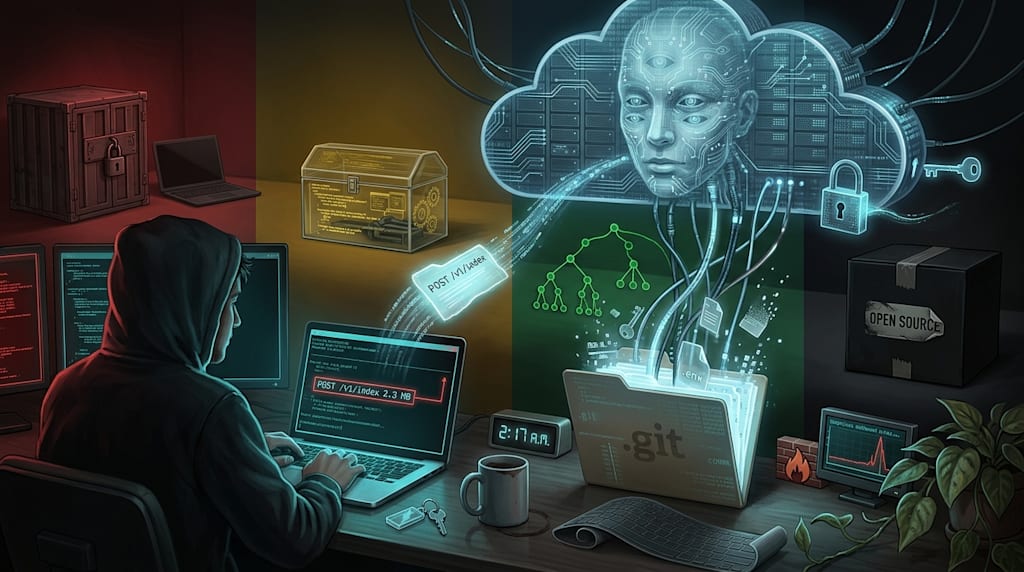
At 2:17 a.m., the terminal stopped scrolling. One line hung at the end:
POST /v1/index 200 2.3 MB 1.8s
You didn’t click upload. The cursor blinked. You opened Little Snitch and saw the connection pointing to a cloud service domain. The .git folder in the repository root had just been read. .env wasn’t in the workspace, but it was in a commit from three months ago. You deleted it. Git remembered.
The ZCode incident put this chain on the table. A default-on codebase index silently packaged the workspace after login and uploaded it to the cloud. The package didn’t contain only current code. .git history, reflog, LFS cache, and global config all went along. The RSA public key used for encryption was issued by the server; the private key stayed in the cloud. You couldn’t decrypt it locally. Enterprise users began to demand accountability. Permission design caused this. The code was not wrong.
1. The Same Move Is Not Unique
Grok Build CLI’s validation was colder. The instruction said, “Reply only OK, do not read any files.” The client replied OK. In network monitoring, another channel sent out the project repository and commit history. Upload behavior could change with server-side configuration. Your instruction couldn’t control the data flow.
Claude Code is closed source. The Ministry of Industry and Information Technology’s NVDB platform warned that specific versions sent back region, identity identifiers, and other information. Default configuration can automatically execute MCP servers in the project. One config file in a project can pull in remote code. A large user base means many people looking for problems. That helps. It does not reduce the tool’s permissions.
Cursor and GitHub Copilot personal and free tiers have trained on code by default. The opt-out switch is buried in settings. Cursor’s “always index” has poor visibility. Convenience comes from deep reading. Deep reading is permission.
Kimi Code desktop is not open source. Older versions had an SSRF vulnerability that prompt injection could exploit. Kimi Code 2 recently launched, with a discount for running it on Kimi. A discount is a business move. Security is another table.
Aider is open source, and its privacy policy says it will not collect your code, chats, or keys. It has also had code injection issues. Prompt injection could cause a backdoor to be automatically committed. Open source gives you audit rights. It does not make the tool safe.
Codex CLI is open source and bare-bones. The core features live in the closed-source desktop client. You audit the unfinished shell; the official version is elsewhere. The AB-version game borrows open-source trust without accepting open-source oversight.
OpenCode is open source. OpenCode 2 launched with smoother performance, according to its release notes. dsh is open source too. They aren’t perfect. At least their core code is public. You can read it, change it, self-host it.
2. Eight Actions for Choosing an Agent
1. Check code transparency.
Open the release page. See whether the binary is built from a public repository. Is the license clear? Is the repository complete? Only the CLI is open source, desktop closed source: note it. A special open-source version, official version closed: note it. The core of open source is that you can verify the version running.
2. Check data flow.
Open the privacy policy. Search train, retain, delete, opt out. A 540-day retention period is high risk. An opt-out switch three menus deep is as good as absent. Code uploaded by default, trained by default, retained by default: all red lines. Whether deletion works matters more than “we value privacy.”
3. Check default settings.
After install, first thing: turn off indexing, telemetry, training. Default-on stands on the vendor’s side. Default-off lets you choose. That is where trust starts. The switch exists. It defaults outward.
4. Check network behavior.
Use Little Snitch, Wireshark, a firewall. The task says “reply only OK.” Look for a POST. If there is one, stop. Look at request body size. 2.3 MB is not one OK. Look at the destination domain. See whether it changes with server-side config. You don’t need to reverse the whole client. You only need to see whether it speaks when you didn’t ask it to.
5. Minimize permissions.
Containers, VMs, a dedicated user. --read-only. Don’t mount ~/.ssh, ~/.aws, production config. Copy the repo, strip .git history, give it that to read. If it needs history, give it a trimmed copy. Give the agent one key, not the whole keyring.
6. Look at community oversight scale.
Claude Code has many users; when something breaks, someone reverse-engineers it. A niche agent adds something, and no one may see it. A big target gets hit; a small target gets ignored. Choosing a tool means choosing who inspects it. An agent no one helps inspect has opaque risk.
7. Check supply-chain vulnerabilities.
Treat the agent as a dependency. Look at CVEs, changelogs, response speed. Vulnerabilities are normal. Not fixing, not disclosing is not normal. Look at the libraries it depends on, the plugins it auto-executes, the MCP it auto-starts. One config file can become a remote code execution entry.
8. Find localization and air-gap options.
Tabnine supports local deployment. Code never leaves your infrastructure. Weaker capability, clear boundary. In sensitive scenarios, local models, air-gapped environments, offline editors are worth more than cloud convenience.
3. Red, Yellow, Green, Black Zones
Red: Core repositories, keys, production config, business secrets.
Ban cloud agents. Use local models, air-gapped tools, offline editors. If an agent is mandatory, put it in an isolated container, network allowlist, full audit. Do not mount .ssh, .aws, .env, production database config. Trim Git history first, then let it read.
Yellow: Internal business code, non-core projects.
Prefer open-source agents whose core code is public, such as OpenCode, Aider, dsh. Run in containers, turn off default cloud sync, restrict network egress. Read privacy policy updates weekly. If you see “collected by default,” “trained by default,” “retained 540 days,” stop.
Green: Public code, open-source projects, practice projects.
You can use closed-source tools from large vendors, such as Claude Code, Cursor, Copilot. Turn on privacy mode, turn off training data collection, don’t touch sensitive information. Public code can also leak committer emails, internal paths, old keys. Green doesn’t mean casual.
Black: Pseudo-open-source, default upload, cannot be turned off, niche and unsupervised.
Don’t use. No efficiency gain is worth handing over the trust of the entire repository. The AB-version game (open source for traffic, closed source for the core product) is worse than not open-sourcing at all. With closed source, at least you know to guard. Pseudo-open-source borrows trust without accepting oversight.
4. One Action
You turn off “always index.” In Wireshark, that POST /v1/index disappears. Dust sits on the pothos leaf; you wipe it with your sleeve. The edge of the keyboard cover curls up. Cold coffee has left a ring at the bottom of the cup. You close the laptop. Tomorrow you still have code to write.
About the Creator
Jin
Writer of reamstories
https://reamstories.com/jin
Enjoyed the story? Support the Creator.
Subscribe for free to receive all their stories in your feed. You could also become a paid subscriber, letting them know you appreciate their work.
Comments
There are no comments for this story
Be the first to respond and start the conversation.