
visionOS 27 Made My Vision Pro Feel Less Like a Demo and More Like a Tool
Siri now lives anywhere in your room, Iceland arrives at night, and your Mac connects before it even turns on.
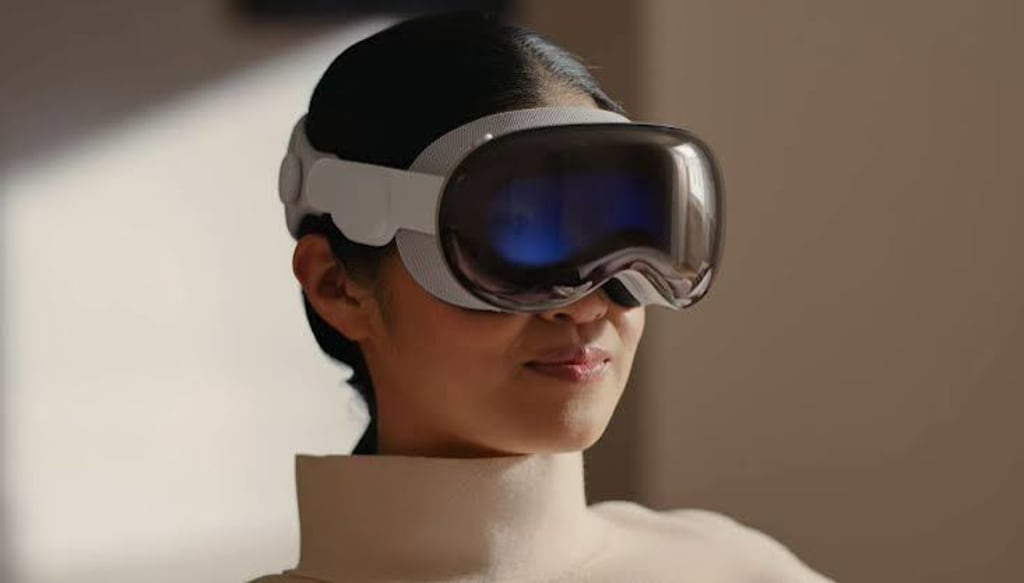
Apple released visionOS 27 on September 15, alongside iOS 27, iPadOS 27, macOS 27 Golden Gate, and watchOS 27. The update spreads across AI, environments, Control Center, windows, Mac collaboration, recording, and developer tools. Here is what changes when you put the headset on.
1. Siri moves into your space
Apple Intelligence and Siri AI now run on visionOS 27. Siri can search photos using personal context, act inside apps, and summarize what you are reading.
On Vision Pro, Siri can appear anywhere. You look at it, and the conversation starts. No fixed corner. No bottom dock. No walking to a window first.
Visual Intelligence lets you ask about objects and windows in front of you. You look at a thing, a window, or text, and ask the system. For a headset built around cameras and spatial awareness, this fits better than a voice assistant tied to a screen.
The China mainland version of Apple Vision Pro still cannot use Apple Intelligence or Siri AI. Settings shows the entry. Tapping it does nothing. For those users, this part of the update stays outside the room.
2. Thórsmörk and My Environments
visionOS 27 adds Thórsmörk, an immersive environment shot in Iceland. The name comes from Norse mythology. Thor, not the Marvel version.
The production team shot it on location. Daytime shows a quiet river. Night brings aurora over snow and ice. The scene includes winter ambience and water sounds.
visionOS 27 also lets you upload your own panoramas. They go into My Environments at the bottom right of the Environments screen.
The catch is simple. Your photos lack the resolution, field of view, motion, and sound of Apple’s scenes. Custom environments feel weaker. They are a bonus, not a replacement. The useful part: your own photos can now sit inside the headset.
3. Control Center splits into three cards
Control Center now uses three cards.
The first card shows time, battery, music, and a collapsed notification entry. It looks like an iPhone Lock Screen. The second card holds Wi-Fi, Bluetooth, Mac Virtual Display, Focus, and other controls. The third card shows the current immersive environment and lets you adjust it.
This cuts down menu hunting. Wi-Fi is on card two. Environment is on card three. Time and notifications are on card one. Spatial systems have no physical buttons. Direct controls matter more here.
4. Curved windows and Safari Side-By-Side
Several apps now support curved windows. App windows look like Mac Virtual Display windows, with a curved screen effect.
Apple says Safari, Freeform, and Apple TV support the feature. After updating to the official release, Apple TV still does not trigger curved windows. Support is still rolling out.
Safari also adds Side-By-Side. This lays out every open tab in space at once. You can compare pages without jumping through the tab bar.
For research, writing, or tracking several pages, this is more useful than opening tabs one by one. Spread pages around the room. Move your eyes. Skip the tab bar.
5. Mac Virtual Display brings 3D models into space
Mac Virtual Display now lets you preview and edit 3D models from your Mac inside Vision Pro.
Quick Look can override materials, show wireframes and UV maps, and check modeling quality. You can also annotate the model directly. Team members can see the latest feedback.
The old process leaned on screenshots, screen recordings, and text notes. Now the model sits in space. Materials, wireframes, and UV maps switch in place. Notes stay on the model. Modeling, design, and engineering get a direct viewing and marking tool. This depends on a stable Mac connection and software that supports it.
6. Recording, widgets, and small fixes
visionOS 27 records up to 3 minutes of non-foveated rendered field of view at 4K. The full view stays clear. You can also mirror the recording at 4K.
Three minutes is short. For demos, short films, and social clips, it is enough. The recording no longer clears only the spot you are looking at.
Freeform now sorts boards with folders and views objects as spatial groups. Messages syncs unread counts and missed notifications faster to other Apple devices. Apple says Vision Pro starts and connects to Wi-Fi up to three times faster.
Widgets add an extra-small size and a Mac Virtual Display widget. Place it anywhere at home. Tap it to connect to your Mac, even if the Mac is off.
Extra-small widgets make floating information more flexible. The Mac widget turns a spot in your room into a connection button. Put it on the left side of the desk. Tap it. The Mac is still off. The connection starts.
7. Developers get 360-degree web and Reality Composer Pro 3
Safari can now show 360-degree immersive web environments built by developers.
Reality Composer Pro 3 adds simulation, character animation, and dynamic lighting for game assets. Script Graph handles game logic.
Web pages can become immersive spaces. 3D tools gain simulation, character animation, lighting, and logic. Most users will not notice these changes today. Apps and content will grow from them later.
Ending
After the update, Settings shows visionOS 27.
Control Center’s third card sits on Thórsmörk. Safari tabs spread across the room. The Mac Virtual Display widget waits on the left side of the desk. Tap it, and the connection starts before the Mac does. China mainland users see the Siri AI entry and cannot tap in.
That is where visionOS 27 changes.
About the Creator
Jin
Writer of reamstories
https://reamstories.com/jin
Enjoyed the story? Support the Creator.
Subscribe for free to receive all their stories in your feed. You could also become a paid subscriber, letting them know you appreciate their work.
Comments
There are no comments for this story
Be the first to respond and start the conversation.