
Using Facebook Data To Analyse Your Facebook Group
This May Be Useful In Deciding How to Direct Group Content - From 2022


Introduction
This is mainly for group admins and relates to the Facebook Vocal Groups, but it is fine for any group. You may look at this and think it’s not for me but that is fine, it's not for everyone. Hopefully I can show some things that may make you see something that you find useful. In the Manage section there is a lot of high level information that can direct your Group policies.
This is not about all the things you can do as a Facebook Group Administrator, but what you can get from the data downloads in the group management section. There is a lot you can get without the downloads, but the download does have a lot that is not available on the main screens.
I will make sure that no data is made public that belongs to any group that I am not fully responsible for.
Where To Find The Data
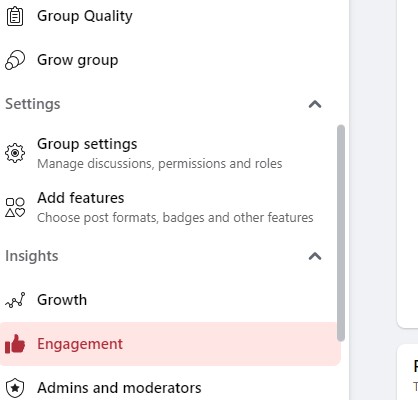
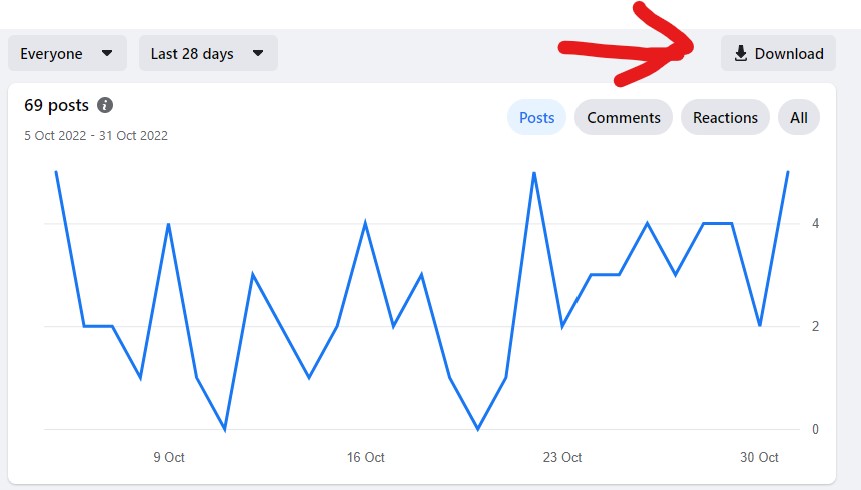
If you go into your Group Management and scroll to Engagement you will see some high level graphs and you have the option to download. This is what we are looking for, so download the workbook and you will get a number of sheets with information that may be useful to you.
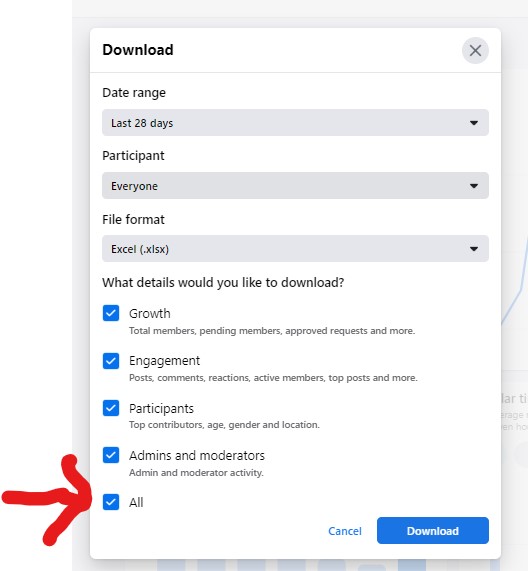
Note that Admin information is not available in the workbook apart from a little basic information on the Admin and Moderators Tab. Some of the tabs are very much just information only but others can be useful in applying moderation to the group or picking the best times to post information to get the best response.
These are the sheets and what they contain.
Daily Numbers
This contains a lot of useful high level information by day. This includes the number of new joiners, posts, comments, reactions, members posting or commenting.
There are no drill down options but it is quite fascinating data.
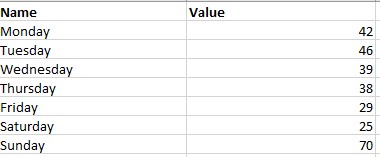
Popular Days
This is simply an overall value given to each day based on activity. In this case Sunday looks to be the most active.
Popular Times
This gives the number of events for each hour of the week, similar to the image above, so a more granular version of Popular Days
Top Posts
This is a detailed list of posts and who posted it, the number of reactions and the URL (web address) of the actual posts. It could be useful in attempting to direct the content of your group especially if you are one of the main posters of articles in the group.
Age And Gender of Members
This can be useful in directing or expecting content because you can see the spread of age and sex and tailor your direction appropriately, though taste of any sex or age can vary phenomenally.
Town or City of Members
To me this is just one of those interesting to have lists although it may be useful to know if you are not the only person in your town.
Country of Members
This is probably a bit more useful especially if you have a large non English speaking contingent in your group. All my groups have a huge USA contingent and the usually UK follows that.
Contributors
This is the area that I use the most. It gives details of active users and their interactions with the group in terms of posting, commenting and reactions. You get to know who is truly part of a group and who just uses it as maybe a dumping groumd for their content, so you can identify the group assets.
Admins and Moderators
Information about Admin approvals of posts and members. You can see what the other admins are up to in tabular format.
Conclusion
If you want any advice feel free to contact me and I will try and help if I can. As this is workbook based I will include a video of the guy who invented the spreadsheet Dan Bricklin in a TED Talk.
About the Creator
Enjoyed the story? Support the Creator.
Subscribe for free to receive all their stories in your feed.
Comments
There are no comments for this story
Be the first to respond and start the conversation.