
I Stopped Sending Files to Myself After Testing Doubao's New Keyboard
Five devices, one account, and the small annoyances that quietly disappeared.
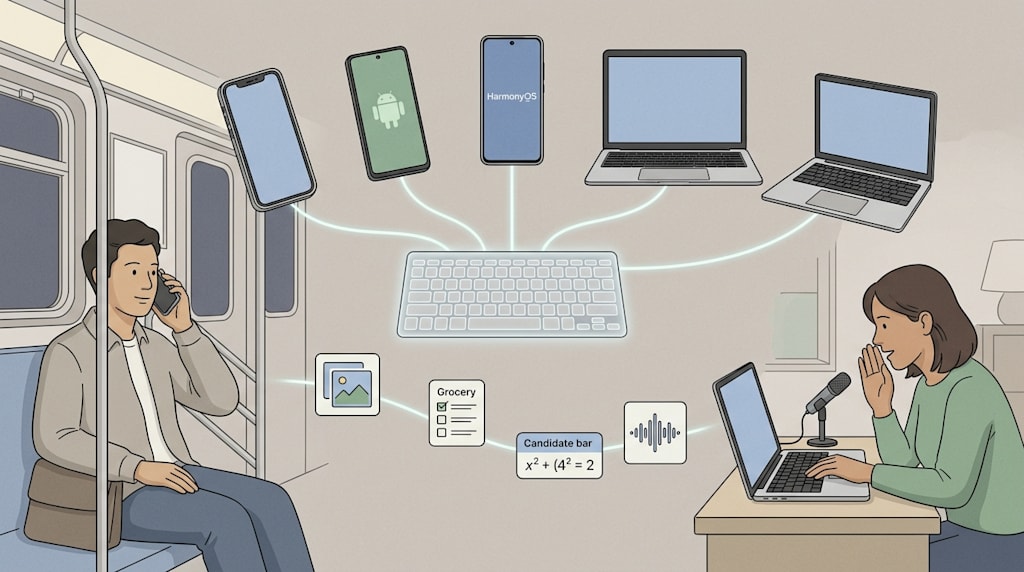
Messaging yourself is normal now. You see a link on your phone, send it to File Transfer Assistant, then copy it on your laptop. You save an address on your computer, then send it back to your phone before leaving. Photos, passwords, and browsing history sync. The sentences you need still get stuck on one screen.
Last year, Doubao Input Method was new. It now runs on iOS, Android, HarmonyOS NEXT, macOS, and Windows. Voice recognition, large-model typing, smart text cleanup, and Super Transfer work across those platforms. Coverage is the visible change. The more useful change is that your account, dictionary, and content move with you. The input method is less a tool on each device and more a record of how you write.
Five screens, one keyboard
An input method can support five systems and still fail at cross-device work. The test is simple: after you switch devices, does it recognize how you type?
I write about AI. My daily vocabulary includes Claude, token, benchmark, model names that change every few weeks, and scholar names I mistype once and then never again. I can train the phone dictionary for a week. Then I open my PC, and the candidate bar is blank. Every name is a fresh fight. Every acronym needs to be selected again.
With one Doubao account, the personal dictionary aligns in real time. A name, a term, a project code, an English abbreviation, or a phrase I corrected once on the phone shows up on the other screen. The keyboard does not start over.
On a subway morning, I see a news item and dictate a few story angles into my phone. At the office, I open my laptop. The names and terms are already in the candidate bar. At night, I edit the draft on another machine. I do not spend the first ten minutes teaching the keyboard what I already taught it that morning.
That detail sounds small. It runs hundreds of times a day. One less correction, one less selection, one less moment of re-learning. Cross-device sync is not about whether you can type. It is about whether typing feels like the same act on every screen.
Super Transfer: the middleman disappears
Dictionary sync handles how you say it. Super Transfer handles how you carry it.
Cross-device clipboards are not new. Doubao's version is simple. Sign in to the same account. Copy text or an image on one device. Paste it on another. The content stays inside the input method.
A chart I copy on my phone at lunch can go straight into a draft on my laptop. An address I organize on my computer before leaving can be used on my phone. I do not open a transfer app, upload a file, or search through a chat history for the thing I just sent myself.
The old workflow had a name: File Transfer Assistant. It worked. It also made every device switch feel like a small logistics project. The new workflow removes the project. You copy. You paste. You keep moving.
Voice input: from hearing words to hearing people
Voice input used to be judged by accuracy. Daily use is messier. A product name gets mangled. An office is too quiet to speak at normal volume. A subway tunnel has no signal. Even when every word is correct, the pauses, repetitions, filler words, and missing punctuation still need work.
I tested long passages. A classical Chinese dialogue from Empresses in the Palace contains titles, formal speech, rapid turns, and emotional shifts. Doubao followed the passage, added punctuation at pauses, and went back to check a few words and breaks. Cantonese worked. So did a TVB-style line that mixed Cantonese, Mandarin, and English. It kept most of the Cantonese expressions and English words instead of flattening everything into Mandarin. When the language switched quickly, a few details still needed manual fixes.
For office workers, the quieter modes matter more. With colleagues nearby, reading a full message aloud is awkward. Most people give up and type with their thumbs. I brought the phone close, lowered my voice, and said: "Meeting at three. Bring last week's design draft." The algorithm picked it up. It did not broadcast the message to the room.
Offline voice adds continuity. In a subway section with poor signal, I can still record a to-do. On a plane, I can put a thought into a memo. The offline model has to be downloaded first. Anyone who commutes or travels should install it in settings before the signal disappears.
iOS also lost a layer of friction. In the past, voice input often jumped to the Doubao app. Even with a floating window, you had to drag it to the edge of the screen. After the first microphone authorization, the new version can call voice input in the default mode. Mac uses a long press on Fn. On phones, you hold the space bar. Voice stops being a separate function you hunt for. It becomes another way to type.
Smart cleanup: a mouthful becomes a checklist
Speech recognition turns sound into words. Smart cleanup turns rough speech into something you can use.
After a voice input passes 20 characters, the system handles punctuation, paragraphs, repetition, and filler words. A large model then adjusts word order and reorganizes content when needed. You can view both stages. If the cleanup misses, one tap restores the original.
I dictated a grocery request without planning it:
"After work I need to go to the supermarket. Help me make a shopping list. For meat, 300 grams of sliced beef and two chicken legs. The beef is for stir-fry. The chicken legs are for soup. For vegetables, three ripe tomatoes, a bunch of enoki mushrooms, two heads of lettuce, half a pound of potatoes, and a few scallions. For seasoning, check if we still have soy sauce, oyster sauce, and black pepper. If not, buy one of each. Also get a carton of eggs, two bottles of milk, and a bag of toast. The tomatoes should not be too hard. Pick fresh lettuce. Get milk with a longer expiration date. Keep everything under 200 yuan."
The result came back sorted: meat, vegetables, seasonings, and other items. Quantities, cooking uses, selection notes, and the 200-yuan limit were all in place. A long, spoken paragraph became a list I could check against shelves.
The same tool works on messy text. I typed a paragraph with repeated word order, missing punctuation, and filler phrases. The system reflowed it, cut the extra words, and fixed the punctuation. The cleaned version was easier to read. It saved the time I would have spent fixing format line by line.
This structure helps with daily fragments. At night, I can start with the commute, move to something that happened at work, then add a thought from after dinner. A few minutes of speaking becomes a diary draft with paragraphs, repeated ideas removed, and word order adjusted. After a meeting, I can dictate: "Design draft confirmed Wednesday. Data from Xiao Li. Second review next Monday." The cleanup turns it into a clearer to-do list.
The candidate bar reads the whole sentence
Voice and formatting are not the only places where the large model shows up. It also changes the physical keyboard.
Keyboards are picking up a new job. They still produce text. They also pass tasks to AI. Code can start as a spoken requirement. A model prompt can start as voice input. The input method is becoming a common interface between ordinary people and large models.
Old prediction worked on the first two or three characters. With longer context, the candidate bar understands more of the sentence. A long string of pinyin produces a full sentence in the first slot more often.
The useful pieces are small and frequent:
Inline math: Type 2200+167+15= and the candidate bar shows the result. No calculator app.
Semantic continuation: Type the first half of a classical poem. The next line appears.
Time and date completion: Type a time or date phrase. The current timestamp shows up in the first candidate slot.
Knowledge completion, math, symbols, and emoji are not complicated on their own. Together, they cut the number of times you switch apps or keyboard pages. An input method is called hundreds of times a day. Every saved hesitation and correction adds up.
There are also gesture changes. Press and swipe up on the delete key to remove text before the cursor or clear the candidate area. Swipe down to restore what you just deleted. In pinyin and English input, press and swipe left on delete to clear the pinyin or pending English in the candidate area. Once the gestures become habit, they speed up editing long sentences. They are useful when you need to delete a whole mistyped block.
Still an input method
After all the AI features, the client still behaves like an input method.
It is clean. No pop-up ads. Background resource use is restrained. It supports full pinyin, double pinyin, and Wubi. Shortcut mapping, candidate window size, and toolbar modules can be adjusted. It fits different typing habits.
The restraint is the point. An input method is a strange kind of tool. It must be frequent, stable, and quiet. Users will not tolerate lag, pop-ups, or interruptions because an input method has AI. The stronger the AI, the more it should stay in the background. Typing, speaking, cleaning up, and moving content across devices should happen without ceremony.
There are risks. Cross-device sync depends on an account system. Voice input raises privacy questions. Offline models need to be downloaded. Dialect-plus-English switching still needs manual fixes. Cross-platform consistency has to hold up over time. Convenience now depends on trust.
A keyboard that follows the thought
Liu Xie wrote in The Literary Mind and the Carving of Dragons: "Emotion moves, and language follows." Feeling and thought come first. Language comes after. In the digital age, devices, apps, dictionaries, and keyboards sit between the two.
Technology gets more complex. Using it should get simpler. A water system improves until water comes out when you turn the tap. An input method improves until a thought can be left behind more naturally.
The large model does not need a new app. Sometimes the keyboard is enough.
At 11:40 p.m., I close the laptop. The phone screen lights up. The keyboard is there. The cursor blinks.
About the Creator
Jin
Writer of reamstories
https://reamstories.com/jin
Enjoyed the story? Support the Creator.
Subscribe for free to receive all their stories in your feed. You could also become a paid subscriber, letting them know you appreciate their work.
Comments
There are no comments for this story
Be the first to respond and start the conversation.