
I Restored a 25-Year-Old Sony Laptop. It Weighed 1.26kg and Glowed Blue.
It ran Windows XP, refused modern Wi-Fi, and still made today's ultrabooks feel plain.
Nostalgia Notes: How Did a 25-Year-Old Laptop Balance Lightness, Style, and Performance?
In 2001, IBM released the ThinkPad X22. It had a 12.1-inch TFT LCD, 1024x768 resolution, and an Intel Pentium III-M at 733MHz or 800MHz. The X series was a portable office laptop. It weighed 1.6 to 1.7kg.
In November that year, Sony launched the VAIO PCG-SRX series. The high-end model, PCG-SRX7, came with a 10.4-inch screen at 1024x768, a Pentium III-M at 800MHz, 128MB RAM, a 30GB hard drive, built-in 2.4GHz Wi-Fi and Bluetooth, and Windows XP Home Edition. With the battery, it weighed about 1.26kg. The body was close to B5 paper size.
I put this SRX7 on a sheet of B5 paper. The edges almost line up. On the scale, with battery, it read 1.26kg.
Three Models
Japan got three models first:
PCG-SRX3: Celeron 650MHz, 128MB RAM, 20GB hard drive, 2.4GHz Wi-Fi, Windows XP Home Edition.
PCG-SRX3/BD: Same specs as the SRX3, plus an external CD-RW/DVD-ROM drive.
PCG-SRX7: Pentium III-M 800MHz, 128MB RAM, 30GB hard drive, 2.4GHz Wi-Fi, built-in Bluetooth, Windows XP Home Edition, no external optical drive.
My SRX7 had been upgraded by the previous owner to 256MB RAM. It runs Windows XP Professional Simplified Chinese. XP will not choke, but do not expect smooth.
Appearance
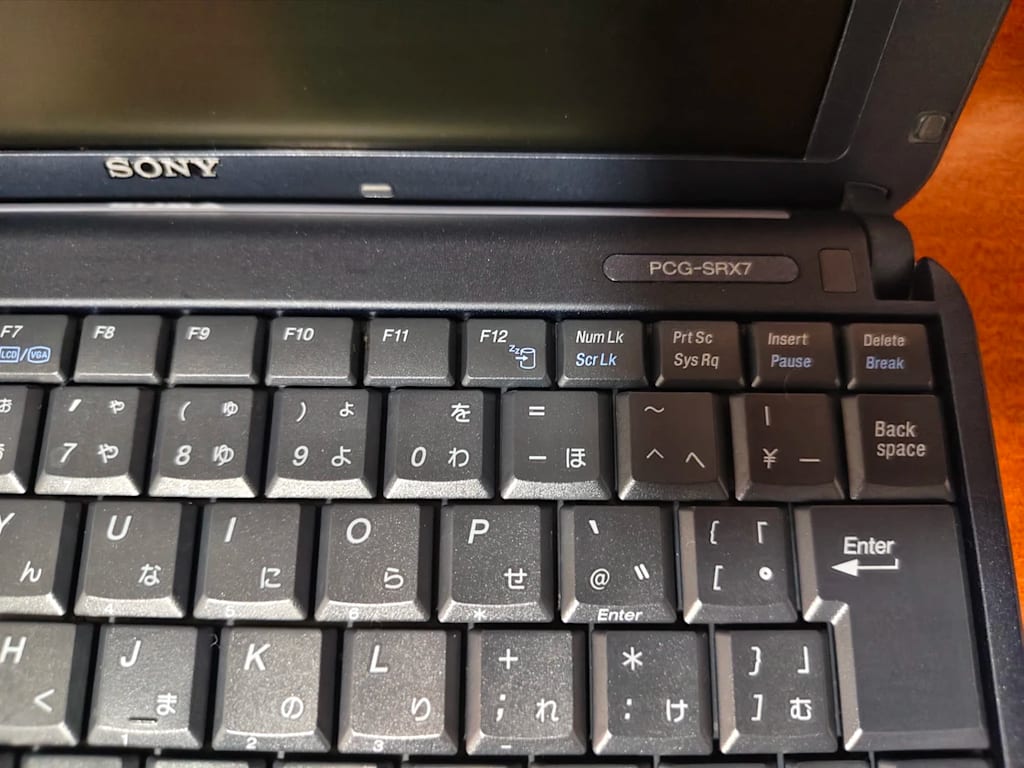
The A-side has a bright silver coating. The B- and C-sides are blue-violet. After more than 20 years, the body has no obvious scratches, and the keyboard shows no clear signs of use. On this model, the silver coating on the A-side often peels. Mine has not.
The screen is 10.4 inches. The left and right bezels are wider than the top and bottom. The symmetry looks balanced.
Sony did not shrink the keyboard layout too much. Typing feels crisp. Press a single keycap and the whole area sinks a little. The keyboard midframe has aged.
The palm rest is translucent polycarbonate. Light from the power LED and HDD activity LED shines through it. In low light, the palm rest glows faint blue-violet. The power LED sits on the left. The HDD LED sits on the right.
In the center of the palm rest is a circular touchpad, the SmartPad. Below it is the Jog Dial.
Turn the machine over. Removable battery. Cooling fan exhaust vent. A quick-release HDD cover sits at the bottom left. Remove the screws with a Phillips screwdriver to swap the hard drive. In the side PCMCIA slot is a Sony wireless network PCMCIA expansion card. The original power adapter matches the body color.
Cooling
The SRX series uses Sony's "Cascade Cooling Unit," built for small bodies. Ultra-thin heat pipes. An optimized internal layout. It keeps the Pentium III-M under control inside a 10.4-inch chassis.
Ten minutes after boot, hot air comes from the exhaust vent. The left side of the keyboard is warmer than the right. The fan is not loud, but you can hear it.
Installing the OS
This machine has no internal optical drive. It has one USB port, and the BIOS does not support USB boot. You cannot use a USB external optical drive or a USB flash drive to boot and install.
Back then, if the OS broke, you used the official external optical drive. The CD-RW/DVD-ROM drive bundled with the SRX3/BD uses an i.LINK (IEEE 1394) interface. Plug the drive's i.LINK connector into the laptop's side i.LINK port. Sony also included a small stand so the drive could stand upright.
I do not have the original drive or recovery discs. The system is "bare-bones": no third-party software, no previous owner's photos or documents. That saved me the trouble of reinstalling the OS.
Completing the Drivers
Basic drivers are installed. Resolution is normal. Sound is normal. Shortcut keys and the Jog Dial do not work.
A Sony VAIO needs hardware drivers plus Sony-specific drivers. To get the original functions back, you have to install the full set. Drivers from over 20 years ago are hard to find. I used VAIOLibrary, entered PCG-SRX7, and found the drivers and official recovery disc information.
After downloading, install them in order. More than 10 drivers in total. Low-level drivers plus required software. The order cannot be reversed, or some functions will not activate.
After installation, the keyboard shortcuts, touchpad, and Jog Dial all work. I open the Start menu and turn the Jog Dial. The cursor moves up and down, selecting programs. A pop-up shows the current state. It also works in folders and image preview. When idle on the desktop, scrolling pops up the Start menu directory, with built-in Windows software and Sony's original bundled software.
Fn brings up volume. Turn the Jog Dial, and the volume bar slides. The Windows XP notification sound comes from the speakers, louder than expected.
Networking
The built-in Wi-Fi and Bluetooth drivers work. My usual Wi-Fi cannot be recognized or connected. Occasionally it connects, but says the network has no internet.
I thought the system time was wrong or the root certificate had expired. I installed the root certificate KB patch. The patch did not fix it.
The 2001 wireless card supports 802.11b and WEP. Modern routers use WPA2/WPA3 and by default disable backward compatibility with old protocols. This card cannot connect to modern Wi-Fi.
The machine has an RJ45 Ethernet port. Connect it to the router with an Ethernet cable. Set the system time correctly and update the root certificates. The browser can open some pages. IE still throws errors.
Audio and Video
Sony sold this machine as a portable media device as much as an office tool. It pushed portability plus audio and video.
I transfer MP3s via USB drive. I download the full Office 2003. With 256MB RAM, keeping only Office and Windows Media Player in the background, system resources do not max out often, and virtual memory does not thrash.
The speakers are loud. A bit of stereo. The noise floor is louder than the music. I lower the screen brightness. The battery does not last long.
Trivia
The SRX series had a Chinese mainland version. That version stripped the 2.4GHz Wi-Fi and Bluetooth that were standard on Japanese models.
The machine shows up in the 2003 live-action film Johnny English. It is not a fleeting prop. In the plot, it is used to assemble a suspect image and plan an attack on the villain Sauvage's headquarters.
Sony laptops kept showing up in movies. The later UX handheld PC series appeared in many films. I remember it most from Terminator Salvation.
Closing
I close the lid. The blue-violet glow on the palm rest goes out. The power adapter is still warm. The Jog Dial rests one notch above the middle of the volume bar.
I will turn it on again tomorrow.
About the Creator
Jin
Writer of reamstories
https://reamstories.com/jin
Enjoyed the story? Support the Creator.
Subscribe for free to receive all their stories in your feed. You could also become a paid subscriber, letting them know you appreciate their work.
Comments
There are no comments for this story
Be the first to respond and start the conversation.