
I Put a Mac mini in My TV Cabinet and Let It Run My House
The M5 Pro Mac mini is not the fastest Mac I own. It is the one I never turn off.
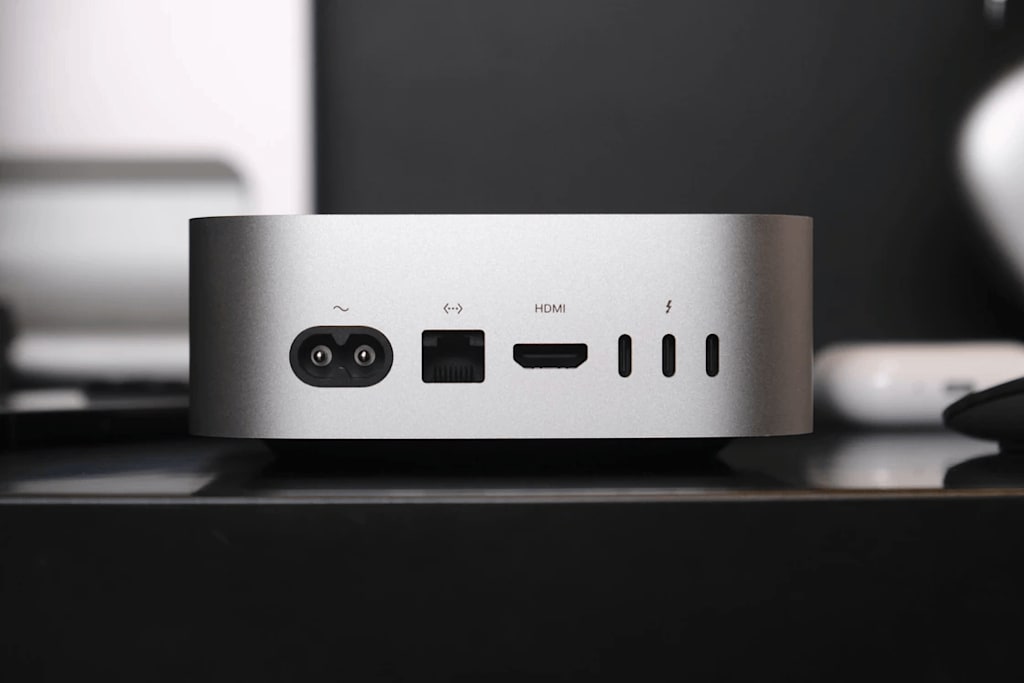
A Mac mini in the TV Cabinet: One Machine, Four Jobs
When I took the M5 Pro Mac mini out of the box, it was smaller than the photos suggested. I could hold it in one hand. Under a monitor stand, it nearly disappears. I put it on the second shelf of my TV cabinet with a router and an optical modem. That shelf was already full. Adding the Mac mini still left room.
I had used a Mac mini before. My old one had an M2 Pro chip and the older design. All ports were on the back. Every time I plugged in an external drive, I had to feel around for the port. The M5 Pro model was my first time using the redesigned body on my own desk.
Square, Quiet, and Easy to Place
It does not take up much space. The new model is smaller than the old one, and the proportions look better. It fits in a TV cabinet, beside a monitor, or in a desk corner without drawing attention. Apple kept the design simple: an aluminum block with rounded edges and a sandblasted finish. Put it anywhere and it stays out of the way.
The front ports are the ones I use most. Two USB-C ports and a 3.5mm headphone jack sit at the lower left of the front panel. With the old Mac mini, I had to reach around the back to plug in an external drive. Now I plug the cable into the front. I can charge my keyboard without an adapter. That sounds minor. Used every day, it removes the small annoyance of searching for a port in the dark.
The three Thunderbolt ports on the back now run vertically instead of horizontally. When three cables are plugged in, they do not stack on top of each other. I currently have two Thunderbolt cables, one HDMI cable, and one power cable connected. The cables stay separated. Only people who plug and unplug devices every day will notice this detail.
This generation moves the Ethernet port from gigabit to 2.5Gb. My NAS and switch both support 2.5Gb. LAN transfer speeds went from around 110MB/s to around 280MB/s. Backing up a 100GB photo library used to take more than ten minutes. Now it finishes in just over five. If you do not have 2.5Gb devices at home, you will not feel the upgrade. If you have a NAS, or plan to use the Mac mini as a server, the port matters.
There is still no SD card slot. I still need a card reader for camera photos. I am used to it. Every time I import photos, I still wish I could plug the card in directly.
The power button is still on the bottom. When I need to force a shutdown, I have to lift the machine and feel for it. I almost never shut it down. It stays plugged in and online. Apple even offers an option to start it when power is connected. After a while, the button's location stops mattering.
Small, but Not Slow
I have an M4 Pro MacBook Pro. I used it to compare against the M5 Pro Mac mini in a few common tasks.
For local AI, I used LM Studio with Gemma 4 31B MLX 4-bit. I set GPU offload to Max, concurrency to 1, and Temperature to 0. I ran the same prompt five times.
The M5 Pro had a median first-token latency of 0.157 seconds. The M4 Pro was 0.384 seconds. The M5 Pro was about 2.45 times faster. Generation speed was nearly the same: 13.25 versus 13.20 tokens/s.
With short prompts, the gap is only 0.23 seconds. With long articles, codebases, or a long Agent history, the input load grows. Faster first-token latency means each call reaches a response state sooner. The neural accelerator in the M5 Pro's GPU mainly improves that stage, not continuous generation.
Final Cut Pro export: a 10-minute 4K 60p video, mostly cuts and splices, with little color grading, noise reduction, stabilization, transitions, or subtitles. I exported Apple ProRes 422. The M5 Pro Mac mini took 62.3 seconds. The M4 Pro MacBook Pro took 77.2 seconds. That is 14.9 seconds less, or about 19% shorter.
Lightroom batch processing: 1,525 JPG photos, about 9.1GB total, averaging about 6MB each. I applied the same preset. The M5 Pro took 3 minutes 17 seconds. The M4 Pro took 3 minutes 43 seconds. That is 26.2 seconds less, or about 11.7% shorter.
Then I exported the photos at full resolution. The Mac mini took 4.71 seconds. The MacBook Pro took 25.88 seconds. That is 21 seconds less, or about 82% shorter. Full-resolution export depends heavily on storage and cache state, so it cannot measure GPU performance by itself. Taken together, the M5 Pro Mac mini completes this kind of high-volume photo workflow more efficiently.
What I Run on It
The Mac mini sits in the living room TV cabinet and stays on 24 hours a day. It runs several services.
One is udpxy. My ISP's IPTV live streams go through the Mac mini and onto the local network. TVs, phones, and computers can watch directly. I no longer turn on the set-top box. It is in a drawer. I cannot find the remote.
Another is SMB. The Mac mini connects to a 4TB external drive and shares it over SMB. The Files app on my iPhone can access it. Infuse on my iPad can play movies from the drive. When I am away, I connect back through Tailscale.
I also run Codex. I open Codex on my iPhone and connect to the Mac mini at home. I check UniFi router logs to see why the network dropped last night. Codex runs on the Mac mini, reads local log files, and uses local CLI tools. I can do this from anywhere with my phone.
Home Assistant runs on it too. I can change a theme, install a plugin, or adjust an automation from my phone. I do not need to turn on a computer.
A Raspberry Pi could run these services. The Mac mini can do other work at the same time. I can run local models, edit video, or use it as a development machine. One machine, several jobs. A Raspberry Pi cannot do that.
Businesses use it too. Haidilao has deployed local server clusters made of Mac minis across stores nationwide for AI monitoring and door-greeting decisions. Store space is limited. The Mac mini is small enough to run from a corner. A survey commissioned by Apple and conducted by Omdia found that among companies developing AI in-house, Mac adoption is about 1.8 times that of companies buying commercial AI solutions. About one-third of surveyed organizations plan to increase on-device AI workloads within a year.
Should You Buy One?
The new Mac mini starts at 6,999 yuan. That is 2,500 yuan more than the previous generation's 4,499 yuan. The increase is more than 50%.
With national subsidies or channel discounts, the base version can drop to around 6,000 yuan. Compared with similarly priced desktop PCs, it is still competitive.
I would not buy the most basic configuration. 256GB of storage runs out quickly. 16GB of memory may not last for long-term use. Memory and storage prices are still rising. Future generations will likely cost more. Buy as much as you can afford.
A Mac mini with 512GB of storage and 24GB of memory, with the M6 chip, costs 9,999 yuan. You still need a monitor, keyboard, and mouse. The latest M5 MacBook Air with almost the same storage and memory costs 11,499 yuan. That is 1,500 yuan more. It has a good screen and does not need a keyboard or mouse.
The Mac mini still has no direct replacement. It can stay online 24 hours a day. It can act as a server. It can connect to many peripherals. It can join a cluster. A MacBook Air cannot do those things.
If you need a Mac that stays online, or you want to start with local AI, or you want to build home infrastructure, the Mac mini remains the lowest-entry option with solid performance. Memory and storage are tight right now. If you need one, buying now may be better than waiting. No one knows what prices will do next.
I slid the Mac mini back onto the second shelf of the TV cabinet. It sat next to the router, the optical modem, and an external drive. A single white light stayed on. I closed the cabinet door, took out my phone, opened Codex, and asked: Was there anything unusual in last night's logs?
A few seconds later, the reply came.
About the Creator
Jin
Writer of reamstories
https://reamstories.com/jin
Enjoyed the story? Support the Creator.
Subscribe for free to receive all their stories in your feed. You could also become a paid subscriber, letting them know you appreciate their work.
Comments
There are no comments for this story
Be the first to respond and start the conversation.