
🔁How EasyLaunchpad Saves You Weeks of Repetitive Setup Work (with Real Examples)
In this blog, we’ll walk through real-world examples of what EasyLaunchpad saves you from, how it compares to building from scratch, and why it gives you the fastest path to MVP success.


If you’ve ever built a SaaS MVP in .NET from scratch, you know the drill:
🔄 Rebuild login
🔄 Add role-based access
🔄 Create user management
🔄 Set up email templates
🔄 Integrate payments
🔄 Write background job queues
🔄 Build an admin panel
🔄 Handle logging
🔄 Configure everything for production
You spend 2–4 weeks just laying the foundation… before you even begin writing your app’s core logic.
That’s where EasyLaunchpad changes the game.
This production-ready .NET boilerplate saves you dozens of hours by bundling the most common (and essential) parts of any modern SaaS or admin-based app — all neatly wired and tested.
In this blog, we’ll walk through real-world examples of what EasyLaunchpad saves you from, how it compares to building from scratch, and why it gives you the fastest path to MVP success.
🧱 The Time Drain: Building SaaS Infrastructure from Scratch
Let’s take a typical solo founder or .NET developer trying to launch a SaaS MVP.
Here’s what they usually do:
— Task and Time Estimate:
Authentication + Google login- 2 days
Admin panel layout + navigation- 2–3 days
User + role management- 2 days
Email system (SMTP + templates)- 2 days
Payment integration (Stripe/Paddle)- 3–4 days
Background job system- 1–2 days
Logging setup + error tracking- 1–2 days
Packages and plan management- 2 days
UI styling with Tailwind (or custom)- 2 days
Total = 15–20 days (minimum)
That’s assuming you’re fast, experienced, and not handling marketing or sales.
⚡ EasyLaunchpad: Everything You Need, Already Done
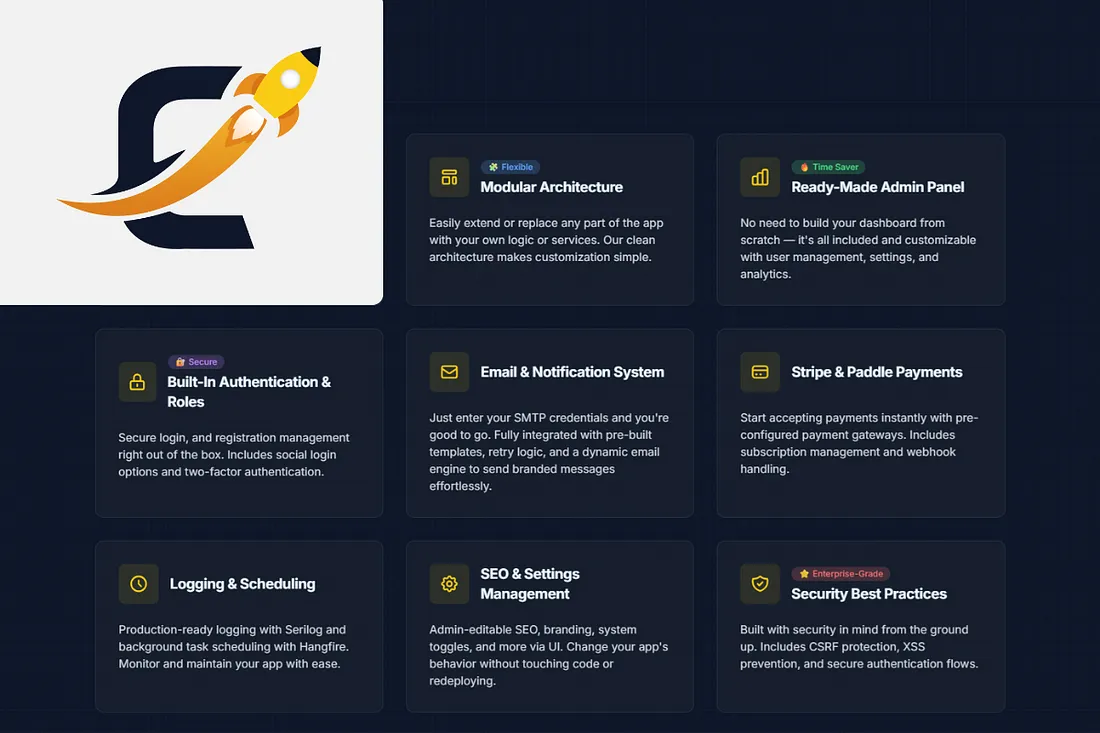
With EasyLaunchpad, all of this is ready from day one:
— Feature and the Status:
✅ Auth (email + Google)- Pre-integrated
✅ Admin Panel- Fully built with Tailwind + DaisyUI
✅ User/Role Management- Pre-wired
✅ Email System- SMTP + DotLiquid templates
✅ Stripe + Paddle- Plug-and-play integration
✅ Background Jobs- Hangfire setup complete
✅ Logging- Serilog fully configured
✅ Packages/Plans- Managed via admin UI
✅ Modular Architecture- Scales with your project
✅ UI Components- Responsive and styled
You can save 2–3 weeks of initial work and jump straight into building features that make your app unique.
🔁 Real Example: Setting Up a SaaS Plan
🛠 Without EasyLaunchpad:
Write plan model
Build admin form for plan creation
Connect Stripe API
Store plan status in DB
Handle webhook for new subscription
Send email receipt
Log result and errors
Test the flow
⏳ Time estimate: 3–4 days
🚀 With EasyLaunchpad:
Plans module already exists in admin
Stripe/Paddle integration is prebuilt
Email receipt templates are in place
Logging and background retry handled by Serilog + Hangfire
⏱ Time spent: 15–30 minutes to define your plan
🔁 Real Example: Adding Background Email Notifications
🛠 Without EasyLaunchpad:
Choose a job processor (Hangfire, Quartz)
Install + configure
Write job queue logic
Setup cron expressions
Monitor success/failure manually
🚀 With EasyLaunchpad:
Hangfire is already in place
Email sending is built with queuing
Admin can monitor jobs visually
Retry logic is auto-managed
No job setup. No middleware configuration. Just call:
_backgroundJobClient.Enqueue(() => _emailService.SendWelcomeEmailAsync(user.Id));
Done.
🔁 Real Example: Logging for Debugging & Audit
🛠 From Scratch:
Choose and install logging framework
Write global logger wrapper
Manually add logging to each service/controller
Design a strategy for log levels and outputs
🚀 In EasyLaunchpad:
- Serilog is already wired
- Logs are structured
- Logged across services, email jobs, auth, and payments
- Easily extended to write to Seq, ELK, or console
You can even tail production logs instantly:
{
“Level”: “Information”,
“Message”: “User logged in”,
“UserId”: “12345”,
“Timestamp”: “2024–07–22T09:15:00Z”
}
🧠 Developer Feedback
“The first time I used EasyLaunchpad, I went from idea to deployed MVP in 6 days. What normally takes weeks was already done for me.”
— A SaaS Founder & Full Stack .NET Developer
“My team saved nearly 40 hours in setup time. We used that time to launch a second product.”
— Senior Engineer, Startup CTO
🚀 Results That Matter
With EasyLaunchpad and Without:
Launch in days- Launch in weeks
Focus on product- Focus on boilerplate
Admin UI ready- Build from scratch
Built-in payments- Stripe docs + trial/error
Email templates- Code manually
Job scheduler + logs- Built-in
Scaling-ready- Needs refactoring later
🛡 Who Is It For?
Persona and Why It Works:
👨💻 Solo .NET Developers — Skip boilerplate, build fast
🚀 Indie Hackers — Test ideas faster without architecture fatigue
🏢 Startup Teams — Standardize project structure
📈 Scale-ups — Extendable for enterprise features
🧠 Tech Leads — Simplify onboarding with clear modules
📁 Developer-First Architecture
EasyLaunchpad uses:
- Razor + Tailwind + DaisyUI for fast, responsive UI
- Clean separation of concerns: Controllers → Services → Repositories
- Autofac for DI
- Modular design (each feature lives in its own area)
- Hangfire + Serilog = background jobs and logs fully managed
This isn’t just a file dump of starter code. It’s clean, organized, and scalable.
🧩 Build Smarter, Ship Sooner
In the startup world, time is everything. The longer it takes to launch, the more momentum you lose.
EasyLaunchpad lets you skip the startup grunt work:
- No more redoing the same backend logic
- No more duct-taping email or payment APIs
- No more half-baked dashboards
You focus on what makes your product valuable — not what every app needs.
✅ Final Thoughts
You don’t need to reinvent the boilerplate every time you build something new.
With EasyLaunchpad, you’re buying back your most valuable resource: time.
It’s clean. It’s complete. It’s ready for scale.
👉 Skip the setup. Launch the product.
Start with EasyLaunchpad now → https://easylaunchpad.com
#DotnetBoilerplate #ComparingBoilerplate #SkipDotnetsetup
#SaasMvpEfficiency #Easylaunchpad
About the Creator
Adil Yousaf
EasyLaunchpad is a .NET Core SaaS boilerplate built for developers, founders, and startups who want to launch software products faster without building the core architecture from scratch.
Enjoyed the story? Support the Creator.
Subscribe for free to receive all their stories in your feed.
Comments
There are no comments for this story
Be the first to respond and start the conversation.