
What Is a BCM in a Car? Body Control Module Explained
Learn what the body control module does, which electrical systems it may control, how to diagnose problems, and why programming matters before replacement

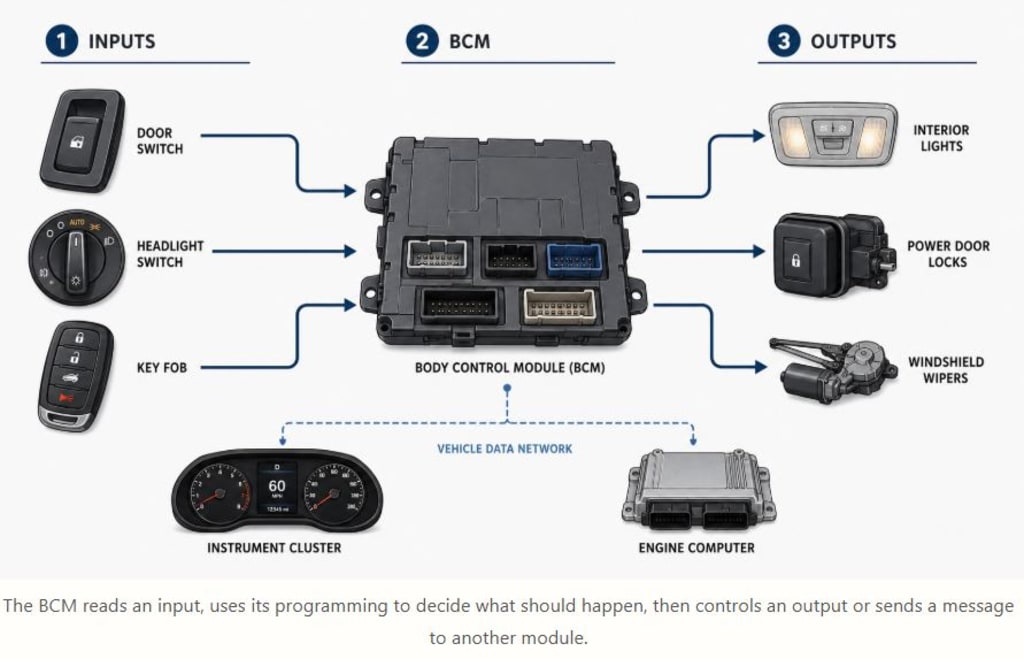
A BCM, or body control module, is one of the computers in a modern vehicle. It monitors switches and sensors, communicates with other control modules, and operates or coordinates many electrical features throughout the vehicle’s body.
Depending on the vehicle, the BCM may control or manage the lights, door locks, power windows, windshield wipers, alarm, keyless entry, horn, warning chimes, and other systems.
When several unrelated electrical features begin acting strangely at the same time, the BCM may be involved. However, that does not automatically mean the module itself has failed. A weak battery, poor ground, blown fuse, damaged wire, water intrusion, faulty switch, or communication-network problem can cause a good BCM to appear defective.
Quick Answer
BCM stands for body control module. It acts like a manager for many electrical functions that are not handled directly by the engine or transmission computer.
The BCM receives information from inputs such as door switches, lock buttons, lighting controls, key fobs, and other vehicle modules. It then uses its programming to decide what should happen and sends a command to an output or another control module.
For example, when you open a door, the BCM may detect the door-switch signal, turn on the interior lights, activate a warning message, and communicate the door status to the instrument cluster.
The exact functions vary by year, make, model, and equipment level. Always use the correct wiring diagram and service information for the vehicle being diagnosed.
What Does a Body Control Module Do?
The simplest way to understand a BCM is to divide its operation into inputs, decision-making, and outputs.
An input is a signal the module monitors. Common inputs include:
Door switches
Headlight switches
Lock and unlock buttons
Key fob signals
Wiper controls
Ignition-switch positions
Rain or light sensors
Messages from other vehicle computers
An output is an action the BCM performs or requests. Examples include:
Turning on a lamp
Activating a relay
Operating a door-lock actuator
Controlling a horn
Switching power to an accessory
Sending a command to another module
Some electrical loads are controlled directly through electronic drivers inside the BCM. Others use separate relays, fuses, door modules, lighting modules, or dedicated control units.
Modern vehicles also use communication networks such as CAN and LIN. These networks allow different computers to share information. For instance, a switch may send a signal to the BCM, and the BCM may then send a message to a separate door module to operate a window motor.
This means that several steps can exist between pressing a button and seeing a component operate. A power window that does not work could have a failed switch, damaged wiring, a bad motor, a door-module problem, a network fault, or a BCM issue.
The goal of diagnosis is to determine where the command stops.
What Systems Can the BCM Control?
The exact list depends on the vehicle, but common BCM-related functions include:
Interior lighting
Exterior lighting
Headlights and parking lamps
Turn signals and hazard lights
Power door locks
Keyless entry
Security and anti-theft functions
Power windows
Power mirrors
Windshield wipers and washers
Horn operation
Battery-saver functions
Retained accessory power
Warning chimes
Instrument-panel messages
Communication between switches and modules
Not every component in these systems is controlled directly by the BCM. Newer vehicles often distribute responsibilities among several modules, including door modules, lighting modules, gateway modules, and body-domain controllers.
Some manufacturers may also use different names for computers that perform BCM-like functions. Always identify the specific module and circuit used by the vehicle manufacturer.
Signs of a Possible BCM Problem
A problem involving the BCM can cause many different symptoms because the module is connected to numerous body systems. Possible signs include:
Lights that remain on
Lights that flicker or operate intermittently
Interior lights that fail to turn off
Door locks that work inconsistently
Keyless entry problems
Wipers that operate at the wrong time
Several power accessories are failing together
A battery that repeatedly goes dead
Security system problems
Starting issues on vehicles where the BCM participates in immobilizer functions
Body-control trouble codes
Communication codes
A scan tool that cannot communicate with the BCM
The pattern of failures is often more useful than any single symptom. One inoperative window usually points toward that window’s switch, motor, wiring, or door module. Several unrelated body functions failing at once may justify checking shared power, grounds, communication lines, and BCM inputs.
Software can also create symptoms that resemble hardware failure. Some vehicles have service bulletins describing lights or indicators that stay on long enough to drain the battery. In certain cases, reprogramming the BCM corrects the problem without replacing any parts.
How Do You Diagnose a Bad BCM?
Begin with the basics. Confirm that the battery is fully charged and that the charging system is working correctly. Low system voltage can cause control modules to behave unpredictably.
Next, check the relevant fuses. Do not rely only on visual inspection. A fuse may appear intact while power is missing on one side of the circuit. Test for voltage where appropriate and confirm that the BCM is receiving proper power and ground.
A typical diagnostic process includes the following steps:
Record all trouble codes.
Scan every available module before clearing anything. Codes stored in multiple modules may reveal a network failure or a module that has dropped offline.Check communication with the BCM.
If the scan tool cannot communicate with the module, possible causes include lost power, a poor ground, network wiring damage, connector problems, or an internal BCM failure.Test BCM powers and grounds.
Use the wiring diagram and test circuits under load. A voltage reading with no current flowing may not reveal a weak connection.Check live input data.
If the scan tool shows that a door is always closed even when it is open, the problem may be in the switch or wiring before the BCM.Command outputs when possible.
A capable scan tool may allow you to command lights, locks, relays, or other outputs. This can help determine whether the module is receiving the correct input and sending the expected command.Inspect connectors and the surrounding area.
Look for water leaks, corrosion, backed-out terminals, loose pins, damaged wiring, and aftermarket accessories connected to the circuit.airbagCheck technical service bulletins.
The manufacturer may already have identified a software issue or a known wiring problem for the symptom.
Do not randomly jump terminals or probe unfamiliar connectors. Some circuits may involve vehicle-network communication, immobilizer systems, or air-bag wiring. Incorrect testing can damage a module or create a safety problem.
Can You Reset a BCM?
There is no universal BCM reset procedure that applies to every vehicle.
Depending on the model, a reset or reinitialization may involve:
A battery disconnect
A scan-tool function
A software update
A service procedure
Relearning certain vehicle settings
Disconnecting the battery may erase learned settings, create warning lights, or require the vehicle to relearn windows, steering-angle data, idle settings, or security information.
Avoid online advice that recommends touching disconnected battery cables together as a general BCM reset. That procedure is not appropriate for every vehicle and may create unnecessary risks. Follow the manufacturer’s instructions for the specific vehicle.
If a reset temporarily fixes the problem, continue diagnosing the original cause. Low voltage, water intrusion, software corruption, network faults, or an overloaded output may cause the symptom to return.
Does a Replacement BCM Need Programming?
Many replacement BCMs require some form of programming or configuration. Depending on the vehicle, this may include:
Loading the correct software
Entering the vehicle identification number
Restoring vehicle configuration
Setting equipment options
Programming security information
Relearning keys
Performing a module-replacement routine
A used BCM can create additional complications. Even if the connector fits and the part number appears similar, the module may contain configuration or security data from another vehicle.
Before purchasing a replacement, confirm:
The exact part number
Any superseded part number
Whether the unit is new, remanufactured, or used
Whether it arrives programmed
What scan tool or subscription is required
Whether key relearning is necessary
Whether the original configuration can be saved before removal
Programming should be performed with stable battery voltage. An interrupted programming session can leave a module unresponsive and may require additional recovery procedures.
Can a BCM Be Repaired?
Some electronic-repair companies can repair certain BCM failures, water damage, or corrupted memory. Whether repair is possible depends on the module and the type of damage.
Before sending a BCM for repair, verify that the vehicle’s power, grounds, communication lines, inputs, and outputs have been tested. If an external short circuit damaged the original module, installing a repaired unit without correcting the short may damage the replacement again.
Ask the repair provider:
What components will be tested
Whether the original programming will be retained
Whether the module will be returned with the vehicle configuration
What happens if the unit cannot be repaired
Whether additional programming will be required afterward
How Much Does BCM Replacement Cost?
There is no single price that applies to every vehicle. The final cost may include:
Diagnostic labor
The replacement module
Programming
Configuration
Key relearning
Installation labor
Trim or panel removal
Additional wiring repairs
Access may be simple on one vehicle and time-consuming on another. Get a diagnosis and a programming plan before ordering a part. This is more useful than relying on a generic online replacement estimate.
What Should You Do Next?
If only one body function has failed, begin by testing that individual circuit. If several unrelated electrical features are malfunctioning together, scan all available modules and check the BCM’s power, grounds, connectors, and network communication.
Save trouble codes and scan data before clearing anything. When seeking help, provide the vehicle’s year, make, model, engine, symptoms, and diagnostic codes.
Safety Notes
Use caution when working around control modules and electrical connectors.
Do not probe unfamiliar terminals without a wiring diagram.
Do not disconnect modules with the battery connected unless the service information allows it.
Keep clear of airbag and restraint-system wiring.
Use correct back-probing equipment to avoid spreading terminals.
Protect modules and connectors from water and static electricity.
Maintain proper battery voltage during programming.
Do not assume a battery disconnect will safely reset every vehicle system.
A BCM can control many different body functions, but replacing it should rarely be the first step. Careful testing of power, grounds, wiring, inputs, outputs, communication networks, and software can prevent an expensive module replacement that does not solve the problem.
About the Creator
Mark Lim
Hi I am mark an automotive student and a car, tech and food enthusiast ! Im gonna try and post daily & hope you enjoy what I write and do share my page with people you know. I would gladly appreciate it! Cheers
Enjoyed the story? Support the Creator.
Subscribe for free to receive all their stories in your feed.
Comments
There are no comments for this story
Be the first to respond and start the conversation.