
How Do You Decode a VIN Number? A Complete Guide
A character-by-character breakdown of what those 17 digits on your dashboard actually mean.
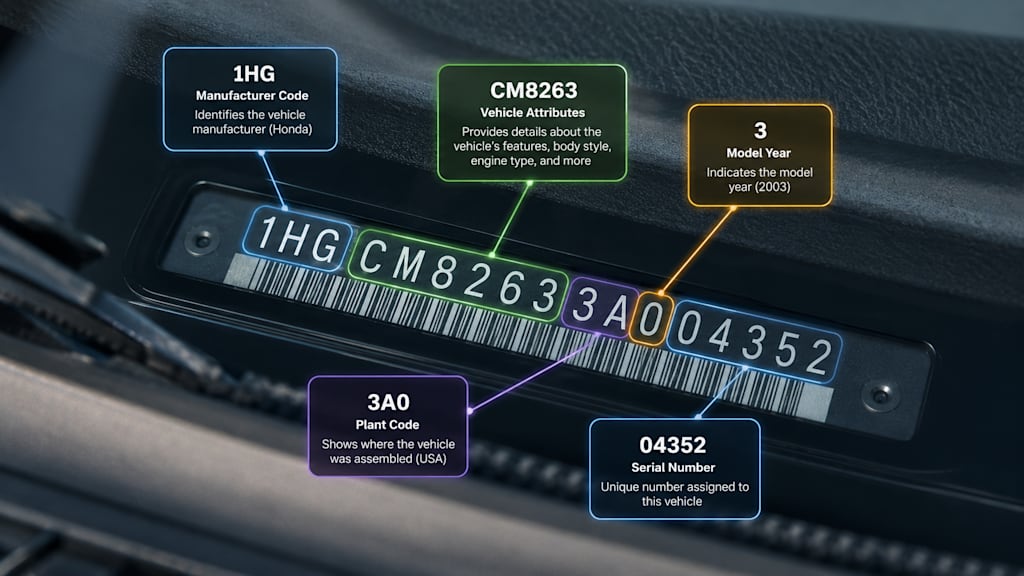
Every car built since 1981 carries a 17-character code stamped into its dashboard, door jamb, and engine bay — the Vehicle Identification Number, or VIN. It looks like a random string of letters and numbers, but it's actually a structured record of exactly what the vehicle is: who built it, where, what engine it left the factory with, and even a built-in check to catch tampering. So how do you decode a VIN number, and what does each part actually tell you?
What a VIN Actually Is
A VIN is the automotive equivalent of a fingerprint — no two vehicles share one. Since 1981, every VIN sold in North America has followed the same 17-character format, standardized so that any character position means the same thing across every manufacturer. That structure is exactly what makes decoding possible in the first place.
One quirk worth knowing: VINs never contain the letters I, O, or Q. They're excluded specifically because they're too easy to confuse with the numbers 1 and 0. If you ever see one of those three letters in a supposed VIN, that's an immediate sign something's wrong with the plate, the listing, or the source.
Breaking Down the 17 Characters
Each section of the VIN encodes a different piece of information:
Characters 1–3 — World Manufacturer Identifier (WMI): identifies the country of origin and the manufacturer. This is why VINs starting with "1," "4," or "5" are North American-built, "J" is Japan, "W" is Germany, and so on.
Characters 4–8 — Vehicle Descriptor Section (VDS): covers the model, body style, engine type, and sometimes transmission — manufacturer-specific, but consistent within their own lineup.
Character 9 — Check digit: a mathematically calculated value used to validate that the rest of the VIN is legitimate and hasn't been altered. This single character is one of the more useful, least-known parts of the VIN for catching a tampered or fraudulent plate.
Character 10 — Model year: a letter or number code corresponding to the vehicle's model year.
Character 11 — Plant code: identifies the specific factory where the vehicle was assembled.
Characters 12–17 — Vehicle Identification Sequence (VIS): the unique production/serial number for that specific vehicle.
How to Decode a VIN Manually
Technically, you can decode a VIN by hand — cross-referencing the WMI against a manufacturer database, working out the model year from a standardized character table, and calculating the check digit yourself using the VIN's weighted formula. It's possible, but it's slow, easy to get wrong, and most of the reference tables you'd need aren't things the average buyer has memorized or bookmarked.
The Easier Way: Use a Free VIN Decoder
This is exactly the kind of task worth automating. Paste the VIN into a vin decoder and it instantly returns the make, model, trim, engine, and factory-installed options — no manual lookup tables required. It's the fastest way to confirm that a listing actually matches the car behind it, which matters more than people expect: mismatched details between a VIN and a listing are one of the more common signs of an inaccurate or outright fraudulent ad.
VIN Lookup vs. VIN Decode: Is There a Difference?
The terms get used interchangeably, but they're not quite the same thing. Decoding pulls the manufacturing specs baked into the code itself — model, engine, trim, plant. A vin lookup usually goes further, cross-referencing that VIN against outside records: open recalls, title status, and reported history. If you're seriously considering a car, decoding tells you what it is; a lookup tells you what's happened to it.
Don't Stop at Decoding — Run a Full Vin Check
Decoding confirms the car is what the listing claims. A full Vin Check goes a step further and flags anything the seller might not mention — most importantly, open safety recalls, which are common and usually fixed free at any dealer, but easy to miss if nobody tells you to look.
Decode Without Leaving the Listing
If you're comparing multiple cars across Craigslist, Facebook Marketplace, or a dealer site, switching tabs to decode every VIN gets old fast. The free VIN decoder and recall checker Chrome extension puts the same decode-and-recall-check process one click away from whatever page you're already browsing, so you can vet a listing in seconds instead of opening a new tool for every car you're considering.
Common VIN Decoding Mistakes
A few things trip people up even when they're trying to do this right:
Misreading similar characters — a handwritten or low-resolution VIN can blur numbers and letters together, especially since I, O, and Q are excluded but 1, 0, and other lookalikes aren't.
Only checking one location — the VIN should match exactly across the dashboard, driver's door jamb, and engine bay. A mismatch between locations is a red flag worth walking away from, not explaining away.
Skipping the check digit — most people decode a VIN for the make and model and never notice the check digit exists, even though it's specifically there to catch a tampered plate.
Assuming a clean decode means a clean history — decoding confirms the vehicle's specs, not what's happened to it. That's what a full history report and recall check are for.
The Bottom Line
A VIN isn't just a random ID number — it's a structured record you can actually read once you know what each section means. Manually decoding one is possible but tedious; running it through a proper tool takes seconds and removes the guesswork, especially when you're comparing several listings at once. Decode first to confirm the car matches the ad, then run the fuller check to see what the decode alone won't show you.
About the Creator
THÉO GOMEZ
Founder of CarfaxDeals.us | Helping drivers get affordable CARFAX reports without overpaying. Making vehicle history reports more accessible, simple, and budget-friendly.
Enjoyed the story? Support the Creator.
Subscribe for free to receive all their stories in your feed.
Comments
There are no comments for this story
Be the first to respond and start the conversation.