
Managing eCash Made Simple: Exploring the ECXIUM Wallet
From wallet creation to self-custody, discover what users should know before managing ECX through a dedicated web wallet.

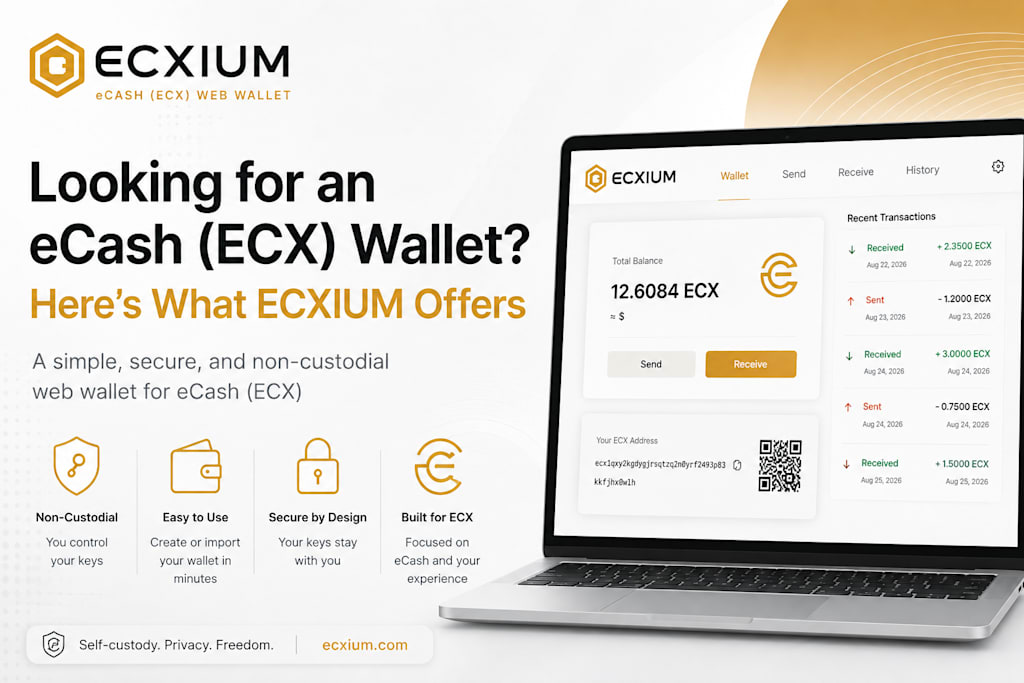
What Is an eCash (ECX) Wallet?
Finding the right eCash wallet can be confusing when you are new to the ECX ecosystem. Cryptocurrency wallets are often described as places where digital coins are stored, but technically, they provide the tools needed to manage blockchain addresses, sign transactions, and access assets associated with those addresses.
For someone using eCash (ECX), an ECX wallet can be used to receive, send, and manage ECX while keeping track of transaction activity. One important consideration is whether the wallet is custodial or non-custodial. With a custodial service, another company typically controls the private keys. A non-custodial wallet, on the other hand, puts those credentials under the user's control.
That distinction is central to ECXIUM, which is designed as a browser-based, non-custodial wallet specifically focused on eCash.
Why ECXIUM Takes a Focused Approach
Many cryptocurrency wallets try to support a huge number of coins and blockchain networks. That can be convenient if you regularly manage different digital assets, but it can also make the interface more complicated than necessary.
ECXIUM takes a different route by concentrating on the eCash ecosystem. Rather than treating ECX as one asset among hundreds, the platform is designed around the core activities an ECX user needs.
This focused approach can make the experience easier to understand, particularly for someone searching specifically for an ECX wallet rather than a general-purpose multi-chain application.
Key wallet functions include:
Creating a new ECX wallet
Importing compatible wallet credentials
Sending and receiving ECX
Managing wallet addresses
Checking transaction history
Using QR codes for transactions
The result is a more specialized experience for people who want a web wallet for eCash without navigating through unrelated cryptocurrency networks.
How to Create or Import an ECX Wallet
Getting started with ECXIUM can involve either creating a new wallet or importing an existing compatible wallet. For a newcomer to eCash, creating a new wallet is the straightforward option. The browser-based setup allows users to establish an ECX wallet without relying on the traditional account-registration model associated with exchanges.
Existing cryptocurrency users may instead be interested in the import functionality. ECXIUM supports importing wallet credentials through a recovery phrase or a WIF private key where compatible.
This can be particularly relevant to people coming from Bitcoin. Because ECX has a connection to Bitcoin through its snapshot-based distribution, eligible Bitcoin addresses may have corresponding ECX associated with them on the ECX network.
However, users should take care when handling wallet credentials. A recovery phrase or private key is not simply a login password. It can provide control over the associated assets, so it should never be shared with another person or entered into an application unless the user has independently verified that application.
Understanding ECX, Bitcoin, and Self-Custody
One of the easiest mistakes for newcomers is assuming that accessing ECX somehow converts their Bitcoin into another cryptocurrency. It does not.
Bitcoin and ECX are separate assets operating on separate networks. Importing compatible Bitcoin wallet credentials into an ECX wallet does not exchange BTC for ECX, nor does it move Bitcoin onto the ECX network.
Think of it as having access to information associated with the same underlying wallet credentials across different blockchain histories. The Bitcoin remains on the Bitcoin blockchain, while ECX exists on its own network.
This is also where the concept of self-custody becomes important. With a non-custodial wallet, users maintain control over their wallet credentials instead of handing that control to an exchange or other third party.
That independence comes with responsibility. Users should keep recovery phrases and private keys securely backed up and avoid storing them in publicly accessible locations.
Important: Never share a recovery phrase or private key with someone claiming they need it to “activate,” “verify,” or “recover” your wallet.
Understanding this principle is useful not only for ECX but also for anyone moving from Bitcoin or learning about cryptocurrency forks and related blockchain ecosystems.
What Can You Do With ECXIUM?
Once an ECX wallet has been created or successfully imported, the purpose is straightforward: provide the tools needed to interact with ECX.
For example, someone receiving ECX from another user can provide their wallet address and monitor the incoming transaction. Someone sending ECX can enter the recipient's address, review the transaction details, and complete the transfer through the wallet interface.
The main functions can be summarized simply:
| Feature | Purpose |
| Wallet creation | Set up a new ECX wallet |
| Wallet import | Access compatible existing credentials |
| Send ECX | Transfer ECX to another address |
| Receive ECX | Accept ECX from another wallet |
| Transaction history | Review wallet activity |
| QR codes | Simplify address and transaction handling |
This focused functionality may appeal to users who do not need a large multi-asset wallet and instead want a dedicated environment for managing eCash.
Conclusion
Choosing an eCash wallet is about more than finding an application that displays a balance. Users should understand how the wallet works, who controls the private keys, and how the wallet interacts with the relevant blockchain.
ECXIUM offers a focused, browser-based and non-custodial approach for users looking to manage eCash (ECX). It supports core wallet activities such as creating or importing compatible wallets, sending and receiving ECX, managing addresses, and reviewing transaction activity.
For users exploring ECX, particularly those familiar with Bitcoin and interested in self-custody, understanding the difference between Bitcoin and ECX remains essential. A dedicated wallet can simplify access, but responsible management of private keys and recovery information remains the user's responsibility.
FAQs
1. What is an eCash (ECX) wallet?
An eCash wallet provides the tools needed to manage ECX addresses and interact with the eCash network. It can be used to send, receive, and monitor ECX.
2. Is ECXIUM a non-custodial wallet?
Yes. ECXIUM is designed as a non-custodial wallet, meaning users retain control of their wallet credentials rather than relying on a traditional custodial account.
3. Can I import an existing wallet into ECXIUM?
ECXIUM supports importing compatible wallet credentials using a recovery phrase or WIF private key. Users should always verify their credentials and the wallet application before importing anything.
4. Does accessing ECX affect my Bitcoin?
No. ECX and Bitcoin remain separate assets on separate networks. Accessing compatible ECX associated with eligible Bitcoin addresses does not itself convert or transfer your BTC.
5. Can I use ECXIUM as a web wallet for eCash?
Yes. ECXIUM is designed as a browser-based wallet focused specifically on eCash, providing core functions for managing ECX without requiring a traditional custodial exchange account.
About the Creator
MUHAMMAD SHAFIE
Muhammad Shafie is a writer and blogger passionate about digital culture, tech, and storytelling. Through insightful articles and reflections, they explore the fusion of innovation and creativity in today’s ever-changing world.
Enjoyed the story? Support the Creator.
Subscribe for free to receive all their stories in your feed.
Comments
There are no comments for this story
Be the first to respond and start the conversation.