
The Battle of the Mini PCs: Which One is Right for You?
The advantages of using a mini pc
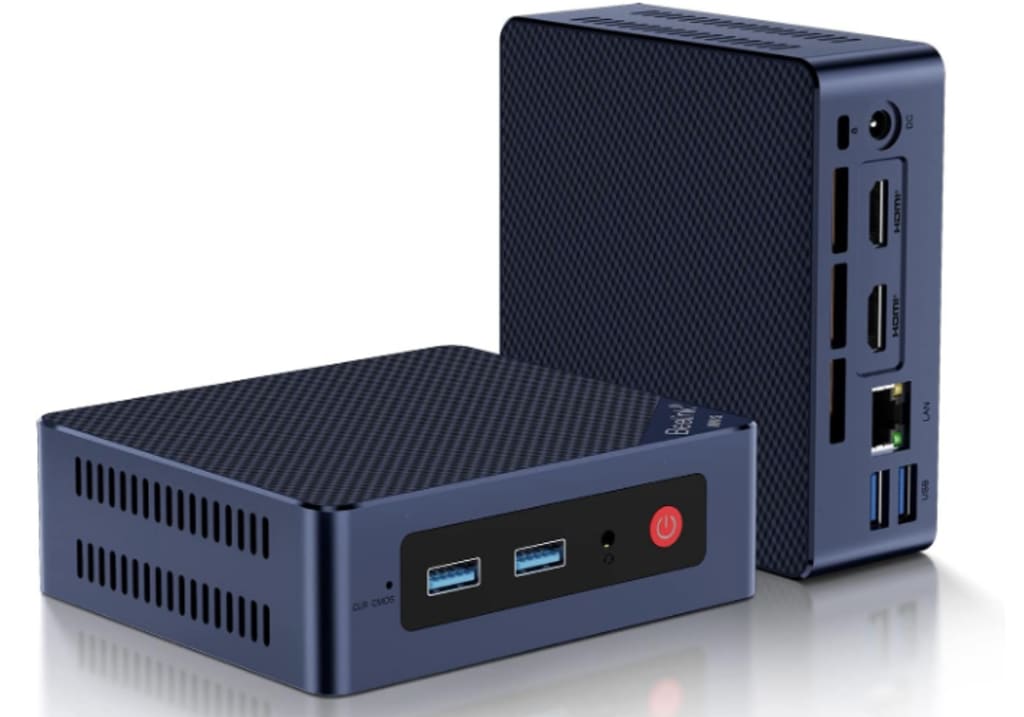
In the ever-changing world of technology, mini PCs have carved out their place by offering powerful computing in a compact form. Whether you're a student, a professional, or someone who loves a sleek setup at home, there's a mini PC out there tailored for you. But with so many options available, how do you choose the right one? Today, we'll look at four popular mini PCs available on Amazon, weighing the pros and cons of each, and offering expert advice to help you make an informed decision.
Before diving into the specifics of each model, it's important to address a key factor that often drives people toward mini PCs in the first place: their affordability.
Why Mini PCs are a Budget-Friendly Solution
Let’s be honest—technology can be expensive. Between powerful desktops, high-end laptops, and all the peripherals that come with them, setting up a proper computing environment can quickly become a costly endeavor. This is where mini PCs stand out—they offer a budget-friendly alternative without compromising on essential features.
Lower Initial Cost: One of the biggest advantages of mini PCs is their affordability. Compared to full-sized desktops or high-performance laptops, mini PCs generally cost a fraction of the price. This makes them an attractive option for students, small business owners, or anyone looking to get the most bang for their buck. You don’t need to spend a fortune to get a machine capable of handling your everyday tasks—mini PCs offer a more economical way to achieve your computing goals.
Reduced Operating Costs: But the savings don’t stop at the initial purchase. Mini PCs are also more energy-efficient than their larger counterparts. This means lower electricity bills over time, which is especially beneficial if you’re running multiple units in an office environment or using a mini PC as a constantly running server at home. They also tend to have fewer moving parts, reducing the likelihood of hardware failures and the associated repair costs.
Longevity and Upgradability: While mini PCs might not have the same raw power as top-of-the-line desktops, they are often more than capable of handling everyday tasks for years to come. Many models also offer the ability to upgrade components like RAM and storage, extending their useful life and providing even more value for your investment. This flexibility allows you to start with a basic configuration and expand as your needs grow, all while keeping costs in check.
In a world where technology often feels like it’s getting more expensive by the day, mini PCs offer a refreshing alternative—a way to enjoy the benefits of modern computing without breaking the bank.
Why Mini PCs are a Game-Changer
You might be asking yourself, “Why would I even consider a mini PC when laptops and desktops have been around for so long?” It’s a fair question! But mini PCs are more than just a passing trend; they represent an evolution in how we think about computing power and space.
Space-Saving Elegance: First off, let’s talk about the obvious: mini PCs are tiny. They’re perfect for people who are tired of bulky towers and tangled cables cluttering up their desks. Imagine having a powerful computer that takes up less space than a hardcover book. Whether you’re setting up a home office or looking to declutter your workspace, mini PCs offer a minimalist approach without sacrificing performance.
Portability Meets Power: Another perk is portability. Sure, they’re not as portable as a laptop, but mini PCs are easy to move from one location to another. Whether you’re traveling for work or need to set up a temporary workstation in a different room, just unplug, pack it up, and you’re good to go. Plus, with their ability to connect to various peripherals, you can turn any space into a productive environment.
Versatility at Its Best: Mini PCs aren’t just for work. They can transform into home entertainment hubs, handling everything from streaming 4K movies to serving as the brains behind your smart home setup. Want to play games? Sure, they might not compete with high-end gaming rigs, but many mini PCs are more than capable of handling popular titles at respectable settings.
Energy Efficiency: Let’s not forget about power consumption. Mini PCs generally use less energy than their larger counterparts, which is great for both your electricity bill and the environment. If you’re running a home office or a small business, this could be an essential factor to consider over the long term.
In short, mini PCs are the embodiment of efficiency—offering just the right amount of power and flexibility for most users while taking up a fraction of the space.
Now, Let's Dive into the Top Contenders
1. Beelink S12 Pro Mini PC
Specs Overview:
• Processor: Intel 12th Gen Alder Lake-N100 (up to 3.4GHz)
• RAM: 16GB DDR4
• Storage: 500GB M.2 SSD
• Graphics: Supports 4K Dual Display
• Connectivity: USB 3.2, WiFi 6, Bluetooth 5.2, Gigabit Ethernet
Pros:
• Performance: The 12th Gen Intel Alder Lake-N100 processor offers solid performance, handling multitasking and moderate workloads with ease.
• Connectivity: With WiFi 6 and Bluetooth 5.2, you're getting the latest in wireless technology, ensuring fast and stable connections.
• Storage: The 500GB SSD provides ample space for most users, and the inclusion of USB 3.2 ensures quick data transfers.
Cons:
• Graphics: While it supports 4K dual display, it may struggle with more demanding graphics tasks like high-end gaming or intensive video editing.
• Build Quality: Some users report that the build quality feels a bit less premium compared to other mini PCs.
If you’re looking for a mini PC that can handle a variety of tasks without breaking a sweat, the Beelink S12 Pro is an excellent choice. It's particularly well-suited for users who need reliable performance for everyday tasks, such as office work, web browsing, and light content creation. The inclusion of WiFi 6 and Bluetooth 5.2 ensures that you're future-proofed in terms of connectivity, which is increasingly important in a world where devices and accessories are becoming more wireless.
However, it's essential to manage your expectations when it comes to graphics. If you're a casual gamer or need to edit videos occasionally, the Beelink S12 Pro will do just fine. But for anyone requiring high-end graphics processing—think serious gamers or professional video editors—this mini PC might not meet those demands. Also, while the build quality is generally good, it's worth noting that it doesn’t have the same premium feel as some of the more expensive options on the market. That said, for the price, it offers a robust and versatile computing experience that’s hard to beat.
2. Apple 2023 Mac Mini with M2 Chip
Specs Overview:
• Processor: Apple M2 chip with 8‑core CPU and 10‑core GPU
• RAM: 8GB Unified Memory
• Storage: 256GB SSD
• Compatibility: Works seamlessly with iPhone and iPad
Pros:
• Performance: The M2 chip delivers exceptional performance, particularly in graphics-intensive applications. It's perfect for creative professionals who use software like Final Cut Pro or Logic Pro.
• Ecosystem: If you're already in the Apple ecosystem, the Mac Mini integrates flawlessly with your other devices, offering a seamless experience.
• Design: Apple’s minimalist design is both elegant and space-saving.
Cons:
• Price: The Mac Mini is one of the more expensive options in the mini PC category, and the 256GB SSD might feel limiting for some users.
• Upgradeability: Unlike some other mini PCs, upgrading the Mac Mini’s hardware isn't easy, as many components are soldered to the board.
The Mac Mini with M2 chip is a powerhouse that brings Apple's renowned design and performance to the mini PC market. This model is particularly appealing to creative professionals—think graphic designers, video editors, and music producers—who need a machine that can handle demanding applications like Final Cut Pro, Logic Pro, or Adobe Creative Suite. The M2 chip, with its integrated 10-core GPU, ensures that even the most graphics-intensive tasks are handled smoothly.
One of the standout features of the Mac Mini is its seamless integration with the Apple ecosystem. If you’re already an iPhone or iPad user, you’ll appreciate how effortlessly the Mac Mini fits into your digital life. From using AirDrop to share files across devices to picking up calls or messages on your desktop, the Mac Mini enhances the continuity that Apple is known for.
That said, the Mac Mini’s high price point and limited storage capacity might be a concern for some. While 256GB SSD storage is fast, it can quickly fill up, especially if you're working with large media files. You can, of course, opt for external storage, but it's an additional cost. Moreover, if you're someone who likes to tinker with hardware or plans on upgrading components down the line, the Mac Mini's lack of upgradeability might be a deal-breaker. Many of its components are soldered in place, making it challenging to enhance its specs after purchase.
3. Dell OptiPlex 7050 Micro Computer (Renewed)
Specs Overview:
• Processor: Intel Quad Core i5-6500T (up to 3.1GHz)
• RAM: 16GB DDR4
• Storage: 256GB SSD
• OS: Windows 10 Pro
Pros:
• Value for Money: As a renewed product, the Dell OptiPlex 7050 offers excellent value, providing robust performance at a lower price point.
• Business-Friendly: With Windows 10 Pro, this mini PC is ideal for business use, offering features like BitLocker and Remote Desktop.
• Upgradeability: The OptiPlex series is known for being easy to upgrade, allowing users to increase storage or RAM as needed.
Cons:
• Age: Being a renewed product, it’s a few years older than the other options, which might mean it lacks some of the latest features and support.
• Graphics: The integrated graphics are sufficient for general use but won’t handle high-end gaming or graphic design well.
The Dell OptiPlex 7050 Micro Computer is an excellent choice for those who need a reliable workhorse at a fraction of the cost of a new machine. Its Intel Core i5-6500T processor and 16GB of RAM ensure that it can handle everyday business tasks, from running office applications to managing large spreadsheets and databases. The inclusion of Windows 10 Pro adds further value, especially for businesses, offering advanced features like BitLocker encryption and the ability to connect to a domain.
What’s particularly appealing about the OptiPlex 7050 is its upgradeability. Unlike many mini PCs, this model allows you to easily upgrade components like RAM and storage, extending the machine's useful life and adapting to your growing needs. This makes it a great option for businesses that may need to enhance their PCs over time without investing in entirely new systems.
However, there are a couple of caveats to consider. First, as a renewed product, the OptiPlex 7050 might show signs of wear, and while it has been refurbished to meet certain standards, it won’t offer the same out-of-the-box experience as a brand-new device. Additionally, while the integrated graphics are fine for general use, they’re not up to the task of high-end gaming or professional graphic design. If your needs are more graphics-intensive, you might want to look elsewhere or consider adding an external GPU.
4. KAMRUI GK3Plus Mini PC
Specs Overview:
• Processor: 12th Gen Alder Lake N95 (up to 3.4GHz)
• RAM: 16GB
• Storage: 512GB M.2 SSD
• Graphics: 4K UHD support
• Connectivity: Gigabit Ethernet, WiFi, Bluetooth, VESA mountable
Pros:
• Storage and RAM: With 16GB of RAM and a 512GB SSD, this mini PC offers generous specs at a competitive price.
• Versatility: The VESA mount allows you to attach the PC to the back of a monitor, saving desk space.
• Performance: The Alder Lake N95 processor provides a good balance of performance and energy efficiency, making it suitable for a wide range of tasks.
Cons:
• Brand Recognition: KAMRUI isn’t as well-known as other brands, which might make some users hesitant.
• Support: Lesser-known brands might not offer the same level of customer support or warranty service as bigger names.
The KAMRUI GK3Plus Mini PC is a versatile and cost-effective option for those who want solid performance without breaking the bank. Its 12th Gen Alder Lake N95 processor is designed to provide a good balance between power and efficiency, making it capable of handling everyday tasks like web browsing, document editing, and even some light gaming. The 16GB of RAM ensures smooth multitasking, and the 512GB SSD offers plenty of fast storage for your files and applications.
One of the standout features of the GK3Plus is its VESA mount compatibility, which allows you to attach the mini PC to the back of a monitor. This is particularly useful if you’re working with limited desk space or want a clean, minimalist setup. It also makes the GK3Plus a good candidate for a home entertainment system, as you can easily hide it behind your TV and connect it to your home network for streaming content in 4K UHD.
However, the KAMRUI brand might not be as familiar as others like Dell or Apple, which could give some potential buyers pause. This isn’t necessarily a bad thing—many lesser-known brands offer excellent products at competitive prices—but it’s something to consider if you value brand recognition or anticipate needing strong customer support. Additionally, while the GK3Plus offers great value, the level of support and warranty services might not match those provided by more established brands, so it’s worth doing some research into customer reviews and warranty details before making a decision.
Conclusion: The Mini PC Revolution
So, after all this tech talk, you might be wondering, “Is a mini PC right for me?” The answer, as with most tech decisions, is: it depends.
If you're someone who values a clean, uncluttered workspace, or you simply don’t have the room for a traditional desktop setup, a mini PC can be a perfect fit. They’re also great for those who appreciate the flexibility to move their workstations or want a computer that can double as an entertainment hub without taking up much space.
For the environmentally conscious, mini PCs offer an energy-efficient alternative that doesn’t skimp on power. They’re especially appealing if you’re looking to reduce your carbon footprint without compromising on performance.
Of course, not all mini PCs are created equal. The Apple Mac Mini with M2 chip stands out for its performance and seamless integration into the Apple ecosystem, making it a top choice for creatives. The Beelink S12 Pro and KAMRUI GK3Plus offer excellent value for home and business users, with solid specs and modern features at competitive prices. Meanwhile, the Dell OptiPlex 7050 provides a budget-friendly option with the reliability of a trusted brand, especially suitable for business environments.
In the end, the best mini PC is the one that fits your specific needs and lifestyle. Whether you’re a digital nomad, a small business owner, or someone just looking to simplify their home office, there’s a mini PC out there that’s just right for you. The real beauty of mini PCs lies in their versatility and the way they can adapt to our changing technological needs. So, take the plunge, and join the mini PC revolution—you might just find that less is truly more.
About the Creator
Enjoyed the story? Support the Creator.
Subscribe for free to receive all their stories in your feed.
Comments
There are no comments for this story
Be the first to respond and start the conversation.