tech
Technology with a twist; geek out to gadget hacks and tech tricks that will give your devices more mileage.
9 Surprising Facts About The Invention Of The Best Rated Payroll Software
Payroll management is an essential aspect of any business, ensuring that employees are accurately compensated for their work. In today's digital age, payroll software has revolutionized the way companies handle their payroll processes. While there are numerous payroll software options available, one stands out as the best-rated in the industry. Let’s unveil the top nine surprising facts about the invention of this exceptional payroll software.
By Alisha Parker3 years ago in Lifehack
Walmart Will Pay 4 Million To Customers
Walmart recently announced that it will pay a total of $4 million in cash refunds to customers who purchased certain products between April 2016 and October 2019. The products, which include kitchen appliances, power tools, and other items sold online and in stores nationwide, were the subject of an FTC investigation into deceptive pricing practices. According to the FTC complaint, Walmart advertised the products at a discounted price but charged customers the full retail price.
By Ebem Charles 3 years ago in Lifehack
"The Unbreakable Bond: A Tale of True Friendship". Content Warning.
Once upon a time in a small town called Meadowville, two unlikely souls named Lily and Sarah found themselves brought together by a twist of fate. Despite their contrasting personalities, they quickly formed a deep and unbreakable bond that would stand the test of time.
By Stefi Dourado3 years ago in Lifehack
Rediscovering the Beauty of Sharing Snaps on Instagram
In a series of major changes, social media megalith Meta is revolutionizing its platforms, with a gradual rollout set to continue until the end of 2023. Among the transformations, one development has garnered significant attention and sparked excitement among social media gurus – the upcoming revolution of Instagram.
By Spencer Hawken3 years ago in Lifehack
Apple iPad
Mac iPad (ninth Era) The reasonable force to be reckoned with in 2023 In the steadily developing universe of innovation, the Mac iPad has reliably stood firm on a noticeable situation, dazzling clients with its smooth plan, strong execution, and flexible usefulness. Today, we dig into the domain of the Mac iPad (ninth Era) and investigate how this specific gadget holds up in the year 2023. The iPad 9, with its 10.2-inch show, proceeds to intrigue and stays a well known decision among purchasers. Indeed, even now, various arrangements and limits can be found, making it a tempting choice for those trying to buy another iPad. Go along with us as we uncover the qualities and highlights of the iPad 9 and find the reason why it actually merits your consideration in the always extending tablet market.
By Universal Media3 years ago in Lifehack
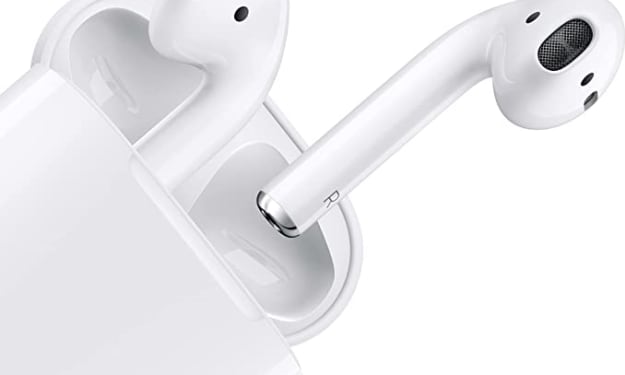
How to Reset Apple Air Pods: A Comprehensive Guide. Content Warning.
Apple Air Pods have altered the manner in which we experience remote sound, offering accommodation and consistent joining with Apple gadgets. Nonetheless, similar to any innovation, Air Pods can experience gives that might require a reset. In this exhaustive aide, we will investigate the most common way of resetting Air Pods and why it is fundamental for keeping up with ideal execution.
By Chamli Nawod3 years ago in Lifehack
Tech Hacks:
Tech Hacks: Unlocking the Potential of Your Devices and Apps Introduction: In today's digital age, technology has become an integral part of our lives. From smartphones and tablets to laptops and smart home devices, we rely on technology for communication, productivity, entertainment, and more. However, many people only scratch the surface of what their devices and apps can truly do. In this article, we will explore a range of tech hacks that will help you unlock the full potential of your devices and apps, enhancing your efficiency, customization, and overall tech experience. 1. Customizing Your Device: Personalizing your device can make it feel like a seamless extension of yourself. Explore the settings and customization options available on your device's operating system. Change wallpapers, set up widgets, rearrange your app icons, and adjust notification settings to create a personalized and visually appealing home screen. Experiment with different themes, icon packs, and launchers to transform the look and feel of your device. 2. Mastering Keyboard Shortcuts: Keyboard shortcuts are time-saving tools that can significantly boost your productivity. Whether you're using a computer, smartphone, or tablet, familiarize yourself with common keyboard shortcuts for tasks like copy, paste, undo, and save. Additionally, many applications and operating systems have specific shortcuts that can streamline your workflow. Take the time to learn and practice these shortcuts to navigate through your devices and apps more efficiently. 3. Automating Tasks with Macros and Scripts: Macros and scripts are powerful tools that can automate repetitive tasks, saving you time and effort. Many productivity apps and operating systems offer features or third-party tools that allow you to create custom macros or scripts. Whether it's automating data entry, generating reports, or performing complex actions, spend some time learning how to create and use macros or scripts to simplify your workflow. 4. Managing Notifications: Notifications can be both helpful and distracting. Take control of your device's notification settings to minimize interruptions and maintain focus. Review the apps on your device and disable notifications for ones that are not essential. Customize notification preferences for each app, allowing only important alerts to come through. Consider utilizing features like "Do Not Disturb" or "Focus Mode" during specific periods, such as work or study hours, to minimize distractions and improve productivity. 5. Utilizing Cloud Storage: Cloud storage services, such as Google Drive, Dropbox, or iCloud, offer convenient and secure ways to store and access your files across multiple devices. Take advantage of cloud storage by uploading and syncing your important documents, photos, and videos. This way, you can access your files from any device with an internet connection, ensuring you have your essential data available whenever and wherever you need it. 6. Maximizing Battery Life: Battery life is a crucial aspect of any portable device. To extend your device's battery life, adjust settings like screen brightness, background app refresh, and location services. Disable unnecessary features like Wi-Fi, Bluetooth, or GPS when not in use. Additionally, consider using battery-saving modes or power-saving apps that optimize your device's performance and reduce battery drain. 7. Exploring Hidden Features: Devices and apps often come packed with hidden or lesser-known features that can be incredibly useful. Take the time to explore the settings, menus, and help sections of your devices and apps to discover these hidden gems. Whether it's advanced camera settings, gesture controls, hidden menus, or hidden game features, you may find new functionalities that enhance your user experience. 8. Securing Your Devices and Data: In the era of increasing digital threats, ensuring the security of your devices and data is essential. Set up strong passwords, PINs, or biometric authentication methods to protect your device from unauthorized access. Enable device encryption and remote tracking features to safeguard your data in case of loss or theft. Regular
By ARUN KRISHNA J3 years ago in Lifehack
Everything You Need to Know About the Apple iPad (9th Generation)
A. Brief outline of the Mac iPad (9th Generation) The Mac iPad (9th Generation) is the most recent emphasis of Macintosh's well known tablet arrangement. Expanding upon the outcome of its ancestors, this new model brings a scope of upgrades and highlights intended to improve your computerized insight.
By Chamli Nawod3 years ago in Lifehack