
How to Download YouTube Videos Without Premium on Computer/Mobile [Free]
4 best ways to download YouTube videos to local for free without YouTube Premium subscription.


As we all know, YouTube Premium that starts at $13.99/month allows users to download YouTube videos for legal, ad-free offline viewing. However, it comes with the following drawbacks:
- The downloaded video file is not saved to your local device, and can only be viewed within the app or cached website.
- Available quality options are 720p, SD or lower, no 1080P or other Full HD options.
- Downloaded videos can be played offline for up to 29 days, you’ll need to reconnect to the internet to renew the video’s availability every month.
So what other methods are there to download YouTube videos without Premium? In this guide, I will show you best third-party tools to download YouTube videos to your computer or mobile for free, safely and with no quality or time limits.
1. Use Desktop or Mobile YouTube Downloader Software
2. Use Online Downloader Tool
3. Use Browser Extension
4. Use Command-line tools
Format Selection Advice & Legal Consideration
Solution 1. Best YouTube Downloader Software for Safe & High-quality Downloads
If you need to download a large number of videos from YouTube and prioritize quality, a dedicated downloader software is the best option. Recommended choices:
ClipGrab (Windows, Mac, Linux): Free and open source downloader based on yt-dlp, downloading YouTube video one by one, support 5 video/audio output formats; a bit slower downloads. The downside is that the download speed can be slow and bugs happen. Similar options include aTube Catcher, Stacher, and so on.
Cisdem Video Converter (Windows, Mac): All-in-one video downloader that can save video, audio, music and subtitles from YouTube in original quality, up to 8K; download entire playlists and channels at once; provides built-in video converter to change YouTube videos to any desired format. Also downloads private content requiring account login. Similar options include 4K Downloader+, SnapDownloader, etc. These options offers lifetime license with regular updates.
PipePipe (Android): Free video downloader for Android phones. Download and play videos from YouTube and other video sites for free in the original formats. Not available in the Google Play Store, you’ll need to download it from F-droid or other downlaod sites. Similar apps include Seal and NewPipe.
How to use:
- Download and install the software from its official website or trusted sites like Uptodown, CNET.
- Copy the video link of the YouTube video you want to download, and paste it into the downloader.
- Select the video resolution and format.
- Click a Download button to save the video file to your computer.
Is there a good YouTube video downloader for iOS?
Apps in the App Store are normally not allowed to offer YouTube download capability, so the easiest way to download YouTube videos without Premium on iPhone or iPad is to use an online tool.
Another unconventional workaround is to use a YouTube downloader shortcut that works with a Terminal emulator app called “a-Shell”. The usage: add a working YouTube downloader shortcut to the Shortcuts app, share a YouTube video link to the shortcut to download the video in a-Shell. But in my experience, the shortcut may fail due to lack of updates. You can find more info about this technique in Solution 4.
Solution 2. The Best Online YouTube Downloader
Some online tools lets you download YouTube videos without software for free, one go-to site is cobalt.tools.
It’s a completely free web-based YouTube downloader, no ads, viruses, or registration required, safer than other online competitors. How to use it:
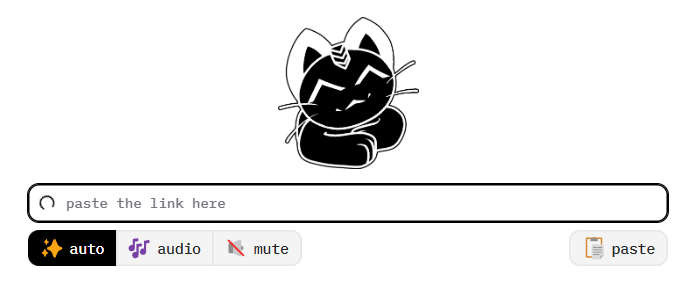
- Go to https://cobalt.tools/
- Click Settings in the left panel, and select a preferred video/audio quality level and format in advance.
- Go back to the Save page, enter the YouTube video URL and click >> button to download the video.
While this online downloader seems perfect, playback issues happens sometimes with the downloaded videos, such as lagging, not being able to drag the progress bar, etc. So please check the file soon after the download. And if there’s any problem with the video, switch to other methods or convert/re-encode the downloaded video.
Must-try trick to download YouTube videos in 1080p for free online: add “sos” after the word “youtube” in the link from the address bar to quickly download YouTube videos.

Solution 3. The Best Browser Extension to Download YouTube Videos for Free
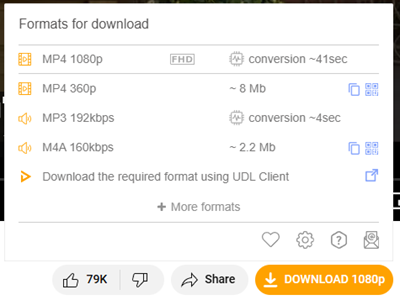
There are several extensions/add-ons for Firefox to download videos from YouTube with one click, no need to copy or paste video links, such as UDL Helper.
YouTube Downloader (UDL Helper) helps you download YouTube videos in HD, 2K and even 4K without any software on your computer. It offers “PLAYER” formats for fast downloads or MP4/WebM formats that require conversion. Note that the conversion process may take a several minutes or longer time and slow down your browser.
How to use it:
- Install UDL Helper add-on in your Firefox, Edge or Opera browser.
- Go to youtube.com and play the video you want to download.
- Hover your mouse pointer to a Download button below the video added by the extension, and view all formats for download.
- Select a download option to begin downloading the video. Once the process is finished, the video will be saved to the downloads folder.
Solution 4. Command-line Tools
yt-dlp is the best command-line tool for downloading videos from YouTube and other video hosting sites. It provides all the YouTube download features you may need, such as HD downloads, playlist downloads, audio downloads and so on.
I have mentioned some yt-dlp GUI for Android and iOS in Solution 1. If you’re using a laptop or PC, you can also use this powerful command-line tool directly from Terminal or Command Prompt interface. It’s not as easy-to-use as other tools, but it worth the time to learn. Here’s a beginner’s guide to using yt-dlp to download YouTube videos without Premium.
- Install yt-dlp. Windows users can download the latest yt-dlp.exe release from https://github.com/yt-dlp/yt-dlp#release-files. You can then add yt-dlp to system path so you can run it from any directory. On Mac, install yt-dlp via Homebrew.
- Install FFmpeg. FFmpeg is a multimedia command-line tool used by yt-dlp to perform operations like merging high quality video and audio files and converting formats, it’s necessary if you want to download HD YouTube video with sound.
- Basic usage. Open the Terminal (Mac) or Command Prompt (Windows) software, and run yt-dlp URL to download a YouTube video. This basic command line will save the best quality and output video in WebM, MP4 or MKV format.
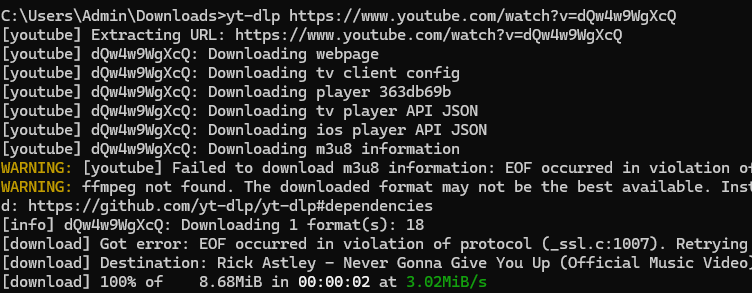
Commonly used commands:
- Before downloading, use the cd command to choose where to output the downloads to, such as cd desktop. You can simply drag the folder to the interface.
- To choose a specific YouTube video format, first use yt-dlp -F URL to list all formats, then run yt-dlp -f video-ID+audio-ID URL to download the video in selected format and quality.
- To download content that require login authentication such as age-restricted videos, private videos, liked playlists, etc., use yt-dlp --cookies-from-browser browser URL.
- Run yt-dlp -U to update the tool to keep it working.
Format Selection Advice
A decent YT downloader app can download YouTube videos in the original formats and allows you to choose from all available options. So which should we choose when there are multiple options for the same resolution?
For short answer, in terms of compatibility, choose MP4 format with AVC (H.264) video codec and M4A audio codec for YouTube videos in 1080p or lower quality; for higher quality including 2K to 8K, MP4 or WebM in VP09 and M4A codecs are more recommended.
If your downloaded YouTube video won’t open or play without audio/video due to codec issues, consider converting it to MP4 using an online video converter or transcoder software such as HandBrake.
Is it legal to download YouTube videos without YouTube Premium?
Most videos on YouTube are free to watch content without DRM (Digital Rights Management) protection. Personal-use downloads, such as offline viewing or education purposes, are generally seen as fair use in most countries including the US. However, downloading paid content like rental movies or series using 3rd party downloaders is strongly discouraged and violates copyright laws.
To Conclude
The best alternative to YouTube Premium for downloading YouTube videos is to use a third-party downloader such as yt-dlp, Cisdem Video Converter, or websites like cobalt.tools. No matter which method you choose, it should be cheaper and more flexible than the official YouTube download feature.
About the Creator
Jenny.H
Multimedia Specialist
Enjoyed the story? Support the Creator.
Subscribe for free to receive all their stories in your feed.
Comments
There are no comments for this story
Be the first to respond and start the conversation.