
How All-In-One AI Chatbot Supercharged My Productivity
No More Expensive Multi-tool Subscriptions


I’ve always been a firm believer in AI’s potential to streamline work—but I was juggling half a dozen specialized tools every day. One for drafting marketing copy, another for analyzing spreadsheets, a third for image generation, and on and on.
It felt like my focus was scattered across ten different browser tabs and subscriptions. Then I discovered ChatLLM from Abacus AI. Several months later, I’m still impressed by how one All-in-One AI Chatbot replaced my entire toolkit and supercharged my output.
Why I Switched to All-In-One AI Chatbot
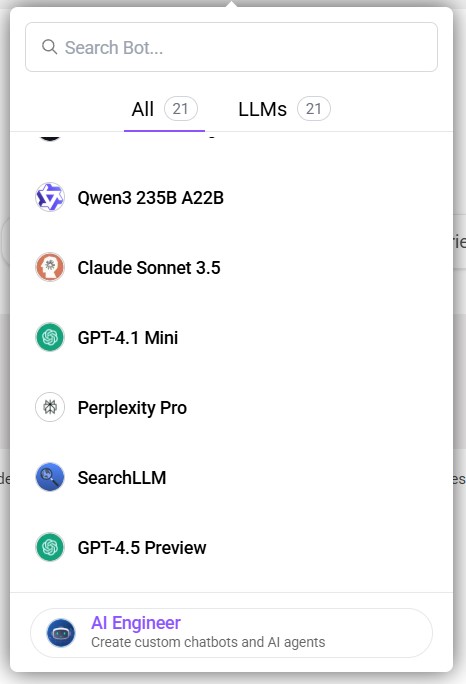
When I first heard about ChatLLM’s promise—“One AI assistant with access to all top LLMs, video and image generators, coding agents, and more”. I was skeptical.
Could a single interface really handle everything from code execution to PowerPoint creation? The $10 per user per month price (first month free) convinced me to give it a try. That one subscription unlocks:
- Top-tier LLMs (GPT-4.1, Sonnet-3.7, Sonnet-3.5, GPT-4o) plus unlimited access to lighter minis (GPT-4.1-Mini, Gemini 2.0 Flash, DeepSeek R1, Llama 4), with total of 20+ AI Models!
- 20,000 monthly credits that roll over if unused. Enough to power thousands of chats, images, videos, and documents.
- Bonus DeepAgent and CodeLLM access for autonomous tasks and code generation.
After a few weeks, I realized ChatLLM wasn’t a gimmick: it was a genuine one-stop shop.
Deep Dive into ChatLLM’s Core Features
1. Multi-Modal Chat
I can type a prompt, upload a screenshot of my website, ask for UI feedback, then switch to voice to brainstorm headlines. ChatLLM processes text, images, code snippets, and even video generation-all in one chat window.
That flexibility means I never waste time hopping between separate design, dev, or transcription tools.
2. Wide Model Selection
Depending on the task, I choose the best model: GPT-4o for creative storytelling, Sonnet-3.7 for technical debugging, or GPT-4.1-Mini for quick summaries.
There’s no extra cost for choosing heavier models; your credits cover them. Once you learn each model’s strengths, productivity soars.
3. DeepAgent: Autonomous AI Agent
DeepAgent feels like having an AI coworker. I say, “Build a customer support summarizer that pulls from Zendesk,” and it scaffolds the service, writes queries, generates response templates, and deploys a basic interface.
It cut our ticket triage time by 60 percent. Sure, I still review edge cases, but DeepAgent handles 80–90 percent of repetitive setup without me touching a line of code.
4. Seamless Integrations
My workflow lives in Slack, Google Drive, AWS S3, and Salesforce. ChatLLM hooks into each with native connectors or its RESTful API.
I now receive daily sales briefs in Slack, have a project folder in Drive auto-updated with generated reports, and even push GitHub pull requests through the AI Engineer feature.
5. Chat with Docs & Web Search
I upload a 50-page PDF product spec and ask ChatLLM to summarize key requirements or extract action items. When I need the latest market data, the agent’s built-in web search fetches real-time insights without needing a browser tab. It makes research feel effortless.
6. Code Execution & CodeLLM
From data analysis in Python to React component scaffolding, I write a prompt, and ChatLLM’s CodeLLM module generates runnable code.
It even runs plots and returns visuals inline. For complex debugging, I paste a failing snippet and get targeted fixes and explanations.
7. Image & Video Generation
I use FLUX.1 Pro and Ideogram models to create high-res marketing graphics directly from text prompts.
Need a quick product teaser? ChatLLM’s video generator outputs a 5-second clip with transitions and captions. On slower networks, large media can lag, but it’s still faster than juggling desktop software.
8. Generate Docs & PowerPoints
Each Monday, I upload our latest metrics sheet and ask ChatLLM to draft a slide deck. In minutes, I get a fully formatted PPT with charts, bullet points, and speaker notes—saving me hours in manual formatting.
9. Humanize Text & Text-to-Speech
Drafts often need a friendly tone. I select “Professional” or “Casual” humanization, and ChatLLM rewrites passages to match. When I’m on the go, I hit the TTS button and listen to my meeting agenda while commuting.
10. Mobile Apps with Voice Mode
On iOS and Android, I chat via voice on the road, summarizing call notes, requesting quick graphics, or triggering code runs. It keeps me productive outside the office.
Epic Moment
Last month, my e-commerce team needed a real-time fraud detector. I asked DeepAgent to build a monitoring pipeline: ingest payment logs from SQL, flag anomalies with Structured ML, and post alerts to Slack.
Within two days, we had a working prototype. In mid-July, it caught an unusual transaction pattern. I received a 3 AM notification, blocked the cards, and prevented a six-figure fraud attempt.
That kind of speed would have taken weeks to implement manually.
Nothing's Perfect
Although it makes my day more productive, I must admit there are several I don't like about it. But first, here are what I like most:
- Replaces multiple point tools with one interface
- Predictable $10/user/month pricing, first month free
- Broad model access with rollover credits
- DeepAgent automates 60–90 percent of workflow tasks
- Seamless integrations across enterprise systems
- Mobile and voice support for on-the-go productivity
What I dislike:
- Initial on-prem deployment can require IT coordination
- Steep learning curve to master dozens of features
- Large media generations may lag on slow connections
- Chat context can reset after long idle periods
Next Steps
I was skeptical that one AI factor could replace my entire tech stack. Six months in, ChatLLM from Abacus AI has proven to be that factor. It’s powerful, flexible, and frankly cheaper than maintaining half a dozen subscriptions.
If you’re battling tool overload, give ChatLLM a try and start your free DeepAgent trial. You might just find it’s the last AI assistant you ever need.
About the Creator
Nova Carissa
Curious mind, kind heart, and a passion for building things that help.
Enjoyed the story? Support the Creator.
Subscribe for free to receive all their stories in your feed.
Comments
There are no comments for this story
Be the first to respond and start the conversation.