
7 Common Phone Repair Mistakes Beginners Make and How to Avoid Them
Make your DIY repair successful in one go
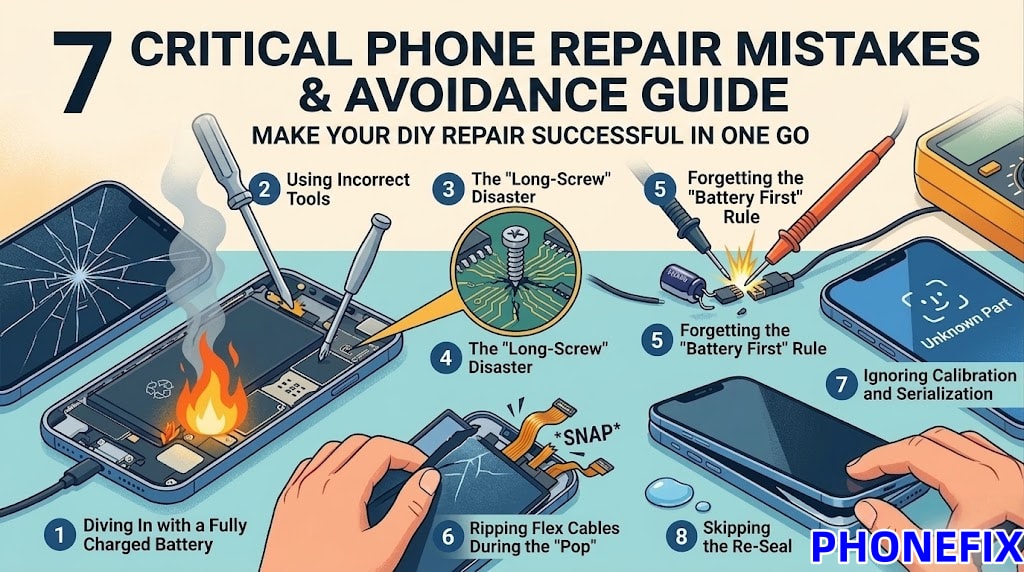
When a phone screen unexpectedly cracks, many people look at "easy tutorials" and try to repair it themselves. They buy inexpensive tool kits and confidently get started. But five minutes later, they might be faced with a broken cable or a completely malfunctioning phone.
By 2026, mobile devices will be more like delicate jewelry, where a small mistake can render the device unusable. When attempting DIY phone repair for the first time, be sure to avoid turning a simple screen replacement into a $1,000 lesson. This article will analyze common repair mistakes made by beginners and provide practical avoidance strategies to help you successfully complete the repair.
1. Diving In with a Fully Charged Battery
The biggest safety mistake beginners make happens before the phone is even open. Most people think a full charge is good for testing the new part later. In reality, a fully charged Lithium-ion battery is a high-capacity energy cell waiting for a reason to vent.
A punctured battery is a fire hazard. If your screwdriver slips or your pry tool goes too deep into a 100% charged battery, it can lead to thermal runaway—a violent chemical fire that is almost impossible to put out.
● How to avoid it: Always discharge your phone to below 10% before starting. A "dead" battery has much lower potential energy, making a small nick or puncture a minor annoyance rather than a kitchen-clearing emergency.
2. Using Using Desktop Repair Tools
Your charging port isn't broken—it might just be lint—but if you try to scrape it out with a metal paperclip, you will break it. Beginners often try to save money by using generic screwdrivers or metal kitchen knives instead of specialized mobile repair tools.
Metal tools cause short circuits and scratches. Metal pry bars will chip your glass and gouge your aluminum frame. Cheap screwdrivers will "strip" the heads of your tiny pentalobe screws, leaving them stuck in the phone forever.
● How to avoid it: Invest in a basic Mobile Repair Kit. You need plastic spudgers, nylon picks, and high-quality hardened steel screwdrivers. As the pros say: If you’re forcing it with a metal tool, you’re doing it wrong.
3. The "Long-Screw" Disaster
This is the silent killer of iPhones and high-end Androids. To the naked eye, two screws might look identical. But in 2026 models, one might be 1.2mm and the other 1.3mm.
One millimeter can kill a motherboard. If you put a "long" screw into a "short" hole, the screw will drive right through the bottom of the screw hole and into the layers of the motherboard. This severs the microscopic copper traces underneath, causing permanent, unfixable damage.
● How to avoid it: Use a Magnetic Project Mat. Lay out your screws in the exact pattern you removed them. If a screw doesn't turn effortlessly with two fingers, stop. You likely have the wrong screw for that hole.
4. Ripping Flex Cables During the "Pop"
Modern phones are held together by industrial adhesive. Beginners often get impatient, pull too hard on the screen, and—snap—the display or Face ID cable tears like wet tissue paper.
Prying is about patience, not power. In the iPhone 15 through 17 series, the cables are shorter than ever. You can only "open" the phone about an inch before you need to disconnect the internal cables.
● How to avoid it: Use a PCB Heating Platform or heat pad at 70°C to soften the glue first. Never pull the screen away with your hands; use a suction cup to lift it just enough to see where the cables are located.
5. Forgetting the "Battery First" Rule
You’ve got the phone open. You’re excited. You immediately unplug the old screen. Pop! Suddenly, the phone is dead.
Standby current is always flowing. Even when the phone is "off," the motherboard is still live. If you touch a metal tool to a connector while the battery is still plugged in, you can blow a backlight filter or a capacitor. This is the #1 reason why a "successful" screen swap results in a phone that has a black screen but still vibrates.
● How to avoid it: The very first thing you do once the phone is open is disconnect the battery. No exceptions. It is the golden rule of repair.
6. Ignoring Calibration and Serialization
In 2026, you can't just "swap and go." Many parts are digitally "paired" to your motherboard. If you swap a battery or a screen without the proper tools, you’ll lose features like True Tone, Auto-Brightness, or Face ID.
A message saying "Unknown Part" isn't a glitch. It's a security feature. Beginners often think the new part is "bad" when in reality, it just hasn't been programmed.
● How to avoid it: Use a Phone programmer like the JCID V1S Pro to transfer the data from your old part to the new one. If you don't have a programmer, keep your old parts—you may need to move the original sensors to the new assembly.
7. Skipping the Re-Seal
You finished the repair, the phone turns on, and you snap it back together. But a month later, a little rain or a humid bathroom kills the phone.
A repair isn't finished until it's waterproof. When you open a phone, you destroy the factory seal. If you don't replace it, dust and moisture will get in, corroding the logic board over time.
● How to avoid it: Always scrape off the old adhesive and apply a new, model-specific Waterproof Gasket. It costs $3 and takes two minutes, but it’s the difference between a repair that lasts a month and one that lasts years.
Final Thought: When to Call the Pros
Repairing your own phone can be rewarding, but it requires some skill. If you feel uneasy or lack the tools, stay calm and consider sending it in for repair or reviewing your warranty terms. Make sure you have the appropriate tools before you begin. For professional support, consider purchasing a high-quality repair kit from PhoneFix to ensure your phone receives the best possible care!
About the Creator
Enjoyed the story? Support the Creator.
Subscribe for free to receive all their stories in your feed.
Comments
There are no comments for this story
Be the first to respond and start the conversation.