
What is the Process for Upgrading an ANSI PST file to Unicode PST file?
Upgrade ANSI PST files into Unicode PSTfile

If you have been using Microsoft Outlook for a while, you might have come across the terms "ANSI PST file" and "Unicode PST file". These two file formats are used to store email messages, contacts, calendar items, and other data in Outlook. However, there are some limitations to using an ANSI PST file, such as a maximum size of 2 GB. This is where upgrading your ANSI PST file to a Unicode PST file comes in handy.
In this blog post, we'll discuss the steps you need to follow to upgrade your ANSI PST file to a Unicode PST file.
What is an ANSI PST File?
An ANSI PST file is an older format used to store data in Outlook. It has a maximum size limit of 2 GB, which means that if your mailbox exceeds this size, you may experience performance issues, such as slow startup or response times.
What is a Unicode PST File?
A Unicode PST file is a newer format that offers a larger maximum size limit of 20 GB or even 50 GB (depending on the version of Outlook you're using). This means that you can store more data in your mailbox without worrying about performance issues.
Option: - Here is a manual Steps to Upgrade ANSI PST File into Unicode PST File
Here is a manual process for upgrading PST files from ANSI to Unicode:
- Select File > Import and Export in Microsoft Outlook.
- By selecting "Export to a file" and pressing "Next."
- Choose "Outlook Data File (.pst)" and then select "Next."
- Select the folder or folders you wish to export and then select "Next."
- Select a save location and give the exported file a name.
- Choose "Unicode (UTF-8)" as the file type under "Options" in the options menu.
- Select "Finish" to launch the export procedure.
- Hold off until the export procedure is finished. Depending on the size of your PST file, this can require some time.
An ANSI PST file is a type of file format used by Microsoft Outlook to store email messages, calendar appointments, contacts, tasks, and other data. PST stands for "Personal Storage Table", and it is a proprietary format developed by Microsoft for their Outlook software.
Option:- Upgrade ANSI PST into Unicode PST file
Our SYSessential Upgrade Outlook PST Tool enables the conversion of pre-existing ANSI PST files into new Unicode PST files. PST files can be safely, precisely, and without data loss converted to Unicode PST files by users. The ANSI and Unicode Outlook PST data files in this PST file have a size range of 20GB to 50GB and are both infinite in size. There are numerous features it has, including tasks, calendars, attachments, emails, notes, and messengers. All Windows OS versions are compatible, including 11, 8.1, 8, 7, Vista, and XP.
Step 1: Download the Outlook PST upgrade Tool as the first step.
Step 2: Set up the Software to run on Windows by installing it and configuring it.
Step 3: Browse to add one or more PST files.
Step 4: Remove those PST files if you don’t want to upgrade them
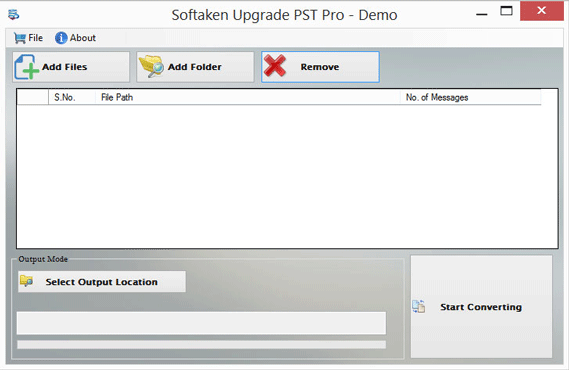
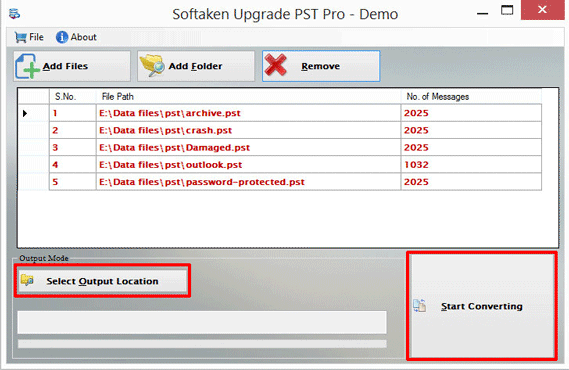
Step 5: Specify the output route for your upgrade data
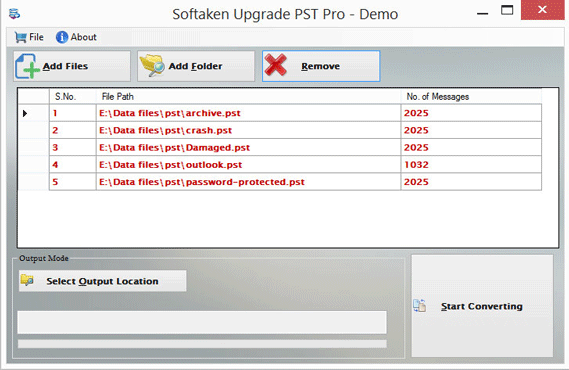
Step 6: To get results, click the "Start Converting" tab.
Conclusion
Upgrading an ANSI PST file to a Unicode PST file is a simple process that can help you overcome the limitations of the older file format. By following the steps outlined in this blog post, you can easily create a new Unicode PST file and transfer your data from the old file to the new file. Once you have set the new file as the default, you can continue to use Outlook without worrying about the size limitations of the ANSI PST file.
About the Creator
Enjoyed the story? Support the Creator.
Subscribe for free to receive all their stories in your feed.
Comments
There are no comments for this story
Be the first to respond and start the conversation.