
What Happens When Everyday Creators Can Turn Images Into 3D Models
For a long time, 3D creation belonged to a relatively small group of specialists.

For a long time, 3D creation belonged to a relatively small group of specialists.
If an illustrator wanted to turn a character into a model, a teacher wanted to create an interactive object for a lesson, or a small business wanted a three dimensional version of a product, the process usually required professional software and someone who understood how to use it.
That is starting to change.
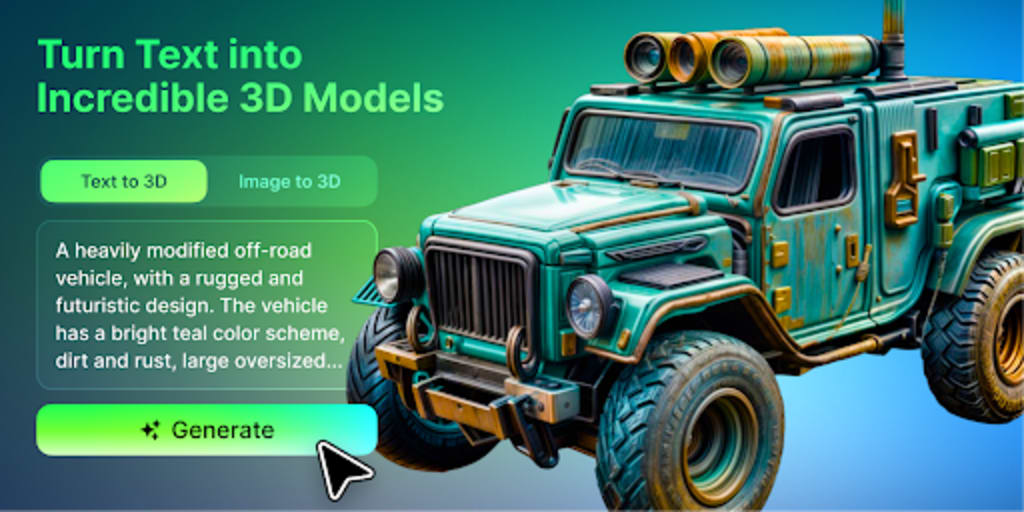
AI tools can now take a photograph, drawing, concept image, or product reference and turn it into an initial 3D model. The result may still need editing, but the first step no longer depends entirely on advanced modelling skills.
This shift matters because many creators already have ideas that could work in three dimensions. What they often lack is a practical way to move from a flat image to an object that can be rotated, viewed from different angles, placed into a digital scene, or prepared for further production.
A New Life for Existing Images
Most creators already have more visual material than they realise.
An illustrator may have years of character sketches. A product designer may have concept drawings that were never developed. A teacher may have diagrams that would be easier to understand as objects. A photographer may have images of sculptures, furniture, or handmade pieces.
Traditionally, these images remain two dimensional unless someone rebuilds the subject manually.
An AI based image to 3D workflow offers another path.
Instead of starting with an empty modelling screen, the creator begins with something familiar. The image provides the visual direction, while the AI estimates the form and creates a model that can be explored from multiple viewpoints.
A platform such as meshy.ai allows users to begin with either text or images, making 3D creation more approachable for people whose main skills may be illustration, design, photography, storytelling, or craft.
The model is not automatically a finished product. It is a new version of the original idea that can be reviewed, refined, and reused.
Illustrators Can See Characters From Another Angle
Character designers often spend most of their time working in two dimensions.
They draw facial expressions, clothing, colour palettes, and poses. But when a character needs to appear in a game, animation, interactive website, or physical collectible, the design has to move beyond a flat image.
Turning a character into 3D traditionally requires knowledge of anatomy, topology, sculpting, texturing, and sometimes rigging.
AI generation can help with the earliest stage.
An illustrator could upload a clear character image and receive an initial model that shows how the design might look from the side or back. The result may not perfectly match the original drawing, especially in areas hidden from view, but it can reveal useful questions.
Does the silhouette still work in three dimensions?
Are the proportions too exaggerated?
Does the costume make sense from every angle?
Would the character suit a game, animation, or collectible?
Even an imperfect result can help the creator understand the design more clearly.
Small Game Teams Can Prototype Faster
Independent game developers often work with limited budgets and small teams.
They may have a strong idea for a game but lack enough artists to create every character, weapon, prop, and environment object needed for a prototype.
Stock asset libraries can help, but they may not match the visual direction of the project. Hiring a modeller for every early idea may also be unrealistic.
An AI generated model can act as a temporary asset.
A concept drawing of a fantasy weapon, robot, piece of furniture, or environmental prop can become a rough 3D object for testing. The team can place it inside the game, check its scale, and decide whether the idea deserves more work.
The model may later be replaced by a professionally created version. That does not make the first asset useless.
Its purpose was to help the team answer an important question early: does this idea work inside the game?
Makers Can Move From Inspiration to Prototype
People who enjoy 3D printing, crafting, and DIY projects often have ideas they cannot easily model.
They may want to create a decorative object, a custom game piece, a planter, a small sculpture, or a personalised gift. They may even have a sketch or photograph that captures the idea clearly.
The challenge is creating the digital file.
Using this 3D tool, a visual reference can become an initial textured model. The creator can then inspect the object and decide whether it is suitable for further editing or printing preparation.
This does not remove the practical requirements of 3D printing.
A printable model may still need:
Correct dimensions
Sufficient wall thickness
Closed surfaces
Fewer fragile details
A stable base
Support planning
Geometry cleanup
The AI helps with the beginning of the process. The creator still needs to make sure the object works in the physical world.
Teachers Can Make Ideas Easier to Understand
Some topics are difficult to explain with a flat image.
A historical artefact, biological structure, geometric form, mechanical object, or architectural detail may be easier to understand when students can view it from different angles.
Teachers do not always have access to ready made 3D resources for every lesson.
Image based generation could help them create simple visual aids from existing diagrams or reference images. These models might be used in presentations, virtual classrooms, educational websites, or interactive demonstrations.
Accuracy remains important.
AI generated educational models should be checked carefully before they are presented as factual representations. The tool can support visualisation, but it should not replace expert review.
Used responsibly, it can help teachers create more engaging material without requiring them to become professional 3D artists.
Independent Brands Can Reuse Product Images
Small brands often invest heavily in product photography.
Those images may support an online store, social media campaign, catalogue, or launch page. Once created, however, each photograph is limited to the angle that was captured.
A 3D version of the product can open up more options.
The brand might use the model to create:
New viewing angles
Rotating social content
Concept visuals
Interactive website sections
Virtual displays
Product presentations
Seasonal campaign variations
A generated model must still be compared with the real item. Shape, colour, logos, materials, and proportions need to be reviewed before the asset is used in customer facing content.
For early concepts and creative campaigns, the model can help a small brand produce more from the visual material it already owns.
3D Creation Becomes Part of Other Creative Fields
The most interesting change may not be that more people become professional 3D artists.
It may be that 3D becomes part of many other creative practices.
An illustrator may use a model as a reference for a new drawing. A filmmaker may place a generated object into a storyboard. A designer may use a 3D asset in a portfolio. A writer may visualise an object from a fictional world. A teacher may create an interactive lesson.
In each case, 3D supports another form of expression.
The creator does not need to master every technical stage before experimenting. They can begin with the skills they already have, whether that is drawing, photography, storytelling, design, or teaching.
This lowers the cost of curiosity.
More ideas can be tested because the first attempt no longer requires the same amount of time, software knowledge, or external support.
Accessibility Does Not Mean the Work Is Finished
It is important not to confuse accessibility with perfection.
AI generated models may contain:
Incorrect hidden surfaces
Inconsistent textures
Unexpected geometry
Weak proportions
Too many polygons
Shapes that are difficult to animate
Details that do not print well
Elements that do not match the original image
The amount of correction depends on the final use.
A rough model for a presentation may need very little work. A game character, printable object, manufactured product, or animated asset may require significant editing.
The creator still needs to decide whether the model is good enough for its intended purpose.
AI makes the first version easier to obtain. It does not remove the need for judgement.
The Creator Still Makes the Important Decisions
A generated model is not meaningful simply because it exists.
Someone still has to choose the source image, review the output, reject weak versions, refine the strongest result, and decide where the model belongs.
These choices are part of the creative process.
The tool may estimate the missing sides of an object, but the creator decides whether those choices fit the idea. The tool may generate textures, but the creator decides whether the visual style feels right.
This is why AI 3D creation should be understood as a collaboration between automation and human direction.
The system handles part of the production. The person provides purpose.
Final Thoughts
The biggest impact of image to 3D technology may not be the quality of any single model.
It may be the number of people who can now explore three dimensional ideas without first becoming specialists.
Illustrators can examine characters from new angles. Game developers can test custom assets. Teachers can create visual learning material. Makers can move closer to physical prototypes. Small brands can reuse existing images in new ways.
Not every generated model will be ready for publication, production, or printing. Many will need correction. Some will simply help the creator understand why an idea does not work.
That is still valuable.
When the first step becomes easier, more people are willing to experiment. Images no longer have to remain flat. They can become objects, scenes, prototypes, and starting points for something new.
About the Creator
Enjoyed the story? Support the Creator.
Subscribe for free to receive all their stories in your feed.
Comments
There are no comments for this story
Be the first to respond and start the conversation.