
Turning a Written Story Into My First Video Draft
From Story to Screen: Creating My First Video Draft

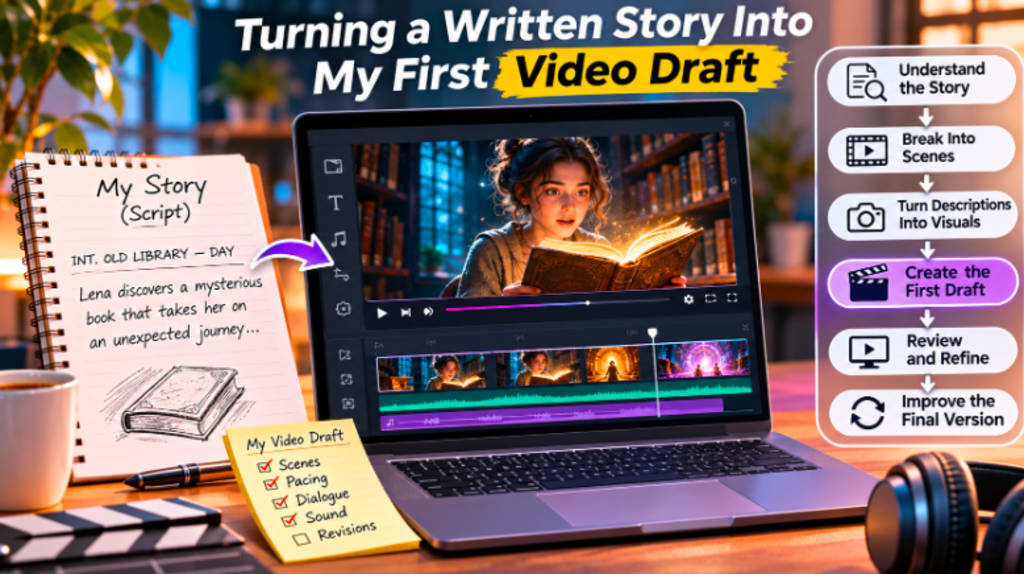
Creating a video based on a written story can be quite distinct from writing a story. Themes may be developed in the page by means of description, thoughts, dialogue, and imagination. Now, in video, every significant moment must be made visible, audible, and/or emotionally clear through images, pacing, sound, and motion. The first draft of the video is a crucial step in the process because of that change.
First drafts do not have to be flawless. It is to help make the written story into something visual that can be reviewed, changed and improved. It can make you aware of the transitions and balance of the story on screen, and if the emotional beats are functioning. It's in the first draft that the written version starts to come alive to the viewer instead of just being read.
Understanding the Story Before Building the Video
It is important to grasp the essence of the story before developing any visuals. There may be a lot of information in the written story, but not everything will be used in the video. The first step is to find out exactly what the audience needs to see and hear.
Typically, these will include the main character, main objective, the conflict, the turning point, and the resolution. These elements help form the structure of the video. When they are sorted, the rest of the material can be arranged around them.
One way to go is to read the story through and mark places that will be good visuals. Things like characters entering a room, receiving a message, making big decisions, finding some unexpected, and reacting emotionally could all easily be translated to video. But lengthier descriptions or thoughts might need to be cut or offered visually or as dialogue.
Do not copy each sentence of the written version. The idea is to still convey the meaning but in a visual manner.
Breaking the Story Into Individual Scenes
After the structure of the main plot has been established, it is time to break the story down into scenes. Have a clear objective for each scene.
A scene can introduce a character, give information, build tension, reveal a reaction or push the story forward to the next important moment. Scenes that don't support the story may be cut or eliminated.
This stage can be particularly helpful in breaking a long piece of writing down into digestible sections. You don't need to consider the whole video; you can just consider one of its scenes at a time.
For every scene imagine what the setting might be, what characters might be there, what should happen on screen, what should be said and how long the moment should last. These decisions contribute to developing a rough production plan prior to the actual draft of the video.
The length of the scene is also a factor. One shot may be a written paragraph and one written paragraph may need several visual moments. These differences can be revealed in the first draft.
Converting Written Descriptions Into Visual Actions
The challenge with adapting a story is turning description into action, and one of the biggest challenges in doing that is one of the most significant problems.
You can write that they are nervous, excited, uncertain, or angry. The emotions are typically conveyed in a video through facial expressions, body language, pacing, sound or camera positioning.
Rather than stating the person is nervous, the image could depict them checking the clock over and over, tapping their fingers, stumbling before opening a door, or deep breathing.
This is where visual storytelling comes into play!
Each scene should convey as much information as possible by what is visible to the viewer. Dialogue can help explain, but should not be used to tell the whole story.
Typically, the strongest adaptations involve visual actions, expressions, and environment(s) to do part of the storytelling.
Using the Script as a Practical Production Guide
Once the scenes are arranged the story can be converted to a viable script.
The main point to remember about writing a video script is that it should be more functional than the written story. It should convey what is happening on the screen, who is speaking and what the viewer should learn from every moment.
It is here that tools like a script to video maker can come in handy, as they can help to transform written scenes into a rough version of the visual sequence, thereby speeding up the initial drafting process. Even the first produced result needs to be considered a draft, and may not need pacing, character consistency, scene transitions, or visual accuracy to be fully developed, so it needs to be proofread.
A good working script is easy to follow in production. Descriptive sentences (long paragraphs) make it more difficult. Rather, the visual action and any necessary dialogue should be indicated in each scene.
For now, there's no need for perfection. It's meant to produce a prototype that can be visually tested.
Creating the First Visual Draft
The first draft of the video is where the story becomes real. It can be a simple version. May employ rough footage, temporary images, placeholder music, simple transitions and/or incomplete effects. The main objective is to test the structure.
The draft should provide answers to a few questions. Can you follow the story from the book without reading it? Is the sequence of the scenes correct? Is the speed too fast or too slow? Is sufficient time allowed for important moments? Is there a satisfying conclusion?
From a written script alone, it will be hard to answer these questions.
When you have all the scenes set in order on a timeline, the problems normally become apparent. Something that is important on the page can seem superfluous in action. There is one scene that takes a little longer, as the emotional moment flies by.
That's the importance of the initial draft. It shows problems before spending a lot of time lighting a single scene.
Paying Attention to Pacing and Timing
One of the most prominent distinctions between writing a story and making a video is Pacing.
Readers read at their own pace. They can read a sentence more than once or skip through a paragraph. Video plays at a constant speed.
That implies that each moment should be given the time it takes to be understood, but not too long or too repetitive.
The first draft, watch the length of each scene. When a character responds to significant information, viewers might need a second or two to decipher the expression between cuts. A scene that mostly has a task to fill with information might need to be done in a quicker pace.
Transitions are also a factor in pacing. A long story that has a lot of slow fades in it can appear as if it is too long, and an emotional story with too many fast cuts can seem rushed.
The first draft helps set a pace to the story to help tone it to the story's rhythm.
Making Dialogue Sound Natural on Screen
Scripted conversation is not always good sounding when spoken out loud.
While a written character might be able to write out thoughts in long sentences, real conversations can be shorter, less formal, and more straightforward.
In the first video draft, pay attention to all dialogue. Make the dialogue simpler if it's too formal, repetitive, or explanatory.
It can also be used to eliminate lines that are already visually conveyed.
Audience will recognize if a character is terrified, and so another character does not have to comment: “You look scared.”
Use natural language that reinforces the visuals but doesn't duplicate them. In short videos, every line must work for its purpose, making this particularly important.
Using Temporary Music and Sound to Test Emotion
The right sound can transform the atmosphere of a scene.
In a rough cut, an improvised or basic sound effect or score can be used to experiment with the emotional path of a film. Background music can help to evoke some introspection in a quiet scene. With some control over the sound design, a tense moment can become more effective.
An abrupt break in the action can make a significant reveal more impactful. The problem is, however, that sound should not mask bad story.
If the music is all the way to the extreme of drama, the visuals may need some improvement to make it feel like an emotional scene.
You can be creative in the first draft, as it's not the final one. The flow of music, timing, and sound can be varied without impacting the main design.
Reviewing the Draft as a Viewer
Once assembled, it is helpful to view the first version from start to finish, without stopping.
Read it as if you haven't read the original story.
This can show if the video can effectively convey the information without the help of the presenter. Be aware of instances where the story gets confusing, where your attention starts to wander, or where a scene is too long. Record any points that seem particularly compelling.
The first review should have a view to the overall experience and not just small technical issues.
It would be a lot of work trying to make the colours and effects of a scene look good when it later gets cut out.
Structure comes first.
Fixing the Story Before Polishing the Visuals
Too early polishing is one of the most frequent errors. When still working on the story structure, it's easy to get caught up in making the transitions, effects, color, or graphics better.
This frequently leads to additional working. When polishing a draft scene later finds that it must be shortened or replaced, it can be a waste of effort. Story should be improved first and then the pictures.
In the first revision, concentrate on the order of scenes, too long/delayed scenes, missing info, unclear moments, and repetitions.
When these elements are sorted out, then the second version can be more production-driven.
Keeping the First Draft Flexible
The initial draft will be easy to edit. This means to not make decisions that will create an unnecessary hassle when it comes to revision.
Use a logical structure for scenes, save originals and label versions. If multiple versions of a scene exist, maintain them separately to be compared in the future.
When dealing with feedback, it's particularly crucial to be flexible. After watching the video in action, a client, collaborator or even the creator may identify new opportunities.
The first draft should be easy to make those changes; don't prematurely lock the project into a fixed structure.
Learning from the difference between the script and the video
The most helpful lessons in video production is that a good video script doesn't necessarily translate to a good video visual.
In some cases, fewer words are required in the video version. Sometimes, more reaction shots are required. In some cases it's better to have two written scenes in the same script.
These changes will not necessarily indicate that the original story was poor. It's just a difference between written and visual storytelling. The first draft of the video helps uncover what's necessary in this new medium. A lot of the creative improvement occurs in that process.
Final Thoughts
Making a first draft of a video out of a written story is not necessarily making something perfect, it's about finding out how the story works when presented on screen.
It starts by grasping the central idea, dividing the story into scenes, turning words into visual actions and creating an actual script. The initial draft can then be used to prove the pacing, dialogue, emotion, sound, and general structure.
The best attitude is to consider the initial draft as a draft. It should be easily readable but adaptable.
When the story flows from start to finish, production can proceed with more thorough editing, visual polishing, sound design, color correction, and delivery.
The first draft is thus not only an incomplete video, but it is also a first draft. It's where the written idea starts to show what it can be on screen.
About the Creator
Gulshan
SEO Services, Guest Post & Content Writter.
Enjoyed the story? Support the Creator.
Subscribe for free to receive all their stories in your feed.
Comments
There are no comments for this story
Be the first to respond and start the conversation.